
1. Produktas baigtasview
The darkFlash DB330M MESH is a Micro-ATX PC case designed for high heat dissipation and optimal airflow. It features a full mesh front panel and comes with three pre-installed PWM ARGB fans to ensure efficient cooling and dynamic lighting effects. This case supports various components, offering a user-friendly experience for PC builders.
2. Pagrindinės savybės
- High Airflow Mesh Front Panel: Provides superior intake and lower temperatures compared to panoramic cases.
- Pre-installed 3x DR08 PWM ARGB Fans: Ensures powerful cooling and vibrant RGB effects right out of the box.
- Vertical Airflow Cooling: Two fan positions above the power supply direct airflow to the graphics card for improved cooling.
- Apgalvotas dizainas: Includes magnetic dust filters on the top and panel to keep components clean.
- Lengvas montavimas: User-friendly design facilitates hassle-free cable management and component access.
3. Specifikacijos
| Funkcija | Detalė |
|---|---|
| Prekės ženklas | darkFlash |
| Modelio pavadinimas | DB330 MESH |
| Pagrindinės plokštės suderinamumas | Mikro ATX |
| Atvejo tipas | Midi bokštas |
| Spalva | Juoda |
| Medžiaga | Plastikas, Grūdintas stiklas |
| Gaminio matmenys (D x P x A) | 8.58" x 13.11" x 15.75" |
| Maitinimo šaltinio tvirtinimo tipas | Apatinis kalnas |
| Aušinimo būdas | Oras, vanduo |
| Total USB 3.0 Ports | 1 |
| Ypatingos savybės | Įmontuotas ventiliatorius, dulkių filtras, RGB apšvietimas |
| Internal Bays Quantity | 3 |
| Maksimalus GPU ilgis | 305 mm |
| Maksimalus procesoriaus aušintuvo aukštis | 180 mm |
| Radiatoriaus palaikymas | Up to 240mm on top |
4. Sąranka ir diegimas
This section provides a general guide for installing components into your darkFlash DB330M MESH PC case. Always refer to your component manuals for specific installation instructions.
4.1 Bylos parengimas
Before installing components, ensure the case is placed on a stable, flat surface. Remove the side panels and any protective films.

Figure 4.1: The darkFlash DB330M MESH PC Case with side panels and front mesh removed, illustrating the ease of access for component installation.
4.2 Component Compatibility and Placement
- Pagrindinė plokštė: Supports Micro ATX and ITX motherboards. Install the motherboard onto the standoffs provided.
- Vaizdo plokštė: Maximum length of 305mm. Ensure your GPU fits within this specification.
- CPU aušintuvas: Maximum height of 180mm for air coolers.
- Maitinimo šaltinis (PSU): Supports standard size PSUs with a maximum length of 180mm, mounted at the bottom.
- Radiatorius: Up to 240mm AIO liquid cooling systems can be installed on the top panel.
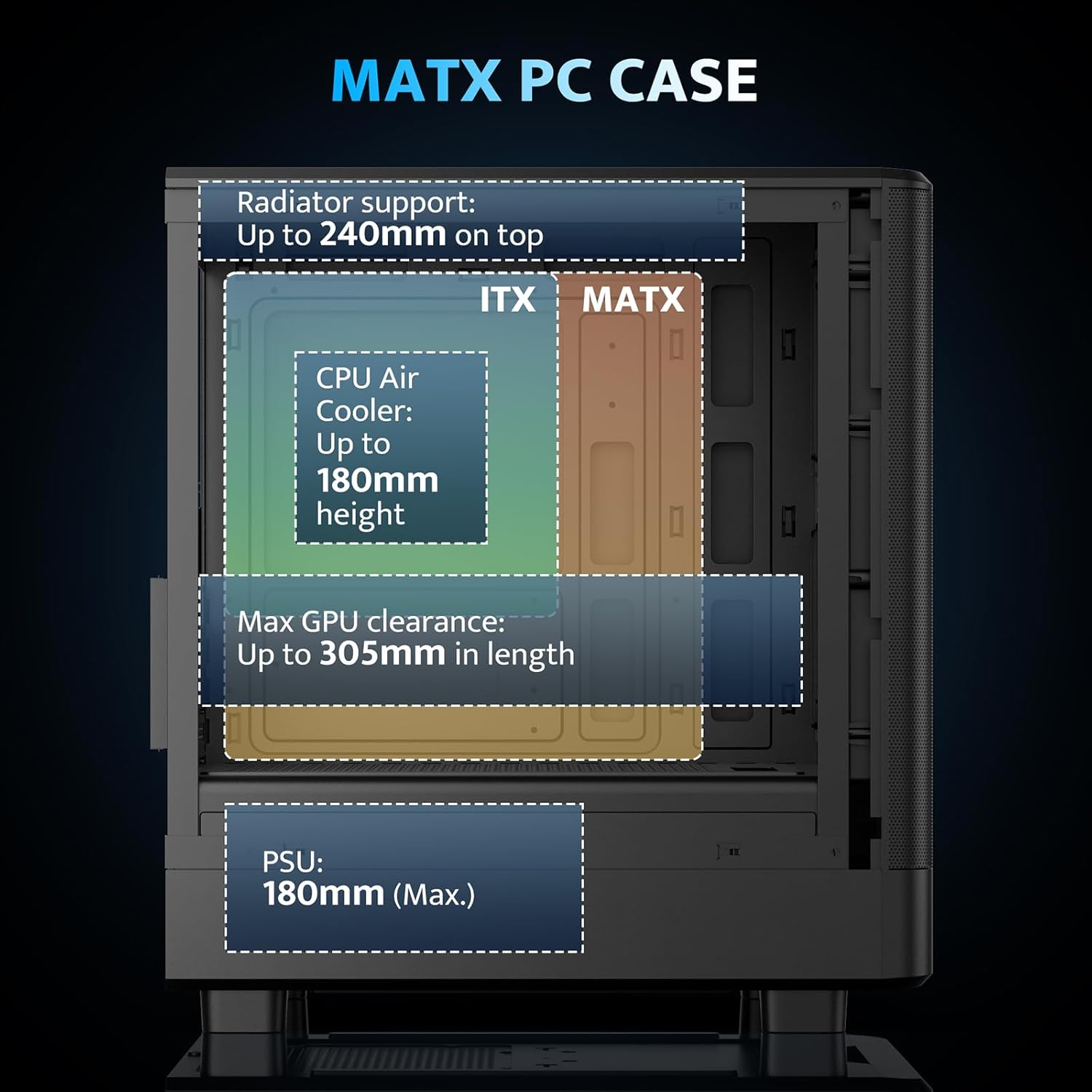
Figure 4.2: Internal layout and maximum dimensions for motherboard (ITX, MATX), CPU air cooler, GPU, and PSU.
4.3 Fan Configuration
The case comes with three pre-installed 120mm PWM ARGB fans. Two are located at the front for intake, and one at the rear for exhaust. Additional fan positions are available at the top (up to 2x 120mm/140mm) and bottom (up to 2x 120mm) for enhanced cooling.

Figure 4.3: Illustration of the pre-installed 120mm PWM ARGB fans and their placement within the case.

Figure 4.4: Optimized airflow channels demonstrating natural vertical air ducts for efficient heat dissipation.
5. Naudojimo instrukcijos
5.1 Įvesties/išvesties skydelio funkcijos
Priekinis įvesties / išvesties skydelis suteikia patogią prieigą prie svarbiausių prievadų ir valdiklių:
- Maitinimo mygtukas: Norėdami įjungti arba išjungti sistemą.
- HD Audio Ports: Skirta ausinėms ir mikrofonams prijungti.
- USB 2.0 prievadai: Periferinių įrenginių prijungimui.
- USB 3.0 prievadas: Dėl didelės spartos duomenų perdavimo.
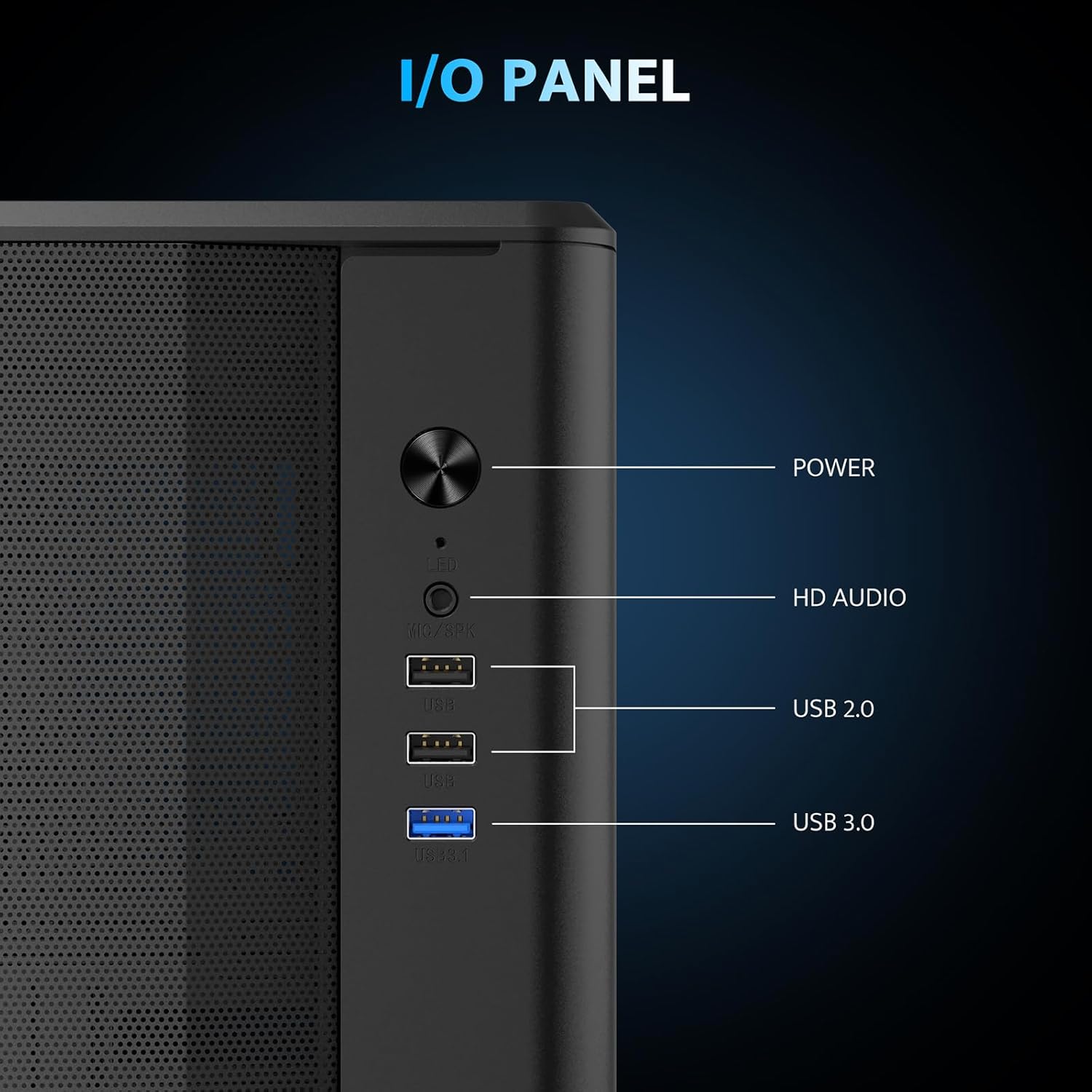
5.1 pav. Išsamus view of the I/O panel and its functionalities.
5.2 ARGB ventiliatoriaus valdymas
The pre-installed fans are PWM ARGB fans. Their lighting effects can be controlled via your motherboard's ARGB software if your motherboard supports it. Please note that an ARGB Hub Controller is not included with the case.
6. Priežiūra
6.1 Dulkių filtro valymas
The darkFlash DB330M MESH PC case is equipped with magnetic dust filters on the top and a panel dust filter to prevent dust accumulation. Regularly clean these filters to maintain optimal airflow and cooling performance.
- To clean the top dust filter, gently lift and detach the magnetic filter.
- Use a soft brush or compressed air to remove accumulated dust.
- Reattach the filter once clean.

Figure 6.1: Top panel with magnetic dust filter and large cooling holes for AIO support.

Figure 6.2: High-airflow dustproof mesh front panel, which also acts as a dust filter.
6.2 Bendras valymas
Use a soft, dry cloth to wipe down the exterior of the case. Avoid using harsh chemicals or abrasive materials that could damage the finish.
7. Problemų sprendimas
Jei kyla problemų dėl kompiuterio surinkimo, atlikite šiuos bendruosius trikčių šalinimo veiksmus:
- Nėra galios: Įsitikinkite, kad visi maitinimo laidai (maitinimo bloko jungtis prie sienos, maitinimo bloko jungtis prie pagrindinės plokštės, procesoriaus, vaizdo plokštės) yra tvirtai prijungti. Patikrinkite maitinimo mygtuko jungtį prie pagrindinės plokštės.
- Ventiliatoriai nesisuka / nėra RGB: Verify fan power connections to the motherboard or fan controller. Check ARGB connections for lighting issues. Ensure your motherboard's BIOS/UEFI settings or software are configured correctly for fan control and RGB.
- Perkaitimas: Confirm all fans are spinning in the correct direction for optimal airflow. Ensure dust filters are clean and not obstructing airflow. Check CPU cooler and GPU cooler installations.
- USB prievadai neveikia: Patikrinkite USB jungtis, einančias nuo priekinio įvesties / išvesties skydelio iki pagrindinės plokštės.
For more specific issues, consult the manuals for your individual components (motherboard, GPU, PSU, etc.) or seek assistance from a qualified technician.
8. Garantija ir palaikymas
The darkFlash DB330M MESH PC Case comes with a 1 metų garantija. For warranty claims or technical support, please contact darkFlash customer service through their official websvetainėje arba mažmenininke, iš kurio įsigijote produktą. Išsaugokite pirkimo įrodymą, kad galėtumėte patvirtinti garantiją.