
1. Įvadas
The AJAZZ AK029 is a high-performance one-handed mechanical gaming keyboard designed for precision and speed. It features a compact 29-key layout, magnetic switches, an 8000Hz polling rate, and 0.01mm RT precision for an ultra-responsive gaming experience. This manual provides detailed instructions for setup, operation, maintenance, and troubleshooting.

Image: The AJAZZ AK029 one-handed gaming keyboard, showcasing its compact design and dimensions (155mm length, 122mm width, 33mm height).

Paveikslėlis: Viršview of the AK029 gaming keyboard, highlighting its sleek design and gaming features.

Image: The AK029 keyboard being used in various scenarios, including gaming, video editing, and 3D modeling, demonstrating its versatility.
2. Sąranka
Pakuotės turinys
- AJAZZ AK029 Keyboard Body
- USB-C laidas (1.6 m)
- Klaviatūros traukiklis
- Atsarginiai jungikliai
- Detachable Carrying Strap
- Vartotojo vadovas

Image: The complete package contents of the AJAZZ AK029, including the keyboard, USB-C cable, keycap puller, spare switches, and user manual.
Klaviatūros prijungimas
- Prijunkite pridėto laido USB-C galą prie klaviatūros USB-C prievado.
- Connect the other end of the USB cable to an available USB port on your computer (Windows or Mac).
- Jūsų operacinė sistema automatiškai atpažins klaviatūrą.
3. Naudojimo instrukcijos
Pagrindinės funkcijos ir išdėstymas
The AK029 features a 29-key layout optimized for gaming and productivity. Many keys have secondary functions accessible via the Fn raktas.
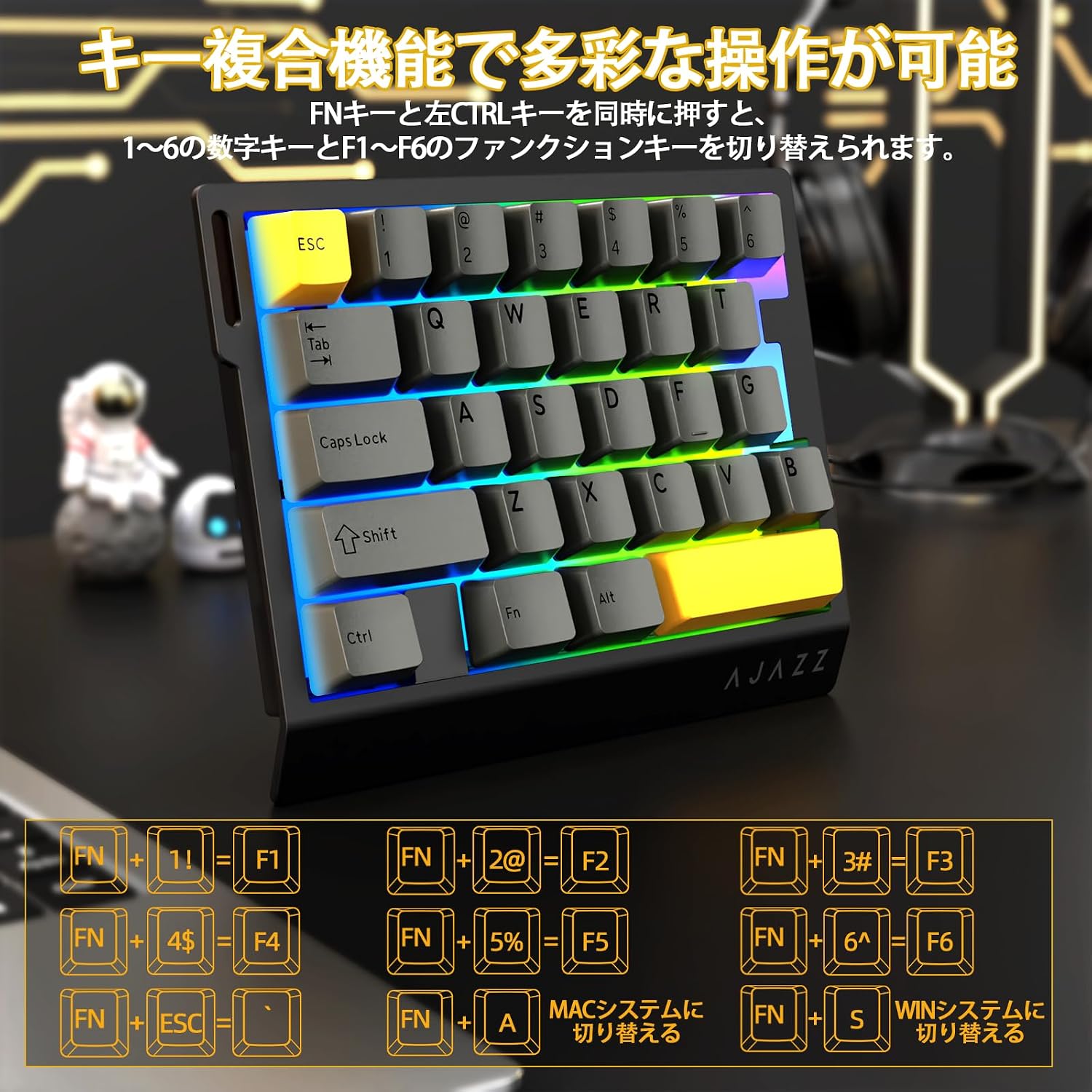
Image: Diagram illustrating the various FN key combinations for accessing secondary functions, such as F1-F6, tilde, and system switching.
- FN + 1-6: Switches between number keys (1-6) and function keys (F1-F6). Default is number keys.
- FN + Esc: Tilde (~)
- FN + A: Switches to Mac mode.
- FN + S: Switches to Windows mode.
Note: When using Mac mode on a Windows PC, the Windows key and Alt key functions may be reversed.
RGB apšvietimo režimai
The keyboard features vibrant RGB backlighting with multiple customizable effects.

Image: The keyboard displaying its colorful RGB backlight, which can be customized with various effects.
- FN + Tab: Cycles through 20 different RGB lighting modes.
- FN + G: Increases backlight brightness (5 levels). Backlight flashes 3 times at maximum brightness.
- FN + F: Decreases backlight brightness (5 levels). Backlight flashes 3 times at minimum brightness.
- FN + V: Changes the direction of the lighting effect.
- FN + B: Changes the backlight color.
- FN + T: Increases the speed of the lighting effect (5 levels). Backlight flashes 3 times at maximum speed.
- FN + R.: Decreases the speed of the lighting effect (5 levels). Backlight flashes 3 times at minimum speed.
- FN + C: Toggles side light mode (Streaming RGB constant light - Rainbow Breath - Off). Default is Streaming.
- FN + X: Toggles backlight on/off (side lights remain on).
- FN + Space (long press 3-5 seconds): Resets lighting settings to factory defaults. Keyboard lights flash 3 times.
Rodiklis L.amps
- Caps Lock indikatorius: Pressing the Caps Lock key illuminates a white LED (uppercase input ON). Pressing it again turns off the LED (lowercase input).
- Sistemos indikatorius: The main key area lights flash 3 times to indicate successful system switching.
Web Driver Customization
The dedicated driver software allows for extensive customization of key functions, macros, and RGB lighting effects. This enables true personalization to match individual playstyles and preferences.

Paveikslėlis: Ekrano kopija web driver interface, showing options for custom keys, lighting effects, macro management, and performance settings.
Vairuotojas Websvetainė: https://ajazz.driveall.cn/#/
4. Priežiūra
Valymas
- Klaviatūros paviršiui valyti naudokite minkštą, sausą šluostę.
- For dust between keycaps, use compressed air.
- Venkite naudoti stiprių cheminių medžiagų ar abrazyvinių medžiagų.
Karšto keitimo jungiklio keitimas
The AK029 supports hot-swappable magnetic switches, allowing for easy replacement and customization.

Vaizdas: Stambus planas view of the hot-swappable magnetic switches, showing the mechanism and keycap removal tool.
- Norėdami švelniai nuimti norimą klavišo dangtelį, naudokite klavišo dangtelio traukiklį.
- Use the switch puller to firmly grip the top and bottom tabs of the switch.
- Pull the switch straight upwards to remove it from the keyboard.
- Align the pins of the new switch with the holes on the keyboard.
- Gently push the new switch vertically until it clicks into place.
5. Problemų sprendimas
Klaviatūra nereaguoja
- Įsitikinkite, kad USB-C laidas yra tvirtai prijungtas prie klaviatūros ir kompiuterio.
- Pabandykite prijungti klaviatūrą prie kito kompiuterio USB prievado.
- Išbandykite klaviatūrą kitame kompiuteryje, kad atmestumėte su kompiuteriu susijusią problemą.
- Iš naujo paleiskite kompiuterį.
RGB Backlight Not Working or Incorrect
- Ensure the backlight is not turned off (FN + X).
- Adjust brightness using FN + G (increase) and FN + F (decrease).
- Cycle through lighting modes using FN + Tab.
- Perform a factory reset for lighting settings by long-pressing FN + Space for 3-5 seconds.
Key Input Issues or Inaccurate Response
- Ensure the correct system mode (Windows/Mac) is selected using FN + A or FN + S.
- If a specific key is not responding, try replacing its switch using the hot-swap procedure.
- Update the keyboard firmware using the dedicated web tvarkyklės programinė įranga.
- Check for any physical obstructions under the keycap or switch.
6. Specifikacijos
| Funkcija | Aprašymas |
|---|---|
| Prekės ženklas | A.JAZZ |
| Modelis | AK029 |
| Ryšys | USB-C laidinis |
| Raktų išdėstymas | 29 Keys (One-Handed) |
| Jungiklio tipas | Magnetic Switches (Hot-Swappable) |
| Apklausos rodiklis | 8000 Hz |
| Latencija | 0.125 ms itin mažas delsos laikas |
| RT Precision | 0.01mm (0.03mm detection increments) |
| Nuskaitymo greitis | 130 tūkst |
| Foninis apšvietimas | RGB (20 lighting modes) |
| Rakto apvertimas | Pilnas N klavišo apvertimas |
| Plokštės medžiaga | Aliuminio lydinys |
| Garsas Dampening | 5-Layer Structure (PO sandwich cotton, IXPE switch pad, PET sound sheet, EPDM cotton, silicone gel) |
| Ergonomika | Ergonomic design with stepped curved keycaps and wrist rest |
| Suderinama OS | Windows, MAC |
| Matmenys | 155 mm (ilgis) x 122 mm (plotis) x 33 mm (aukštis) |
| Svoris | apytiksliai 300 g |
| Kabelio ilgis | 1.6 m |

Image: Detailed basic specifications of the AK029 keyboard, including brand, model, connectivity, dimensions, and lighting.

Vaizdas: Išsprogdintas view of the keyboard's internal structure, highlighting the 5-layer sound dampening system and aluminum alloy plate for enhanced stability and acoustics.

Image: Illustration of the ergonomic design of the AK029, featuring stepped keycaps and a wrist rest for comfortable long-term use.
7. Garantija ir palaikymas
Informacija apie garantiją
The AJAZZ AK029 keyboard comes with a 1-year manufacturer's warranty from the date of purchase. This warranty covers defects in materials and workmanship under normal use.
Pagalba klientams
For technical assistance, warranty claims, or any other inquiries, please contact AJAZZ customer support through their official websvetainę arba mažmenininką, iš kurio buvo pirktas produktas.
Oficialus Websvetainė: https://ajazz.driveall.cn/#/