
1. Įvadas
This manual provides detailed instructions for the ANBERNIC RG476H handheld game console. Please read this manual thoroughly before using the device to ensure proper operation and to maximize your gaming experience.

1.1 vaizdas: Baigtaview of the ANBERNIC RG476H handheld game console, showcasing its full-screen design and available colors.
2. Produktas baigtasview
2.1 Pagrindinės savybės
- Operacinė sistema: Android 13 with built-in game frontend.
- Procesorius: Dimensity T820 (6nm EUV 5G SoC chip, 8-core: 1*A76@2.7GHz + 3*A76@2.3GHz + 4*A55@2.1GHz).
- Ekranas: 4.7-inch LTPS in-cell OCA full lamination touchscreen, 1280x960 resolution, up to 120Hz refresh rate.
- Atmintis ir saugojimas: 8GB LPDDR4X RAM, 128GB UFS2.2 ROM, expandable up to 2TB via TF card.
- Ryšys: WiFi (2.4G/5G 802.11a/b/g/n/ac), Bluetooth 5.0.
- Valdikliai: Dual Hall joysticks, 6-axis gyroscope, Hall triggers, vibration motor.
- Baterija: 5000mAh Lithium-ion battery, providing up to 7 hours of continuous use.
- Aušinimas: Active cooling system with high-speed fan and heat pipe.
- Išvestis: HDMI output, USB Type-C with 1080p DisplayPort output (supports dual-screen display for NDS/3DS games).
- Papildomos funkcijos: RGB joystick lighting with multiple effects, FOTA wireless upgrades, online multiplayer, streaming, wireless screen projection, 3.5mm stereo headphone jack, power-saving settings.
2.2 Komponentai ir valdikliai
Familiarize yourself with the physical components and controls of your RG476H console.

Image 2.1: Technical diagram illustrating the layout of buttons, ports, and internal components of the RG476H.
- Kairysis vairasvirtė: For directional control in games.
- Dešinysis vairasvirtė: For camera control or other directional inputs.
- D-Pad: Tiksliam krypties įvedimui.
- A/B/X/Y mygtukai: Standartiniai veiksmų mygtukai.
- L1/L2/R1/R2 Buttons: Pečių ir paleidimo mygtukai.
- Pradžios / pasirinkimo mygtukai: Game control functions.
- Funkcinis klavišas: For system-specific actions.
- Grįžimo mygtukas: For navigating back in menus.
- TF kortelės lizdas: Išorinės atminties išplėtimui.
- C tipo USB prievadas: For charging, data transfer, and DisplayPort output.
- 3.5 mm ausinių lizdas: Dėl garso išvesties.
- Mikrofonas: Balso įvedimui.
- Garsiakalbiai: Dual stereo speakers located at the bottom.
- Maitinimo mygtukas: Įjungti / išjungti įrenginį arba užmigdyti.
- Garsumo didinimas / sumažinimas: Garso lygiams reguliuoti.
3. Sąranka
3.1 Pradinis įkrovimas
Before first use, fully charge your RG476H console.
- Connect the provided USB Type-C cable to the console's charging port.
- Connect the other end of the cable to a compatible 5V/2A power adapter (not included) or a USB port on a computer.
- Užsidegs įkrovimo indikatoriaus lemputė. Visiškas įkrovimas paprastai trunka maždaug 3 valandas.
3.2 Įjungimas / išjungimas
- Norėdami įjungti: Paspauskite ir palaikykite maitinimo mygtuką, kol užsidegs ekranas.
- Norėdami išjungti: Press and hold the Power button, then select "Power Off" from the on-screen options.
- Miegui / pabudimui: Trumpai paspauskite maitinimo mygtuką, kad perjungtumėte įrenginį į miego režimą arba jį pažadintumėte.
3.3 TF kortelės įdiegimas (neprivaloma)
To expand storage for games and media, you can install a TF (microSD) card. The device supports up to 2TB.

Image 3.1: The TF card slot for storage expansion, shown alongside other features.
- Įrenginyje suraskite TF kortelės lizdą.
- Insert the TF card gently into the slot until it clicks into place.
- To remove, push the TF card inward until it clicks, then release. It will spring out.
4. Naudojimo instrukcijos
4.1 Navigacija ir vartotojo sąsaja
The RG476H runs on Android 13, providing a familiar and intuitive interface.
- Use the joysticks or D-pad to navigate through menus and select options.
- The touchscreen allows for direct interaction with the Android interface.
- The built-in game frontend organizes your games for easy access.
4.2 Žaidimų žaidimas
The console supports a wide range of Android games and up to 30 types of simulator games.
- Access the game frontend from the main menu.
- Select your desired game from the list.
- Use the physical controls (joysticks, D-pad, A/B/X/Y, L/R buttons) for gameplay.
- For simulator games, you may need to configure controls within the emulator settings.
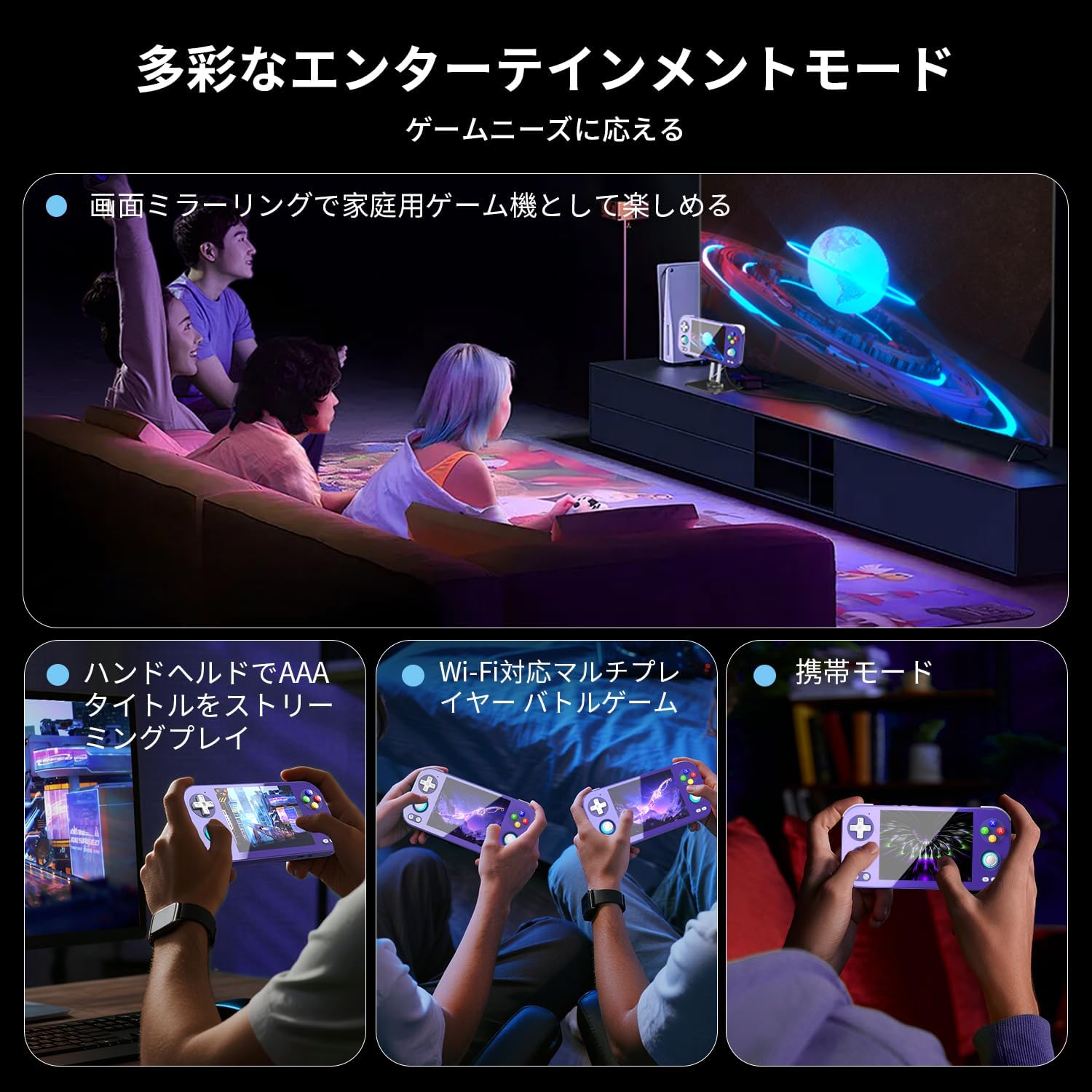
Image 4.1: The RG476H supports various entertainment modes, including handheld play, Wi-Fi multiplayer, and screen mirroring to a TV.
4.3 Išplėstinės funkcijos
- Moonlight Streaming: Supports Moonlight Streaming for playing PC games on your console. Refer to Moonlight documentation for setup.
- HDMI išvestis: Connect the console to a TV or monitor via HDMI for a larger display.
- USB Type-C DisplayPort: Use a compatible USB-C to DisplayPort cable for 1080p video output. This feature also supports dual-screen display for NDS/3DS games.
- „Wi-Fi“ ir „Bluetooth“: Connect to Wi-Fi networks for online gaming, updates, and browsing. Pair Bluetooth accessories like headphones or controllers.
- RGB Joystick Lighting: Customize the RGB lighting effects of the joysticks (e.g., constant light, breathing, rainbow, marquee, chase, gaming mode) and adjust brightness through system settings.
- ANBERNIC AI Assistant: Utilize the built-in AI features for real-time translation, game assistance, and other smart functions.

Image 4.2: The ANBERNIC AI Assistant offers features like AI Square, real-time translation, game assistance, and image processing.
5. Priežiūra
5.1 Valymas
- Use a soft, dry cloth to clean the console's exterior.
- For the screen, use a microfiber cloth specifically designed for electronics. Do not use abrasive cleaners or solvents.
- Laikykite prievadus švarius nuo dulkių ir šiukšlių.
5.2 Programinės įrangos naujiniai
The RG476H supports FOTA (Firmware Over-The-Air) wireless upgrades.
- Įsitikinkite, kad jūsų įrenginys prijungtas prie „Wi-Fi“.
- Navigate to System Settings and check for available updates.
- Follow the on-screen prompts to download and install updates. Ensure the device has sufficient battery life or is connected to power during updates.
6. Problemų sprendimas
6.1 Bendrosios problemos ir sprendimai
| problema | Galima priežastis / sprendimas |
|---|---|
| Įrenginys neįsijungia. | Battery may be depleted. Connect to charger and try again. Ensure power button is pressed and held sufficiently. |
| Ekranas nereaguoja. | Perform a soft reset by holding the power button for 10-15 seconds. If issue persists, ensure the screen is clean and free of obstructions. |
| Games are lagging or performing poorly. |
|
| Wi-Fi or Bluetooth not connecting. |
|
| Nėra garso iš garsiakalbių. | Check volume settings. Ensure headphones are not connected if you expect sound from speakers. |
7. Specifikacijos
| Funkcija | Detalė |
|---|---|
| Modelis | RG476H |
| Procesorius | Unisoc T820, 6nm EUV 5G SoC |
| GPU | Quad-core Mali-G57, 850MHz |
| RAM | 8 GB LPDDR4X |
| Sandėliavimas | 128GB UFS2.2 (Expandable via TF card up to 2TB) |
| Ekranas | 4.7-inch LTPS in-cell OCA full lamination touchscreen, 1280x960 resolution, up to 120Hz refresh rate |
| Operacinė sistema | Android 13 |
| Ryšys | 2.4G/5G WiFi 802.11a/b/g/n/ac, Bluetooth 5.0 |
| Baterija | 5000mAh Lithium-ion, up to 7 hours usage |
| Garsas | High-quality dual stereo speakers, 3.5mm stereo headphone jack |
| Jutikliai | 6-axis gyroscope, Hall joysticks, Hall triggers, Vibration motor |
| Uostai | USB Type-C (charging, data, 1080p DisplayPort output), TF card slot |
| Matmenys | 21.1 x 11.1 x 4.2 cm |
| Svoris | 470 g |
8. Garantija ir palaikymas
For warranty information and technical support, please refer to the official ANBERNIC websvetainėje arba susisiekite su pardavėju. Išsaugokite pirkimo įrodymą, jei prireiktų pateikti garantinį prašymą.
Gamintojas: ANBERNIKA
Websvetainė: www.anbernic.com (Pvzampnuoroda, tikroji nuoroda gali skirtis)