
1. Įvadas
The THINKCAR THINKSCAN 672 is an advanced automotive diagnostic scan tool designed for comprehensive vehicle analysis and maintenance. It features a robust Android 10 operating system, a 7-inch touchscreen display, and powerful diagnostic capabilities. This device is equipped with a TES102 Endoscope Camera, allowing for visual inspection of hard-to-reach areas within the vehicle. The THINKSCAN 672 supports full system diagnostics, bidirectional control, and over 28 special service functions, making it an essential tool for automotive professionals and enthusiasts.

2. Sąranka
2.1 Išpakavimas ir komponentai
Atidarius pakuotę, įsitikinkite, kad yra visi komponentai:
- THINKSCAN 672 Diagnostic Scan Tool
- TES102 Endoscope Camera
- OBD2 diagnostikos kabelis
- C tipo USB įkrovimo laidas
- Maitinimo adapteris
- Vartotojo vadovas (šis dokumentas)
- Sandėliavimo dėklas
2.2 Prijungimas prie transporto priemonės
- Raskite transporto priemonės OBD2 prievadą, kuris paprastai yra po prietaisų skydeliu vairuotojo pusėje.
- Connect the OBD2 diagnostic cable to the THINKSCAN 672 device.
- Plug the other end of the OBD2 diagnostic cable into the vehicle's OBD2 port.
2.3 Įjungimas ir pradinė sąranka
- Once connected to the vehicle, the THINKSCAN 672 will automatically power on, drawing power from the vehicle's OBD2 port. The internal battery will also charge during this time.
- Vykdykite ekrane pateikiamus nurodymus, kad pasirinktumėte pageidaujamą kalbą, laiko juostą ir kitus pradinius nustatymus.
- Connect the device to a Wi-Fi network to ensure access to updates and online services.
3. Naudojimo instrukcijos
3.1 AutoSearch (VIN Scan)
The AutoSearch function automatically identifies the vehicle's Vehicle Identification Number (VIN), brand, model, and year, providing quick access to the vehicle's diagnostic system.
- From the main menu, tap on the 'AutoSearch' icon.
- The device will perform a VIN scan. Please wait for the process to complete.
- Once identified, you will be presented with options for Health Report, System Selection, or Vehicle Information.

3.2 Sveikatos ataskaita
The Health Report performs a full system scan to detect and display all Diagnostic Trouble Codes (DTCs) present in the vehicle's modules.
- After AutoSearch, select 'Health Report'.
- The device will scan all available systems and list any detected DTCs.
- Jūs galite view details of each DTC, clear all DTCs (only after repairs are made), or generate a report.
3.3 Sistemos pasirinkimas
For targeted diagnostics, you can manually select specific vehicle systems (e.g., Powertrain, Chassis, Body) to scan.
- From the main menu or after AutoSearch, select 'System Selection'.
- Choose the desired system (e.g., 'Powertrain', 'Chassis', 'Body').
- Within the selected system, you can perform actions such as 'Read Fault Code', 'Clear Fault Memory', 'Read Freeze Frame', 'Read Data Stream', or 'Actuation Test'.
3.4 Tiesioginis duomenų srautas
Monitor real-time data parameters from various sensors and modules in numerical or graphical format.
- Navigate to a specific system (e.g., Engine Control Module) and select 'Read Data Stream'.
- Select the data parameters you wish to monitor. You can select up to 4 parameters to display simultaneously.
- View the data in numerical ('Value') or graphical ('Graph') format. The graphical display allows for easy visualization of parameter changes over time.
- You can record the data, generate a report, or save a sample for later analysis.
3.5 Actuation Test (Bidirectional Control)
Perform active tests on various vehicle components to verify their functionality.
- Navigate to a specific system and select 'Actuation Test'.
- Choose the component you wish to test (e.g., fuel injectors, cooling fan, ABS pump).
- Vykdykite ekrane pateikiamus nurodymus, kad suaktyvintumėte ir stebėtumėte komponento reakciją.

4. Maintenance Functions (28+ Resets)
The THINKSCAN 672 offers over 28 special service functions for various maintenance tasks. These functions allow for resetting, relearning, or calibrating specific vehicle systems.

4.1 Common Reset Functions
- Alyvos atstatymas: Atstato variklio alyvos tarnavimo laiko sistemą po alyvos keitimo.
- EPB (Brake-pad Reset): Helps replace and reset the brake pad.
- SAS (Steering Angle Reset): Atstato vairavimo kampo jutiklį.
- BMS (Battery Matching): Registers the new battery after replacement.
- DPF (DPF Regeneration): Performs regeneration for diesel particulate filters.
- ABS kraujavimas: Bleeds the ABS system to remove air.
- IMMO (Anti-theft/Key Matching): Disables lost keys and adds new keys (for cars with easy IMMO system).
- Purkštuko kodavimas: Koduoja naujus purkštukų numerius ECU.
- TPMS atstatymas: Padangų slėgio stebėjimo sistemos jutikliai atstatomi.
- ETS (Electronics Throttle Adaption): Initializes the throttle actuators to the default state.
- EGR adaptacija: Adapts the Exhaust Gas Recirculation valve.
- Oro ir degalų santykio atstatymas: Sets or learns air/fuel ratio parameters.
For detailed instructions on each function, refer to the on-device tutorials or the user manual.
5. Problemų sprendimas
5.1 Bendrieji trikčių šalinimo patarimai
- Įrenginys neįsijungia: Ensure the OBD2 cable is securely connected to both the device and the vehicle's OBD2 port. Check the vehicle's battery voltage.
- Ryšio klaida: Verify the vehicle's ignition is on. Ensure the OBD2 cable is not damaged. Try connecting to a different vehicle to rule out device issues.
- DTCs Not Clearing: Ensure the underlying issue causing the DTCs has been resolved before attempting to clear them. Clearing codes without addressing the root cause will result in their immediate return.
- Slow Operation: Ensure the device software is up to date. A stable Wi-Fi connection is recommended for updates.
5.2 Remote Assistance & Feedback
If you encounter persistent issues or require technical support, the THINKSCAN 672 offers built-in support features:
- Atsiliepimai: Submit diagnostic reports and feedback directly to the THINKCAR team for analysis and problem resolution.
- Nuotolinė pagalba: Get technical support through remote diagnostic tools.
6. Specifikacijos
| Funkcija | Aprašymas |
|---|---|
| Ekranas | 7-inch Touchscreen, 1024*600 Resolution |
| Operacinė sistema | Android 10 |
| Procesorius | 2GB Cortex Quad-Core |
| Atmintis | 2 GB RAM, 32 GB ROM |
| Ryšys | 2.4G/5G Wi-Fi, Type-C, Bluetooth |
| Baterija | 3150mAh (Rechargeable via OBD2) |
| Suderinamumas su transporto priemone | 140+ car brands since 1996 (American, European, Asian). FCA AutoAuth compatible (2018+ Chrysler, Jeep, Dodge, Fiat). |
| Atnaujinimai | Nemokami atnaujinimai visą gyvenimą |
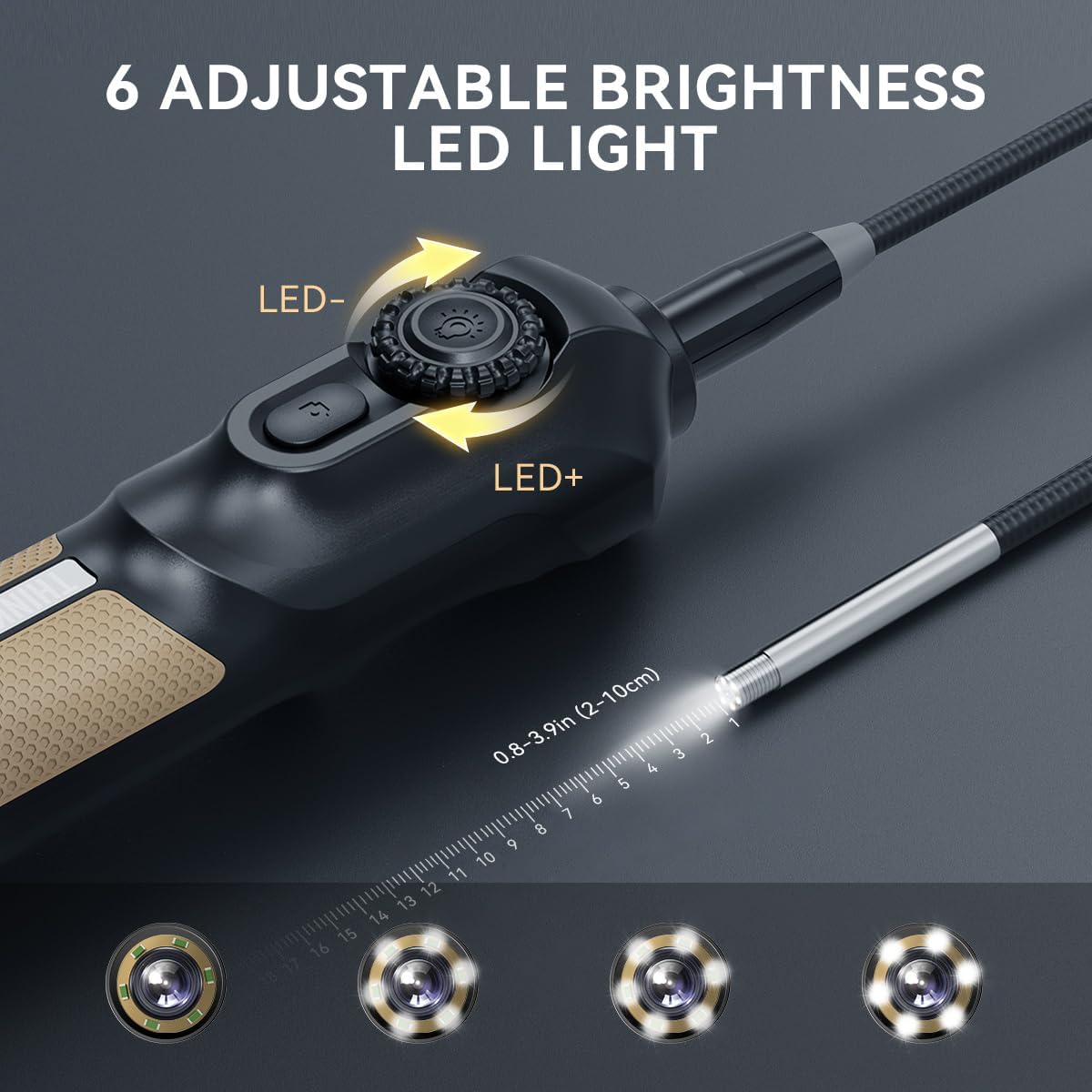
| Endoscope Camera (TES102) | 6 adjustable brightness LED lights, easy entry into hard-to-reach areas, one-click photo/video capture. |

7. Garantija ir palaikymas
7.1 Informacija apie garantiją
Specific warranty details are not provided in the product data. Please refer to the product packaging or contact THINKCAR customer support for comprehensive warranty information.
7.2 Pagalba klientams
For any technical support, questions, or assistance, please contact THINKCAR customer service via:
- Internetinė paslauga: Available through the device's interface.
- El. paštas: support@mythinkcar.com
- Pagrindinis puslapis: Refer to the device's homepage for additional resources.