
1. Įvadas
This manual provides detailed instructions for the safe and effective use of your Moukey MPS5 Portable Karaoke Machine. Please read this manual thoroughly before operating the device and retain it for future reference. The MPS5 is a versatile portable speaker system designed for various audio playback needs, including karaoke, music streaming, and public address, featuring wireless microphones and multiple connectivity options.
2. Kas yra dėžutėje
Atsargiai išpakuokite visus daiktus iš dėžės. Įsitikinkite, kad visi toliau išvardyti komponentai yra ir yra geros būklės.
- Moukey MPS5 Portable Karaoke Machine (1 unit)
- Belaidžiai mikrofonai (2 vnt.)
- USB įkrovimo laidas (1 vnt.)
- 3.5mm AUX Cable (1 unit)
- Shoulder Strap (1 unit)
- Vartotojo vadovas (1 vnt.)
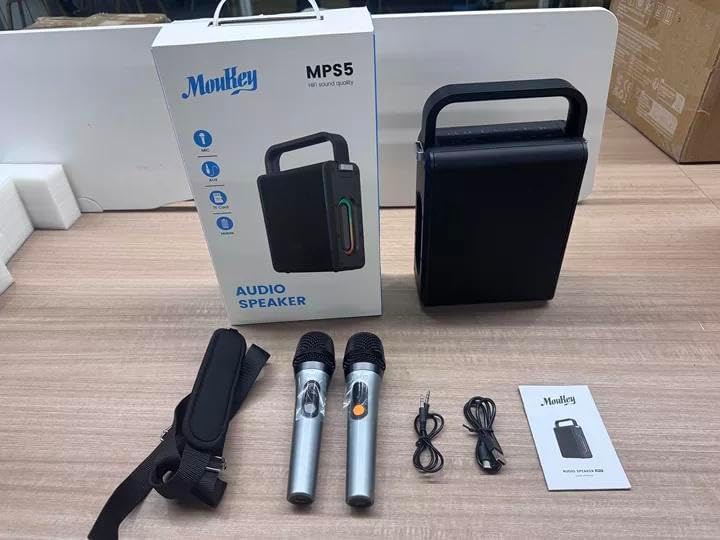
Image: All components included in the Moukey MPS5 package.
3. Produktas baigtasview
The Moukey MPS5 is a compact yet powerful portable karaoke machine. It features a robust design with integrated LED lighting on the sides, enhancing the user experience. A sturdy handle and an included shoulder strap provide convenient portability.
Vaizdas: priekis view of the Moukey MPS5 speaker.

Vaizdas: Šoninė view of the Moukey MPS5, showing the LED lighting.
4. Pagrindinės savybės
- Excellent Sound Output: The MPS5 delivers 200W peak power (RMS 60W) through a 4-inch woofer and two 2-inch tweeters, providing full-range stereo sound with enhanced bass.
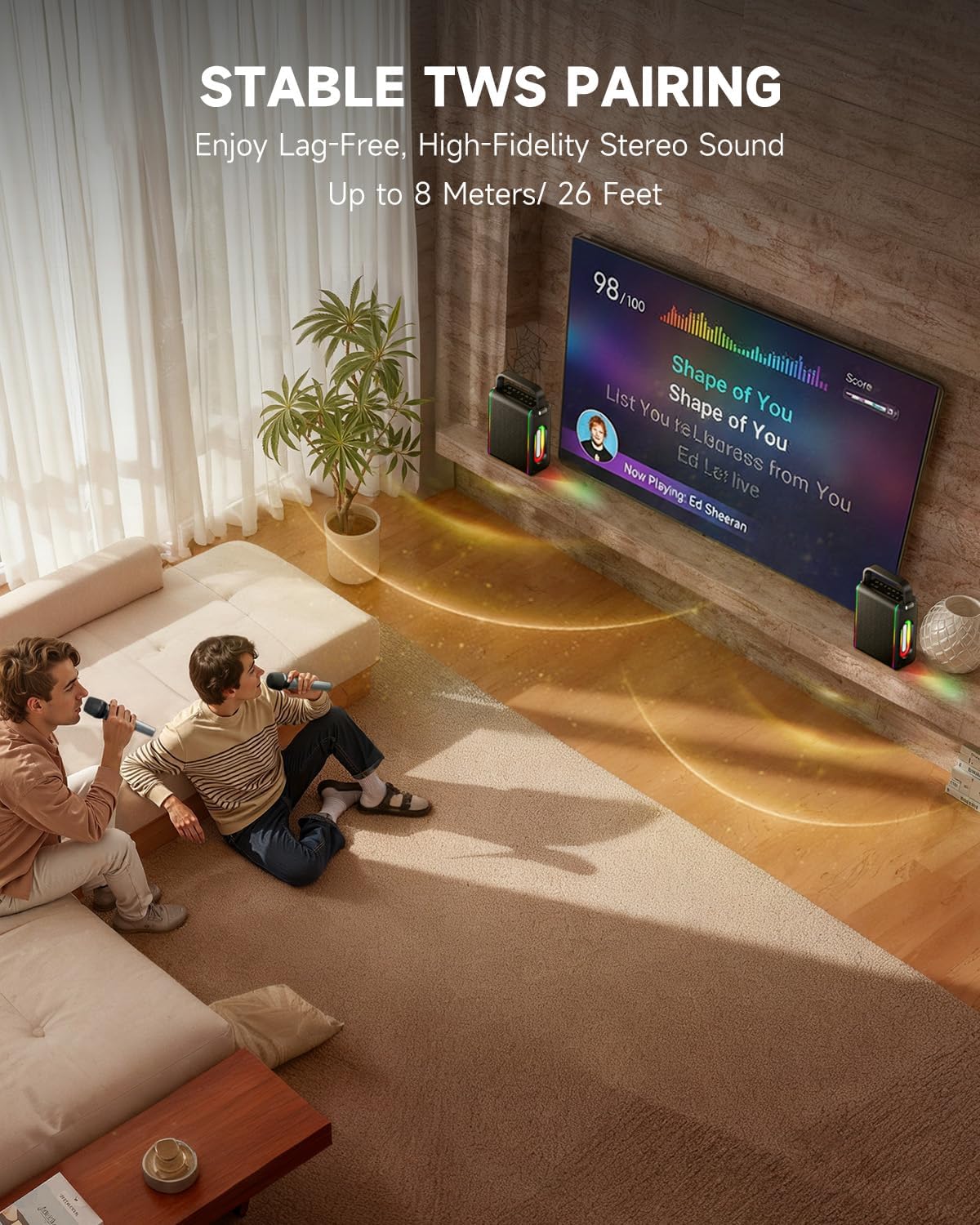
- Galingas funkcionalumas: Supports Bluetooth 5.3 for wireless connection to various devices. Also includes Micro TF card, Flash USB, MP3, and AUX IN playback options. Features stable TWS (True Wireless Stereo) pairing for connecting two MPS5 units for a wider stereo soundstage.
- Itin ilgas baterijos veikimo laikas: The rechargeable battery provides up to 8 hours of continuous music playback on a 2-hour charge, suitable for extended use indoors or outdoors.
- Lengvas ir nešiojamas dizainas: Weighing only 2kg, the MPS5 is designed for easy transport. It can be carried by hand using the integrated handle or with the included shoulder strap.
- Dvigubi belaidžiai mikrofonai: Includes two 2.4Ghz rechargeable microphones with a connection range of up to 60 feet and up to 8 hours of use time per charge (2-3 hours charging time). Features one-tap connectivity for effortless pairing.

Image: Internal speaker components of the MPS5.

Image: MPS5 connected to multiple devices via Bluetooth.

Image: Battery life and charging details for the MPS5.

Image: Demonstrating the portability of the MPS5 with hand and shoulder strap options.

Image: The two wireless microphones for the MPS5.
5. Sąranka
5.1 Garsiakalbio ir mikrofonų įkrovimas
Before first use, fully charge the MPS5 speaker and both wireless microphones.
- Pranešėjas: Connect the provided USB Type-C cable to the charging port on the speaker and to a compatible USB power adapter (not included). The charging indicator light will show charging status. A full charge takes approximately 2 hours.
- Mikrofonai: Each microphone has a charging port. Connect them to a USB power source using the provided USB cable. Charging time for microphones is 2-3 hours.
5.2 Maitinimo įjungimas/išjungimas
- Norėdami įjungti garsiakalbį, paspauskite ir palaikykite nuspaudę maitinimo mygtuką (U) on the top panel for 2 seconds.
- Norėdami išjungti, paspauskite ir palaikykite maitinimo mygtuką (U) dar kartą 2 sekundes.
5.3 Bluetooth poravimas
- Ensure the MPS5 speaker is powered on and in Bluetooth mode (indicated by a blue LED). If not, press the 'M' (Mode) button to switch to Bluetooth mode.
- Mobiliajame įrenginyje (išmaniajame telefone, planšetiniame kompiuteryje ir kt.) įjunkite „Bluetooth“ ir ieškokite galimų įrenginių.
- Select 'Moukey MPS5' from the list of devices to pair. A voice prompt will confirm successful connection.
5.4 TWS (tikro belaidžio stereo) susiejimas
To achieve stereo sound, you can pair two Moukey MPS5 speakers together.
- Ensure both MPS5 speakers are powered on and in Bluetooth mode, but not connected to any other device.
- On one of the speakers, double-press the 'M' (Mode) button. The speaker will enter TWS pairing mode.
- Du garsiakalbiai automatiškai susijungs. Balso pranešimas patvirtins sėkmingą TWS susiejimą.
- Once TWS is established, connect your mobile device to one of the MPS5 speakers via Bluetooth as described in section 5.3. Both speakers will then play audio in stereo.
Vaizdo įrašas: trumpa apžvalgaview of the MPS5 Karaoke Machine, demonstrating TWS pairing and other features.
6. Naudojimo instrukcijos
6.1 Valdymas baigtasview
The top panel of the MPS5 speaker features several buttons for controlling playback, volume, and microphone settings.
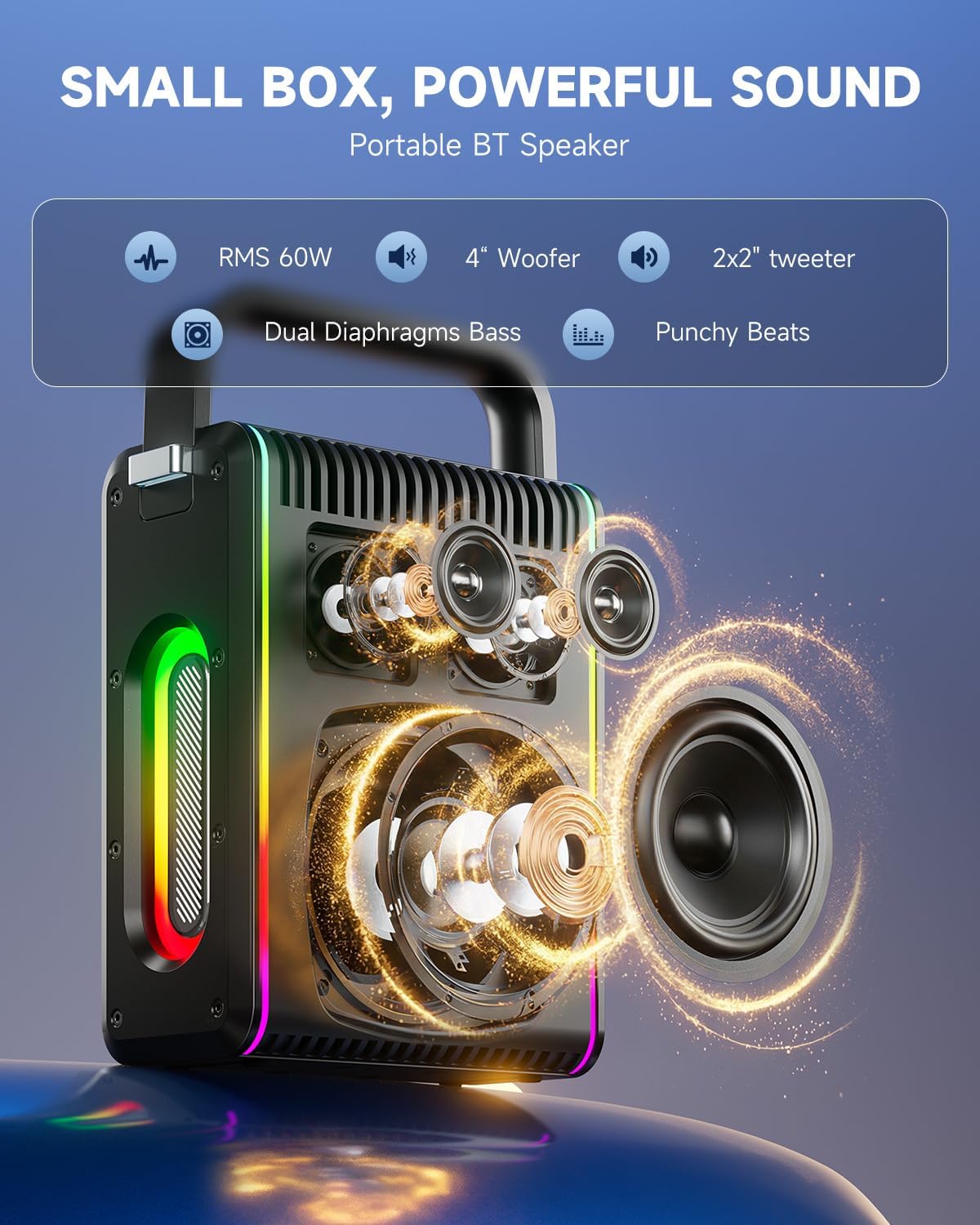
Image: Top control panel of the MPS5.
- Įjungimo mygtukas (U): Paspauskite ir palaikykite 2 sekundes, kad įjungtumėte/išjungtumėte.
- Režimo mygtukas (M): Short press to cycle through input modes (Bluetooth, AUX, USB, TF Card). Double-press to initiate TWS pairing.
- Microphone Volume (Mic - / Mic +): Reguliuoja prijungtų mikrofonų garsumą.
- Echo Adjustment (R- / R+): Reguliuoja mikrofonų aidėjimo efektą.
- Leisti / pristabdyti (▶): Paleidžia arba pristabdo dabartinį takelį.
- Garsumo mažinimas (-): Decreases the main speaker volume.
- Garsumo didinimas (+): Increases the main speaker volume.
- EQ A/E: Short press to switch between EQ modes. Long press to toggle between original sound and accompaniment elimination.
6.2 Mikrofono naudojimas
The MPS5 comes with two wireless microphones for karaoke and vocal performances.
- Maitinimo įjungimas/išjungimas: Norėdami įjungti arba išjungti mikrofoną, paspauskite ir palaikykite nuspaudę maitinimo mygtuką.
- Poravimas: The microphones are pre-paired with the speaker. If re-pairing is needed, ensure the speaker is on, then power on the microphone. They should connect automatically.
- Microphone Disconnect/Reconnect: Press the dedicated microphone button on the speaker's control panel to quickly disconnect or reconnect the microphones.
6.3 Garso įvesties režimai
In addition to Bluetooth, the MPS5 supports several wired and local storage input options.

Image: Input ports on the MPS5 speaker.
- AUX įvestis: Connect an external audio device using the 3.5mm AUX cable. Select AUX mode using the 'M' button.
- USB atkūrimas: Įdėkite USB atmintinę, kurioje yra MP3 garso įrašų fileį USB prievadą. Garsiakalbis automatiškai persijungs į USB režimą ir pradės atkūrimą.
- TF kortelės atkūrimas: Insert a Micro TF card containing MP3 audio fileį TF kortelės lizdą. Garsiakalbis automatiškai persijungs į TF kortelės režimą ir pradės atkūrimą.
6.4 LED apšvietimas
The MPS5 features dynamic LED lighting on its sides. Use the dedicated LED button (if available, or refer to the 'M' button for light control if combined) to cycle through different light modes or turn them off.
7. Priežiūra
- Valymas: Garsiakalbio išorę valykite minkšta, sausa šluoste. Nenaudokite skystų valiklių ar abrazyvinių medžiagų.
- Saugykla: Laikykite prietaisą vėsioje, sausoje vietoje, apsaugotoje nuo tiesioginių saulės spindulių ir ekstremalių temperatūrų.
- Akumuliatoriaus priežiūra: Norėdami pailginti akumuliatoriaus veikimo laiką, venkite dažnai visiškai jį iškrauti. Reguliariai įkraukite įrenginį, net jei jis ilgą laiką nenaudojamas.
8. Problemų sprendimas
If you encounter issues with your Moukey MPS5, refer to the following common problems and solutions:
| Problema | Galima priežastis | Sprendimas |
|---|---|---|
| Nėra galios | Baterija išsikrovusi. | Įkraukite garsiakalbį naudodami pridėtą USB C tipo laidą. |
| Nėra garso iš garsiakalbio | Garsumas per mažas arba nutildytas. Pasirinktas neteisingas įvesties režimas. | Increase volume using the '+' button. Press 'M' to cycle through input modes. |
| „Bluetooth“ susiejimas nepavyko | Garsiakalbis nėra susiejimo režime. Įrenginys yra per toli. | Ensure speaker is in Bluetooth mode. Move device closer to speaker. Try restarting both devices. |
| Mikrofonas neveikia | Microphone is off or uncharged. Microphone is disconnected. | Ensure microphone is charged and powered on. Press the microphone button on the speaker to reconnect. |
| TWS susiejimas nepavyko | Speakers are already connected to another device. | Ensure both speakers are not connected to any other Bluetooth device before initiating TWS pairing. |
9. Specifikacijos
- Prekinis ženklas: Moukey
- Modelio numeris: MPS5
- Išėjimo vattage: 200 XNUMX vatų (didžiausia)
- Ryšio technologija: Bluetooth 5.3
- Garso įvestis: Bluetooth, TF card, USB, MP3, AUX, Wired microphones
- Kanalų skaičius: 2
- Maitinimo šaltinis: Maitinamas baterijomis
- Jungties tipas: C tipo USB
- Prekės matmenys (I x P x A): 2.36 x 6.3 x 12.2 colio
- Prekės svoris: Maždaug 2 kg
- Suderinami įrenginiai: Smartphone, Tablet, Laptop, MP3 Player, Microphone
- Spalva: Black with Silver Accents
10. Garantija ir palaikymas
The Moukey MPS5 Portable Karaoke Machine comes with a 1 metų garantija nuo įsigijimo datos. Ši garantija taikoma gamybos defektams ir gedimams įprasto naudojimo sąlygomis. Išsaugokite pirkimo įrodymą, jei norėtumėte pateikti pretenzijas dėl garantijos.
For technical support, troubleshooting assistance, or warranty inquiries, please contact Moukey customer service through the retailer where the product was purchased or visit the official Moukey websvetainė kontaktinei informacijai.