
1. Įvadas
The THOMSON RT400DABBTBK is a versatile portable radio designed to provide a comprehensive audio experience. It features DAB+ and FM radio reception, Bluetooth connectivity for wireless audio streaming, USB playback for MP3 files, and an AUX-IN port for external devices. Additionally, it includes a dual alarm clock function, making it a practical and convenient device for various settings.
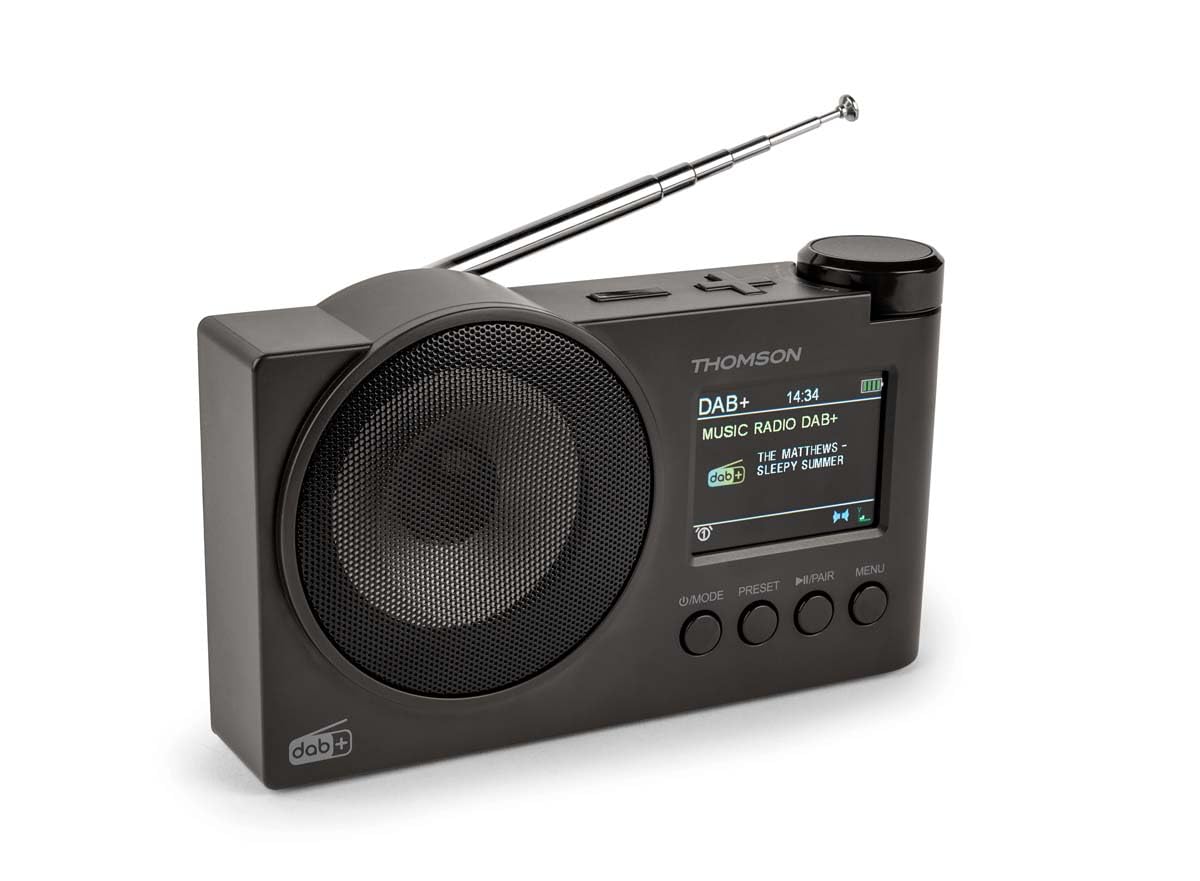
1.1 paveikslas: THOMSON RT400DABBTBK portable radio. This image shows the front of the radio, featuring the speaker grille on the left and the LED display with control buttons on the right. The display indicates the time, date, and battery level.
2. Svarbios saugos instrukcijos
- Prieš naudodami įrenginį, atidžiai perskaitykite visas instrukcijas.
- Išsaugokite šį vadovą ateityje.
- Saugokite įrenginį nuo lietaus, drėgmės ar ekstremalių temperatūrų.
- Neardykite įrenginio. Visus techninės priežiūros darbus patikėkite kvalifikuotiems darbuotojams.
- Use only the specified power adapter (DC 5V 2A) and USB-C cable.
- Užtikrinkite tinkamą vėdinimą aplink įrenginį.
- Nestatykite prietaiso šalia šilumos šaltinių arba tiesioginių saulės spindulių.
3. Pakuotės turinys
Prašome patikrinti, ar yra visi daiktai:
- THOMSON RT400DABBTBK Radio
- USB-C įkrovimo laidas
- Naudotojo vadovas (šis dokumentas)
4. Produkto išdėstymas ir valdikliai

4.1 paveikslas: Front Panel Controls and Display. This image provides a detailed view of the radio's front panel, featuring the circular speaker on the left and the rectangular LED display on the right. Below the display are four control buttons: MODE, PRESET, PLAY/PAIR, and MENU. The display shows '12/8/2025 Mardi 16:24' with alarm and stop icons.
4.1. Valdymo mygtukai
- POWER / MODE: Press to turn on/off. Press to switch between DAB+, FM, Bluetooth, USB, and AUX-IN modes.
- Išankstinis nustatymas: Access and save preset radio stations.
- PLAY / PAIR: In Bluetooth mode, press to play/pause or initiate pairing. In USB mode, play/pause.
- MENIU: Access system settings and options for the current mode.
- Rotary Knob (Top Right): Adjust volume, navigate menus, or tune frequencies. Press to confirm selections.
4.2. Rodyti informaciją
The LED display shows various information depending on the operating mode:
- Current time and date (12/24h format).
- Radio station name, frequency, or DAB+ service information.
- Bluetooth ryšio būsena.
- USB track information.
- Baterijos lygio indikatorius.
- Alarm icons (Alarm 1, Alarm 2).
5. Sąranka
5.1. Įjungimas
The radio can be powered in two ways:
- Kintamosios srovės maitinimas: Connect the supplied USB-C cable to the DC 5V 2A input on the radio and to a suitable USB power adapter (not included).
- Įkraunama baterija: The radio has a built-in 1500mAh Lithium rechargeable battery. Ensure it is fully charged before portable use. The battery charges automatically when connected to AC power.
5.2. Antenos reguliavimas
For optimal DAB+ and FM radio reception, fully extend the telescopic antenna. Adjust its position for the best signal quality.
5.3. Pradiniai nustatymai
Pirmą kartą naudojant arba po gamyklinių parametrų atkūrimo gali reikėti sukonfigūruoti pagrindinius nustatymus:
- Kalbos pasirinkimas: Use the MENU button to navigate to System Settings, then select 'Language' to choose your preferred language (French, English, German, Italian, Spanish, Portuguese, Dutch).
- Laikas ir data: The time and date are often automatically updated in DAB+ mode. If not, navigate to System Settings > Time/Date to set manually.
6. Radijo valdymas
6.1. DAB+ Radio Mode
- Paspauskite REŽIMAS mygtuką, kad pasirinktumėte DAB+ režimą.
- The radio will automatically perform a scan for available DAB+ stations.
- Use the rotary knob to scroll through the list of found stations. Press the knob to select a station.
- Norėdami išsaugoti stotį kaip iš anksto nustatytą, paspauskite ir palaikykite NUSTATYMAS button, select a preset number using the rotary knob, and press the knob to confirm.
6.2. FM radijo režimas
- Paspauskite REŽIMAS mygtuką, norėdami pasirinkti FM režimą.
- To auto-scan for stations, press and hold the rotary knob. The radio will scan and save stations.
- To manually tune, rotate the knob to adjust the frequency.
- Norėdami išsaugoti stotį kaip iš anksto nustatytą, paspauskite ir palaikykite NUSTATYMAS button, select a preset number using the rotary knob, and press the knob to confirm.
6.3. Bluetooth garsiakalbio režimas
- Paspauskite REŽIMAS button to select Bluetooth mode. The display will show 'Bluetooth Pairing'.
- On your smartphone or tablet, enable Bluetooth and search for 'THOMSON RT400DABBTBK'.
- Select the device to pair. Once connected, the display will show 'Bluetooth Connected'.
- Play audio from your paired device. Use the radio's rotary knob to adjust volume.
6.4. USB atkūrimas
- Įdėkite USB atmintinę su MP3 files į USB prievadą.
- Paspauskite REŽIMAS mygtuką, norėdami pasirinkti USB režimą.
- The radio will automatically start playing MP3 files. Use the rotary knob to navigate tracks and the PLAY/PAIR mygtuką, jei norite paleisti / pristabdyti.
6.5. AUX-IN režimas
- Connect an external audio device (e.g., MP3 player) to the AUX-IN 3.5mm port using an audio cable (not included).
- Paspauskite REŽIMAS mygtuką, norėdami pasirinkti AUX-IN režimą.
- Control playback from your external device. Use the radio's rotary knob to adjust volume.
6.6. Ausinių naudojimas
Connect headphones (not supplied) to the 3.5mm headphone jack for private listening. The main speaker will be muted automatically.
7. Žadintuvas
The radio features a dual alarm clock.
- Paspauskite MENIU mygtuką ir eikite į „Signalo nustatymai“.
- Pasirinkite „1 aliarmas“ arba „2 aliarmas“, kad sukonfigūruotumėte.
- Nustatyti laiką: Use the rotary knob to set the desired alarm time.
- Signalizacijos šaltinis: Choose your preferred wake-up sound: DAB+, FM, USB, or Bluetooth.
- Signalizacijos trukmė: Set the alarm duration (15, 30, 45, 60, or 90 minutes).
- Signalizacijos dažnis: Select how often the alarm should sound: Once, Daily, Weekdays, or Weekends.
- Apimtis: Sureguliuokite žadintuvo garsumą.
- Įjungti / išjungti: Turn the alarm ON or OFF.
8. Sistemos nustatymai
Access system settings by pressing the MENIU button and navigating to 'System Settings'.
- Ekrano nustatymai: Adjust backlight duration (10 to 180 seconds) and choose between 12-hour or 24-hour time format.
- Kalba: Select the display language (French, English, German, Italian, Spanish, Portuguese, Dutch).
- Automatic Station Update: Enable or disable automatic updates for radio stations.
- Gamykliniai nustatymai: Iš naujo nustatykite visus nustatymus į numatytąsias reikšmes.
9. Priežiūra
9.1. Valymas
Wipe the radio's surface with a soft, dry cloth. Do not use abrasive cleaners, waxes, or solvents, as these may damage the finish.
9.2. Akumuliatoriaus priežiūra
To prolong the life of the built-in Lithium battery:
- Venkite dažnai visiškai iškrauti akumuliatorių.
- Charge the battery regularly, even if the radio is not in use for extended periods.
- Kai nenaudojate, radijo imtuvą laikykite vėsioje, sausoje vietoje.
10. Problemų sprendimas
| Problema | Galima priežastis | Sprendimas |
|---|---|---|
| Nėra galios | Battery discharged or power cable not connected. | Connect the USB-C cable to a power source. Charge the battery. |
| Prastas radijo priėmimas | Antena neištiesta arba silpno signalo zona. | Visiškai ištieskite ir sureguliuokite teleskopinę anteną. Pabandykite perkelti radijo stotelę į kitą vietą. |
| Bluetooth neprisijungia | Radio not in pairing mode or device already paired. | Ensure the radio is in Bluetooth mode and 'Bluetooth Pairing' is displayed. Forget the device on your phone/tablet and try pairing again. |
| USB atkūrimas neveikia | USB drive not formatted correctly or unsupported file tipo. | Ensure USB drive is formatted to FAT32 and contains MP3 files. Išbandykite kitą USB atmintinę. |
| Signalizacija neskamba | Alarm disabled or incorrect settings. | Check alarm settings (time, source, frequency, enable/disable status). |
11. Specifikacijos
| Funkcija | Specifikacija |
|---|---|
| Prekės ženklas | THOMSONAS |
| Modelio numeris | RT400DABBTBK |
| Palaikomos radijo juostos | DAB+, FM |
| Ryšio technologija | Bluetooth |
| Ypatinga funkcija | Nešiojami |
| Maitinimo šaltinis | Battery Powered, Corded Electric (DC 5V 2A via USB-C) |
| Baterija | 1500 mAh įkraunamas ličio |
| Ekrano tipas | LED |
| Gaminio matmenys (I x P x A) | 8 x 5 x 15 centimetro |
| Prekės svoris | 300 gramų |
| Suderinami įrenginiai | MP3 Player, Speaker, Headphones, Tablet |
12. Garantija ir palaikymas
This THOMSON RT400DABBTBK radio comes with a 1 metų gamintojo garantija.
For further support, troubleshooting, or warranty claims, please refer to your point of purchase or visit the official THOMSON brand store: