
1. Įvadas
The AJAZZ AKP03 Macro Keypad Stream Controller is a versatile device designed to enhance productivity and streamline workflows for gamers, streamers, and professionals. Featuring six programmable keys with LCD displays, three physical knobs, and three toggle switches, it offers extensive customization options for various tasks.
This manual provides detailed instructions for setting up, operating, and maintaining your AKP03 device, ensuring optimal performance and user experience.
2. Produkto ypatybės
- Six Programmable Macro Keys: Customizable LCD displays for single or continuous actions.
- Three Physical Knobs: For precise control over various functions.
- Three Toggle Switches: Additional control options.
- Vieno paspaudimo valdymas: Instant execution of macro commands, text input, application launches, and media control.
- Intuitive Driver Software: Drag-and-drop functionality for easy key assignment and property configuration.
- Platus suderinamumas: Seamless integration with platforms like Streamlabs, Twitch, YouTube, and various software applications on Windows and Mac.
- Removable 40° Stand: Provides an ergonomic viewing angle and stable placement.

2.1 pav. Baigtaview of the AJAZZ AKP03 Macro Keypad, highlighting its programmable buttons, toggle switches, and scroll wheels.
3. Pakuotės turinys
Patikrinkite, ar pakuotėje yra visi reikalingi daiktai:
- AJAZZ AKP03 Macro Keypad Stream Controller
- USB-C į USB-A laidas
- Removable 40° Stand
- Vartotojo vadovas (šis dokumentas)
4. Sąranka
4.1 Fizinis ryšys
- Attach the removable 40° stand to the bottom of the AKP03 for an ergonomic angle, if desired.
- Connect the provided USB-C cable to the USB-C port on the AKP03.
- Prijunkite USB-A laido galą prie laisvo kompiuterio (PC arba „Mac“) USB prievado.
- Įrenginys įsijungs automatiškai.

Figure 4.1: Attaching the removable 40° stand to the AKP03.
4.2 Programinės įrangos diegimas
To unlock the full customization capabilities of your AKP03, you must install the dedicated driver software.
- Atidarykite savo web browser and navigate to the official AJAZZ websvetainė: www.a-jazz.com.
- Locate the 'Driver Download' section.
- Ieškokite 'AKP03' or browse for the corresponding driver for your model.
- Download the driver software compatible with your operating system (Windows or macOS).
- Paleiskite diegimo programą ir vykdykite ekrane pateikiamas instrukcijas, kad užbaigtumėte diegimą.
- Iš naujo paleiskite kompiuterį, jei būsite paraginti.
Video 4.1: Demonstrates the software installation process and initial setup for the AJAZZ Macro Keypad.
5. Naudojimo instrukcijos
5.1 Customizing Keys and Knobs
The AKP03's driver software provides a user-friendly interface for customization:
- Launch the 'Stream Dock AJAZZ' software from your desktop or applications folder.
- The software will display a visual representation of your AKP03.
- To assign an action, drag and drop a desired function (e.g., launch application, media control, macro command) from the software's library onto one of the six programmable keys.
- For knobs, select the knob in the software and assign functions such as volume control, scrolling, or zooming.
- You can configure properties for each assigned action, including specific file takai, web URLs, or macro sequences.
- The LCD displays on the keys will update to show the assigned icon or text.
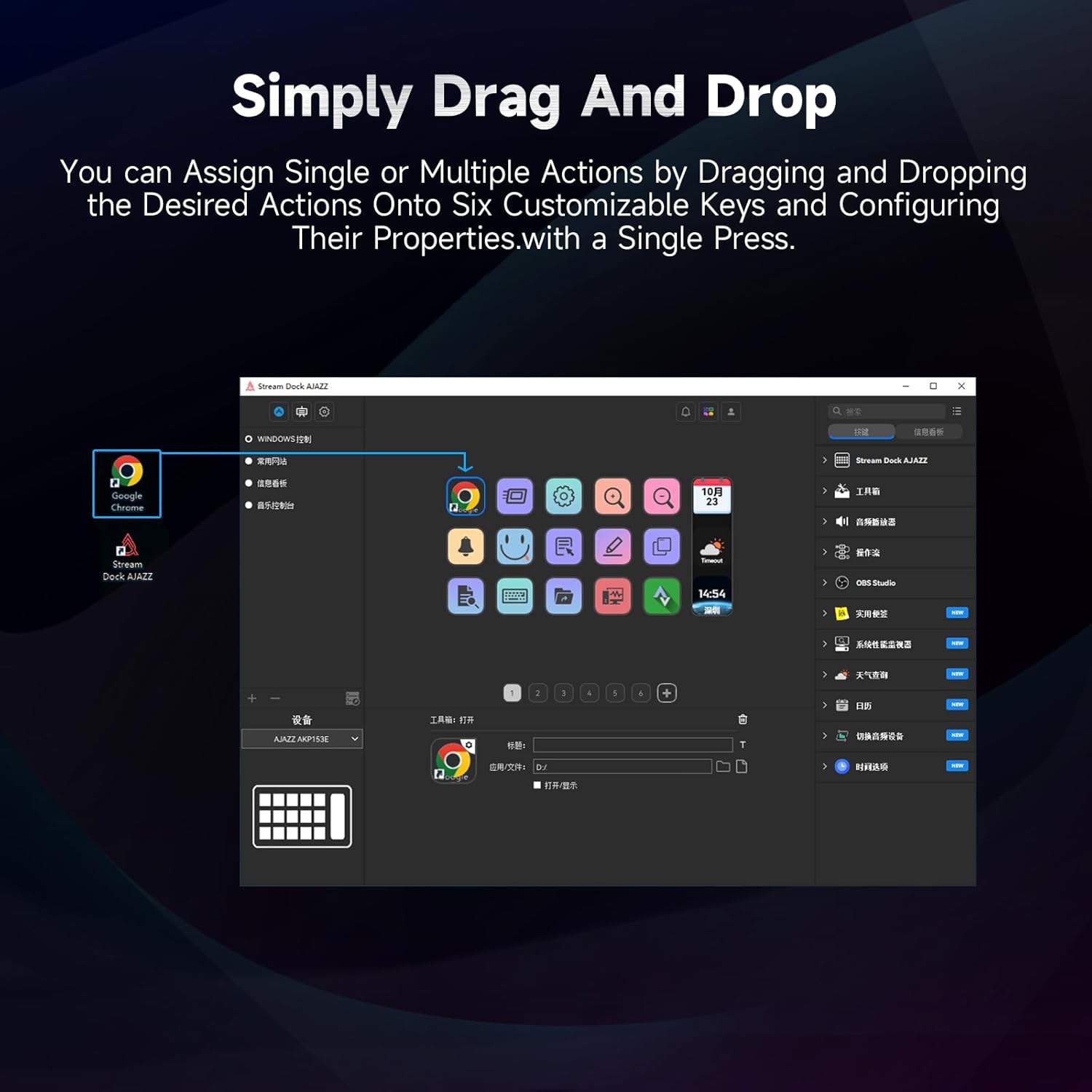
Figure 5.1: Customizing keys using the drag-and-drop interface in the AJAZZ software.
Video 5.1: Demonstration of assigning actions to keys for launching web pages and software with a single click.
5.2 Using Profiles and Pages
The software supports multiple profiles and pages, allowing you to switch between different sets of key assignments for various applications or tasks.
- Sukurkite naują profesionaląfiles for specific games, editing software, or streaming setups.
- Kiekviename profesionalefile, you can create multiple pages of key assignments, accessible by navigating through the device's buttons or software interface.
- The AKP03 automatically switches to the relevant profile when a linked application is in focus.
Video 5.2: Illustrates the multi-functional capabilities and profile switching of the AKP03 for various tasks.
6. Priežiūra
To ensure the longevity and optimal performance of your AJAZZ AKP03, follow these maintenance guidelines:
- Valymas: Use a soft, dry cloth to wipe the surface of the device. Avoid abrasive cleaners or solvents.
- Saugykla: Laikykite prietaisą vėsioje, sausoje vietoje, apsaugotoje nuo tiesioginių saulės spindulių ir ekstremalių temperatūrų.
- Kabelio priežiūra: Kad nepažeistumėte USB kabelio, jo per daug nelenkite ir nesukite.
- Programinės įrangos atnaujinimai: Regularly check the AJAZZ website for software and firmware updates to ensure compatibility and access to new features.
7. Problemų sprendimas
If you encounter issues with your AKP03, refer to the following common troubleshooting steps:
- Įrenginys neatpažintas:
- Ensure the USB cable is securely connected to both the AKP03 and your computer.
- Pabandykite prisijungti prie kito USB prievado.
- Iš naujo paleiskite kompiuterį.
- Verify that the driver software is correctly installed and up to date.
- Klavišai nereaguoja:
- Check the software to ensure keys are properly assigned and the correct profile yra aktyvus.
- Ensure the driver software is running in the background.
- Programinės įrangos problemos:
- Reinstall the driver software.
- Check for software updates on the AJAZZ websvetainę.
8. Specifikacijos
| Funkcija | Detalė |
|---|---|
| Prekės ženklas | AJAZZ |
| Modelio pavadinimas | AKP03 |
| Suderinami įrenginiai | Kompiuteris, nešiojamas kompiuteris |
| Valdiklio tipas | Klaviatūra |
| Ryšio technologija | USB-C |
| Mygtukų kiekis | 6 Programmable Keys (with LCD displays), 3 Physical Knobs, 3 Toggle Switches |
| Prekės svoris | 0.32 kilogramo |
| Prekės matmenys (I x P x A) | 5 x 3 x 2 colio |
| Maitinimo šaltinis | Su laidu elektra |
9. Garantija ir palaikymas
9.1 Informacija apie garantiją
The AJAZZ AKP03 Macro Keypad Stream Controller comes with a 1 metų ribota garantija nuo įsigijimo datos. Ši garantija taikoma gamybos defektams ir gedimams įprasto naudojimo metu. Ji netaikoma žalai, atsiradusiai dėl netinkamo naudojimo, nelaimingų atsitikimų, neleistinų modifikacijų ar netinkamo įrengimo.
Išsaugokite pirkimo įrodymą, kad galėtumėte kreiptis dėl garantijos.
9.2 Pagalba klientams
For technical assistance, troubleshooting, or warranty inquiries, please contact AJAZZ customer support:
- Websvetainė: www.a-jazz.com (Refer to the 'Support' or 'Contact Us' section)
- El. paštas: [Insert Customer Support Email, if available]
- Telefonas: [Insert Customer Support Phone Number, if available]
Our support team is available to assist you with any questions or concerns regarding your product.