
1. Įvadas
This manual provides detailed instructions for the safe and efficient use of your Surfans F20 Pro Android Hi-Res Music Player. Please read this manual thoroughly before operating the device and retain it for future reference.
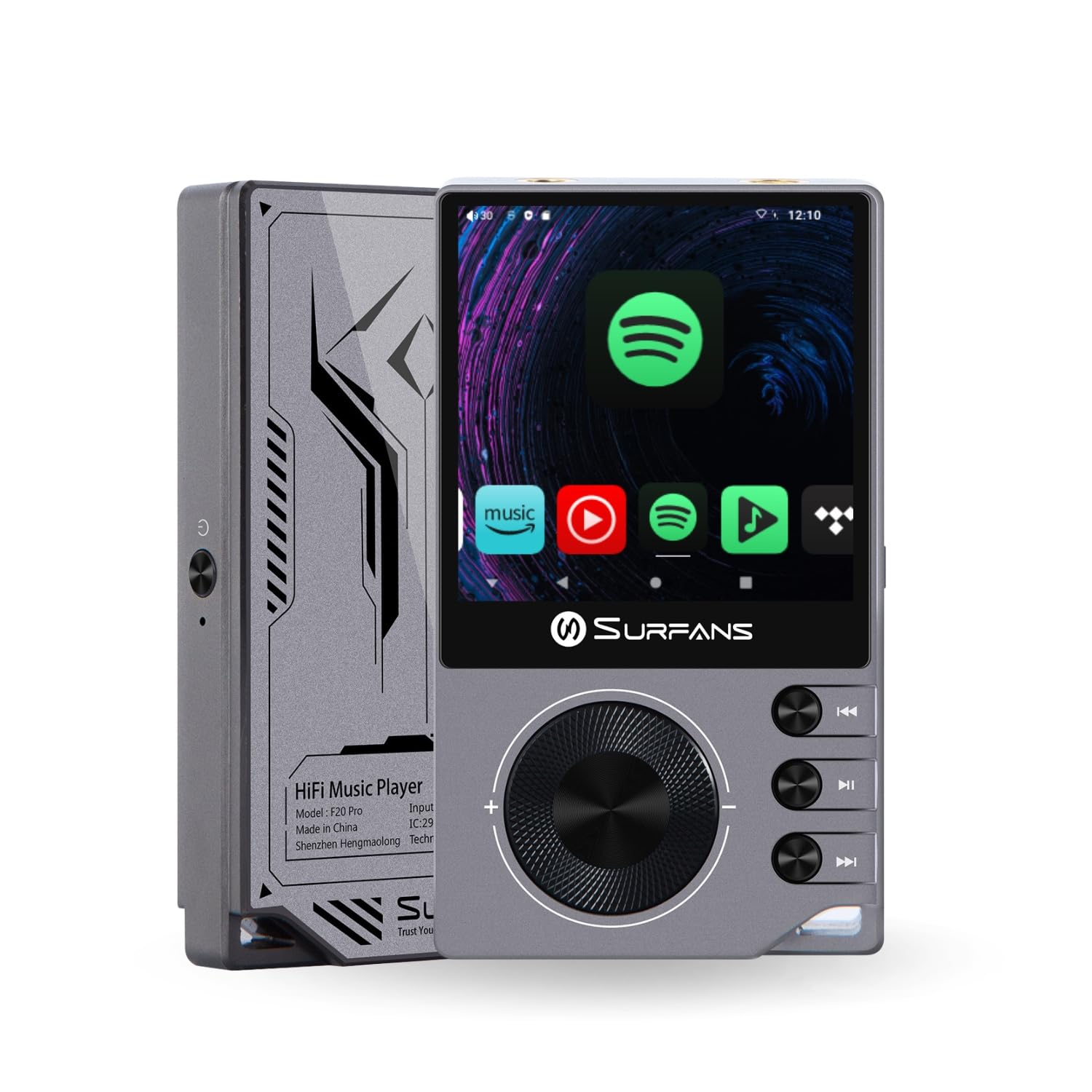
The Surfans F20 Pro Hi-Res Music Player, showcasing its compact design and touchscreen interface.
2. Pakuotės turinys
Patikrinkite, ar pakuotėje yra visi reikalingi daiktai:
- Surfans F20 Pro Hi-Res Music Player
- C tipo USB kabelis
- 32 GB MicroSD Memory Card (pre-installed or separate)
- Apsauginis dėklas
- Vartotojo vadovas (šis dokumentas)
3. Įrenginys baigtasview
Familiarize yourself with the physical components and ports of your F20 Pro player.

Priekyje ir gale view of the Surfans F20 Pro, highlighting its robust CNC metal chassis and button layout.
3.1. Pagrindinės savybės
- Dual ESS9018Q2M DACs: For high-fidelity audio processing.
- Octa-Core Android 12 System: Enables streaming app compatibility and smooth operation.
- 3.5mm Single-Ended & 4.4mm Balanced Outputs: Versatile headphone connectivity.
- Bluetooth 5.0 with LDAC: High-quality wireless audio transmission.
- Dual-Band Wi-Fi (2.4GHz & 5GHz): For stable internet connectivity.
- Išplečiama saugykla: Supports up to 1TB via MicroSD card.
- 2.7 colių jutiklinis ekranas: Intuityvi vartotojo sąsaja.
4. Sąranka
4.1. Įrenginio įkrovimas
Before first use, fully charge the F20 Pro. Connect the included USB Type-C cable to the device's charging port and a compatible USB power adapter (not included) or computer USB port. The charging indicator will show the charging status.
4.2. „MicroSD“ kortelės įdėjimas
The F20 Pro supports MicroSD cards up to 1TB for expanded storage. Locate the MicroSD card slot on the side of the device. Gently insert the card until it clicks into place. To remove, push the card in again until it springs out.
4.3. Pradinis įjungimas
Press and hold the power button until the screen illuminates. Follow the on-screen prompts to complete the initial setup, including language selection and Wi-Fi connection.
4.4. Prisijungimas prie Wi-Fi
Eikite į Nustatymai > Tinklas ir internetas > „Wi-Fi“. Select your desired network and enter the password if prompted. The F20 Pro supports both 2.4GHz and 5GHz Wi-Fi bands.

The Surfans F20 Pro demonstrating its dual-band Wi-Fi capability for fast and stable connections.
4.5. „Bluetooth“ poravimas
To connect Bluetooth headphones or speakers:
- Įsitikinkite, kad jūsų „Bluetooth“ įrenginys veikia susiejimo režimu.
- On the F20 Pro, go to Nustatymai > Prijungti įrenginiai > Susieti naują įrenginį.
- Select your device from the list and confirm pairing.

An illustration of the Bluetooth 5.0 chip, indicating support for high-resolution wireless audio codecs like LDAC.
5. Prietaiso valdymas
5.1. Pagrindinė navigacija
The F20 Pro features a 2.7-inch touchscreen for navigation. Swipe to scroll, tap to select, and use the physical buttons for quick controls:
- Maitinimo mygtukas: Power on/off, screen on/off.
- Tūrio ratas: Reguliuoja garso išvesties garsumą.
- Atkūrimo valdymo mygtukai: Groti / Pauzė, Kitas takelis, Ankstesnis takelis.
5.2. Muzikos atkūrimas
The F20 Pro supports various audio formats including DSD512, 192kHz/24bit, FLAC, WAV, WMA, M4A, MP3, MP2, and AAC.
5.2.1. Vietinis Files
Perkelti muziką files to the device's internal storage or MicroSD card via USB connection to a computer. Use the pre-installed music player application to browse and play your library.
5.2.2. Srautinio perdavimo programos
The Android 12 operating system allows installation of streaming apps like Spotify, Apple Music, Tidal, or YouTube. Connect to Wi-Fi and download apps from the Google Play Store or other compatible sources.

The Surfans F20 Pro's screen showing various streaming application icons, demonstrating its Android capabilities.
5.3. Headphone Connections
The device offers both single-ended and balanced audio outputs.
- 3.5mm Single-Ended Output: Standard headphone jack (125mW/32Ω).
- 4.4 mm subalansuota išvestis: For enhanced audio performance with compatible headphones (500mW/32Ω).

Iš arti view of the 3.5mm single-ended and 4.4mm balanced audio output ports on the Surfans F20 Pro.
6. Priežiūra
6.1. Valymas
Use a soft, dry, lint-free cloth to clean the device. Avoid using abrasive cleaners or solvents, which may damage the surface.
6.2. Programinės įrangos atnaujinimai
Periodically check for software updates to ensure optimal performance and access to new features. Updates can typically be found in Nustatymai > Sistema > Sistemos naujinimas.
6.3. Akumuliatoriaus priežiūra
Norėdami pailginti baterijos veikimo laiką, venkite dažnai visiškai iškrauti įrenginį. Kai nenaudojate ilgesnį laiką, laikykite įrenginį vėsioje, sausoje vietoje.

Vidinis view of battery cells, representing the long-lasting battery capacity of the F20 Pro.
7. Problemų sprendimas
If you encounter issues with your F20 Pro, refer to the following common problems and solutions:
| Problema | Galima priežastis | Sprendimas |
|---|---|---|
| Įrenginys neįsijungia | Žemas akumuliatoriaus lygis; sistemos gedimas | Įkraukite įrenginį; paspauskite ir palaikykite maitinimo mygtuką 10–15 sekundžių, kad priverstumėte įrenginį paleisti iš naujo. |
| Nėra garso išvesties | Volume too low; Incorrect output selected; Faulty headphones | Increase volume; Check headphone connection; Test with different headphones. |
| Nepavyksta prisijungti prie „Wi-Fi“. | Neteisingas slaptažodis; Už diapazono ribų; Maršrutizatoriaus problema | Verify password; Move closer to router; Restart router. |
| Lėtas veikimas / Programų gedimai | Too many apps running; Low storage; Outdated software | Close background apps; Free up storage; Check for system updates. |
8. Specifikacijos
Detailed technical specifications for the Surfans F20 Pro:
| Funkcija | Detalė |
|---|---|
| Prekės ženklas | Surfans |
| Modelio pavadinimas | F20 PRO |
| DAC lustai | Dual ESS9018Q2M |
| op-Amps | Dual OPA1612 |
| Operacinė sistema | Android 12 |
| RAM | 3 GB |
| Vidinė saugykla | 32 GB |
| Išplečiama saugykla | Iki 1 TB per „MicroSD“ kortelę |
| Ekrano dydis | 2.73 colių |
| Ryšys | Aux, Bluetooth 5.0 (LDAC), USB Type-C, Wi-Fi (2.4GHz & 5GHz) |
| Garso išvestys | 3.5mm Single-Ended (125mW/32Ω), 4.4mm Balanced (500mW/32Ω) |
| Palaikomi garso formatai | DSD512, 192kHz/24bit, FLAC, WAV, WMA, M4A, MP3, MP2, AAC |
| Spalva | Pilka |

An illustration of the dual ESS9018K2M DAC chips, central to the F20 Pro's high-resolution audio capabilities.
9. Informacija apie garantiją
The Surfans F20 Pro comes with a 1 metų garantija nuo įsigijimo datos. Ši garantija taikoma gamybos defektams ir gedimams įprasto naudojimo sąlygomis. Ji netaikoma žalai, atsiradusiai dėl netinkamo naudojimo, nelaimingų atsitikimų, neleistinų modifikacijų ar įprasto nusidėvėjimo. Išsaugokite pirkimo įrodymą, jei galėtumėte pateikti pretenzijas dėl garantijos.
10. Pagalba klientams
For further assistance, technical support, or warranty inquiries, please contact Surfans customer service through the official website or your retailer. You may also find additional resources and FAQs online.


