
Įvadas
Thank you for choosing the LIORQUE Wireless Weather Station YGH6208. This device provides accurate indoor and outdoor temperature and humidity readings, weather forecasts, and features a DCF radio-controlled clock with alarm functions. This manual will guide you through the setup, operation, and maintenance of your weather station.
Pakuotės turinys
- 1 x LIORQUE Wireless Weather Station (Main Unit)
- 1 x lauko jutiklis
- 3 x AAA Batteries (for Main Unit)
- 2 x AAA Batteries (for Outdoor Sensor)
- 1 x Naudotojo vadovas (šis dokumentas)
Produktas baigtasview
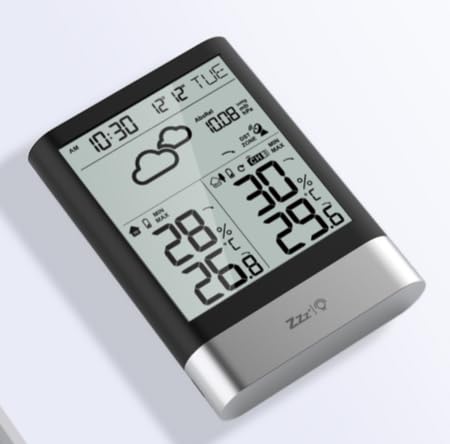
1 vaizdas: LIORQUE Wireless Weather Station Main Unit. This image shows the front view of the main display unit, highlighting its LCD screen and compact design.
Pagrindinės įrenginio savybės:
- 4.3-inch LCD screen with backlight
- Vidaus temperatūros ir drėgmės ekranas
- Lauko temperatūros ir drėgmės rodymas
- Orų prognozės piktogramos
- DCF radio-controlled clock with manual setting option
- Double alarm clock with snooze function
- Calendar and day of the week display (7 languages)
- Max/Min temperature and humidity records
- Air pressure display and weather trend
- 12/24 valandų laiko rodymas
Outdoor Sensor Features:
- Wireless transmission up to 100m (open area)
- Temperatūros ir drėgmės matavimas
- Supports hanging or standing placement
- Data updated every 30 seconds
- Supports up to 3 sensors (one included)
Sąranka
1. Akumuliatoriaus įdėjimas
- Lauko jutiklis: Open the battery compartment cover on the back of the outdoor sensor. Insert 2 x AAA batteries, ensuring correct polarity (+/-). Close the cover.
- Pagrindinis blokas: Open the battery compartment cover on the back of the main unit. Insert 3 x AAA batteries, ensuring correct polarity (+/-). Close the cover.
- The main unit will power on and display indoor readings.
2. Jutiklių susiejimas
After installing batteries in both units, the main unit will automatically search for the outdoor sensor. The outdoor temperature and humidity should appear on the main unit's display within a few minutes. If the outdoor readings do not appear:
- Ensure both units are within range (up to 100m in open air).
- Press the "TX" button inside the outdoor sensor's battery compartment to manually send a signal.
- On the main unit, press and hold the "CHANNEL" button to initiate a manual search for the sensor.
3. Pradiniai nustatymai (laikas, data, vienetai)
The weather station will attempt to synchronize with the DCF radio signal for automatic time setting. This may take several hours, especially in areas with weak signals. You can manually set the time and date if needed.
- Rankinis laiko nustatymas: Press and hold the "MODE" button to enter time setting mode. Use the "UP" and "DOWN" buttons to adjust values and "MODE" to confirm and move to the next setting (e.g., 12/24 hour format, hour, minute, year, month, day, language for day of week).
- Temperatūros vienetai: Press the "°C/°F" button to switch between Celsius and Fahrenheit.
- Air Pressure Units: Press the "BARO" button to cycle through air pressure units (e.g., hPa, inHg).
Naudojimo instrukcijos
Rodyti informaciją
The 4.3-inch LCD screen displays various information:
- Laikas ir data: Dabartinis laikas, data ir savaitės diena.
- Rodmenys patalpose: Current indoor temperature and humidity.
- Lauko skaitymai: Current outdoor temperature and humidity from the connected sensor.
- Orų prognozė: Icons indicating predicted weather conditions (e.g., sunny, cloudy, rainy).
- Oro slėgis: Current atmospheric pressure and trend.
- Foninis apšvietimas: The screen backlight activates with a light touch and returns to normal brightness after 10 seconds to conserve battery.
Žadintuvo funkcija
The weather station features a double alarm clock with snooze.
- Signalų nustatymas: Paspauskite mygtuką „ALARM“, kad view Alarm 1. Press "ALARM" again to view Alarm 2. Hold "ALARM" to enter alarm setting mode. Use "UP" and "DOWN" to adjust the hour and minute, and "ALARM" to confirm.
- Signalizacijos įjungimas / išjungimas: Nors viewing an alarm, press "UP" to toggle it on or off. An alarm icon will appear when active.
- Snaudimo funkcija: When an alarm sounds, press any button (except "ALARM OFF") to activate snooze. The alarm will sound again after a set interval. Press "ALARM OFF" to stop the alarm completely.
Maksimalus ir minimalus įrašas
The weather station records the maximum and minimum indoor/outdoor temperature and humidity values.
- Press the "MAX/MIN" button once to display maximum recorded values.
- Press "MAX/MIN" again to display minimum recorded values.
- Press "MAX/MIN" a third time to return to current readings.
- To clear records, hold the "MAX/MIN" button while viewįrašus.
Priežiūra
- Baterijos keitimas: Kai ekrane pasirodo išsikrovusių baterijų indikatorius, pakeiskite pagrindinio įrenginio ir lauko jutiklio baterijas. Visada keiskite visas baterijas vienu metu.
- Valymas: Ekrano ir įrenginio paviršius valykite minkšta,amp audinys. Nenaudokite abrazyvinių valiklių ar tirpiklių.
- Lauko jutiklių išdėstymas: For optimal performance and longevity, install the outdoor sensor in a shaded area, protected from direct sunlight and rain. Ensure it is within the 100m wireless range of the main unit.
Trikčių šalinimas
| Problema | Galimas sprendimas |
|---|---|
| Nėra lauko temperatūros / drėgmės ekrano. |
|
| Neteisingas laiko rodymas. |
|
| Ekranas blankus arba tuščias. |
|
| Orų prognozė atrodo netiksli. |
|
Specifikacijos
- Modelis: YGH6208
- Prekinis ženklas: LIORKAS
- Ekrano tipas: LCD
- Maitinimo šaltinis (pagrindinis įrenginys): 3 x AAA baterijos (pridedamos)
- Maitinimo šaltinis (lauko jutiklis): 2 x AAA baterijos (pridedamos)
- Belaidis diapazonas: Iki 100 m (atvira zona)
- Temperatūros tikslumas: ±0.5 °C
- Jutiklio technologija: Funk (Wireless)
- Ypatingos savybės: DCF Radio Clock, Alarm, Snooze, Weather Forecast, Max/Min Records, Backlight
- Įtraukti komponentai: Weather Station Main Unit, Outdoor Sensor
Garantija ir palaikymas
LIORQUE products are designed for reliability and performance. For warranty information or technical support, please refer to the contact details provided with your purchase or visit the official LIORQUE websvetainėje. Prašome išsaugoti pirkimo įrodymą garantiniams reikalavimams.