
1. Įvadas
Thank you for choosing the PureMate 12L/Day Dehumidifier. This appliance is designed to effectively remove excess moisture from your indoor environment, helping to prevent dampness, condensation, mould, and musty odours. By maintaining optimal humidity levels, it contributes to a healthier and more comfortable living space. Please read this manual thoroughly before operating the dehumidifier to ensure safe and efficient use.
This dehumidifier features a 12-litre per day extraction capacity, an automatic humidity sensor, a digital display, a 24-hour timer, auto shut-off, and options for continuous drainage or manual tank emptying. It is also equipped with castor wheels and a carry handle for easy portability.
2. Saugos instrukcijos
To reduce the risk of fire, electric shock, or injury, always observe the following basic safety precautions:
- Prieš naudodami prietaisą, atidžiai perskaitykite visas instrukcijas.
- Ensure the power supply matches the rating label on the dehumidifier.
- Nenaudokite oro sausintuvo su pažeistu laidu ar kištuku. Jei maitinimo laidas pažeistas, jį turi pakeisti gamintojas, jo techninės priežiūros atstovas arba panašios kvalifikacijos asmenys, kad būtų išvengta pavojaus.
- Always place the unit on a firm, level surface.
- Maintain at least 20 cm (8 inches) clearance around the unit for proper air circulation.
- Nekiškite daiktų į oro įleidimo ar išleidimo angas.
- Laikykite prietaisą atokiau nuo šilumos šaltinių, tiesioginių saulės spindulių ir degių medžiagų.
- Prieš valydami, perkeldami ar atlikdami bet kokią techninę priežiūrą, atjunkite įrenginį nuo elektros tinklo.
- Šis prietaisas nėra skirtas naudoti asmenims (įskaitant vaikus), kurių fizinės, jutimo ar psichikos negalios arba neturintys patirties ir žinių, nebent už jų saugumą atsakingas asmuo juos prižiūrėtų arba instruktuotų, kaip naudoti prietaisą.
- Vaikus reikia prižiūrėti, kad jie nežaistų su prietaisu.
- Do not use the appliance in areas where water is likely to splash onto it.
3. Produktas baigtasview
The PureMate 12L/Day Dehumidifier is designed for efficient moisture removal and ease of use. Below are the key components and features.

3.1 vaizdas: Priekyje view of the PureMate 12L/Day Dehumidifier, showing its compact design and the '12L Per Day' capacity label.
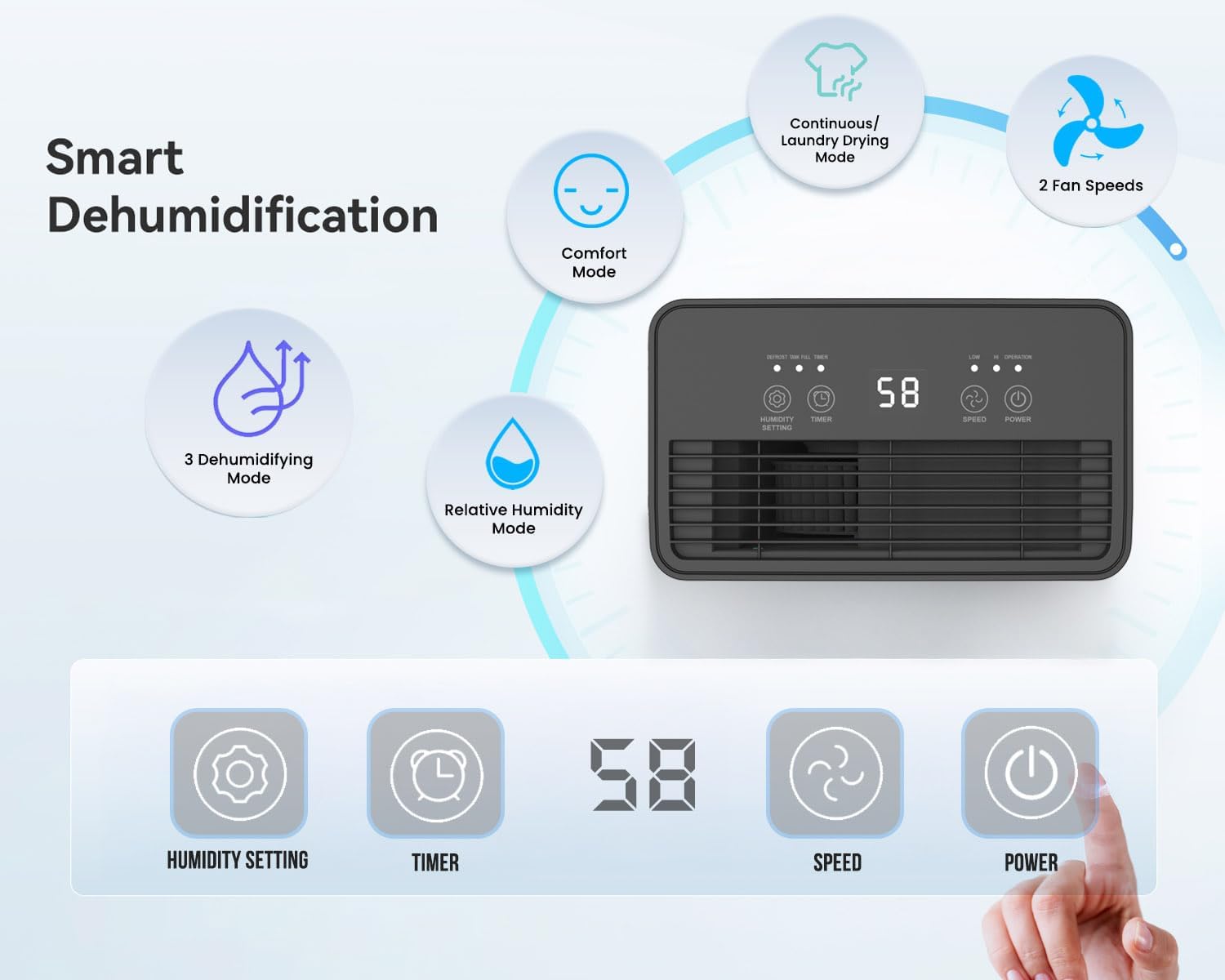
3.2 vaizdas: Illustration of the dehumidifier's smart features and control panel. It highlights Comfort Mode, Continuous/Laundry Drying Mode, 2 Fan Speeds, 3 Dehumidifying Modes, Relative Humidity Mode, and the digital display with buttons for Humidity Setting, Timer, Speed, and Power.
Pagrindinės funkcijos:
- Galingas drėgmės pašalinimas: Per dieną ištraukia iki 12 litrų drėgmės.
- Customisable Humidity Control: Offers Continuous Mode, Comfort Mode, and adjustable Relative Humidity (30-90% RH).
- Skaitmeninis ekranas ir valdikliai: Intuitive LED display and touch panel for easy operation.
- 24 valandų laikmatis: Allows scheduled operation.
- Automatinis išsijungimas: Activates when the 2-litre water tank is full.
- Dvigubo drenažo parinktys: Manual tank emptying or continuous drainage via a hose.
- Plaunamas oro filtras: Improves air quality by capturing dust.
- Nešiojamas dizainas: Equipped with castor wheels and an integrated handle for easy movement.
- Mažo triukšmo veikimas: Operates quietly at 33-37 dB.
4. Sąranka
4.1 Išpakavimas
- Atsargiai išimkite oro sausintuvą iš pakuotės.
- Nuimkite visas pakavimo medžiagas, įskaitant lipnią juostelę ar apsaugines plėveles.
- Išsaugokite pakuotę, jei prireiktų, kad galėtumėte ją laikyti ar transportuoti ateityje.
4.2 Įdėjimas
Proper placement is crucial for optimal performance and safety.
- Place the dehumidifier on a firm, level surface to prevent vibration and water spillage.
- Ensure there is at least 20 cm (8 inches) of clear space around the air inlet and outlet to allow for proper airflow. Do not block these openings.
- Venkite įrenginio statyti šalia šilumą skleidžiančių prietaisų arba tiesioginiuose saulės spinduliuose.
- For best results, close all doors and windows in the room where the dehumidifier is operating to create an enclosed environment.
4.3 Maitinimo jungtis
- Ensure the power cord is fully extended and not damaged.
- Prijunkite maitinimo laidą į įžemintą elektros lizdą, atitinkantį tūrįtage vieneto reikalavimus.
5. Naudojimo instrukcijos
The dehumidifier features an intuitive touch control panel and digital display for easy operation.

5.1 vaizdas: Close-up of the dehumidifier's touch control panel and the removable 2-litre water tank, illustrating the high-extraction capacity and drainage options.
5.1 Maitinimo įjungimas/išjungimas
- Paspauskite GALIA mygtuką valdymo skydelyje, kad įjungtumėte arba išjungtumėte įrenginį.
5.2 Dehumidifying Modes
Oro sausintuvas siūlo kelis veikimo režimus, pritaikytus skirtingiems poreikiams:
- Relative Humidity Mode: Paspauskite DRĖGMĖS NUSTATYMAS button to set your desired humidity level between 30% and 90% RH (Relative Humidity) in 5% increments. The unit will automatically adjust its operation to maintain this level.
- Komforto režimas: This mode automatically sets the target humidity based on the current room temperature for optimal comfort.
- Nepertraukiamas režimas: The unit operates continuously without targeting a specific humidity level, ideal for very damp sąlygomis arba skalbinių džiovinimui.
- Skalbinių džiovinimo režimas: Similar to Continuous Mode, this setting is optimized for drying clothes indoors by continuously removing moisture from the air.

5.2 vaizdas: Visual representation of the Continuous mode and various humidity solutions provided by the dehumidifier, including dry laundry, protection against black mould, and elimination of window condensation.
5.3 Ventiliatoriaus greitis
- Paspauskite GREITIS button to cycle between different fan speeds (e.g., Low, High). Higher fan speed results in faster dehumidification.
5.4 24 valandų laikmatis
- Paspauskite LAIKMATIS button to set the desired operating duration (in hours) for the unit to turn on or off automatically.
- Each press increases the timer setting. Once the desired time is set, the unit will operate for that duration or turn off after that duration, depending on its current state.

5.3 vaizdas: Depicts the 24-hour timer function and the quiet operation of the dehumidifier (33-37 dB), allowing for undisturbed use even during sleep.
5.5 Digital Display and Indicator Lights
- The digital display shows the current room humidity level or the set humidity/timer value.
- Drėgmės indikatoriaus lemputė: The unit features an LED light that changes color based on the ambient humidity level:
- RAUDONA: Humidity level is greater than 65%.
- ŽALIA: Humidity level is between 40% and 55%.
- MĖLYNA: Humidity level is less than 40%.
- Automatinio atitirpinimo funkcija: The unit automatically performs defrosting when frost builds up on the evaporator coils, ensuring efficient operation in cooler temperatures.

5.4 vaizdas: Illustrates the Automatic Dehumidification Mode, where the unit adjusts target humidity based on room temperature, and the Auto Defrost Function. Also shows the Humidity Indicator Light with its color codes (Red, Green, Blue) for different humidity ranges.
6. Drenažo parinktys
The PureMate dehumidifier offers two methods for water drainage:
6.1 Manual Water Tank Emptying
- The dehumidifier is equipped with a 2-litre water tank.
- When the tank is full, the unit will automatically shut off, and an indicator light (usually 'Full' or 'Tank Full') will illuminate.
- Atsargiai ištraukite vandens baką iš įrenginio.
- Surinktą vandenį išpilkite į kriauklę arba kanalizaciją.
- Reinsert the empty water tank firmly into the unit. The dehumidifier will resume operation.
6.2 Nuolatinis drenažas
- For maintenance-free operation, you can connect a 12mm hose (not included) for continuous drainage.
- Locate the continuous drainage outlet on the back or side of the unit.
- Attach one end of a 12mm hose to this outlet.
- Ensure the other end of the hose is placed in a drain or a larger container, ensuring a downward slope for gravity drainage.
- Once connected, the water will bypass the internal tank and drain directly.
7. Priežiūra
Reguliarus drėkintuvo techninis aptarnavimas užtikrina optimalų veikimą ir ilgaamžiškumą.
7.1 Oro filtro valymas
The washable air filter helps to capture dust and improve air quality. Clean it regularly, typically every two weeks, or more often if used in a dusty environment.
- Išjunkite oro sausintuvą ir atjunkite jį nuo maitinimo lizdo.
- Suraskite ir nuimkite oro filtrą (paprastai jis yra įrenginio gale arba šone).
- Gently wash the filter under running tap water. For stubborn dirt, use a soft brush and mild detergent.
- Rinse thoroughly and allow the filter to air dry completely before reinserting it. Do not use a dryer or direct heat.
- Once dry, place the filter back into its position.
7.2 Vandens bako valymas
Clean the water tank periodically to prevent mould and bacteria growth.
- Išjunkite ir atjunkite įrenginį.
- Nuimkite vandens bakelį.
- Talpyklą išplaukite šiltu vandeniu ir švelniu plovikliu. Kruopščiai nuskalaukite.
- Dry the tank completely before placing it back into the dehumidifier.
7.3 Išorės valymas
- Nuvalykite sausintuvo išorę minkšta, damp audinys.
- Nenaudokite abrazyvinių valiklių, tirpiklių ar stiprių cheminių medžiagų, nes jos gali pažeisti paviršių.
8. Problemų sprendimas
Jei kyla problemų dėl oro sausintuvo, žr. šias dažniausiai pasitaikančias problemas ir sprendimus:
| Problema | Galima priežastis | Sprendimas |
|---|---|---|
| Oro sausintuvas neįsijungia. | No power supply. Power cord not plugged in. Water tank full or not correctly inserted. | Patikrinkite maitinimo jungtį. Ištuštinkite vandens bakelį ir tinkamai jį įstatykite. |
| No water collected or very little water collected. | Room humidity is already low. Temperature is too low (below 5°C). Air filter is clogged. Dehumidifier is in continuous drainage mode. | Increase target humidity setting. Ensure room temperature is adequate. Clean the air filter. Check if continuous drainage hose is properly connected and draining. |
| Įrenginys triukšmingas. | Įrenginys nestatytas ant lygaus paviršiaus. Užsikimšęs oro filtras. | Padėkite įrenginį ant lygaus, stabilaus paviršiaus. Išvalykite oro filtrą. |
| Oro srautas silpnas. | Air inlet/outlet blocked. Air filter clogged. | Ensure clear space around the unit. Clean the air filter. |
If the problem persists after trying these solutions, please contact PureMate customer support.
9. Specifikacijos
Detailed technical specifications for the PureMate 12L/Day Dehumidifier PM411.

9.1 vaizdas: Diagram illustrating the dimensions of the PureMate Dehumidifier: 41.5cm Height, 29cm Width, 17cm Depth.
| Funkcija | Specifikacija |
|---|---|
| Prekės ženklas | „PureMate“ |
| Modelio pavadinimas | PM411 |
| Sausinimo galimybė | 12 Litres per Day |
| Bako tūris | 2 litrai |
| Gaminio matmenys (D x P x A) | 17 x 29 x 41.5 cm |
| Prekės svoris | 8 kg |
| Veikimo režimas | Automatic, Continuous |
| Ypatingos savybės | Countdown Timer, Programmable |
| Viršutinės temperatūros įvertinimas | 30 laipsniai Celsijaus |
10. Garantija ir palaikymas
For warranty information, please refer to the warranty card included with your product or visit the official PureMate website. If you require technical support, troubleshooting assistance beyond this manual, or have any questions regarding your PureMate 12L/Day Dehumidifier, please contact PureMate customer service through their official channels.