
Įvadas
The iLive Cinema Pop-up Movie Kit is a comprehensive portable entertainment solution designed to transform any space into a personal cinema. This kit includes a 720p projector, a 120-inch ultra-bright projector screen, an adjustable tripod, and a powerful Bluetooth 5.0 speaker system. Enjoy crisp images and rich audio for both indoor and outdoor movie nights.
Kas įtraukta
- 720p projektorius
- 120-inch Anti-Wrinkle Polyester Projector Screen (16:9 aspect ratio, 1.3 gain)
- Professional-Grade Tripod with integrated bubble level (360-degree pan, ±180-degree tilt, 41.73-inch max height, 4 kg capacity)
- Bluetooth 5.0 Speaker System (dual 4-inch full-range speakers, 16W peak output, LED light effects, rechargeable battery)
- Nuotolinio valdymo pultas
- Maitinimo kabelis
- HDMI kabelis
- 3.5 mm garso laidas
- USB kabelis
- Dėklas nešiojimui
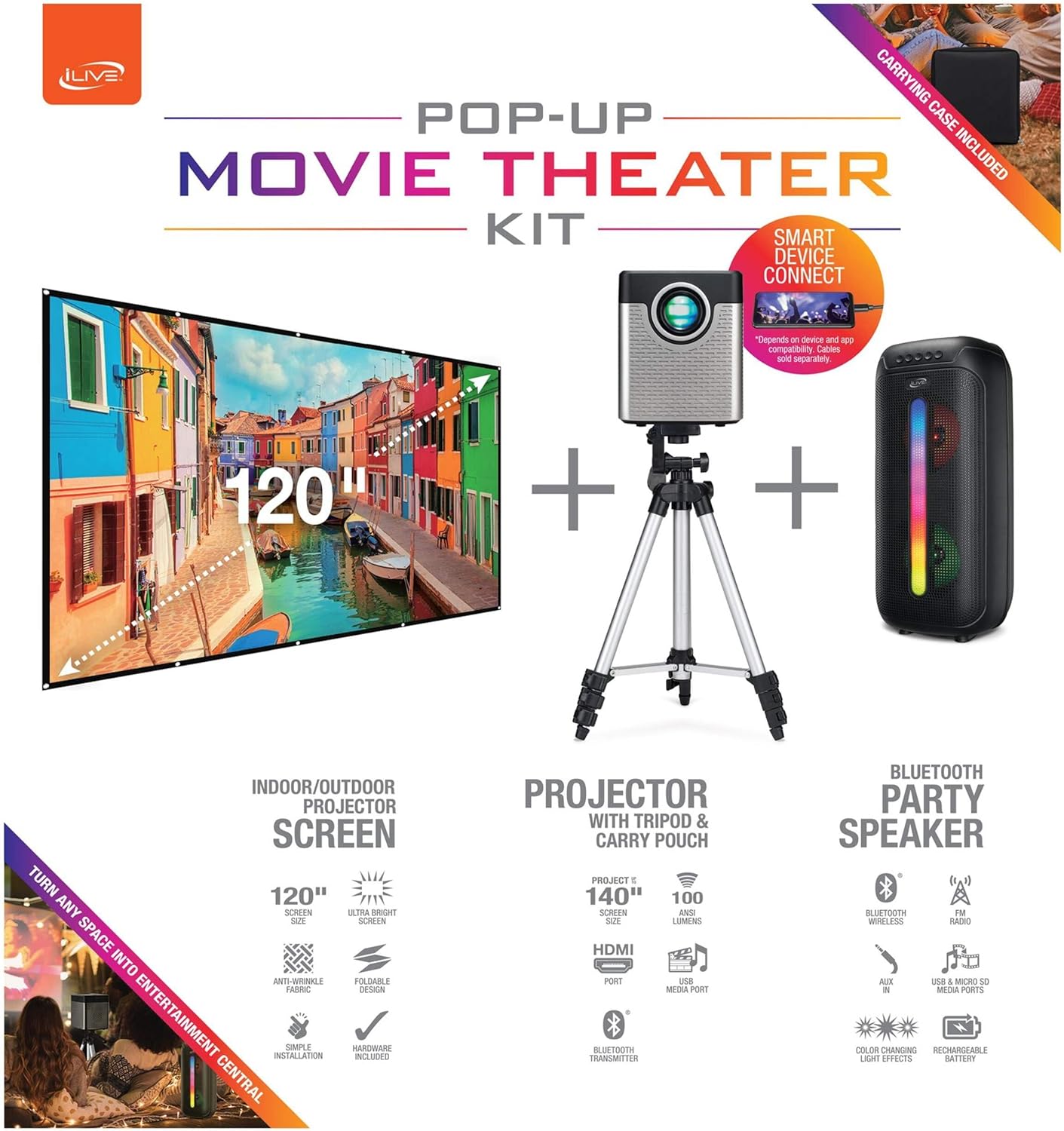
Figure 1: Diagram of the iLive Cinema Pop-up Movie Kit components.

Figure 2: The complete kit packed in its carrying case.
Sąranka
- Išpakuokite komponentus: Atsargiai išimkite visus daiktus iš nešiojimo dėklo.
- Surinkite trikojį: Extend the legs of the tripod and secure them. Adjust the height to your desired viewing level. The integrated bubble level assists in ensuring a stable and level base.
- Projektoriaus tvirtinimas: Securely attach the projector to the tripod mount. Ensure it is stable and facing the desired projection area.
- Set Up Screen: Unfold the 120-inch anti-wrinkle screen. If using the tripod, attach the screen to the tripod frame using the provided fasteners. Ensure the screen is taut and wrinkle-free for optimal viewing. For alternative mounting, use the grommets along the screen's edges with appropriate wall hooks (not included).
- Pozicijos kalbėtojas: Place the Bluetooth speaker in a location that provides optimal sound distribution for your viewzonoje.
- Prijunkite maitinimą: Prijunkite maitinimo laidą prie projektoriaus ir tinkamo maitinimo lizdo.
- Prijungti įrenginius (nebūtina): Connect your media source (e.g., laptop, gaming console, Blu-ray player) to the projector using an HDMI or USB cable. For external audio, use the 3.5mm audio input or connect wirelessly via Bluetooth to the speaker.

Figure 3: Projector mounted on the tripod.

4 pav. Pvzample outdoor setup with the projector and screen.
Naudojimo instrukcijos
Projektoriaus veikimas
- Maitinimo įjungimas/išjungimas: Norėdami įjungti arba išjungti įrenginį, paspauskite projektoriaus arba nuotolinio valdymo pulto maitinimo mygtuką.
- Įvesties šaltinis: Use the remote control to select the desired input source (HDMI, USB, etc.).
- Fokuso reguliavimas: Sureguliuokite projektoriaus objektyvo fokusavimo žiedą, kol vaizdas taps aiškus.
- Keystone korekcija: If the projected image appears trapezoidal, use the keystone correction feature (manual or automatic, if available) to adjust the image to a rectangular shape. The projector supports vertical keystone correction.
- Kraštinių santykis: Select between 16:9 and 4:3 aspect ratios based on your content and preference.
- Projekcijos atstumas: The projector has a flexible projection range of 2.6 to 12.5 feet. Adjust the distance to achieve the desired screen size.
Bluetooth garsiakalbio veikimas
- Maitinimo įjungimas/išjungimas: Norėdami įjungti arba išjungti garsiakalbį, paspauskite ir palaikykite nuspaudę maitinimo mygtuką.
- „Bluetooth“ susiejimas: Įjunkite „Bluetooth“ savo įrenginyje (pvz., išmaniajame telefone, planšetiniame kompiuteryje). Ieškokite the iLive speaker in the list of available devices and pair.
- Garsumo valdymas: Sureguliuokite garsumą naudodami garsiakalbio arba prijungto įrenginio valdiklius.
- LED šviesos efektai: The speaker features LED light effects. Refer to the speaker's specific controls for adjusting or disabling these effects.
- Tikrasis belaidis stereofoninis ryšys (TWS): If you have two iLive Bluetooth speakers, you can pair them together for a True Wireless Stereo experience. Follow the instructions provided with the speaker for TWS pairing.
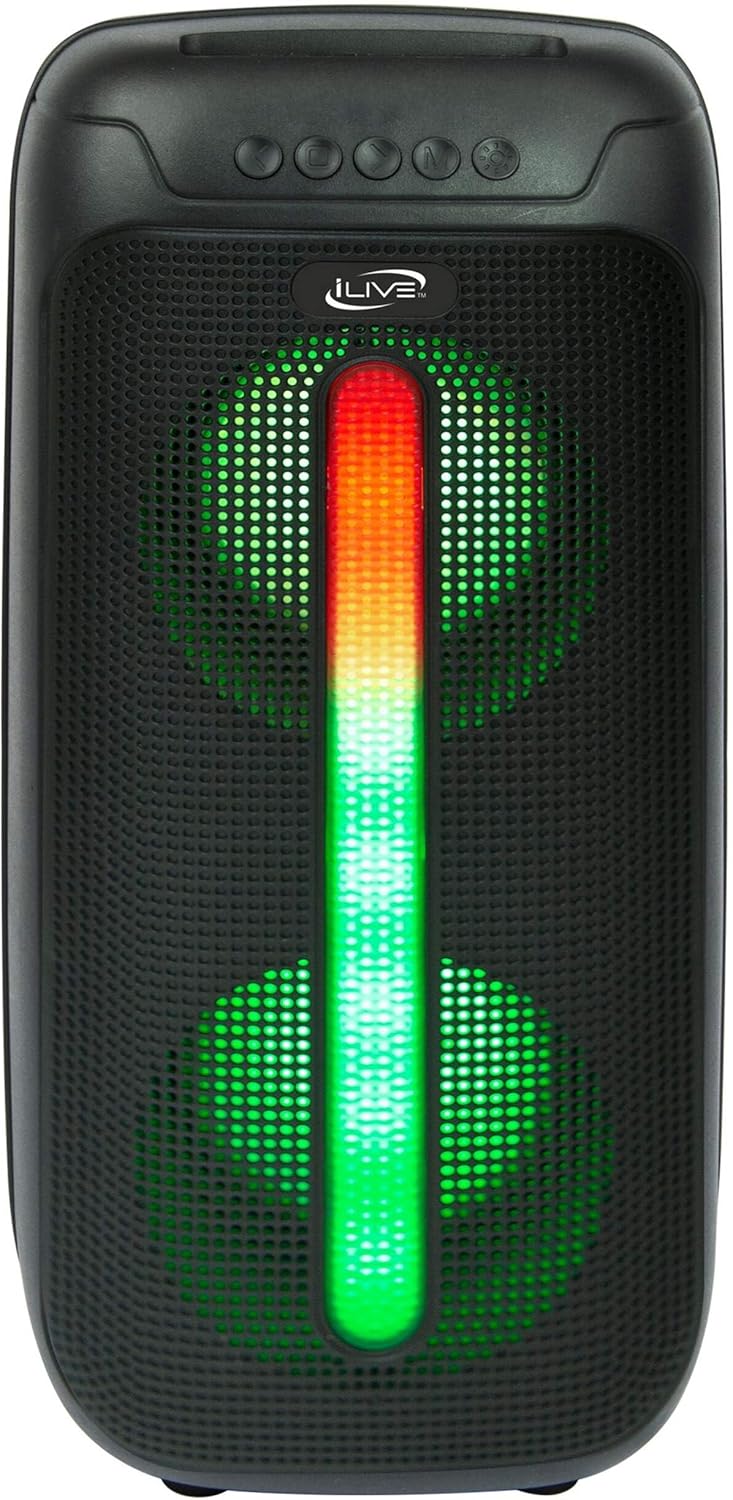
Figure 5: iLive Bluetooth 5.0 Speaker.
Priežiūra
- Projektoriaus objektyvas: Use a soft, lint-free cloth to gently clean the projector lens. Avoid abrasive materials or harsh chemicals.
- Projector Vents: Ensure the projector's ventilation openings are clear of dust and debris to prevent overheating.
- Ekrano valymas: The anti-wrinkle polyester screen can be gently wiped with a damp cloth if necessary. Allow it to air dry completely before folding or storing.
- Garsiakalbio priežiūra: Keep the speaker dry and clean. Avoid exposing it to extreme temperatures or direct sunlight.
- Saugykla: When not in use, store all components in the provided carrying case in a cool, dry place to protect them from dust and damage.
Trikčių šalinimas
- Nėra vaizdo ekrane:
- Įsitikinkite, kad projektorius įjungtas ir nuimtas objektyvo dangtelis.
- Patikrinkite, ar projektoriuje pasirinktas teisingas įvesties šaltinis.
- Patikrinkite, ar visos kabelių jungtys (HDMI, USB) yra tvirtai prijungtos.
- Neryškus vaizdas:
- Sureguliuokite fokusavimo žiedą ant projektoriaus objektyvo.
- Ensure the projection distance is within the recommended range (2.6-12.5 ft).
- Distorted Image (Trapezoidal):
- Norėdami pakoreguoti vaizdo geometriją, naudokite trapecijos korekcijos funkciją.
- Ensure the projector is placed on a level surface or the tripod is properly adjusted.
- Nėra garso iš garsiakalbio:
- Įsitikinkite, kad garsiakalbis įjungtas ir įkrautas.
- Verify Bluetooth pairing or 3.5mm audio cable connection.
- Check volume levels on both the speaker and the connected device.
- „Bluetooth“ poravimo problemos:
- Įsitikinkite, kad garsiakalbis yra susiejimo režimu.
- Perkelkite garsiakalbį arčiau savo įrenginio.
- Disconnect and re-pair the device.
Specifikacijos
| Funkcija | Specifikacija |
|---|---|
| Modelio numeris | THE2024BDL |
| Ekrano raiška | 1280 x 720 (720p) |
| Ekrano tipas | LED |
| Ryškumas | 3000 liumenų |
| Kontrasto santykis | 1000:1 |
| Kraštinių santykiai | 16:9, 4:3 |
| Šviesos šaltinio gyvenimas | 20,000 valandų |
| Projekcijos diapazonas | 2.6–12.5 pėdos |
| Maksimalus vaizdo dydis | 120 colių |
| Ryšys | HDMI, USB, 3.5mm Audio, Bluetooth 5.0 |
| Garsiakalbio išvestis | 16W Peak (Dual 4-inch drivers) |
| Speaker Battery Life | Iki 4 valandų (esant 50% garsumui) |
| Trikojo savybės | Integrated bubble level, 360-degree pan, ±180-degree tilt, 41.73-inch max height, 4 kg capacity |
| Vaizdo kodavimo palaikymas | H.264, H.265 |
| Kontrolės metodas | Nuotolinio valdymo pultas |
Oficialūs produktų vaizdo įrašai
Šiuo metu nėra jokių oficialių šio produkto pardavėjo vaizdo įrašų.
Garantija ir palaikymas
For warranty information or technical support, please contact iLive customer service at 1-888-999-4215. Please have your model number (THE2024BDL) and proof of purchase ready when contacting support.


