
Įvadas
Thank you for choosing the ProtoArc KM310 Wireless Mechanical Keyboard and Mouse. This combo offers a responsive typing experience with low-profile linear red switches and versatile multi-device connectivity. The ergonomic mouse is designed for comfort and precision. This manual provides detailed instructions for setup, operation, maintenance, and troubleshooting to ensure optimal performance.
Kas yra dėžutėje

Image: Contents of the ProtoArc KM310 package, including the keyboard, mouse, charging cable, and user manual.
- ProtoArc KM310 Wireless Mechanical Keyboard
- ProtoArc Wireless Mouse
- USB-C įkrovimo laidas
- Vartotojo vadovas
Produktas baigtasview
Klaviatūros ypatybės

Vaizdas: Stambus planas view of the ProtoArc KM310 keyboard, highlighting its low-profile keys and linear red switches.
- „Low-Pro“file Mechaniniai raktai: Equipped with linear red switches for a smooth, quiet, and responsive typing experience.
- Aluminum Top Case: Provides durability and a sleek, modern aesthetic.
- Reguliuojamo pakreipimo kojelės: Ergonomically designed with 2-stage foot mats offering 6° and 9° tilt options for comfortable typing.
- Viso dydžio išdėstymas: A 108-key layout suitable for office and business use.
Pelės savybės

Image: The ProtoArc KM310 mouse being held, showcasing its ergonomic design for a natural grip.
- 63G Ultra-Lightweight: Reduces hand fatigue during extended use and enhances portability.
- Ergonomiškas dizainas: Contoured shape for a comfortable and natural grip.
- Reguliuojamas DPI: Three DPI levels (1000/1600/2400) for tailored control and precision.
- Tylus paspaudimas: Sukurta tyliam veikimui.
- Pirmyn/atgal mygtukai: Integrated for seamless browsing.
Ryšys ir galia
- Kelių įrenginių ryšys: Connects up to 3 devices via 2.4G USB receiver or Dual Bluetooth (BT1, BT2).
- Įkraunamas: Both keyboard and mouse feature Type-C charging. The mouse's USB receiver is stored on its bottom.
- Ilgas baterijos veikimo laikas: Up to 150-200 days standby time; 2-3 hours for a full charge.
Sąrankos instrukcijos
1. Įrenginių įkrovimas

Image: The keyboard and mouse are shown connected to power sources via USB-C cables for charging.
- Connect the provided USB-C charging cable to the charging port on the keyboard (located on the top edge) and the mouse (located on the front edge).
- Kitą laido galą prijunkite prie USB maitinimo šaltinio (pvz., kompiuterio USB prievado, USB sieninio adapterio).
- The indicator lights will show charging status. Allow 2-3 hours for a full charge.
2. Prisijungimas prie įrenginių

Image: A desk setup showing the ProtoArc KM310 keyboard and mouse connected to a laptop, monitor, and tablet, illustrating multi-device capability.
The KM310 combo supports three connection modes: 2.4G wireless via USB receiver, Bluetooth 1 (BT1), and Bluetooth 2 (BT2).
2.1. 2.4G belaidis ryšys
- Raskite USB imtuvą, esantį pelės apačioje esančiame skyriuje.
- Prijunkite USB imtuvą prie laisvo kompiuterio USB prievado.
- Įjunkite klaviatūrą ir pelę naudodami atitinkamus maitinimo jungiklius.
- Įrenginiai turėtų prisijungti automatiškai.
2.2. „Bluetooth“ ryšys (BT1 / BT2)
- Įjunkite klaviatūrą ir pelę.
- Klaviatūroje paspauskite BT1 or BT2 key (usually located on the number pad, indicated by orange keycaps) to select the desired Bluetooth channel. The indicator light will flash.
- On your device (computer, tablet, etc.), go to Bluetooth settings and search for "ProtoArc KM310 Keyboard" and "ProtoArc KM310 Mouse".
- Select the devices to pair. The indicator light will stop flashing once connected.
- Repeat for a second Bluetooth device using the other BT channel.
2.3. Įrenginių perjungimas
To switch between connected devices, simply press the corresponding connection key on the keyboard (2.4G, BT1, or BT2) and the channel switch button on the bottom of the mouse.
Naudojimo instrukcijos
Klaviatūros naudojimas
- Rašant: Mažai profesionalusfile linear red switches provide a responsive and quiet typing experience.
- Operacinės sistemos suderinamumas: The keyboard is compatible with Windows and Mac OS. Keys like 'Win' and 'Alt' also show 'Option' and 'Cmd' for Mac users.
- Pakreipimo reguliavimas: Use the adjustable tilt legs on the underside of the keyboard to set your preferred typing angle (6° or 9°).
Pelės naudojimas
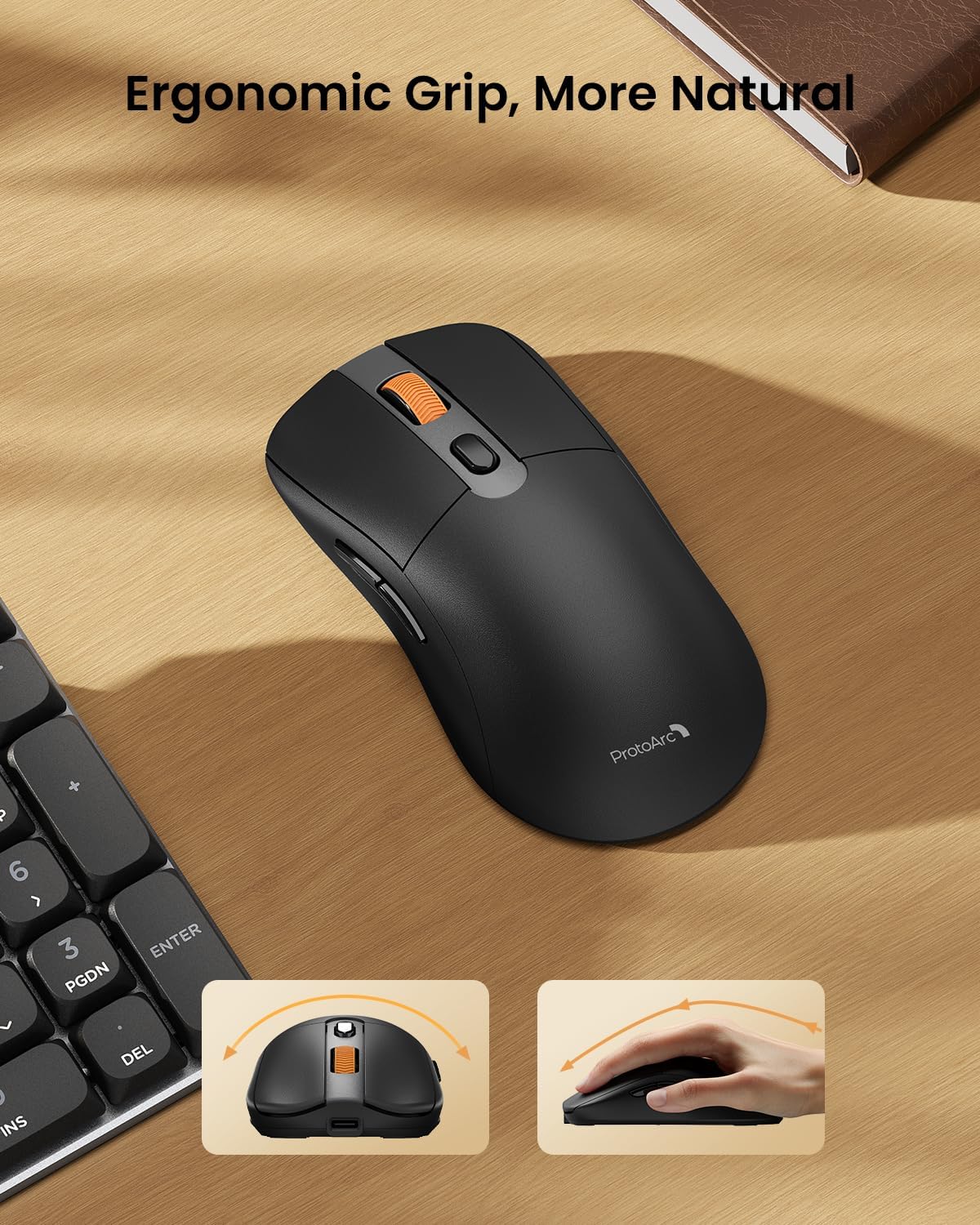
Image: A close-up of the ProtoArc KM310 mouse, illustrating the three adjustable DPI settings (1000, 1600, 2400).
- DPI reguliavimas: Press the DPI switch button (usually located near the scroll wheel) to cycle through the 3 DPI levels (1000/1600/2400) to match your preference for cursor speed and precision.
- Naršymo mygtukai: Use the forward and backward buttons on the side of the mouse for quick navigation in web naršyklės arba file tyrinėtojai.
- Tylūs paspaudimai: The mouse features silent click buttons for a quiet working environment.
Priežiūra
- Valymas: Klaviatūrą ir pelę nuvalykite minkšta, sausa šluoste. Įsisenėjusius nešvarumus lengvai nuvalykite.amp Galima naudoti šluostę su švelniu muilu, užtikrinant, kad į įrenginį nepatektų skysčio.
- Akumuliatoriaus priežiūra: Recharge the devices when the battery indicator is low. Avoid prolonged exposure to extreme temperatures.
- Saugykla: When not in use for extended periods, turn off the devices to conserve battery life. Store the USB receiver inside the mouse to prevent loss.
Trikčių šalinimas
Keyboard/Mouse Not Turning On or Stopping Working
- Patikrinkite akumuliatorių: Ensure both the keyboard and mouse are sufficiently charged. Connect them to a power source using the USB-C cable.
- Įrenginių suporavimas iš naujo:
- For 2.4G connection, ensure the USB receiver is securely plugged in and the devices are set to 2.4G mode.
- For Bluetooth connection, ensure the devices are set to the correct BT channel (BT1 or BT2) and re-pair them through your device's Bluetooth settings.
- Išbandykite kitą kabelį: If charging issues persist, try using a different USB-C cable to rule out a faulty cable.
- Trikdžiai: Perkelkite įrenginius arčiau kompiuterio arba toliau nuo kitų belaidžių įrenginių, kurie gali sukelti trikdžius.
- Susisiekite su palaikymo komanda: If the issue persists, please contact ProtoArc customer support for further assistance.
Specifikacijos
| Modelio numeris | KM310 |
| Prekės ženklas | ProtoArc |
| Spalva | Erdvė pilka |
| Ryšio technologija | Bluetooth, USB (2.4G Wireless) |
| Ypatingos savybės | „Low Pro“file Keys, Linear Red Switches, Ergonomic Design, Ultra-Light Mouse, Ergonomic Mouse |
| Suderinami įrenginiai | Laptop, Personal Computer, Tablet (Windows 7/8/10, Mac OS X 10.12, Android 4.3 or higher) |
| Prekės svoris | 2.31 svaro |
| Pakuotės matmenys | 17.68 x 8.07 x 2.05 colio |
Garantija ir palaikymas
The ProtoArc KM310 Mechanical Keyboard and Mouse combo comes with a 2 metų garantija.
For any questions, technical support, or warranty claims, please contact ProtoArc customer service:
- El. paštas: support@protoarc.com
- Telefonas: +1 866-287-8188
Oficialus produkto vaizdo įrašas
Vaizdo įrašas: oficialus produkto vaizdo įrašasasing the features and design of the ProtoArc KM310 Aluminum Mechanical Keyboard and Mouse.