
1. Įvadas
This manual provides detailed instructions for the safe and efficient use of your Qubo X232 phone. Please read this manual thoroughly before operating the device and retain it for future reference.
2. Produktas baigtasview
The Qubo X232 is a 4G mobile phone designed for ease of use, featuring a large 2.3-inch screen, loud audio, and a dedicated SOS emergency button. Its robust 1700mAh battery ensures extended usage, and the unlocked status provides compatibility with various Mexican carriers.
2.1. Pakuotės turinys
- Qubo X232 Phone
- 1700 mAh baterija
- C tipo USB įkrovimo laidas
- USB OTG adapteris
- Vartotojo vadovas
3. Pagrindinės savybės
- Clear Display & Simple Operation: Features a 2.3-inch color screen for enhanced readability, large illuminated buttons with voice prompts, and a simplified user interface for straightforward navigation. Includes side buttons for keypad lock/unlock and volume control.
- SOS avarinė funkcija: A dedicated SOS button allows for automatic dialing to up to 5 pre-set emergency contacts and simultaneous alert message sending.
- Loud Audio & Clear Calls: Equipped with a high-volume speaker for improved audibility in various environments. Supports 3.5mm headphones and Bluetooth accessories.
- Efficient 1700mAh Battery: Offers extended battery life, providing up to 14 days of standby time depending on usage. Features a reversible USB Type-C port for convenient charging.
- Unlocked & Wide Compatibility: Compatible with major Mexican carriers including Telcel, AT&T, Movistar, BAIT, CFE, and Altan. Supports 4G, 3G, and 2G networks, and accepts 5G SIM cards operating on 4G.
- Integruoti įrankiai: Includes FM radio (usable without headphones), camera, multimedia player, alarm, calendar, calculator, call recorder, SMS, and photo contacts.
- Kompaktiškas ir ergonomiškas dizainas: Dimensions of 132.1 x 58.2 x 14.1 mm and a weight of approximately 110 grams ensure comfortable handling and portability.
4. Sąranka
4.1. SIM kortelės ir baterijos įdėjimas
- Atsargiai nuimkite telefono galinį dangtelį.
- Insert your Nano SIM card(s) into the designated slot(s). Ensure the gold contacts face downwards and the card is correctly oriented.
- If desired, insert a MicroSD card (up to 64GB) into its dedicated slot for expanded storage.
- Place the 1700mAh battery into the battery compartment, aligning the contacts.
- Uždėkite galinį dangtelį, kol jis spragtelėdamas tvirtai užsifiksuos.
4.2. Pradinis įkrovimas
Before first use, fully charge the phone battery. Connect the USB Type-C cable to the phone's charging port and the other end to a compatible USB power adapter. The charging indicator will show the battery status. A full charge typically takes a few hours.

The Qubo X232 features a 1700mAh battery for extended use, with convenient Type-C charging.
4.3. Įjungimas/išjungimas
- Norėdami įjungti: Paspauskite ir palaikykite maitinimo / skambučio baigimo mygtuką (paprastai raudoną), kol ekranas užsidegs.
- Norėdami išjungti: Press and hold the Power/End Call button until the power-off options appear, then select 'Power Off'.
5. Naudojimo instrukcijos
5.1. Pagrindinė navigacija
Use the directional keys (up, down, left, right) to navigate through menus. The 'OK' button (center) confirms selections, and the 'Back' button (often the right soft key) returns to the previous screen.

The Qubo X232 features a user-friendly, multi-language menu with voice prompts for keys, enhancing ease of use.
5.2. Skambinimas ir skambučių priėmimas
- Norėdami surinkti: Įveskite telefono numerį naudodami klaviatūrą ir paspauskite žalią skambinimo mygtuką.
- Atsakyti: Kai suskambės telefonas, paspauskite žalią skambinimo mygtuką.
- Norėdami baigti skambutį: Paspauskite raudoną mygtuką „Baigti skambutį“.
- Greitasis rinkimas: Assign frequently called numbers to specific keys for quick dialing. Refer to the 'Phone Settings' menu for setup.
- Nuotraukų kontaktai: Store contacts with associated photos for easy visual identification.
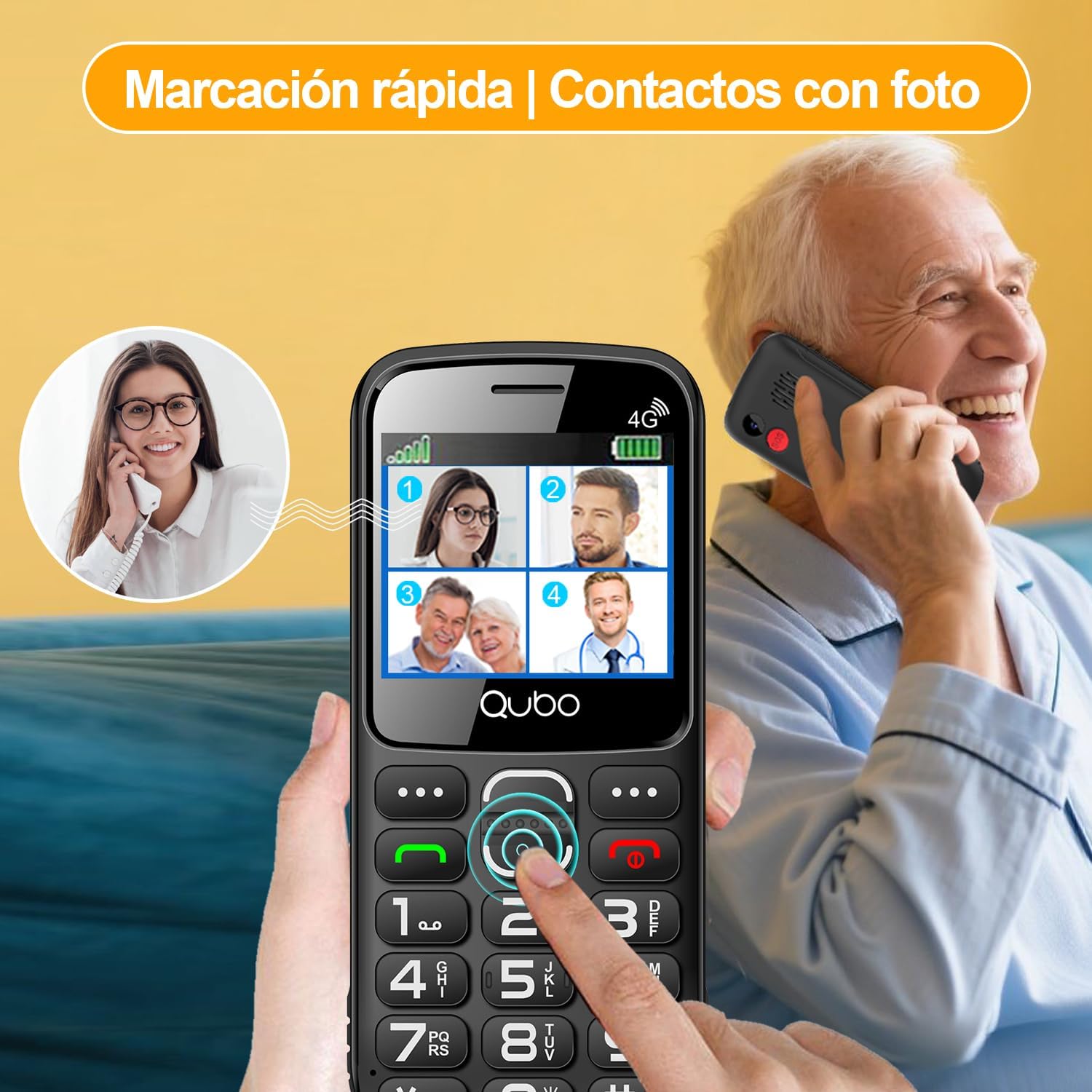
Quick dial and photo contacts on the Qubo X232 simplify calling for users, allowing them to recognize contacts visually.
5.3. SOS avarinis mygtukas
The SOS button is located on the back of the phone. In an emergency:
- Press and hold the SOS button for a few seconds.
- Telefonas automatiškai surinks iki 5 iš anksto nustatytų skubios pagalbos kontaktų iš eilės, kol vienas iš jų atsilieps.
- Simultaneously, an alert message will be sent to these contacts.
To set up SOS contacts: Navigate to Menu > SOS Settings and add/edit emergency numbers.
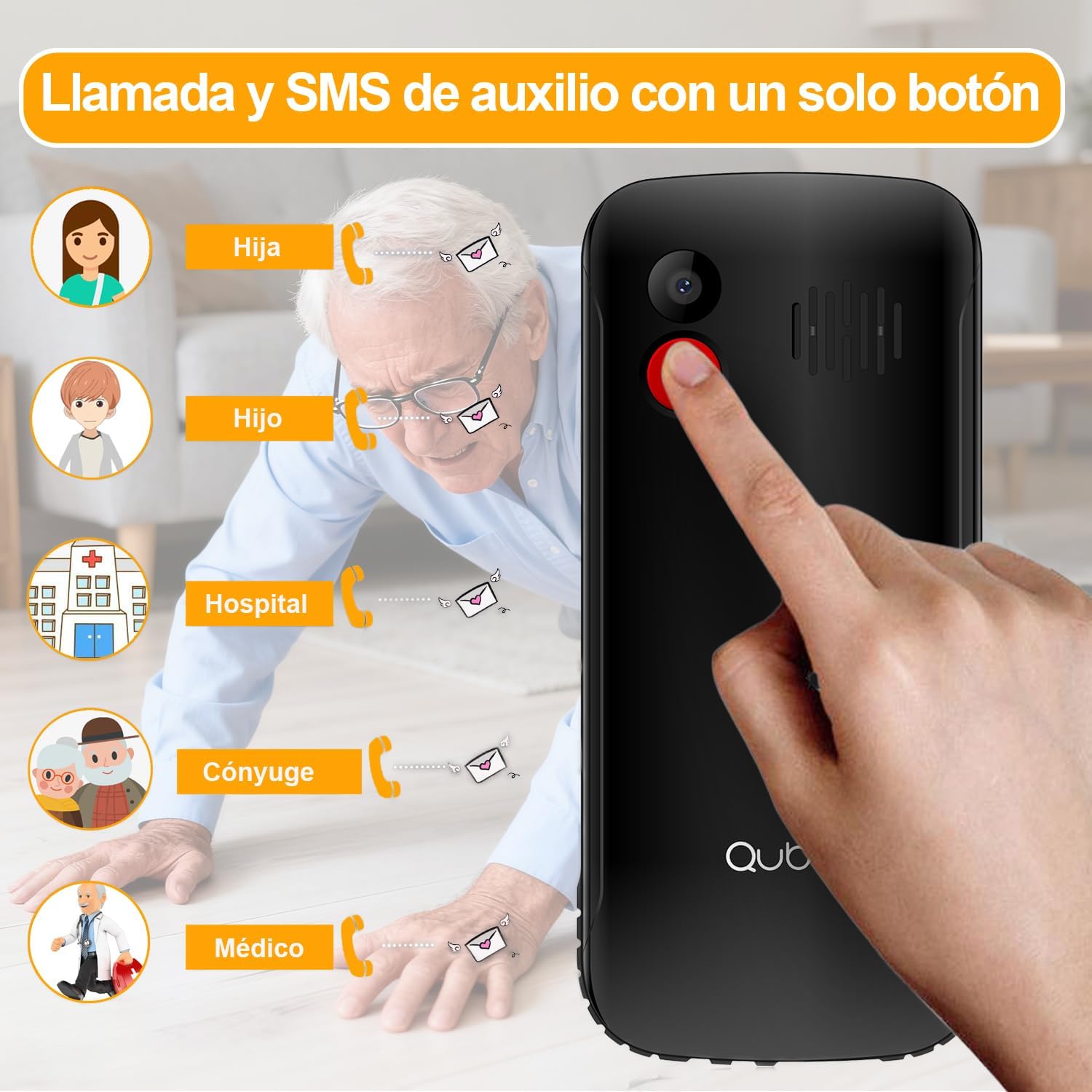
The dedicated SOS button on the Qubo X232 allows for quick emergency calls to up to five pre-selected contacts.
5.4. Žinutės (SMS)
To send or read text messages, navigate to Menu > Messages. The large screen and clear font facilitate easy reading and composing.
5.5. Žibintuvėlis
The Qubo X232 includes a built-in LED flashlight. To activate/deactivate, use the dedicated side button or access it via the menu.

The Qubo X232 includes a bright built-in flashlight, easily accessible for use in low-light conditions.
5.6. FM radijas
Access the FM Radio via the Meniu. The Qubo X232 allows listening to FM radio without requiring headphones.

Enjoy FM radio on the Qubo X232, which can be used without the need for headphones.
5.7. Kitos programos
The phone includes various useful applications:
- Kamera: For taking basic photos.
- Multimedijos grotuvas: For playing audio and video files stored on the device or MicroSD card.
- Signalizacija: Nustatykite kelis žadintuvus.
- Kalendorius: Sekite datas ir įvykius.
- Skaičiuotuvas: Atlikti pagrindinius aritmetinius veiksmus.
- Call Recorder: Record phone conversations (check local laws regarding consent).
- Naršyklė: Basic internet access.

The Qubo X232 offers essential applications such as messaging, FM radio, a camera, and a calculator, along with Bluetooth connectivity.
5.8. Kalbos nustatymai
The phone supports multiple languages including Spanish, English, and Portuguese. To change the language, navigate to Menu > Settings > Phone Settings > Languages.
6. Priežiūra
- Valymas: Use a soft, dry cloth to clean the phone. Avoid liquid cleaners.
- Akumuliatoriaus priežiūra: Norėdami pailginti baterijos veikimo laiką, venkite ekstremalių temperatūrų ir nepalikite telefono ilgam visiškai išsikrovusio.
- Saugykla: Kai nenaudojate telefono, laikykite jį vėsioje, sausoje vietoje.
7. Problemų sprendimas
| Problema | Galima priežastis | Sprendimas |
|---|---|---|
| Telefonas neįsijungia | Baterija išsikrovusi arba netinkamai įdėta. | Kraukite bateriją bent 30 minučių. Įsitikinkite, kad baterija tinkamai įdėta. |
| Nėra tinklo signalo | Out of network coverage, SIM card not inserted correctly, or network settings issue. | Persikelkite į vietą, kurioje geresnis ryšio signalas. Įdėkite SIM kortelę iš naujo. Patikrinkite tinklo nustatymus meniu. |
| Negaliu skambinti / priimti skambučių | No network signal, insufficient balance (prepaid), or call barring activated. | Check network signal. Ensure sufficient balance. Deactivate call barring if active. |
| SOS mygtukas neveikia | Nenustatyti skubios pagalbos kontaktai arba jų numeriai neteisingi. | Patikrinkite SOS nustatymus ir įsitikinkite, kad skubios pagalbos kontaktai yra teisingai išsaugoti. |
| Baterija greitai išsikrauna | Heavy usage, poor network signal, or background applications. | Reduce usage. Turn off features like Bluetooth when not needed. Charge regularly. |
8. Specifikacijos
| Funkcija | Detalė |
|---|---|
| Prekės ženklas | Qubo |
| Modelis | X232 |
| Operacinė sistema | Branduolio OS |
| RAM | 48 MB |
| Vidinė saugykla | 1 GB |
| Išplečiama saugykla | „MicroSD“ iki 64 GB |
| Ekrano dydis | 2.31 colių |
| Rezoliucija | 320 x 240 pikselių |
| Ekrano tipas | AMOLED |
| Mobiliosios technologijos | 4G (compatible with 5G SIM on 4G network) |
| SIM kortelių lizdai | Dvi SIM kortelės |
| SIM kortelės dydis | Nano |
| Baterijos talpa | 1700 mAh |
| Pokalbių laikas | Iki 6 valandų |
| Budėjimo laikas | Iki 14 dienų |
| Įkrovimo prievadas | C tipo USB |
| Garso lizdas | 3.5 mm |
| Matmenys (I x P x A) | 132.1 x 58.2 x 14.1 mm |
| Svoris | apytiksliai 110 gramų |
| Kilmė | Kinija |
9. Oficialūs produktų vaizdo įrašai
9.1. HXEIR 4G Phone Features Overview
Video demonstrating the features of a 4G phone for seniors, including large buttons, SOS function, flashlight, and a simplified user interface.
9.2. artfone 4G Basic Mobile Phone for Seniors
Baigėsiview video of a basic 4G mobile phone for seniors, showcasing features like large buttons, SOS emergency call, charging dock, and built-in flashlight.
9.3. artfone C1+ 4G Mobile Phone for Seniors
Demonstration of the artfone C1+ 4G mobile phone for seniors, highlighting its large buttons, SOS function, charging cradle, and voice dialing capabilities.
10. Garantija ir palaikymas
10.1. Informacija apie garantiją
Your Qubo X232 phone comes with a 30-day product warranty from the date of purchase. This warranty covers manufacturing defects. Please retain your proof of purchase for warranty claims.
10.2. Pagalba klientams
For technical assistance, troubleshooting, or warranty inquiries, please contact your retailer or the Qubo customer support line. Refer to the packaging or official Qubo websvetainė, kurioje rasite kontaktinius duomenis.


