
1. Produktas baigtasview
The DOOMAY Digital Alarm Clock Model 6221 is designed for bedside use, featuring a clear VA LCD display. It includes dual alarm settings, a 9-minute snooze function, and a weekend mode. The clock displays time, date, day of the week, and indoor temperature. It offers adjustable brightness, multiple alarm sounds, and volume levels. Power options include a Type-C adapter and battery backup.

Vaizdas: priekis view of the DOOMAY Digital Alarm Clock Model 6221, displaying time, date, and temperature.
2. Pakuotės turinys
- DOOMAY Digital Alarm Clock Model 6221
- C tipo USB kabelis
- Power Adapter (Wall Plug)
- 2 x AAA Batteries (for backup)
- Vartotojo vadovas (šis dokumentas)
3. Sąranka
3.1 Laikrodžio maitinimas
The clock can be powered via the included Type-C adapter for continuous operation or by batteries for backup during power outages. For optimal performance and continuous display, it is recommended to keep the clock plugged in.
- Primary Power (Adapter): Connect the Type-C USB cable to the clock's DC 5V port and the other end to the power adapter. Plug the adapter into a wall outlet.
- Baterijos atsarginė kopija: Open the battery compartment on the back of the clock. Insert 2 AAA batteries (included), ensuring correct polarity. These batteries will preserve your settings during power interruptions and allow the alarm to function, but the display will not be continuously lit when running on battery power alone.

Image: Illustration showing the clock powered by a wall adapter for continuous use and the battery compartment for backup power.
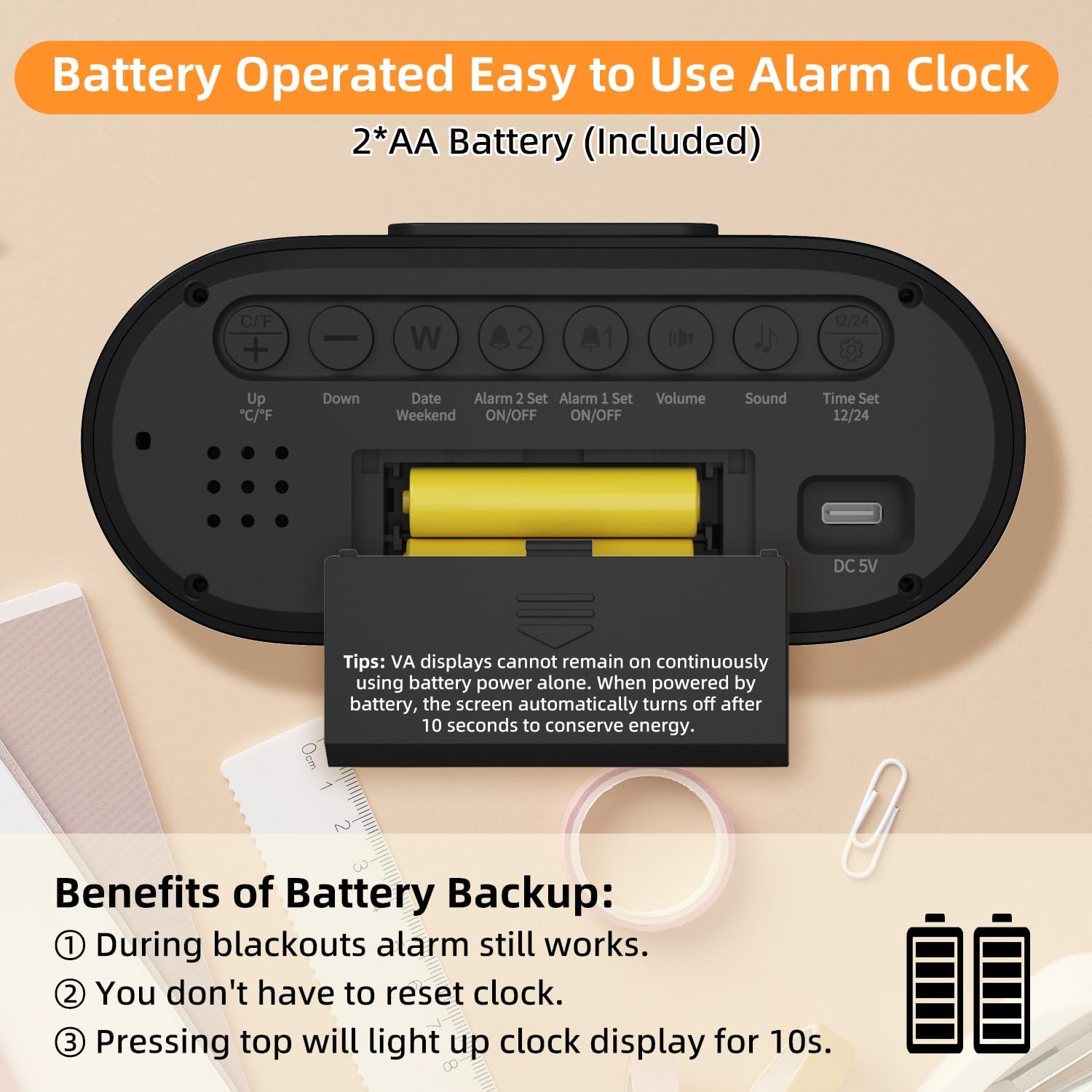
Vaizdas: Galinis view of the alarm clock, highlighting the battery compartment and labeled control buttons for setup.
4. Naudojimo instrukcijos
4.1 Laiko ir datos nustatymas
Norėdami nustatyti dabartinį laiką ir datą:
- Paspauskite "Time Set 12/24" button on the back of the clock to enter time setting mode.
- Naudokite "Up °C/°F" ir "Žemyn" mygtukai valandoms reguliuoti.
- Paspauskite "Time Set 12/24" dar kartą, kad pereitumėte prie minučių reguliavimo, tada naudokite "Aukštyn" ir "Žemyn" mygtukai.
- Spauskite toliau "Time Set 12/24" to cycle through year, month, and day settings, adjusting each with the "Aukštyn" ir "Žemyn" mygtukai.
- Paspauskite "Time Set 12/24" paskutinį kartą, kad išeitumėte iš nustatymų režimo.
- Norėdami perjungti tarp 12 valandų ir 24 valandų formato, paspauskite "Time Set 12/24" mygtukas yra už nustatymo režimo ribų.

Image: The clock display showing both 12-hour (AM/PM) and 24-hour time formats.
4.2 Signalizacijos nustatymas
The clock features two independent alarms (Alarm 1 and Alarm 2).
- Signalo nustatymas:
- Paspauskite "Alarm 1 Set ON/OFF" or "Alarm 2 Set ON/OFF" button to select the alarm you wish to set. The alarm icon will flash.
- Naudokite "Up °C/°F" ir "Žemyn" mygtukai valandoms reguliuoti.
- Press the respective alarm set button again to move to minute adjustment, then use "Aukštyn" ir "Žemyn" mygtukai.
- Press the alarm set button one last time to confirm and exit setting mode.
- Signalizacijos įjungimas / išjungimas: Paspauskite "Alarm 1 Set ON/OFF" or "Alarm 2 Set ON/OFF" button briefly outside of setting mode to toggle the alarm on or off. An alarm icon will appear on the display when active.
- Savaitgalio režimas: Paspauskite "Date Weekend" button to activate or deactivate weekend mode. When active, alarms will only sound from Monday to Friday.
- Snaudimo funkcija: Kai suskamba žadintuvas, paspauskite didelį "SNOOSE/APŠVIESA" button on top of the clock to activate a 9-minute snooze. The alarm will sound again after 9 minutes.
- Signalizacijos išjungimas: To stop an alarm completely, press any button on the back of the clock. If no button is pressed, the alarm will sound for 2 minutes, snooze for 9 minutes, and repeat this cycle 3 times before turning off automatically.

Image: The clock displaying two separate alarm times, indicating its dual alarm capability.

Image: A hand pressing the top snooze button on the clock, illustrating the 9-minute snooze feature.

Image: The clock display indicating "WEEKEND" mode is active, meaning alarms are suspended for the weekend.
4.3 Ekrano nustatymai
Sureguliuokite ekraną pagal savo pageidavimus:
- Ryškumo reguliavimas: When the clock is plugged in, press the large "SNOOSE/APŠVIESA" button on top to cycle through 4 brightness levels (Off, Dim, Medium, Bright). The display will remain continuously lit at the selected brightness. When operating on battery power, pressing this button will illuminate the display for 10 seconds.
- Temperatūros vienetas: Paspauskite "Up °C/°F" button on the back to switch the temperature display between Celsius (°C) and Fahrenheit (°F).

Image: Four panels illustrating the different brightness levels (Off, Dim, Medium, Bright) of the clock display when plugged in.

Image: The clock display showing temperature in both Celsius and Fahrenheit, with an icon indicating the switch function.
4.4 Garso nustatymai
Customize your alarm experience:
- Garso reguliavimas: Paspauskite "Volume" button on the back to cycle through 3 alarm volume levels (Low: 65dB, Medium: 75dB, High: 85dB).
- Skambėjimo melodijos pasirinkimas: Paspauskite "Sound" button on the back to choose from 4 available alarm sounds (standard beeps and 3 music ringtones).

Image: The clock display alongside graphics illustrating three volume levels and four distinct alarm sound options.
5. Priežiūra
- Valymas: Laikrodį valykite minkštu, sausu skudurėliu. Nenaudokite abrazyvinių valiklių ar tirpiklių.
- Baterijos keitimas: Replace AAA batteries when the low battery indicator appears on the display or if the clock fails to maintain settings during a power outage.
- Saugykla: Jei laikrodį ilgesnį laiką laikysite, išimkite baterijas, kad išvengtumėte pratekėjimo.
6. Problemų sprendimas
| Problema | Galima priežastis | Sprendimas |
|---|---|---|
| Display is blank or intermittent. | Neįjungtas, maitinimas išjungtastage, low batteries. | Ensure Type-C adapter is securely plugged in. Check power outlet. Replace AAA batteries. Note: Display is not continuously lit on battery power alone. |
| Signalizacija neskamba. | Alarm not activated, volume too low, weekend mode active. | Verify alarm icon is displayed. Adjust alarm volume. Deactivate weekend mode if necessary. |
| Laikas / data neteisingi. | Incorrectly set, battery backup failed. | Follow instructions in Section 4.1 to reset time and date. Ensure backup batteries are fresh. |
| Ekranas per ryškus/tamsus. | Reikia reguliuoti ryškumo lygį. | Paspauskite "SNOOSE/APŠVIESA" button to cycle through brightness levels (when plugged in). |
7. Specifikacijos
- Modelis: 6221
- Ekrano tipas: VA LCD Digital
- Ekrano dydis: 4.55 colių
- Matmenys: 5.58 colio pločio x 2.56 colio aukščio
- Maitinimo šaltinis: Type-C USB (DC 5V) / 2 x AAA Batteries (backup)
- Signalizacijos funkcijos: Dual Alarms, 9-Minute Snooze, Weekend Mode
- Garsumo lygiai: 3 (65dB, 75dB, 85dB)
- Melodijos: 4 rūšys
- Ryškumo lygiai: 4 (Off, Dim, Medium, Bright - when plugged in)
- Papildomos funkcijos: Time (12H/24H), Date, Day of Week, Indoor Temperature (°C/°F)
- Medžiaga: Plastikiniai
8. Garantija ir palaikymas
For warranty information or technical support, please refer to the contact details provided on the product packaging or visit the official DOOMAY websvetainę. Išsaugokite pirkimo čekį garantiniams reikalavimams.