
1. Įvadas
Thank you for choosing the Angrox Backlit Universal Remote Control for LG Smart TVs. This remote is designed to provide a seamless and enhanced television viewing experience, especially in low-light conditions. It serves as a direct replacement for your original LG TV remote, offering broad compatibility and ease of use without requiring complex setup procedures. This manual provides detailed instructions for setting up, operating, maintaining, and troubleshooting your new remote control.
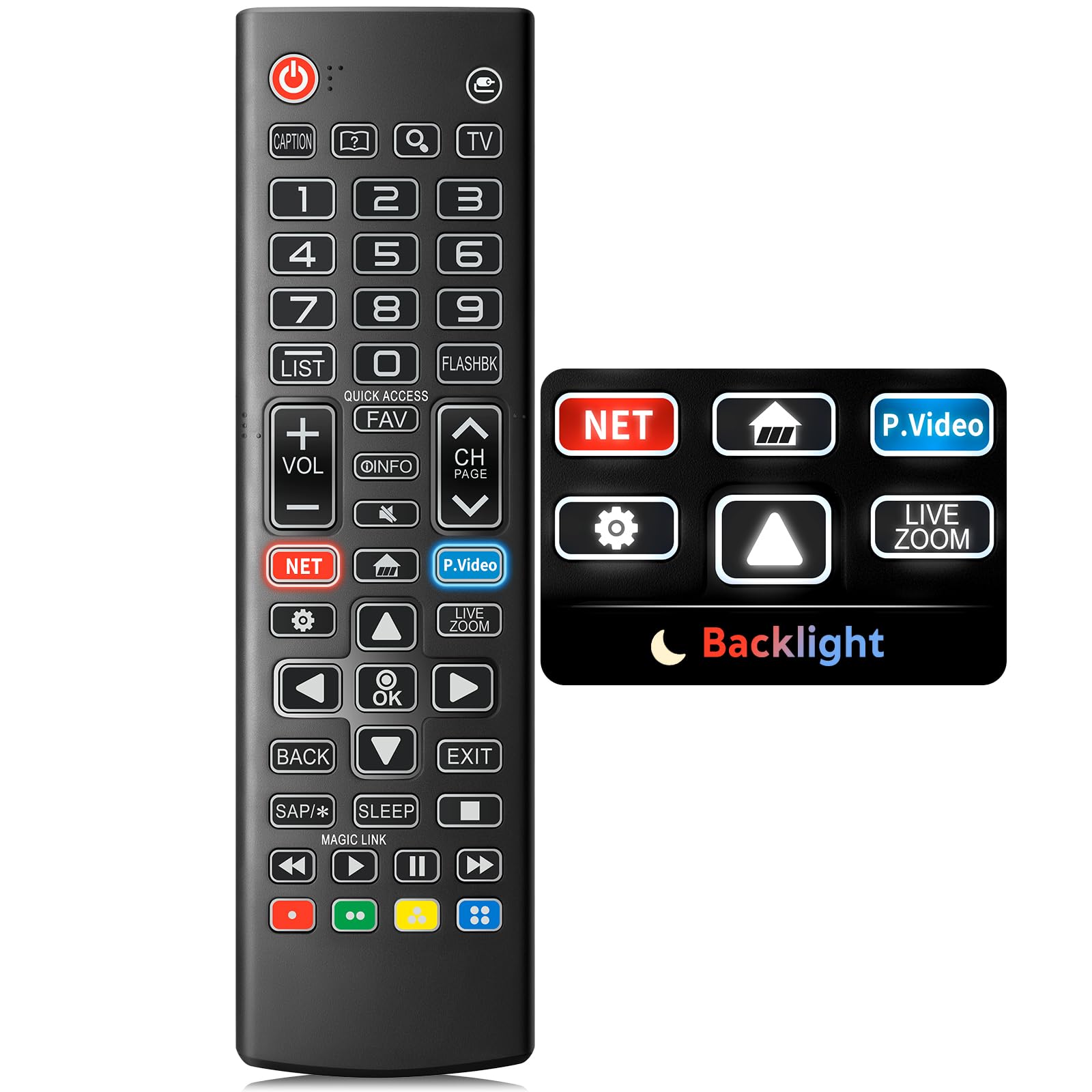
Image: The Angrox Backlit Universal Remote Control, a sleek black remote with clearly labeled buttons.
2. Pagrindinės savybės
- Easy Nighttime Operation: Features soft glow buttons that illuminate, allowing for clear visibility and use in dark environments without causing glare. The backlight activates with any button press and automatically turns off after 10 seconds of inactivity.
- Visuotinis suderinamumas: Designed as a direct replacement for LG TV remotes, compatible with all LG TV models. No programming or complex pairing is required; it works immediately out of the box.
- Aukštos kokybės našumas: Equipped with sensitive buttons and stable signal transmission for smooth and responsive operation.
- Ergonomiškas dizainas: Shaped to fit comfortably in the hand, reducing fatigue during extended use. The button layout is intuitive for users of all ages.
- Patvarus ir patikimas: Constructed from high-quality, sturdy materials to withstand daily use and accidental drops, ensuring a long lifespan.

Image: A comparison showing the remote control with its backlight off and then with its buttons illuminated, highlighting the easy nighttime operation feature.

Image: The remote control displayed alongside various LG TV models (OLED, UHD, QNED, NanoCell), illustrating its broad compatibility.
3. Sąrankos instrukcijos
3.1 Akumuliatoriaus įdėjimas
- Nuotolinio valdymo pulto gale raskite baterijų skyriaus dangtelį.
- Norėdami atidaryti skyrių, stumkite dangtelį žemyn arba paspauskite skląstį.
- Įdėkite dvi (2) AAA baterijas, užtikrindami, kad teigiamas (+) ir neigiamas (-) poliai teisingai sutaptų su indikatoriais skyriaus viduje.
- Uždėkite baterijų skyriaus dangtelį, stumdami jį atgal į vietą, kol jis tvirtai užsifiksuos.
Pastaba: Batteries are not included with the remote control. Please use new AAA alkaline batteries for optimal performance.

Image: A visual guide demonstrating the correct insertion of two AAA batteries into the remote control's battery compartment.
3.2 Initial Use (No Pairing Required)
The Angrox Backlit Universal Remote Control is designed for immediate use with LG Smart TVs. No pairing or programming steps are necessary. Once batteries are installed, the remote is ready to control your LG television.
4. Naudojimo instrukcijos
This section details the functions of the buttons on your Angrox remote control.

Image: A comprehensive layout of the remote control, with labels pointing to each button and describing its primary function.
4.1 Pagrindinės funkcijos
- Galia (
 ): Įjungia arba išjungia televizorių.
 - Įvestis (): Changes the input source (e.g., HDMI 1, HDMI 2).
- Garsumo didinimas / sumažinimas (VOL +/-): Reguliuoja garsumo lygį.
- Kanalas aukštyn/žemyn (CH Page): Keičia televizijos kanalą.
- Nutildyti (): Nutildo arba įjungia televizoriaus garsą.
- Skaičių mygtukai (0–9): Tiesiogiai įvedami kanalų numeriai arba kitos skaitmeninės įvesties parinktys.
- Naršymo mygtukai (aukštyn / žemyn / kairėn / dešinėn): Naudojamas meniu ir parinktims slinkti.
- Gerai mygtukas: Selects menu items or confirms your input.
4.2 Special Function Buttons
- „Netflix“ mygtukas: Tiesiogiai paleidžia „Netflix“ programėlę.
- Amazon Prime Video Button: Tiesiogiai paleidžia „Amazon Prime Video“ programą.
- Greita prieiga: A feature that allows you to enter a specified app or Live TV directly by pressing and holding the number buttons.
- Sąrašas: Atidaromas išsaugotų programų sąrašas.
- Flashback: Grįžta prie ankstesnio viewredaguotas kanalas arba įvestis.
- Informacija: Displays information on the current program.
- Mėgstamiausia: Pasiekite mėgstamiausių kanalų sąrašą.
- Nustatymai (): Accesses the Quick Settings menu.
- Atgal: Išvalo ekrano rodinius ir grįžta į televizorių viewing.
- Išeiti: Išeina iš esamo meniu.
- Miegas: Accesses the sleep timer.
- Medijos valdymo mygtukai (leisti, pristabdyti, sustabdyti, persukti pirmyn, atsukti atgal): Controls media content playback.
4.3 Foninio apšvietimo funkcija
The remote control features a soft backlight for easy use in the dark. Simply press any button, and the backlight will turn on. It will automatically turn off after 10 seconds of inactivity to conserve battery life.
Video: A demonstration of the Angrox Backlit Remote for LG Smart TV, showcasing its easy nighttime use and responsive buttons. This video highlights the convenience of the backlit feature in dark environments.
5. Specifikacijos
| Prekės ženklas | Angrox |
| Modelio pavadinimas | AKB75095307 |
| Modelio numeris | AKB75095307 |
| Ypatingos savybės | Backlit, Ergonomic, Lightweight, No Programming Required, Universal |
| Suderinami įrenginiai | Television (All LG TV models) |
| Maksimalus palaikomų įrenginių skaičius | 1 |
| Ryšio technologija | Infraraudonųjų spindulių |
| Mygtukų kiekis | 30 |
| Valdiklio tipas | Mygtukų valdymas |
| Didžiausias diapazonas | 10 metrų (maždaug 33 pėdos) |
| Reikalingas baterijų skaičius | 2 AAA baterijos |
| Baterijos tipas | Šarminis |
| Prekės matmenys (I x P x A) | 9.25 colio ilgio x 1.89 colių pločio x 0.73 colio aukščio |
6. Problemų sprendimas
Jei kyla problemų dėl nuotolinio valdymo pulto, žr. šiuos dažniausiai pasitaikančius sprendimus:
- Nuotolinis nereaguoja:
- Įsitikinkite, kad baterijos įdėtos teisingai, laikantis poliškumo (+/-).
- Pakeiskite senas baterijas naujomis AAA šarminėmis baterijomis.
- Patikrinkite, ar nėra kliūčių tarp nuotolinio valdymo pulto ir televizoriaus infraraudonųjų spindulių imtuvo.
- Ensure you are within the maximum operating range (10 meters) of the TV.
- Foninis apšvietimas neveikia:
- Verify battery power. Low batteries may affect backlight functionality.
- The backlight is designed to turn off after 10 seconds of inactivity. Press any button to reactivate it.
- Specific buttons not working (e.g., Netflix, Amazon Prime):
- Ensure your LG Smart TV is connected to the internet and the respective applications are installed and updated.
- Some smart TV features or app shortcuts may vary slightly depending on your TV's model and region.
- Remote feels sluggish or unresponsive:
- Pakeiskite baterijas naujomis.
- Clean the remote's infrared emitter (at the top) and the TV's IR receiver with a soft, dry cloth to ensure a clear signal path.
7. Priežiūra
To ensure the longevity and optimal performance of your Angrox remote control, follow these maintenance guidelines:
- Valymas: Use a soft, dry cloth to clean the remote's surface. Avoid using liquid cleaners, aerosols, or harsh chemicals, as they may damage the remote.
- Baterijos keitimas: Replace batteries promptly when the remote's performance declines or if the backlight becomes dim. Remove batteries if the remote will not be used for an extended period to prevent leakage.
- Saugykla: Laikykite nuotolinio valdymo pultą vėsioje, sausoje vietoje, toliau nuo tiesioginių saulės spindulių, ekstremalių temperatūrų ir didelės drėgmės.
- Venkite lašų: Nors nuotolinio valdymo pultas yra patvarus, pakartotiniai kritimai gali pažeisti vidinius komponentus. Elkitės su pulteliu atsargiai.
8. Garantija ir palaikymas
8.1 Informacija apie garantiją
The Angrox Backlit Universal Remote Control (Model AKB75095307) is covered by a 90 dienų garantija from the date of purchase. This warranty covers manufacturing defects and ensures the product functions as described under normal use. It does not cover damage caused by misuse, accidents, unauthorized modifications, or normal wear and tear.
8.2 Pagalba klientams
For any questions, technical assistance, or warranty claims, please contact Angrox customer support through the retailer where you purchased the product or visit the official Angrox store online. Please have your purchase receipt and product model number available when contacting support.