
1. Įvadas
The ZTE U60 Pro MU5250 is a portable 5G Wi-Fi 7 router designed to provide high-speed internet connectivity on the go. It features an ultra-high-speed 5G-A network, the flagship Snapdragon X75 chip platform, and advanced Wi-Fi 7 technology. This device is equipped with a 10,000 mAh high-capacity battery, offering extended usage and the ability to function as a power bank for other electronic devices. Its 3.5-inch HD touchscreen allows for easy network management and traffic monitoring. The U60 Pro supports up to 64 simultaneous device connections and offers convenient NFC one-touch connectivity, intelligent AI scenes, and AI voice management for a fast, stable, and efficient internet experience.

1.1 vaizdas: priekis view of the ZTE U60 Pro MU5250, showing its 3.5-inch display with network information.
2. Sąranka
2.1 Pakuotės turinys
Prieš pradėdami, įsitikinkite, kad yra visi komponentai:
- ZTE U60 Pro MU5250 5G Pocket Wi-Fi 7 Router
- Kintamosios srovės adapteris
- Vartotojo vadovas (šis dokumentas)
2.2 SIM kortelės montavimas
To enable 5G connectivity, a compatible SIM card must be installed.
- Suraskite SIM kortelės lizdą įrenginio šone.
- Using the provided SIM ejector tool (if applicable) or a small pin, gently press into the small hole next to the SIM tray to eject it.
- Place your 5G-enabled Nano-SIM card into the tray, ensuring proper orientation.
- Atsargiai įstatykite SIM kortelės dėklą į įrenginį, kol jis spragtelėdamas užsifiksuos.
2.3 Įjungimas / išjungimas
To power on the device, press and hold the power button located on the side until the screen illuminates. To power off, press and hold the power button until the power-off options appear on the screen, then select 'Power Off'.
2.4 Pradinis „Wi-Fi“ ryšys
After powering on, the device will automatically search for a 5G network. You can connect to the Wi-Fi network using one of the following methods:
- Rankinis prijungimas: On your device (phone, laptop, etc.), search for available Wi-Fi networks. Select the network name (SSID) displayed on the U60 Pro's screen and enter the password (also displayed on the screen).
- NFC vieno palietimo ryšys: For Android phones with NFC enabled, tap your phone against the NFC area on the U60 Pro. Your phone will automatically connect to the Wi-Fi network without requiring a password.

Image 2.1: Illustrates the NFC one-touch connection process for quick Wi-Fi access.
3. Naudojimo instrukcijos
3.1 Jutiklinio ekrano sąsaja
The 3.5-inch HD touchscreen provides a minimalist user interface for managing the device. You can view network status, data usage, signal strength, battery level, and adjust basic settings directly from the screen. Swipe and tap gestures are used for navigation.
3.2 Kelių įrenginių prijungimas
The ZTE U60 Pro supports simultaneous connections for up to 64 devices, allowing multiple users to share the 5G network. Connect devices using the standard Wi-Fi connection method as described in Section 2.4.
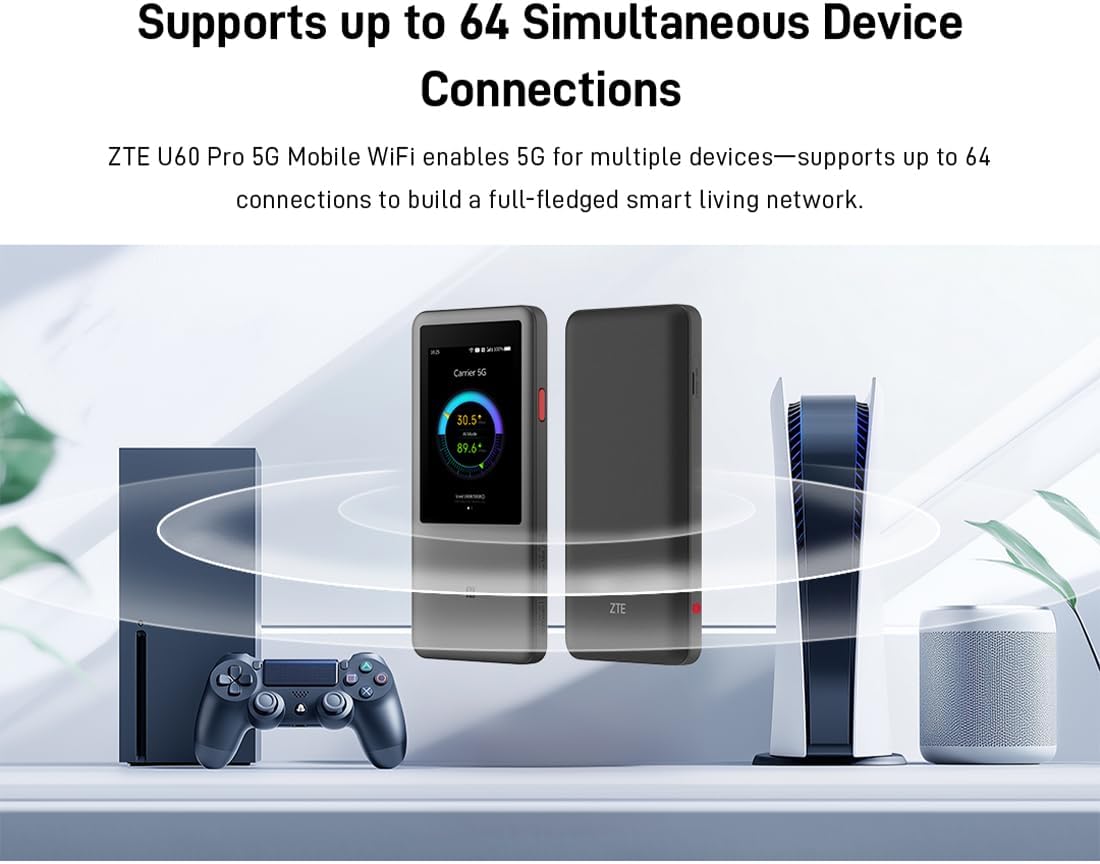
Image 3.1: The ZTE U60 Pro providing 5G Wi-Fi connectivity to various electronic devices.
3.3 AI Smart Scene Modes
The device features intelligent AI Scene technology with dynamic bandwidth allocation. It adjusts bandwidth and priority for applications based on user usage patterns to ensure smooth operation. Available modes include:
- Anchor Mode: Optimized for live streaming.
- Konferencijos režimas: Prioritizes video conferencing applications.
- Vaizdo įrašo režimas: Enhances video playback and streaming.
- Greičio režimas: Maximizes overall network speed.
- Žaidimo režimas: Reduces latency for online gaming.
3.4 AI Voice Management (via ZTE Smart Life APP)
The ZTE Smart Life APP enables effortless device management, including AI voice control. This feature allows for intelligent management of the router through voice commands. Download the ZTE Smart Life APP from your device's app store.

Image 3.2: The ZTE Smart Life APP interface demonstrating AI voice management capabilities.
3.5 Išorinės baterijos funkcionalumas
The U60 Pro can also serve as a power bank. With its 10,000 mAh battery and 18W reverse fast charging, you can charge other electronic devices by connecting them to the router's appropriate port (e.g., USB-C).
4. Priežiūra
4.1 Akumuliatoriaus priežiūra
Įrenginyje yra 10,000 mAh talpos baterija. Norėdami pailginti baterijos veikimo laiką:
- Venkite ekstremalių temperatūrų.
- Optimaliam įkrovimui naudokite pridedamą 27 W greitąjį įkroviklį.
- Ilgalaikiam laikymui įkraukite akumuliatorių maždaug iki 50 % ir laikykite vėsioje, sausoje vietoje.
4.2 Bendroji įrenginio priežiūra
To ensure the longevity and optimal performance of your ZTE U60 Pro:
- Laikykite įrenginį švarų ir be dulkių. Valymui naudokite minkštą, sausą šluostę.
- Saugokite prietaisą nuo vandens ar per didelės drėgmės.
- Nemeskite prietaiso ir nepalikite jo stipriam smūgiui.
- Naudojimo metu užtikrinkite tinkamą vėdinimą, kad išvengtumėte perkaitimo.
5. Problemų sprendimas
If you encounter issues with your ZTE U60 Pro, refer to the following common solutions:
5.1 Nėra tinklo ryšio
- Patikrinkite SIM kortelę: Ensure the SIM card is correctly inserted and activated with a 5G data plan.
- Signalo stiprumas: Verify the signal strength indicator on the device's screen. Move to an area with better 5G coverage if the signal is weak.
- Iš naujo paleiskite įrenginį: Power off and then power on the U60 Pro.
- Tinklo nustatymai: Check network settings via the touchscreen or ZTE Smart Life APP to ensure APN settings are correct (usually automatic).
5.2 „Wi-Fi“ ryšio problemos
- Neteisingas slaptažodis: Double-check the Wi-Fi password displayed on the U60 Pro's screen.
- Įrenginio limitas: Ensure you have not exceeded the maximum of 64 connected devices.
- Restart Connected Device: Restart the device attempting to connect to the Wi-Fi.
- Maršrutizatoriaus paleidimas iš naujo: Restart the ZTE U60 Pro.
5.3 Lėtas interneto greitis
- Signalo stiprumas: A weak 5G signal will result in slower speeds.
- Duomenų riba: Check if your data plan has a fair usage policy or if you have exceeded a data cap, which might throttle speeds.
- AI Scene Mode: Ensure the appropriate AI Scene mode (e.g., Speed Mode) is selected for your activity.
- Trikdžiai: Perkelkite įrenginį toliau nuo kitų elektroninių prietaisų, kurie gali sukelti trikdžius.
6. Specifikacijos
The following table details the technical specifications of the ZTE U60 Pro MU5250:

Image 6.1: The Snapdragon X75 Flagship Chip-set Platform, central to the router's performance.
| Funkcija | Detalė |
|---|---|
| Prekės ženklas | ZTE |
| Modelio pavadinimas | MU5250 |
| Prekės modelio numeris | MU5250 |
| Gamintojas | ZTE |
| Ypatinga funkcija | 5G Connection, Wi-Fi 7, AI Scenes, Voice Control, Power Bank |
| Ryšio technologija | 5G, Wi-Fi |
| „Wi-Fi“ generavimas | „Wi-Fi“ 7 |
| Belaidžio ryšio standartas | 802.11a, 802.11ac, 802.11b, 802.11g, 802.11n |
| Dažnių juostos klasė | Dvi juosta |
| Dažnis | 5 GHz |
| Duomenų perdavimo sparta | 4.29 Gigabits per second (Download) |
| Maximum Upstream Data Transfer Rate | 3600 Megabits per second (Wi-Fi 7 Peak Throughput) |
| Antenų skaičius | 9 (Omnidirectional 5G Array) |
| Aprėptis | Wide and complete (360° full-band coverage) |
| Kontrolės metodas | Palieskite |
| Operacinė sistema | ZyNOS |
| Saugumo protokolas | WPA3 |
| Router Firewall Security Level | Pagrindinis |
| Baterija(-os) | 1 AAA - included (Note: Product description mentions 10,000 mAh, likely internal) |
| Prekės svoris | 435 gramų |
| Įtraukti komponentai | Kintamosios srovės adapteris |
| Suderinami įrenginiai | Game Console, various Wi-Fi enabled devices |
| Rekomenduojami gaminio naudojimo būdai | Streaming, Gaming, Outdoor/Travel, Small Office |
| Interneto ryšys | Taip |
| Modem Compatible | No (Functions as a standalone 5G router) |
| Išmaniųjų namų suderinamumas | Not Smart Home Compatible |
| Atsarginių dalių prieinamumas | Informacija nepasiekiama |
| Programinės įrangos atnaujinimai garantuojami iki | Informacijos nėra |

Image 6.2: Highlighting the 5G ultra-high-speed network of the ZTE U60 Pro MU5250.

Image 6.3: Illustration of the 9 omnidirectional 5G antennas providing 360° full-band coverage.
7. Palaikymas ir garantija
7.1 Pagalba klientams
For further assistance, technical support, or inquiries not covered in this manual, please refer to the official ZTE support channels or contact your retailer.
7.2 Informacija apie garantiją
Warranty terms and conditions may vary by region and retailer. Please refer to the warranty card included with your product or consult your point of purchase for detailed warranty information.