
Įvadas
Thank you for choosing the NEWFAST AC1200 WiFi Repeater. This device is designed to extend the coverage of your existing wireless network, eliminating Wi-Fi dead zones and providing a stronger, more reliable connection throughout your home or office. Please read this manual carefully before using the device to ensure proper installation and operation.
Pakuotės turinys
Patikrinkite, ar pakuotėje yra visi reikalingi daiktai:
- 1 x NEWFAST AC1200 WiFi Repeater
- 1 x Vartotojo vadovas
- 1 x RJ-45 eterneto kabelis
Produktas baigtasview
Familiarize yourself with the physical components of your NEWFAST AC1200 WiFi Repeater.
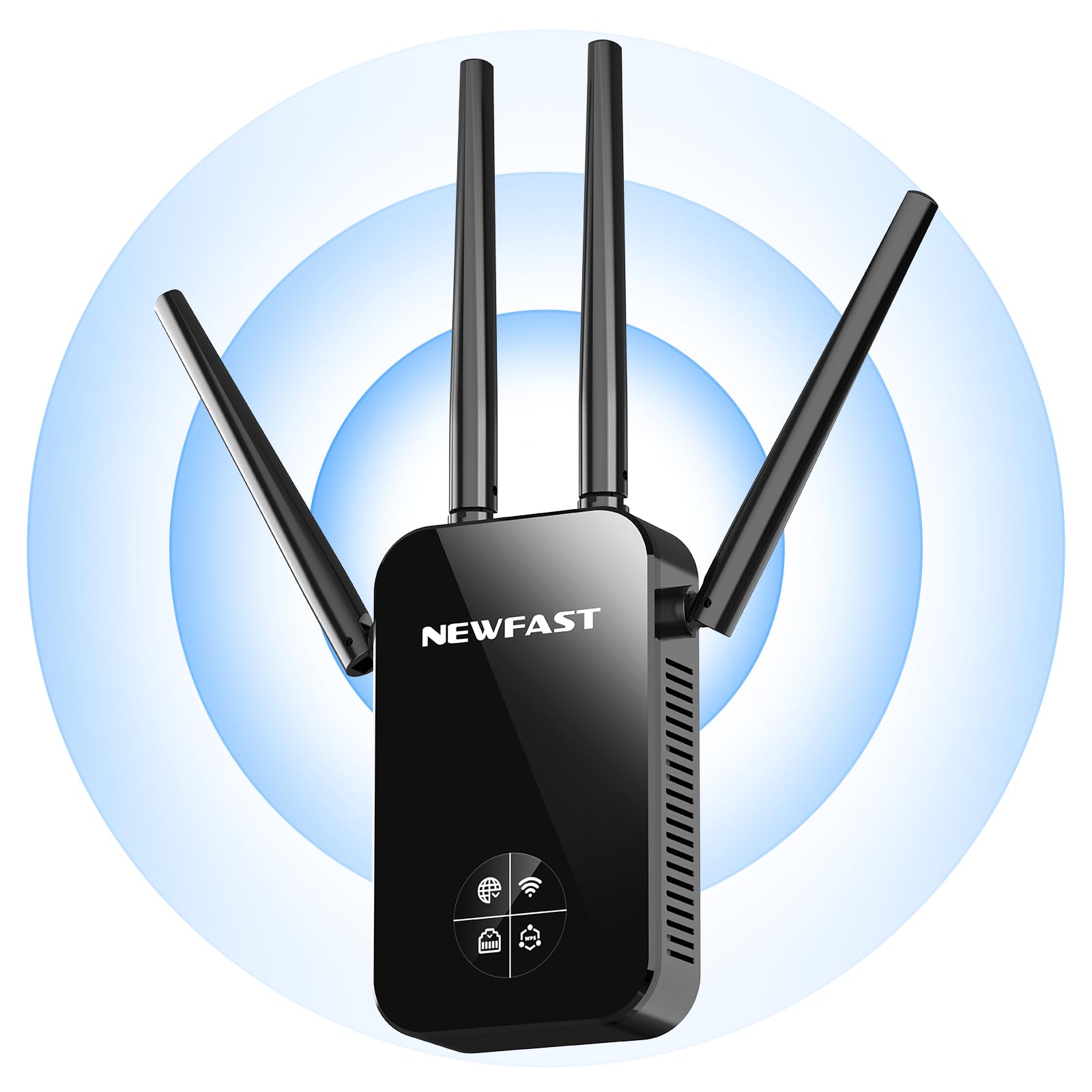
Priekyje view of the NEWFAST AC1200 WiFi Repeater, showing its compact design and indicator lights.
The device typically features indicator LEDs for power, Wi-Fi signal strength, and connection status. It also includes an Ethernet port for wired connections and a WPS button for quick setup.
Sąranka
Follow these steps for initial setup of your NEWFAST AC1200 WiFi Repeater:
- Maitinimas: Plug the repeater into an electrical outlet near your existing router. Wait for the power indicator light to turn on.
- Prijunkite prie kartotuvo: On your computer or mobile device, connect to the repeater's default Wi-Fi network (e.g., "NEWFAST_Repeater" or similar, usually found on a label on the device). No password is required for the initial connection.
- Prieigos sąrankos puslapis: Atidarykite a web browser and enter the default IP address (e.g., 192.168.10.1) or web address (e.g., repeater.net) provided in the device's label or quick start guide.
- Prisijungimas: Enter the default username and password (e.g., admin/admin).
- Pasirinkite režimą: Choose the desired operating mode (Repeater Mode or Access Point Mode).
- Konfigūruoti tinklą:
- Kartotuvo režimas: Select your existing Wi-Fi network from the list, enter its password, and choose whether to keep the same SSID or create a new one for the extended network.
- Prieigos taško režimas: Connect the repeater to your router via an Ethernet cable. Configure a new Wi-Fi network name (SSID) and password for the repeater.
- Taikyti nustatymus: Save the settings and wait for the repeater to restart. The indicator lights will show the connection status.
Alternatively, you can use the WPS (Wi-Fi Protected Setup) button for a quicker setup if your router supports it. Press the WPS button on your router, then within two minutes, press the WPS button on the repeater. The devices will automatically connect.
Veikimo režimai
The NEWFAST AC1200 WiFi Repeater supports multiple operating modes:
- Kartotuvo režimas (diapazono plėtiklis): This is the primary mode, extending the range of your existing Wi-Fi network. The repeater connects wirelessly to your router and re-broadcasts the signal.
- Prieigos taško (AP) režimas: In this mode, the repeater connects to your router via an Ethernet cable and creates a new wireless network. This is useful for adding Wi-Fi capability to a wired network or creating a separate Wi-Fi network.
Naudojimo instrukcijos
Once set up, the repeater operates automatically. To ensure optimal performance:
- Vieta: Position the repeater halfway between your router and the area with poor Wi-Fi coverage. Ensure it receives a good signal from the router.
- Ryšys: Connect your wireless devices (smartphones, tablets, laptops) to the extended Wi-Fi network created by the repeater.
- Laidiniai įrenginiai: If in Repeater Mode, you can connect a wired device (e.g., a desktop computer or gaming console) to the repeater's Ethernet port for a stable connection.
Priežiūra
To maintain the performance and longevity of your device:
- Valymas: Švelniai nuvalykite įrenginį sausa, minkšta šluoste. Nenaudokite skystų valiklių ar aerozolių.
- Firmware atnaujinimai: Periodiškai tikrinkite gamintojo websvetainės, kurioje rasite programinės įrangos atnaujinimus. Atnaujinus programinę įrangą, galima pagerinti našumą, pridėti naujų funkcijų ir ištaisyti klaidas. Atidžiai vykdykite kartu su programinės įrangos atnaujinimu pateiktas instrukcijas.
- Paleidimas iš naujo: Jei kyla tinklo problemų, pabandykite iš naujo paleisti kartotuvą, atjungdami jį nuo maitinimo lizdo 10 sekundžių ir vėl prijungdami.
Trikčių šalinimas
If you encounter problems with your NEWFAST AC1200 WiFi Repeater, refer to the following common issues and solutions:
- Nėra galios: Ensure the repeater is securely plugged into a working electrical outlet. Check the power indicator light.
- Nepavyksta pasiekti sąrankos puslapio: Verify that your device is connected to the repeater's Wi-Fi network. Try clearing your browser's cache or using a different browser. Ensure you are using the correct IP address or web adresu.
- Prastas signalo stiprumas: Relocate the repeater closer to your main router. Ensure there are no major obstructions (thick walls, metal objects) between the router and the repeater.
- Nėra interneto prieigos: Check if your main router has internet access. Ensure the repeater is correctly configured and connected to your router's Wi-Fi network with the correct password.
- WPS sąranka nepavyksta: Ensure your router supports WPS and that you are pressing the buttons within the specified time frame. If it continues to fail, try manual setup via the web sąsaja.
- Pamiršote slaptažodį: If you forget the repeater's login password or Wi-Fi password, you may need to perform a factory reset. Locate the reset button (usually a small pinhole) on the device, press and hold it for 5-10 seconds until the lights flash, then release. This will restore the device to its factory default settings.
Specifikacijos
Key technical specifications for the NEWFAST AC1200 WiFi Repeater:
| Prekės ženklas | NEWFAST |
| Gamintojas | NEWFAST |
| Gaminio matmenys | 8.6 x 4.5 x 19.7 cm; 120 g |
| Suderinami įrenginiai | Internet Box, Computer, Access Point, Router |
| Ypatingos savybės | 360 degrees, 1-touch setup, 1-click setup, MU-MIMO, Access Point Mode, LCD Display |
| Įtraukti komponentai | 1 RJ-45 Ethernet Cable, 1 User Manual, 1 AC1200 WiFi Repeater |
| Produktų skaičius | 1 |
| Reikalingos baterijos | Nr |
| Duomenų perdavimo sparta | 1200 megabitų per sekundę |
| Belaidžio ryšio tipas | 802.11a/b/g/n/ac |
| Dažnis | 5.8 GHz |
| Produkto svoris | 120 g |
| Belaidžio ryšio standartas | 802.11a/b/g/n/ac |
| Dažnių juostos klasė | Dvi juosta |
| Spalva | Juoda |
Garantija ir palaikymas
This NEWFAST AC1200 WiFi Repeater comes with a standard manufacturer's warranty. Please refer to the warranty card included in your package or visit the official NEWFAST websvetainėje, kurioje pateikiamos išsamios garantijos sąlygos.
For technical support, troubleshooting assistance, or to inquire about product information, please contact NEWFAST customer service through their official websvetainėje arba kontaktinę informaciją, pateiktą jūsų produkto dokumentuose.