
1. Produktas baigtasview
This manual provides detailed instructions for the AINAVI 10-inch (4G+64G) Touchscreen Car Stereo, designed as a radio replacement and upgrade kit for Dodge Ram 1500, 2500, and 3500 models manufactured between 2009 and 2012. This unit features Android 13 OS, wireless CarPlay, Android Auto, 5G WiFi, Bluetooth 5.0, and GPS navigation.
Pagrindinės funkcijos:
- Android 13 OS with 4GB RAM + 64GB ROM: Ensures a fast and smooth user experience.
- 10-inch QLED Touchscreen: Features 1280x720 resolution, G+G full lamination technology, and 178-degree full-viewing angles for clear visibility.
- Belaidis ir laidinis „CarPlay“ / „Android Auto“: Seamless integration for navigation, calls, messages, and music with voice command support ("Hey Siri" or "Hey Google").
- Integruota GPS navigacija: Supports online and offline maps, providing traffic information when connected to a network.
- 5G WiFi & Bluetooth 5.0: Offers high-speed internet access and stable Bluetooth connectivity for hands-free calls and music streaming.
- 1080P AHD Camera: Includes a 170° ultra-wide angle camera to eliminate blind spots.
- AM/FM radijas: Built-in radio with a 4*45W amplifer pagerintai garso kokybei.
- „Plug and Play“ diegimas: Custom-fit design for Dodge Ram 1500, 2500, 3500 (2009-2012) with included wiring harness, CANbus decoder, and frame panel.

Image: A close-up of the AINAVI 10.2-inch HD IPS Touch Screen, highlighting its 1280x720 resolution and full lamination for enhanced clarity.
2. Kas įskaičiuota
The product package contains the following components:
- 1x Android Car Stereo (Head Unit with Screen)
- 1x Wiring Harness Power Cable with CANbus Decoder
- 1x Radio Antenna Adaptor
- 1x GPS antena
- USB & Audio Cables (2x USB cables, RCA cable)
- 1x AHD 1080P Backup Camera
- 1x External Microphone
- 1x Frame Removal Tool
- Diegimo vadovas

Vaizdas: Viršview of included components: head unit, power cable, RCA cable, microphone, GPS module, USB cables, reversing control cable, 1080P rear view camera, and frame removal tool.
Vaizdo įrašas: išpakavimas ir viskasview of the components included in the AINAVI car stereo package for Dodge Ram (2009-2012).
3. Sąranka ir diegimas
This AINAVI car stereo is designed for a plug-and-play installation in Dodge Ram 1500, 2500, and 3500 models from 2009-2012. No modification to your car's original cables is typically required. It supports most original vehicle functions, including steering wheel controls and reverse signals.
3.1 Suderinamumas
This unit is specifically compatible with Dodge Ram 1500, 2500, and 3500 models from 2009, 2010, 2011, and 2012.
3.2 Bendrieji diegimo veiksmai
- Paruošimas: Ensure the vehicle's power is off. Gather all included components and tools, including the frame removal tool.
- Pašalinti originalų radiją: Carefully use the frame removal tool to detach the existing radio and surrounding trim. Disconnect all cables from the original unit.
- Prijunkite laidus: Connect the provided wiring harness and CANbus decoder to the vehicle's existing wiring. Ensure all connections are secure.
- GPS antenos įrengimas: Mount the GPS antenna under the dashboard, away from metal obstructions, for optimal signal reception.
- Prijunkite išorinį mikrofoną: Prijunkite išorinį mikrofoną, kad pagerintumėte skambučių kokybę.
- Prijunkite galinio vaizdo kamerą (neprivaloma): If installing the backup camera, connect its cables to the designated inputs on the head unit and route the camera to the rear of the vehicle.
- Mount New Head Unit: Secure the AINAVI head unit into the dashboard opening using the provided installation frame and mounting hardware.
- Bandymo funkcionalumas: Before fully reassembling the dashboard, turn on the vehicle and test all functions of the new stereo, including audio, touch screen, CarPlay/Android Auto, GPS, and backup camera.
- Surinkite prietaisų skydelį iš naujo: Patikrinus visas funkcijas, atsargiai surinkite prietaisų skydelio apdailą.

Image: Visual comparison showing the original Dodge Ram dashboard and the upgraded dashboard with the AINAVI 10-inch touchscreen car stereo installed.

Image: The AINAVI car stereo seamlessly integrated into the dashboard of a 2009 Dodge Ram.
4. Naudojimo instrukcijos
4.1 Pagrindinės operacijos
- Maitinimo įjungimas/išjungimas: The unit powers on automatically with the vehicle ignition. Press and hold the power button on the unit for a few seconds to manually turn it off or on.
- Jutiklinio ekrano sąsaja: Naršykite meniu ir programas naudodami jautrų 10 colių jutiklinį ekraną.
- Garsumo valdymas: Adjust volume using the physical buttons on the unit or steering wheel controls (if supported and configured).
4.2 belaidis „CarPlay“ ir „Android Auto“
Connect your iPhone or Android smartphone wirelessly or via USB to access CarPlay or Android Auto features. This allows for integrated navigation, hands-free calls, messaging, and music playback.
- Ryšys: Enable Bluetooth and Wi-Fi on your smartphone. On the car stereo, select the CarPlay or Android Auto application and follow the on-screen prompts to pair your device. For wired connection, use a USB cable.
- Balso komandos: Activate voice assistants by saying "Hey Siri" for CarPlay or "Hey Google" for Android Auto to control functions hands-free.
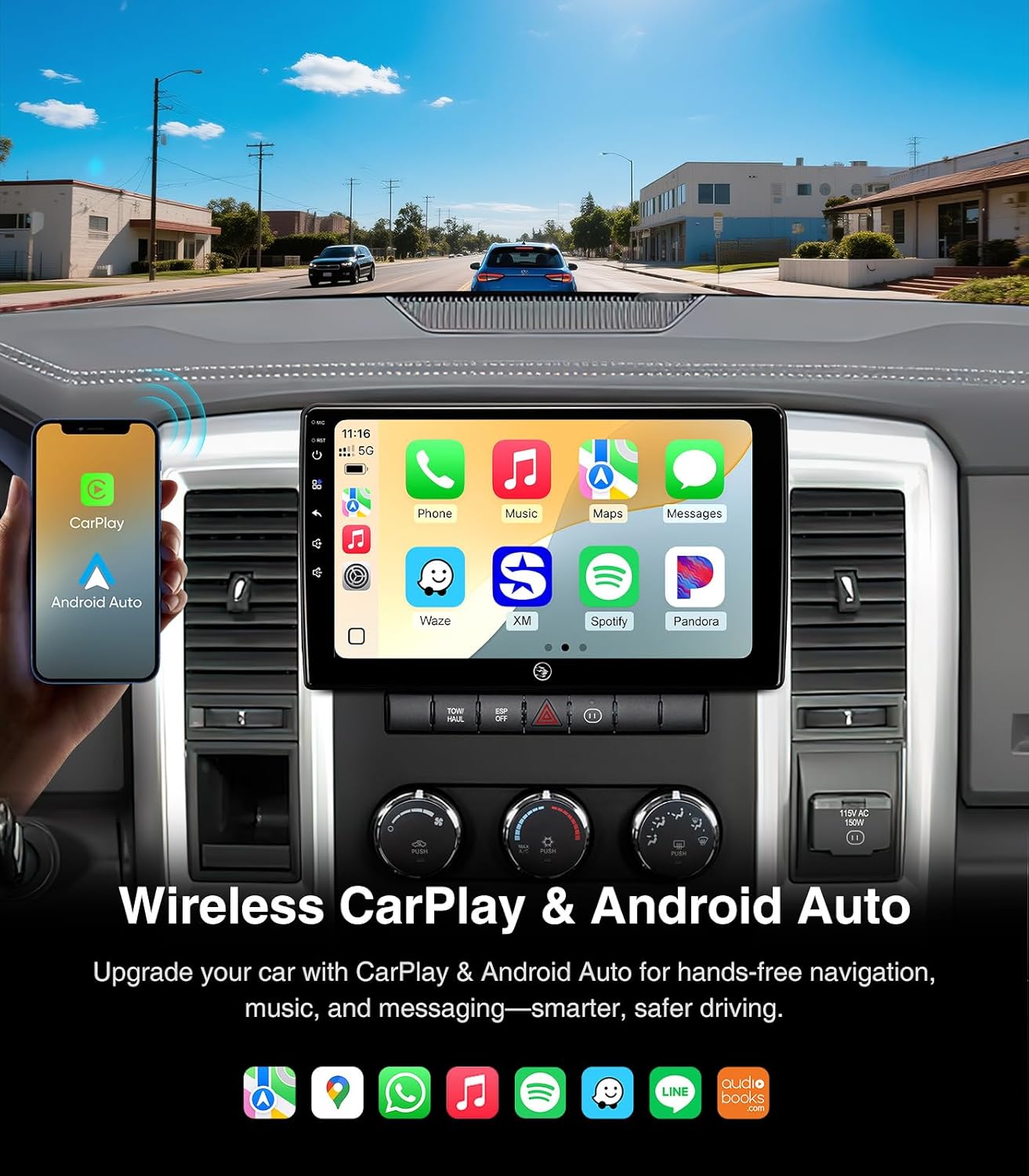
Image: The car stereo screen showing both Wireless CarPlay and Android Auto interfaces, highlighting smartphone integration for navigation, music, and communication.

Image: A split display demonstrating the distinct user interfaces for iOS CarPlay and Android Auto on the AINAVI car stereo.
4.3 GPS navigacija
The unit features built-in GPS navigation. You can use online maps when connected to a network or download offline maps for navigation without internet access.
- Naršymas internete: Connect to a 5G WiFi hotspot to receive real-time traffic information and use online mapping services.
- Navigacija neprisijungus: Download map data for your desired regions to the unit's internal storage. This allows for navigation even in areas without network coverage.

Image: The car stereo screen showing a detailed GPS navigation map with route guidance and estimated arrival time.
4.4 5G belaidis internetas ir „Bluetooth 5.0“
The unit supports dual-band WiFi (2.4GHz & 5GHz) for fast and stable internet access, and Bluetooth 5.0 for seamless device connectivity.
- „WiFi“ ryšys: Go to Settings > Network & Internet > Wi-Fi to connect to available hotspots.
- „Bluetooth“ susiejimas: Go to Settings > Connected devices > Bluetooth to pair your smartphone for hands-free calls and music streaming.
- Skambinimas laisvų rankų įranga: Once paired, you can make and receive calls directly from the car stereo interface, enhancing driving safety.

Image: The car stereo screen showing the phone dialer interface and a smartphone connected via Bluetooth, illustrating hands-free communication and music streaming capabilities.

Image: A visual guide emphasizing the safety benefits of using Bluetooth hands-free connection for calls while driving, contrasting it with unsafe phone handling.
4.5 AM/FM/RDS Radio
Access local radio stations with the built-in AM/FM tuner. RDS (Radio Data System) provides additional information like station name and song title where available.
- Tiuningas: Use the touchscreen interface to scan for stations or manually tune to a specific frequency.
- Išankstiniai nustatymai: Išsaugokite mėgstamiausias stotis, kad galėtumėte jas greitai pasiekti.

Image: The car stereo screen showing the AM/FM radio interface, with options for tuning and displaying radio information.
4.6 Garso nustatymai
Customize your audio experience with the multi-band audio equalization feature.
- Ekvalaizeris: Access the equalizer settings to adjust frequency bands for optimal sound output.
- Išankstiniai garso nustatymai: Choose from various preset sound profiles (e.g., Pop, Rock, Jazz) or create custom settings.

Image: The car stereo screen showing the multi-band audio equalization interface, allowing users to fine-tune sound output.
4.7 Split Screen & Screen Mirroring
Enhance multitasking and content sharing with split screen and screen mirroring functionalities.
- Padalintas ekranas: Paleiskite ekrane dvi programas vienu metu, pvz., navigaciją ir muzikos grotuvą.
- Ekrano dubliavimas: Mirror your smartphone's display onto the car stereo screen.

Image: The car stereo screen illustrating the split screen function with two apps open, and the screen mirroring feature showing a smartphone's display mirrored on the unit.
4.8 Galinis View Fotoaparatas
The included 1080P AHD backup camera provides a 170° ultra-wide angle view, automatically activating when the vehicle is in reverse.
- Automatinis aktyvinimas: The camera display automatically appears on the screen when shifting into reverse gear.
- Padidintas saugumas: The wide-angle view helps eliminate dangerous blind spots during parking and reversing maneuvers.

Image: The car stereo screen showing the clear, wide-angle view provided by the 1080P AHD rearview camera, assisting with safe reversing.
5. Priežiūra
Tinkama priežiūra užtikrina jūsų automobilio garso sistemos ilgaamžiškumą ir optimalų veikimą.
- Ekrano valymas: Jutiklinį ekraną švelniai nuvalykite minkšta, nepūkuota šluoste. Įsisenėjusias dėmes šiek tiek nuvalykiteampNuvalykite šluostę vandeniu arba ekranui saugiu valikliu. Venkite stiprių cheminių medžiagų ar abrazyvinių medžiagų.
- Programinės įrangos atnaujinimai: Periodiškai tikrinkite, ar yra programinės įrangos atnaujinimų, ir įdiekite juos, kad sistema veiktų efektyviai ir turėtų naujausias funkcijas bei saugos pataisas.
- Kabelių jungtys: Įsitikinkite, kad visi laidai yra tvirtai prijungti, kad išvengtumėte protarpinių problemų.
- Aplinkos priežiūra: Venkite įrenginio ilgalaikio laikymo tiesioginiuose saulės spinduliuose, itin aukštose temperatūrose ar drėgmės.
6. Problemų sprendimas
This section addresses common issues you might encounter with your AINAVI car stereo.
| Problema | Galima priežastis | Sprendimas |
|---|---|---|
| Įrenginys neįsijungia. | Loose power connection, blown fuse in vehicle. | Check all power cable connections. Inspect and replace any blown fuses in the vehicle's fuse box (refer to your vehicle's manual for fuse locations). |
| Radio freezes or stutters during music playback. | Outdated software, temporary system glitch. | Check for and install any available software updates for the unit. Restart the unit by pressing the reset button (if available) or turning the vehicle off and on. |
| Slow booting up or app loading. | System resources overloaded, outdated software. | Close unnecessary background applications. Ensure the unit's software is up to date. A factory reset might be considered as a last resort (note: this will erase all user data). |
| Nėra garso arba garso kokybė prasta. | Incorrect wiring, volume settings, or equalizer settings. | Verify all audio connections (RCA cables, speaker wires). Check the volume level and equalizer settings. Ensure the correct audio output source is selected. |
| GPS signalas silpnas arba netikslus. | GPS antena netinkamai pastatyta arba uždengta. | Ensure the GPS antenna is mounted in a clear location, free from metal obstructions, typically under the dashboard. |
| „CarPlay“ / „Android Auto“ neprisijungia. | Bluetooth/Wi-Fi issues, incorrect settings, incompatible phone. | Ensure Bluetooth and Wi-Fi are enabled on both the unit and your phone. Try restarting both devices. Verify your phone's operating system is compatible. Try a different USB cable for wired connections. |
7. Specifikacijos
| Funkcija | Detalė |
|---|---|
| Prekės ženklas | AINAVI |
| Modelis | 4G+64G |
| Operacinė sistema | Android 13 |
| Atminties talpa | 64 GB |
| Ekrano dydis | 10 colių |
| Ekrano tipas | QLED, Capacitive Touch Screen |
| Ryšio technologija | Bluetooth 5.0, USB, Wi-Fi (2.4Ghz & 5Ghz), Wired Android Auto, Wireless CarPlay |
| Supported Navigation System | BeiDou, GPS, Galileo (Supports Europe, North America, South America, Worldwide maps) |
| Garso išvesties režimas | Surround Sound Stereo (Max. output 4*45W ampgyvybingesnis) |
| Galinis View Fotoaparatas | AHD 1080P, 170° ultra-wide angle |
| Suderinamas transporto priemonės tipas | Dodge Ram 1500, 2500, 3500 (2009-2012) |
| Prekės svoris | 2.02 kilogramo |
| UPC | 610371336303 |
8. Garantija ir palaikymas
AINAVI provides comprehensive support for its products.
- Garantija: Šiam produktui suteikiama 12 mėnesių gamintojo garantija.
- Techninė pagalba: For any installation or operational assistance, please contact technical support via Amazon email. The seller, HomeCar, also provides customer service.
- Kontaktinė informacija: You can reach customer service via Amazon's messaging system or by calling +1 833 838 5016 (as listed by seller HomeCar).

Image: Guide on how to access customer installation support through Amazon, directing users to contact the seller HomeCar for assistance.