
1. Įvadas
This manual provides essential information for setting up, operating, maintaining, and troubleshooting your Ulefone RugKing 2 Pro Rugged Phone. Please read it carefully to ensure optimal performance and longevity of your device.
1.1. Produktas baigtasview
Video: Ulefone RugKing 2 Pro Product OverviewŠiame vaizdo įraše pateikiama bendra informacija.view of the phone's features and design.
1.2. Kas yra dėžutėje
- 1x Ulefone RugKing 2 Pro Phone
- 1x AC Power Charger (100~240V)
- 1x USB-A to Type-C Data Cable (100cm)
- 1x Protective film (Pre-installed)
- 1x Tempered glass screen protector
- 1x Pry Opener
- 1x dirželis
- 1x Multi-language user manual

Image: The complete package contents of the Ulefone RugKing 2 Pro, including the phone, charger, cable, screen protector, pry opener, lanyard, and user manual.
Note: Additional accessories like the Desk Charging Dock, Armor Case, Bike Mount, and Car Mount are sold separately.
2. Sąranka
2.1. SIM kortelės ir „MicroSD“ kortelės įdėjimas
The Ulefone RugKing 2 Pro supports two Nano SIM cards and one MicroSD card for expandable storage up to 2TB. Follow these steps to install them:
- Raskite SIM kortelės dėklą telefono šone.
- Use the provided pry opener to gently open the SIM card tray.
- Carefully place your Nano SIM cards and MicroSD card into the designated slots on the tray. Ensure they are correctly oriented.
- Slide the tray back into the phone until it is securely closed.
Video: Ulefone RugKing 2 Pro Unboxing Video. This video demonstrates the unboxing process, including the installation of SIM and MicroSD cards.
2.2. Pradinis įjungimas ir įkrovimas
To power on your device, press and hold the power button located on the side of the phone until the Ulefone logo appears. For initial charging, connect the provided USB-A to Type-C cable to the phone and the AC power charger to a wall outlet. The phone also supports dock charging with a separately sold accessory.

Image: The Ulefone RugKing 2 Pro placed on its dedicated desk charging dock, indicating charging functionality.
3. Naudojimo instrukcijos
3.1. Pagrindinės funkcijos
- Maitinimo įjungimas/išjungimas: Paspauskite ir palaikykite maitinimo mygtuką.
- Garsumo valdymas: Use the volume up/down buttons on the side.
- Pasirinktinis raktas: The programmable custom key can be configured for single click, double click, or long press actions.
- Atrakinimas pagal veidą: Set up face recognition for quick and secure unlocking.

Image: A visual summary of additional features like NFC, GPS, Face Unlock, Custom Key, and the charging dock.
3.2. Kameros veikimas
The RugKing 2 Pro features a 13MP rear camera and a 5MP front camera. Open the camera application to capture photos and videos. Various modes and settings are available within the app.

Image: Demonstrates the 13MP rear camera capturing a landscape and the 5MP front camera taking a group selfie.
3.3. AI Assistant Features (Ulefone AI Pro & Google Gemini)
Leverage the integrated AI capabilities for enhanced productivity:
- AI Recording Summary: Automatically transcribes and summarizes recordings.
- AI Writing Assist: Provides smart formatting, translation, style rewriting, and proofreading.
- Ulefone Screen Search: Circle or select content on your screen to search for information.
- AI Calculator: Supports handwriting calculation for mathematical problems.

Image: Visual representation of the Ulefone AI Pro features, showcasing AI Recording Summary, AI Writing Assist, Ulefone Screen Search, and AI Calculator.
3.4. Water-Lock Mode
Activate Water-Lock mode to disable the touchscreen in wet conditions, preventing accidental touches. This is useful when using the phone near water or in the rain.

Image: The Ulefone RugKing 2 Pro on a bike in the rain, demonstrating the Water-Lock Mode feature.
3.5. Integruotas žibintuvėlis
The phone includes a powerful 110 Lumens flashlight. It can be activated via a dedicated button or through the quick settings panel for use in low-light environments.

Image: The Ulefone RugKing 2 Pro's flashlight in action, highlighting its utility in outdoor settings.
3.6. Ryšys ir navigacija
- Dual 4G: Supports two 4G SIM cards simultaneously.
- NFC: Bekontakčiams mokėjimams ir duomenų perdavimui.
- GPS: Integrated GPS, GLONASS, BeiDou, and Galileo for accurate navigation.
- FM radijas be ausinių: Enjoy FM radio without needing a headset as an antenna.
4. Priežiūra
4.1. Patvarumo savybės
The Ulefone RugKing 2 Pro is designed for rugged environments, featuring IP68/IP69K water and dust resistance and MIL-STD-810H certification for drop resistance. The 5.45" HD+ Corning Gorilla Glass screen provides enhanced protection against scratches and impacts.
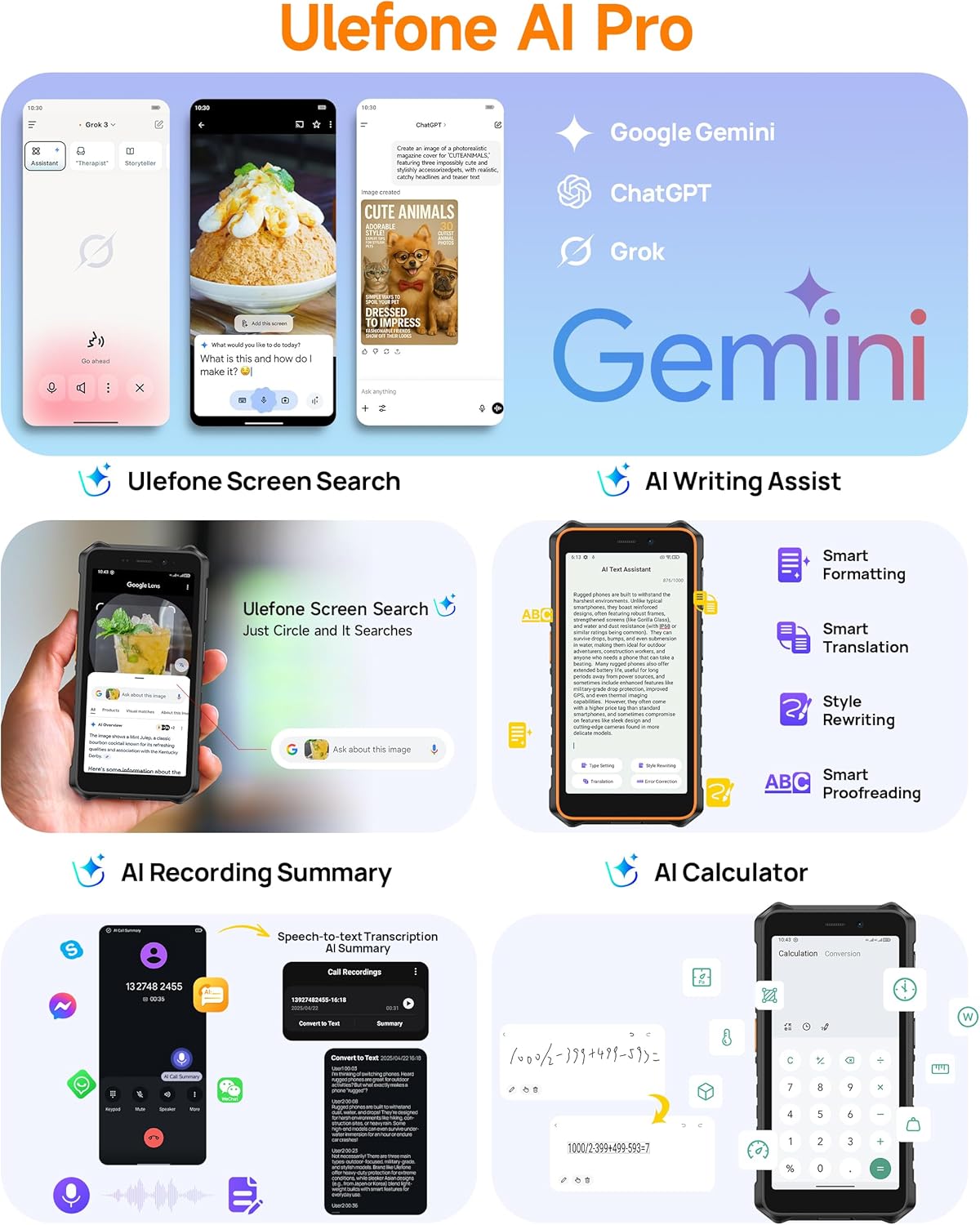
Image: Demonstrates the extreme durability of the Ulefone RugKing 2 Pro, highlighting its water, dust, and drop resistance.
Video: Ulefone RugKing 2 Pro Design. This video showcases the phone's robust design and various color accents.
4.2. Įrenginio valymas
To clean your phone, wipe it with a soft, damp cloth. For stubborn dirt, use a mild soap solution and rinse thoroughly with clean water. Ensure all ports are securely closed before cleaning to maintain water resistance.
5. Problemų sprendimas
5.1. Dažnos problemos
- Telefonas neįsijungia: Įsitikinkite, kad akumuliatorius įkrautas. Prijunkite prie įkroviklio ir bandykite dar kartą.
- Jutiklinis ekranas nereaguoja: If in wet conditions, check if Water-Lock mode is active. If not, restart the device.
- SIM kortelė neaptikta: Ensure the SIM card is correctly inserted and the tray is fully closed. Verify that your carrier is supported (Note: Not compatible with AT&T or Cricket).
- Silpnas tinklo signalas: Move to an open area. Check with your service provider for network coverage in your location.
For further assistance, please refer to the official Ulefone support channels.
6. Specifikacijos
| Funkcija | Detalė |
|---|---|
| Prekės ženklas | Ulefone |
| Modelio pavadinimas | RugKing 2 Pro |
| Operacinė sistema | Android 15 |
| Įdiegtos RAM atminties dydis | 8 GB (4 GB fizinės + 4 GB virtualios) |
| Atminties talpa | 128 GB (išplečiama iki 2 TB per „MicroSD“) |
| Ekrano dydis | 5.45 Inches HD+ Corning Gorilla Glass |
| Rezoliucija | 720 x 1440 pikselių (HD+) |
| Atnaujinimo dažnis | 90 Hz |
| Didžiausias ryškumas | 650 nitų |
| Galinė kamera | 13 MP |
| Front Photo Sensor Resolution | 5 MP |
| Baterijos talpa | 4500 mAh |
| Pokalbių laikas | 20 valandų |
| Budėjimo laikas | 315 valandų |
| Atsparumo vandeniui lygis | IP68/IP69K Atsparus vandeniui |
| Patvarumo sertifikavimas | Sertifikuota MIL-STD-810H |
| SIM kortelių lizdų skaičius | Dual SIM (Nano) |
| Ryšio technologija | Bluetooth, NFC, USB Type-C, Wi-Fi, 4G LTE |
| Palaikoma palydovinė navigacijos sistema | BeiDou, GLONASS, GPS, Galileo |
| Papildomos funkcijos | Built-In Flashlight (110 Lumens), Custom Key, Outdoor Toolbox, Gloves Mode, Face Unlock, Widevine L1 Certified |
| Prekės matmenys | 6.26 x 3.15 x 0.62 colio |
7. Papildomi priedai
Enhance your Ulefone RugKing 2 Pro experience with these separately sold accessories:
- Desk Charging Dock: Patogiam įkrovimui.
- Armor Case: Provides additional protection and mounting options.
- Armor Mount Pro (Bike Mount): Securely attach your phone to a bicycle.
- Armor Mount Next-Gen (Car Mount): Universal car mount for dashboard and windshield.
Video: Ulefone RugKing 2 Pro Accessory Ecosystem Showcase. This video demonstrates various optional accessories and their use cases.
8. Garantija ir palaikymas
„Ulefone“ teikia paslaugas. 12-month manufacturer warranty service in the US for the RugKing 2 Pro. For any questions or issues regarding your product, please contact Ulefone Direct - US customer service. They are available to assist you.
Norėdami gauti daugiau informacijos, apsilankykite „Ulefone“ parduotuvė „Amazon“ platformoje.