
1. Įvadas
The Ulefone RugKing 2 Pro is a rugged smartphone designed for durability and performance in challenging environments. It features an octa-core processor, 8GB RAM, 128GB storage, a 4500mAh battery, and runs on Android 15. This device is built to withstand water, dust, and drops, making it suitable for outdoor adventures and demanding work conditions. This manual provides essential information for setting up, operating, maintaining, and troubleshooting your device.

Image: The Ulefone RugKing 2 Pro rugged phone, showcasindėl tvirto dizaino.
2. Kas yra dėžutėje
Upon opening your Ulefone RugKing 2 Pro package, you should find the following items:
- 1x Ulefone RugKing 2 Pro Phone
- 1x AC Power Charger (100~240V)
- 1x USB-A to Type-C Data Cable (100cm)
- 1x Pre-installed Protective Film
- 1x grūdinto stiklo ekrano apsauga
- 1x Pry Opener
- 1x dirželis
- 1x daugiakalbis vartotojo vadovas

Image: A visual representation of the Ulefone RugKing 2 Pro phone and its included accessories.
3. Sąranka
3.1. SIM kortelės ir „MicroSD“ kortelės įdėjimas
The Ulefone RugKing 2 Pro supports dual Nano SIM cards and one MicroSD card for expandable storage up to 2TB. To install:
- Raskite SIM kortelės dėklą telefono šone.
- Use the provided pry opener to carefully open the SIM card tray cover.
- Insert your Nano SIM cards and/or MicroSD card into the designated slots on the tray. Ensure they are correctly oriented.
- Gently push the tray back into the phone until it is flush with the device body. Ensure the cover is securely closed to maintain water and dust resistance.
Video: Ulefone RugKing 2 Pro Unboxing Video, demonstrating SIM card installation and initial setup.
3.2. Pradinis įkrovimas
Before first use, it is recommended to fully charge your Ulefone RugKing 2 Pro. Connect the provided USB-A to Type-C data cable to the AC power charger and then to the phone's USB-C port. Alternatively, you can use the optional Desk Charging Dock for convenient charging.

Image: The Ulefone RugKing 2 Pro placed in its optional Desk Charging Dock.
3.3. Maitinimo įjungimas/išjungimas
To power on, press and hold the Power button located on the side of the device until the Ulefone logo appears. To power off, press and hold the Power button, then select 'Power off' from the options on the screen.
4. Prietaiso valdymas
4.1. Ekrano funkcijos
The RugKing 2 Pro features a 5.45-inch HD+ display with Corning Gorilla Glass for enhanced durability. It offers a 90Hz refresh rate and 650 nits peak brightness for a clear and smooth viewpatirtį.

Image: The Ulefone RugKing 2 Pro displaying vibrant content on its 5.45-inch HD+ screen.
4.2. Kameros funkcijos
Capture moments with the 13MP rear camera and take selfies with the 5MP front camera. The camera interface provides various modes and settings for different photography needs.

Image: Close-up of the Ulefone RugKing 2 Pro's rear camera module and a sample photo taken with the front camera.
4.3. Baterijos valdymas
The 4500mAh battery provides extended usage. In addition to standard charging, the device supports 5W wired reverse charging, allowing you to charge other devices. The optional Desk Charging Dock offers a convenient way to power up.

Image: Visualizing the 4500mAh battery capacity and the convenience of dock charging and OTG reverse charging.
4.4. Integruotas žibintuvėlis
The RugKing 2 Pro includes a powerful 110 Lumens flashlight, accessible via a dedicated button or quick settings, useful for various outdoor activities.

Image: The Ulefone RugKing 2 Pro's powerful flashlight illuminating a dark environment.
4.5. Water-Lock Mode
Activate Water-Lock mode to disable touchscreen input when using the phone in wet conditions, preventing accidental touches and ensuring usability.

Image: The Ulefone RugKing 2 Pro mounted on a bicycle in the rain, demonstrating Water-Lock Mode.
4.6. AI Assistant (Gemini)
The device integrates Ulefone AI Pro, offering features like AI Recording Summary, AI Writing Assist, Ulefone Screen Search, and AI Calculator. It also supports Google Gemini, ChatGPT, and Grok for advanced AI functionalities.
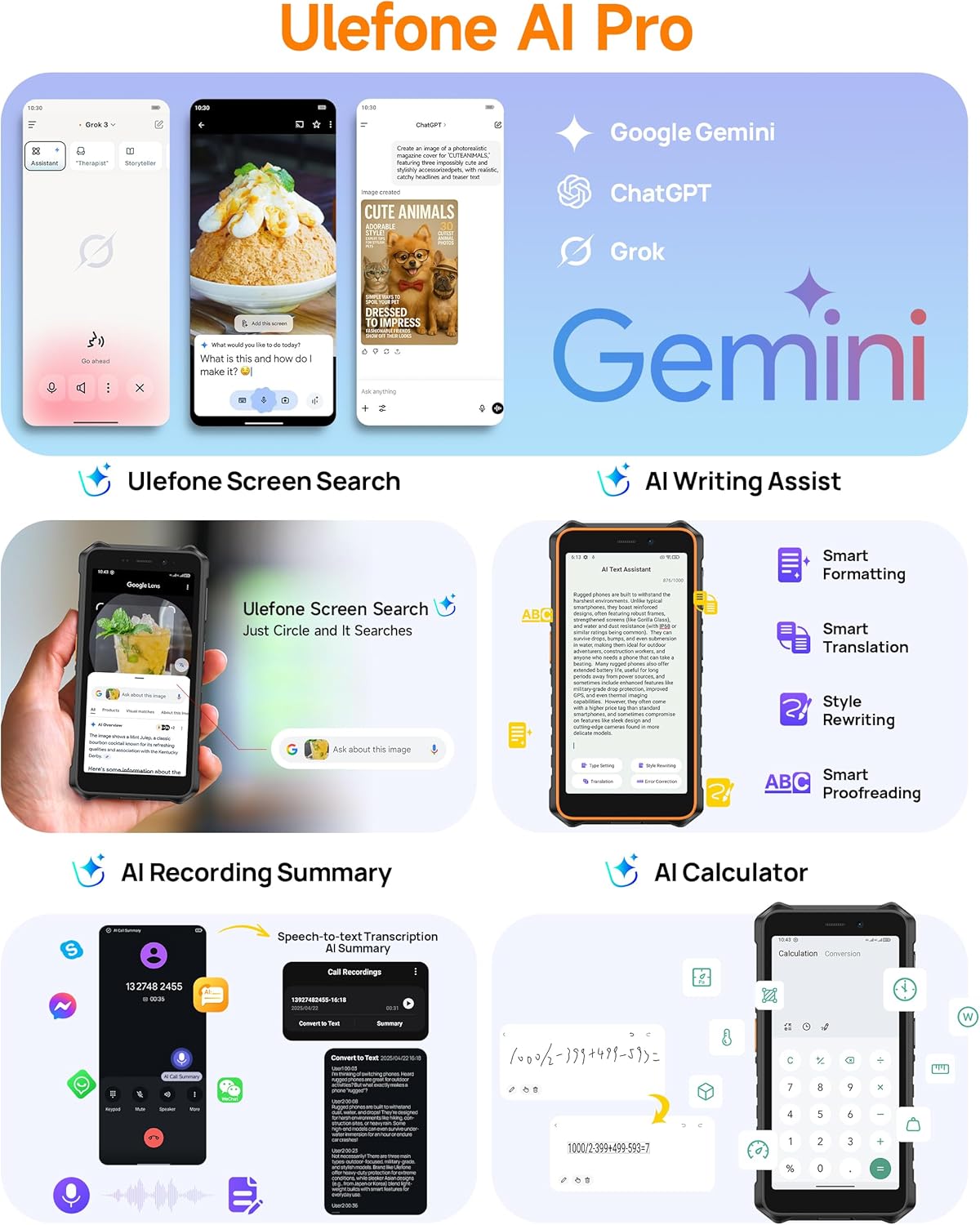
Image: Screenshots illustrating the various AI features available on the Ulefone RugKing 2 Pro, including Google Gemini integration.
4.7. Kitos funkcijos
- Dual 4G: Supports two 4G SIM cards simultaneously.
- NFC: Bekontakčiams mokėjimams ir duomenų perdavimui.
- FM radijas be ausinių: Klausykitės FM radijo be ausinių kaip antenos.
- Pasirinktinis raktas: A programmable button for quick access to functions or apps.
- Lauko įrankių dėžė: Includes various utility tools for outdoor use.
- GPS: Supports GPS, GLONASS, Beidou, and Galileo for accurate navigation.
- Pirštinių režimas: Increases touchscreen sensitivity for use with gloves.
- Atrakinimas pagal veidą: Saugiai atrakinkite įrenginį naudodami veido atpažinimo funkciją.
5. Patvarumo savybės
The Ulefone RugKing 2 Pro is engineered for extreme durability, certified with IP68/IP69K ratings and MIL-STD-810H compliance. This means it is highly resistant to water, dust, and drops.
- Atsparus vandeniui (IP68/IP69K): Can withstand immersion in water up to 2 meters for 30 minutes and high-pressure, high-temperature water jets.
- Atsparumas dulkėms (IP68/IP69K): Visiškai apsaugotas nuo dulkių patekimo.
- Atsparumas kritimui (MIL-STD-810H): Sukurtas atlaikyti kritimus ant kieto paviršiaus iš 2 metro aukščio.
- „Corning Gorilla Glass“ stiklas: Užtikrina didesnį ekrano atsparumą įbrėžimams ir smūgiams.
Video: Ulefone RugKing 2 Pro Rugged Phone, showcasing its resistance to drops and water.

Image: The Ulefone RugKing 2 Pro being dropped onto roots, demonstrating its MIL-STD-810H certified drop resistance.
6. Priedai
Enhance your RugKing 2 Pro experience with a range of optional accessories:
- Armor Case: Provides additional protection and often includes a belt clip or carabiner attachment.
- Desk Charging Dock: A convenient stand for charging your phone.
- Floating Tray: Allows you to safely use your phone and other items while in water.
- Dviračio laikiklis: Securely attaches your phone to a bicycle handlebar.
- Car Mount: For hands-free use in vehicles.
Video: Ulefone RugKing 2 Pro Accessory Ecosystem Showcase, demonstrating various accessories.


Images: Various accessories for the Ulefone RugKing 2 Pro, including the Desk Charging Dock, Protective Case, Bike Mount, and Car Mount.
7. Specifikacijos
| Funkcija | Specifikacija |
|---|---|
| Prekės ženklas | Ulefone |
| Operacinė sistema | Android 15 |
| Įdiegtos RAM atminties dydis | 8 GB (4 GB fizinės + 4 GB virtualios) |
| Atminties talpa | 128 GB (Expandable up to 2TB with Micro SD card) |
| Ekrano dydis | 5.45 colių |
| Maksimali ekrano skiriamoji geba | 720 x 1440 pikselių |
| Atnaujinimo dažnis | 90 Hz |
| Modelio pavadinimas | RugKing 2 Pro |
| Belaidis nešiklis | Atrakinta |
| Korinio ryšio technologija | 4G |
| Spalva | Green (variant shown) |
| SIM kortelių lizdų skaičius | Dvi SIM kortelės |
| Jungties tipas | C tipo USB |
| Formos faktorius | Jutiklinis ekranas |
| SIM kortelės dydis | Nano |
| Atsparumo vandeniui lygis | Waterproof (IP68/IP69K) |
| Papildomos funkcijos | Built-In Flashlight, Dual SIM, Rugged Body, Waterproof |
| Baterijos talpa | 4500 milijonųamp Valandos |
| Prekės matmenys | 6.26 x 3.15 x 0.62 colio |
| Telefoninių pokalbių laikas | 20 valandų |
| Vaizdo įrašymo raiška | 1080p |
| Palaikoma palydovinė navigacijos sistema | BeiDou, GLONASS, GPS, Galileo |
| Ryšio technologija | „Bluetooth“, NFC, USB, „Wi-Fi“ |
8. Priežiūra
To ensure the longevity and optimal performance of your Ulefone RugKing 2 Pro, follow these maintenance guidelines:
- Valymas: Reguliariai valykite telefoną minkšta,amp cloth. For stubborn dirt, use a mild soap solution. Ensure all port covers are securely closed before cleaning with liquids.
- Uostų dangčiai: Always ensure the USB-C port cover and SIM tray cover are tightly sealed to maintain the device's waterproof and dustproof integrity.
- Venkite ekstremalių temperatūrų: Do not expose the phone to excessively high or low temperatures, as this can affect battery life and internal components.
- Ekrano apsauga: While the phone features Corning Gorilla Glass, using the provided tempered glass screen protector can offer an additional layer of defense against scratches.
- Įkrovimas: Use only the original charger and cable or certified accessories to prevent damage to the battery and device.
9. Problemų sprendimas
If you encounter issues with your Ulefone RugKing 2 Pro, try the following common troubleshooting steps:
- Įrenginys nereaguoja: Paspauskite ir palaikykite maitinimo mygtuką maždaug 10–15 sekundžių, kad priverstumėte paleisti iš naujo.
- Įkrovimo problemos: Ensure the charging cable and adapter are securely connected. Try a different outlet or charging accessory. Check the charging port for any debris.
- Tinklo ryšio problemos: Check if your SIM card is properly inserted. Restart the phone. Go to Settings > Network & internet > Mobile network and ensure mobile data is enabled and the correct network type is selected.
- Programėlės strigimas / užstrigimas: Close the problematic app and reopen it. If the issue persists, clear the app's cache and data (Settings > Apps > [App Name] > Storage > Clear cache/Clear data).
- Lėtas našumas: Close unnecessary background apps. Clear cache regularly. Consider uninstalling unused apps.
- Water-Lock Mode Stuck: If the touchscreen is unresponsive after being in water, ensure the phone is dry, then try restarting the device.
- Gamykliniai nustatymai: As a last resort, if software issues persist, you may perform a factory reset (Settings > System > Reset options > Erase all data). Įspėjimas: tai ištrins visus jūsų telefone esančius duomenis. Prieš tęsdami sukurkite svarbios informacijos atsarginę kopiją.
10. Garantija ir palaikymas
The Ulefone RugKing 2 Pro comes with a 12-month manufacturer warranty service in the US. For any questions about the product, technical support, or warranty claims, please refer to the contact information provided in your multi-language user manual or visit the official Ulefone support websvetainę.
Ulefone is committed to providing reliable products and customer service. We are always happy to help with any inquiries you may have.