
1. Įvadas
This manual provides detailed instructions for the installation, operation, and maintenance of your Hikity 4+64G Android Car Radio. This unit is designed to enhance your driving experience with advanced features such as wireless CarPlay, Android Auto, a 9-inch Incell touchscreen, Bluetooth 5.0, GPS navigation, FM/RDS radio, and rear camera support. It is specifically compatible with Fiat Doblo models from 2010-2015 and Opel Combo models from 2011-2018.

Vaizdas: Viršview of the Hikity Android Car Radio's key features and user interface.
2. Saugos informacija
Please read all safety instructions carefully before installation and operation. Improper installation or use can lead to damage to the device, vehicle, or personal injury. Always consult a professional for installation if you are unsure.
- Nenaudokite įrenginio taip, kad tai atitrauktų jūsų dėmesį nuo vairavimo.
- Įsitikinkite, kad visi laidai yra tinkamai prijungti, kad išvengtumėte trumpojo jungimo ar elektros pavojaus.
- Laikykite prietaisą atokiau nuo vandens ir per didelio karščio.
- Naudokite tik gamintojo nurodytus priedus.
3. Pakuotės turinys
Patikrinkite, ar pakuotėje yra visi toliau išvardyti daiktai:
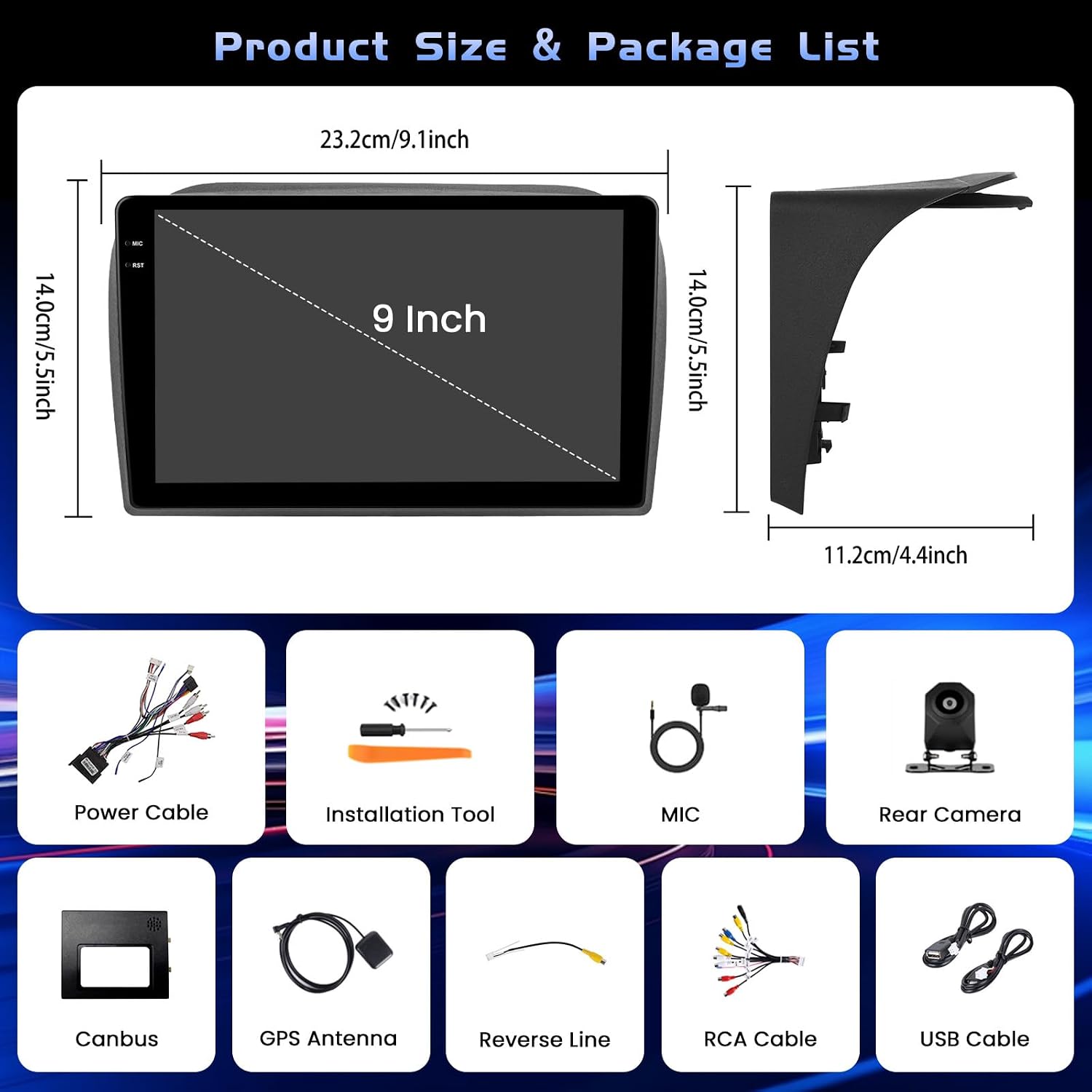
Paveikslėlis: gaminio matmenys ir visų pridedamų priedų vaizdinis vaizdas.
- 1 x „Android“ automobilio radijas
- 1x maitinimo laidas
- 1x GPS antena
- 1 x Input Cable for Reversing Camera
- 1 x RCA kabelis
- 2 x USB kabeliai
- 2 x tvirtinimo laikikliai
- 4 x Varžtai
- 1 x naudojimo instrukcija
- 1 x Reversing Camera
- 1x mikrofonas
- 1 x „Canbus“
4. Sąranka ir diegimas
Proper installation is crucial for optimal performance. If you are not experienced with car audio installation, it is recommended to seek professional assistance.
4.1 Bendras montavimas

Image: Before and after installation view of the car radio in a compatible vehicle dashboard.
The unit is designed for a seamless fit in Fiat Doblo (2010-2015) and Opel Combo (2011-2018) models. Ensure the dashboard opening matches the unit's dimensions before proceeding.
4.2 Wire Harness Connection
Connect the main power cable, RCA cables, USB cables, reversing input cable, and GPS antenna to their respective ports on the back of the head unit. Refer to the diagram for correct connections.

Image: Detailed diagram for connecting the main wire harness components.
4.3 Atbulinės eigos kameros laidai
Connect the reversing camera as shown in the diagram. The backup input cable must be plugged in, even if the camera is not in use, to avoid affecting Bluetooth and WiFi signal reception.

Image: Wiring instructions for the reversing camera system.
4.4 Vairo valdymo (SWC) sąranka
To enable steering wheel controls, connect the RX/TX cable and configure settings via the Canbus Box. Navigate to: Nustatymai > Gamykliniai nustatymai (1234) > Skardinės nustatymai.

Image: Instructions for setting up steering wheel controls.
5. Naudojimo instrukcijos
5.1 Android System and Performance
The unit features a 4GB RAM and 64GB ROM configuration, ensuring stable processing and quick switching between applications like maps and music. The latest Android system provides a responsive and smooth user experience.
5.2 Ekrano funkcijos
The 9-inch Incell touchscreen offers a resolution of 1280 x 720 pixels, displaying vivid and clear colors. The Incell technology makes the screen thinner, brighter, sharper in sunlight, and smoother to touch.

Image: Explanation of Incell screen advantages.
The unit supports multiple UI designs and a split-screen display mode, allowing you to easily switch between maps, media, and contacts simultaneously.

Vaizdas: pvzamples of different user interfaces and split-screen mode.
5.3 Connectivity (CarPlay, Android Auto, Bluetooth, WiFi)
Enjoy seamless integration with your smartphone via wireless or wired CarPlay/Android Auto. This allows for hands-free calls, music playback, and navigation.

Image: Wired and wireless connectivity options including CarPlay, Android Auto, and Mirror Link.
Bluetooth 5.0 ensures stable connections for hands-free calling and clear music streaming. The integrated 5G WiFi provides fast data transmission for online navigation and media playback.

Image: Bluetooth, SWC, FM RDS, and EQ features.
5.4 GPS navigacija
The built-in GPS supports both online and offline maps, offering voice guidance and real-time traffic information to ensure a smooth journey.

Image: Features including WiFi, GPS navigation, and AHD backup camera.
5.5 FM/RDS radijas
The FM/RDS tuner provides access to radio stations, music, news, and traffic announcements with high clarity.
5.6 AHD galinio vaizdo kamera
The included AHD backup camera offers a 1280*720 resolution with super night vision, waterproof design (IP68), and reversing reference lines for safer parking maneuvers.
6. Priežiūra
To ensure the longevity and optimal performance of your Hikity car radio, follow these maintenance guidelines:
- Valymas: Ekraną ir išorę valykite minkšta, sausa šluoste. Venkite abrazyvinių valiklių ar tirpiklių.
- Programinės įrangos atnaujinimai: Periodically check for software updates to ensure the system runs efficiently and securely.
- Aplinkos sąlygos: Venkite ilgą laiką laikyti įrenginį tiesioginiuose saulės spinduliuose arba itin aukštose temperatūrose.
7. Problemų sprendimas
Jei kyla problemų dėl automobilio radijo, vadovaukitės šiais įprastais trikčių šalinimo veiksmais:
- Nėra galios: Patikrinkite visas maitinimo jungtis ir saugiklius. Įsitikinkite, kad automobilio uždegimas įjungtas.
- Nėra garso: Patikrinkite garsiakalbių jungtis, garsumo nustatymus ir garso šaltinio pasirinkimą.
- Jutiklinis ekranas nereaguoja: Pabandykite paleisti įrenginį iš naujo. Jei problema išlieka, gali tekti atkurti gamyklinius nustatymus (žr. nustatymus).
- GPS signalo praradimas: Įsitikinkite, kad GPS antena tinkamai sumontuota ir turi laisvą view dangaus.
- „Bluetooth“ ryšio problemos: Delete previous pairings on both the radio and your phone, then attempt to pair again.
Dėl sudėtingesnių problemų kreipkitės į klientų aptarnavimo tarnybą.
8. Specifikacijos
| Funkcija | Specifikacija |
|---|---|
| Gaminio matmenys | 25.5 x 18.5 x 10 cm |
| Produkto svoris | 1.68 kg |
| Gamintojo modelio numeris | Hikity-A8076A4291H6MI2-EU20 |
| Ryšio technologija | „Bluetooth“, „WiFi“ |
| Valdiklio tipas | Android |
| Ypatingos savybės | 4+64G, 5G WiFi, Incell Touchscreen (1280x720), CarPlay, Android Auto, Bluetooth 5.0, GPS Navigation, FM RDS, Customizable Homepage App, Split Screen |
| Suderinami įrenginiai | Ampkeltuvas, išmanusis telefonas |
| Jungties tipas | 3.5 mm lizdas, RCA |
| Garso išvesties režimas | Stereo |
| Vaizdo įrašų kodavimas | MKV / RMVB / AVI / MP4 / MDV |
| Išėjimo galia | 45 Watts (180 Watts total) |
| Kanalų skaičius | 4 |
| Internet Applications | Blockbuster, Browser, Netflix, Pandora, iTunes |
| Garso išvesties tipas | Garsiakalbiai |
| Palaikomi formatai | AVI, WAV, WMA |
9. Garantija ir palaikymas
9.1 Informacija apie garantiją
Šis produktas tiekiamas su a 12 mėnesių garantija. This warranty covers manufacturing defects and ensures online consultation support with a 24-hour response time.
9.2 Pagalba klientams
For any questions, technical assistance, or warranty claims, please contact Hikity Tech Hub. Our support team is available to assist you.

Image: How to contact customer support.
You can reach us via email at: hikityservices@163.com
Siekiame atsakyti į visus užklausimus per 24 valandas.