
1. Įvadas
This manual provides detailed instructions for the installation, operation, and maintenance of the Lilytech ZL-7903A Automatic Temperature and Humidity Incubator Controller. The ZL-7903A is a multifunctional PID controller designed for precise environmental management in incubators, ensuring optimal conditions for various applications. It integrates temperature control, humidity control, egg turning, ventilation, and alarm functions.
2. Produktas baigtasview
The ZL-7903A controller features a clear digital display and intuitive button interface for easy programming and monitoring. It comes equipped with a ZL-SHr05J temperature and humidity sensor for accurate environmental readings.

2.1 paveikslas: The ZL-7903A controller unit shown alongside the ZL-SHr05J combined temperature and humidity sensor. The controller features a digital display and control buttons.

2.2 paveikslas: The ZL-7903A controller with its sensor cable and a protective cover for the sensor element. This image illustrates the complete package including the wiring.

2.3 paveikslas: Išsamią view of the ZL-7903A controller's digital display, showing current temperature (14.8°C) and humidity (64.3%), along with set points (37.8°C, 50%) and a countdown timer.
3. Specifikacijos
- Modelis: ZL-7903A
- Įvesties tomastage: 100-240Vac
- Valdymo tipas: PID (Proportional-Integral-Derivative) for Temperature and Humidity
- Ekrano tipas: Skaitmeninis
- Jutiklis: ZL-SHr05J (Combined Temperature and Humidity Sensor)
- Maksimali matavimo temperatūra: 70–99 °C
- Stilius: Įdėta
- Jutiklio laido ilgis: 2 metrų
- Funkcijos: Temperature Control, Humidity Control, Egg Turning, Ventilation, Illumination, Alarms, Door Switch Input
4. Diegimas ir sąranka
The ZL-7903A is designed for embedded installation. Ensure proper ventilation around the unit when mounting. All wiring should be performed by a qualified professional to prevent electrical hazards and ensure correct functionality.
4.1 Sujungimo schema
Refer to the following diagrams for correct electrical connections. The controller requires a 100-240Vac power input. Connect all external components such as heaters, fans, egg-turning motors, and sensors according to the specified terminals.
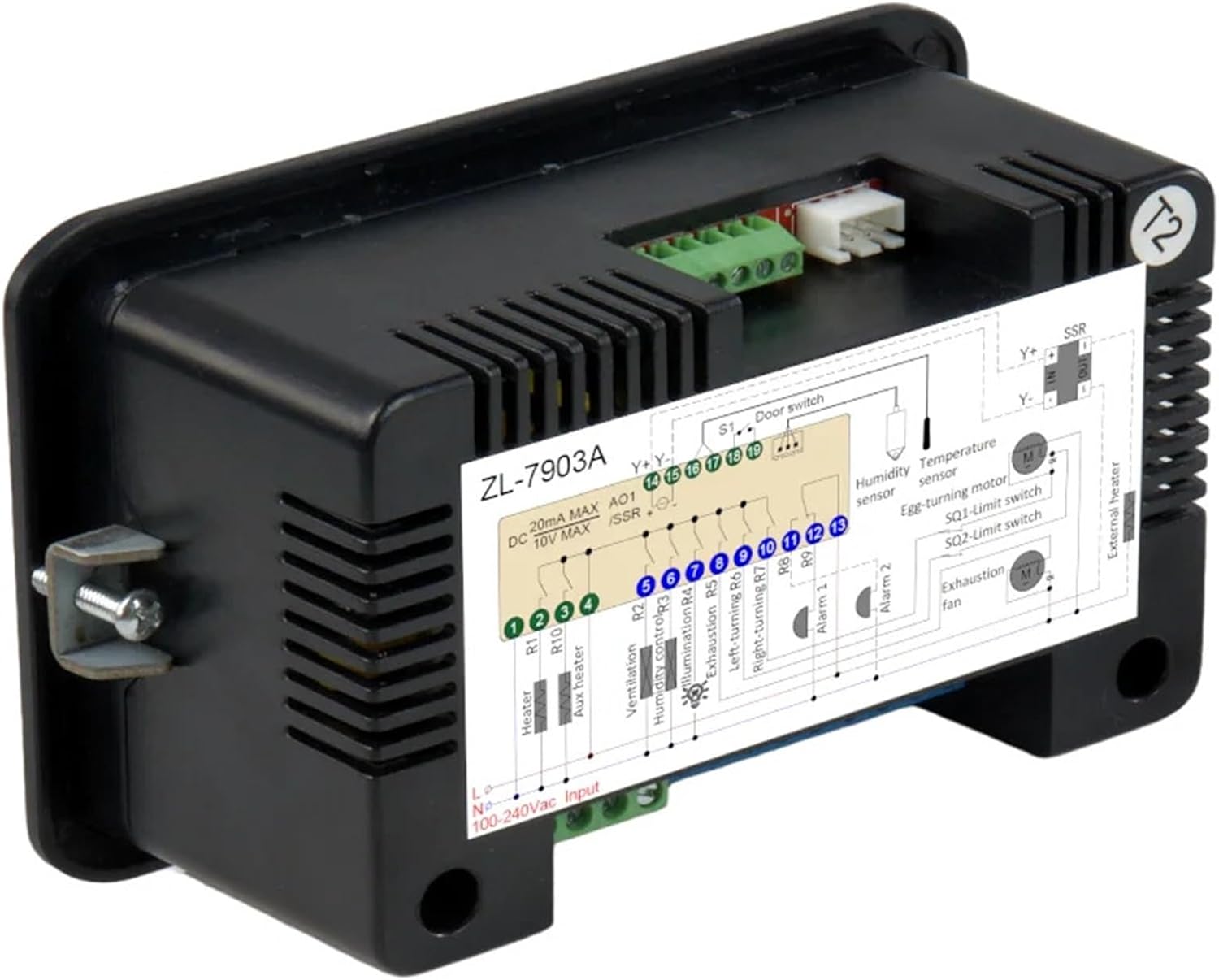
4.1 paveikslas: Galinis view of the ZL-7903A controller, showing the terminal block and an integrated wiring diagram for various connections including power, sensors, and output devices.

4.2 paveikslas: A detailed schematic of the ZL-7903A wiring. This diagram illustrates connections for 100-240Vac input, heater (R1, R10), auxiliary heater, ventilation (R2), humidity control (R3), illumination (R4), egg turning (R5, R6, R7), alarms (R8, R9), door switch (S1), humidity sensor, temperature sensor, SSR, egg-turning motor, and exhaustion fan.
4.2 Jutiklio prijungimas
The ZL-SHr05J sensor connects to the dedicated sensor port. Ensure the connector is securely seated. The sensor provides both temperature and humidity readings to the controller.

4.3 paveikslas: Comparison of ZL-SHr05J (green label) and ZL-SHr05P (red label) sensors. The ZL-SHr05J is included with this model and features VCC (5V), GND, and SDA connections.
5. Operacija
The ZL-7903A controller features a user-friendly interface with dedicated buttons for various functions:
- Maitinimo mygtukas: Įjungia arba išjungia įrenginį.
- Nustatyti mygtukas: Įjungiamas parametrų nustatymo režimas.
- Rodyklės aukštyn/žemyn: Koreguoja vertes arba naršo meniu.
- Fn (funkcijos) mygtukas: Accesses additional functions or confirms selections.
Detailed programming instructions for setting temperature, humidity, egg-turning intervals, ventilation cycles, and alarm thresholds are provided in the full user manual (not included here). Consult the manufacturer's comprehensive guide for specific parameter adjustments.
6. Priežiūra
To ensure the longevity and accuracy of your ZL-7903A controller:
- Valymas: Nuvalykite ekraną ir casinminkštu, sausu skudurėliu. Venkite abrazyvinių valiklių ar tirpiklių.
- Jutiklio priežiūra: Keep the temperature and humidity sensor clean and free from dust or debris. Do not immerse the sensor in liquids.
- Aplinkos sąlygos: Operate the controller within its specified environmental limits (temperature, humidity) to prevent damage.
7. Problemų sprendimas
If you encounter issues with your ZL-7903A controller, consider the following common troubleshooting steps:
- Nėra galios: Check the power supply connection and ensure the unit is properly plugged into a 100-240Vac source.
- Neteisingi skaitymai: Verify that the ZL-SHr05J sensor is correctly connected and free from obstructions or damage.
- Neaktyvūs išėjimai: Check wiring for heaters, fans, and motors. Ensure set points are correctly configured and not in an alarm state.
- Rodymo klaidos: Refer to the full user manual for specific error codes and their meanings.
Jei problemos išlieka, kreipkitės į klientų aptarnavimo tarnybą arba kvalifikuotą specialistą.
8. Garantija ir palaikymas
Warranty information for the Lilytech ZL-7903A controller is typically provided by the seller or manufacturer at the time of purchase. Please retain your proof of purchase for warranty claims.
For technical support, product inquiries, or to obtain a complete version of the user manual, please contact the manufacturer or your authorized distributor.