
Įvadas
This manual provides detailed instructions for the Saitake Wireless Arcade Fight Stick Joystick. It covers product features, setup, operation, connection methods, and troubleshooting to ensure optimal performance across various platforms including PC, Android, iOS, Nintendo Switch, PS3, and PS4.
Produktas baigtasview
Vaizdo įrašas: Viršijimasview of the Saitake Arcade Fight Stick, showcasing its design, joystick, buttons, and key features.
Pagrindinės savybės
- Kelių platformų suderinamumas: Compatible with Windows PC, Android, iOS, Nintendo Switch 1/2, PS3, and PS4.
- Three Connection Methods: Supports Bluetooth, 2.4GHz wireless (with included receiver), and wired (Type-C) connections.
- Integrated Display Screen: A 1.9-inch functional display screen shows function options, volume, lighting effects, brightness, and language settings.
- 3.5 mm ausinių lizdas: For audio output and communication.
- TURBO funkcija: Equipped with standard turbo and upgraded auto turbo modes for rapid input execution.
- Makro funkcija: Customize button mappings and create macro commands with up to 18 keystrokes, including trigger timestamps.
- High Precision Joystick: Features an adjustable RGB light ring with 4 modes and 7 colors.
- „Low-Pro“file Red Switches: Buttons utilize low-profile red switches for light pressure and quick response.
- Ergonomiškas dizainas: Designed for comfortable and extended gaming sessions.
Product Layout and Button Functions
Familiarize yourself with the layout and functions of the arcade fight stick's buttons and controls.

Image: Detailed diagram of the Saitake Arcade Fight Stick showing the location and labels of all buttons and features.
- A: Meniu parinktis
- B: Joystick Function Option
- C: Vairasvirtė
- D: Ekrano ekranas
- E: Turbo mygtukas
- F: SELECT mygtukas
- G: START mygtukas
- H: PAGRINDINIS mygtukas
- I: Ryšio parinktis
- J: Touch Panel (for PS4 platform)
- K: Earphone & Microphone Option
- L: LSB Button
- M: RSB Button
- N: LB mygtukas
- O: LT mygtukas
- P: Ausinių lizdas
- Q: MACRO Button
- R: A Mygtukas
- S: X mygtukas
- T: B mygtukas
- U: Y mygtukas
- V: RT mygtukas
- W: RB mygtukas
Sąranka ir prijungimas
Įrenginio įkrovimas
The arcade stick has a built-in 1000mAh rechargeable lithium battery. Connect the included USB Type-C cable to the device and a power source (e.g., computer USB port, USB wall adapter) to charge. The display screen will indicate charging status.
Prisijungimo būdai
The Saitake Arcade Fight Stick supports three primary connection methods:

Image: Visual representation of the Bluetooth switch, 2.4G receiver, and Type-C wired connection port.
- „Bluetooth“ ryšys:
- Ensure the arcade stick is powered on and in Bluetooth pairing mode (refer to the display screen for status).
- On your device (Android, iOS, Switch, PS3, PS4, PC with Bluetooth), search for available Bluetooth devices.
- Select "Saitake Arcade Stick" to pair.
- 2.4 GHz belaidis ryšys:
- Locate the 2.4GHz receiver in the hidden compartment on the back of the arcade stick.
- Plug the 2.4GHz receiver into a USB port on your PC, Switch dock, or PS3/PS4 console.
- The arcade stick should automatically connect to the receiver.
- Laidinis ryšys:
- Connect the USB Type-C cable from the arcade stick to a USB port on your PC, Switch dock, or PS3/PS4 console.
- Įrenginys automatiškai aptiks laidinį ryšį.
Kelių platformų suderinamumas
The Saitake Arcade Fight Stick is designed for broad compatibility. The image below illustrates the supported systems.

Image: Icons representing Android, iOS, PC, Nintendo Switch, PS3, and PS4, indicating multi-system support.
Naudojimo instrukcijos
Bendrasis naudojimas
Once connected, the arcade stick functions as a standard controller for compatible games. Use the joystick for directional input and the action buttons for in-game commands. The 1.9-inch display screen provides real-time information and allows for various adjustments.
TURBO funkcija
TURBO funkcija leidžia greitai ir pakartotinai paspausti mygtuką. Tai gali būti naudinga žaidimuose, kuriuose reikia greitai spausti mygtukus.
- Standard Turbo: Paspauskite TURBO button and the desired action button simultaneously to activate. The button will now rapidly repeat its input when held down.
- Auto Turbo: Some modes may offer an auto-turbo feature where the button repeats without needing to be held. Refer to the on-screen display for specific settings.
- Greičio reguliavimas: The display screen and encoder allow for adjusting the turbo speed settings.
- Turbo išjungimas: Paspauskite TURBO button and the action button again to deactivate.
Makro funkcija
The MACRO function allows you to record a sequence of up to 18 keystrokes and assign them to a single button for complex command execution.
- Makrokomandos įrašymas:
- Paspauskite MAKRO button to enter recording mode. The display screen will indicate recording status.
- Perform the desired sequence of button presses and joystick movements.
- Paspauskite MAKRO mygtuką dar kartą, kad sustabdytumėte įrašymą.
- Assign the recorded macro to a specific button by pressing that button.
- Makrokomandos vykdymas: Press the assigned button to execute the recorded sequence.
- Makrokomandos išvalymas: Refer to the display screen options or the full manual for instructions on clearing recorded macros.

Image: Visual explanation of the Turbo and Macro functions, highlighting their benefits for efficient gaming.
Display Screen and Audio Jack
- 1.9-inch Functional Display Screen: Use the encoder and buttons near the screen to navigate menus and adjust settings such as volume, lighting effects, brightness, and language. The screen also provides status updates.
- 3.5 mm ausinių lizdas: Located on the side of the unit, this jack allows you to connect headphones or a headset for in-game audio and voice chat (if supported by the connected platform).
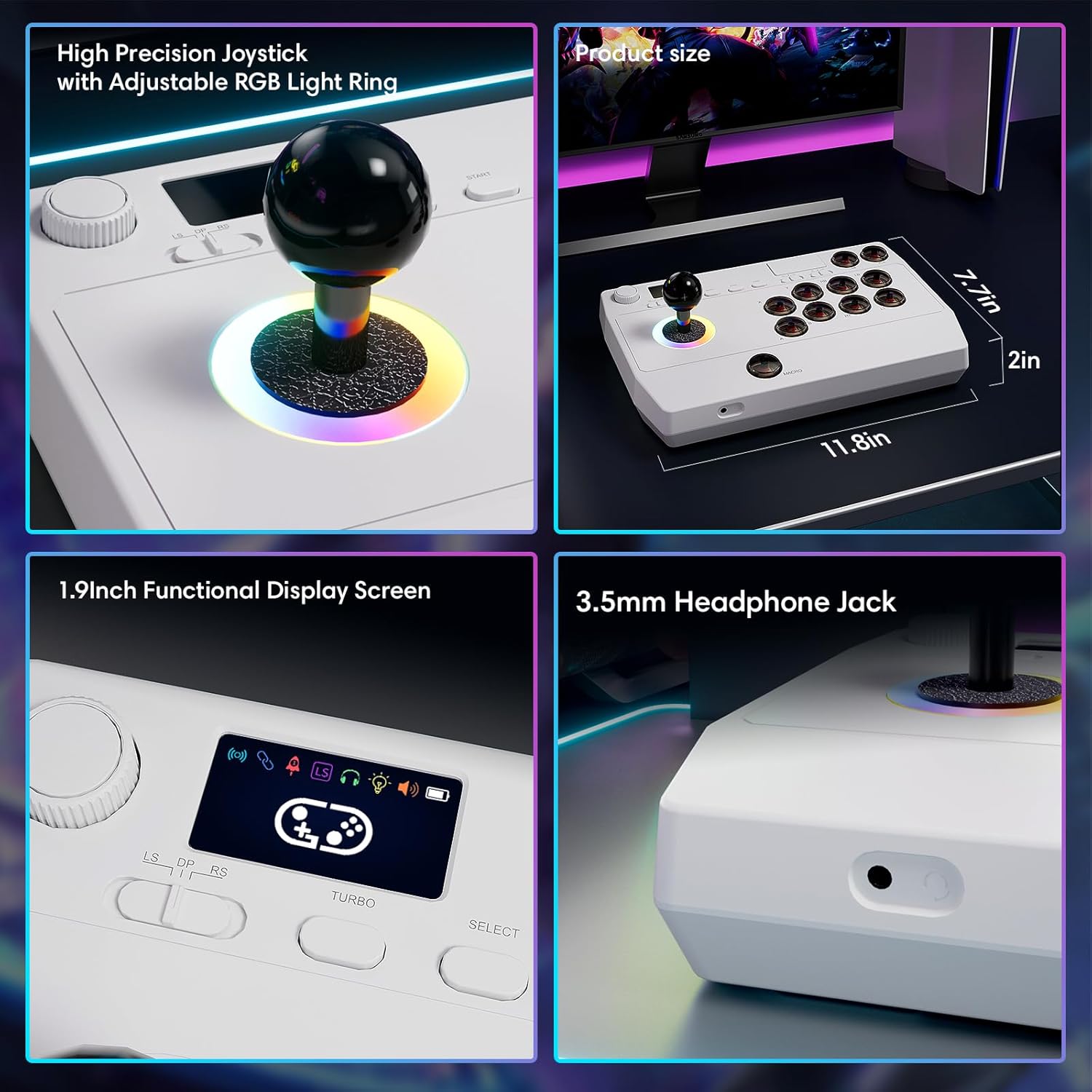
Vaizdas: Stambus planas views of the high-precision joystick with RGB lighting, the 1.9-inch functional display screen, and the 3.5mm headphone jack.
Priežiūra
- Laikykite prietaisą švarų, nuvalydami jį minkšta, sausa šluoste.
- Saugokite, kad prietaisas nepatektų į ekstremalią temperatūrą, drėgmę ar tiesioginius saulės spindulius.
- Do not attempt to disassemble the device, as this may void the warranty.
- Store the 2.4GHz receiver in its designated compartment when not in use to prevent loss.
Trikčių šalinimas
- Įrenginys neįsijungia:
- Įsitikinkite, kad įrenginys yra visiškai įkrautas. Prijunkite jį prie maitinimo šaltinio naudodami USB C tipo laidą.
- Cannot connect wirelessly:
- For Bluetooth, ensure the device is in pairing mode and your host device's Bluetooth is enabled.
- For 2.4GHz, ensure the receiver is securely plugged into a USB port and the arcade stick is in 2.4GHz mode.
- Try restarting both the arcade stick and the host device.
- Buttons or joystick are unresponsive:
- Ensure the device is properly connected (wired or wireless).
- Test the device on a different game or platform to rule out software issues.
- Check for any physical obstructions or damage to the buttons or joystick.
- Audio issues with 3.5mm jack:
- Įsitikinkite, kad ausinės yra visiškai įjungtos.
- Check the volume settings on both the arcade stick's display and the host device.
- Išbandykite su kitomis ausinėmis.
Specifikacijos
| Modelio pavadinimas | „Arcade Stick“. |
| Prekės ženklas | Saitake |
| Suderinami įrenginiai | Android, iOS, Nintendo Switch 1/2, PC, PlayStation 3/4 |
| Valdiklio tipas | Vairasvirtė |
| Ryšio technologija | Bluetooth, USB (2.4GHz wireless, Wired Type-C) |
| Papildomos funkcijos | Ergonomic, Headphone Jack, Portable, Wireless, 1.9-inch Display Screen, TURBO Function, Macro Function, RGB Lighting |
| Aparatinės įrangos platforma | Stalinis kompiuteris, žaidimų konsolė, nešiojamas kompiuteris, išmanusis telefonas, planšetinis kompiuteris, televizorius |
| Maitinimo šaltinis | Battery Powered (Built-in 1000mAh Lithium Battery) |
| Prekės matmenys | 11.61 x 0.71 x 7.68 colio |
| Spalva | Baltas |
Garantija ir palaikymas
The Saitake Wireless Arcade Fight Stick Joystick comes with a 1 metų garantija nuo pirkimo datos.
For technical support, troubleshooting assistance, or warranty claims, please contact Saitake customer service through their official website or the retailer where the product was purchased. Please have your purchase receipt and product model information ready.