
1. Įvadas ir pabaigaview
The EPOS Impact 500 ANC Wireless Headset is engineered for professionals requiring clear communication and focus in diverse work environments. This on-ear Bluetooth headset integrates hybrid Active Noise Cancellation (ANC) to minimize distractions and features EPOS AI™ microphones for natural voice clarity during conversations. It offers versatile connectivity via dual USB-C and USB-A options, ensuring compatibility with various devices. Certified for Microsoft Teams Open Office and other UC platforms, it provides a seamless experience for remote and office collaboration. Key benefits include extended battery life, talk-through mode for quick interactions, and EPOS BrainAdapt™ technology designed to reduce listening fatigue.
2. Kas yra dėžutėje
Upon unboxing your EPOS Impact 500 ANC Wireless Headset, you will find the following components:
- EPOS Impact 500 ANC Wireless Headset
- USB-C į USB-C įkrovimo laidas (1.2 m)
- BTD 900c USB-C Dongle
- USB-C į USB-A adapteris
- Sustainable Carry Pouch
- Saugos vadovas
- Atitikties lapas
- Trumpas vadovas

Image: All items included in the EPOS Impact 500 ANC Wireless Headset package.
3. Sąranka
3.1 Ausinių įkrovimas
Before initial use, fully charge your headset. Connect the provided USB-C to USB-C charging cable to the charging port on the headset and to a compatible USB-C power source. If your device only has USB-A ports, use the included USB-C to USB-A adapter with the charging cable. The LED indicator on the headset will show charging status.
3.2 Prijungimas prie įrenginio
The headset offers flexible connectivity options:
- Belaidis Bluetooth: Power on the headset. Activate Bluetooth on your device (laptop, tablet, smartphone). Put the headset into pairing mode (refer to the Quick Guide for specific button presses). Select "EPOS Impact 500" from your device's Bluetooth list.
- USB-C Dongle (BTD 900c): Insert the BTD 900c USB-C dongle directly into a USB-C port on your computer. The headset will automatically connect to the dongle. If your computer only has USB-A ports, attach the USB-C to USB-A adapter to the dongle before inserting it.
3.3 Ausinių reguliavimas
Adjust the headband for a comfortable fit. The earcups are designed to rest gently on your ears. Position the boom microphone approximately 2-3 cm from the corner of your mouth for optimal voice pickup. The boom mic can be rotated up or down.

Image: The EPOS Impact 500 headset with its adjustable boom microphone.
4. Naudojimo instrukcijos
4.1 Pagrindiniai valdikliai
- Maitinimo įjungimas/išjungimas: Use the dedicated power switch located on one of the earcups.
- Garso reguliavimas: Use the volume up and down buttons on the earcup to control audio levels.
- Skambučių valdymas: A multi-function button is available for answering/ending calls.
- Nutildyti / įjungti mikrofoną: Lift the boom microphone up to mute and lower it down to unmute.
4.2 Aktyvus triukšmo slopinimas (ANC)
The hybrid ANC feature can be activated to reduce background noise, allowing for greater focus during calls and work. Refer to the Quick Guide for specific button controls to toggle ANC on or off.
4.3 Talk-Through Mode
For quick conversations with colleagues without removing the headset, activate Talk-Through mode. This feature allows ambient sounds to pass through, enabling effortless interaction. Consult the Quick Guide for activation instructions.
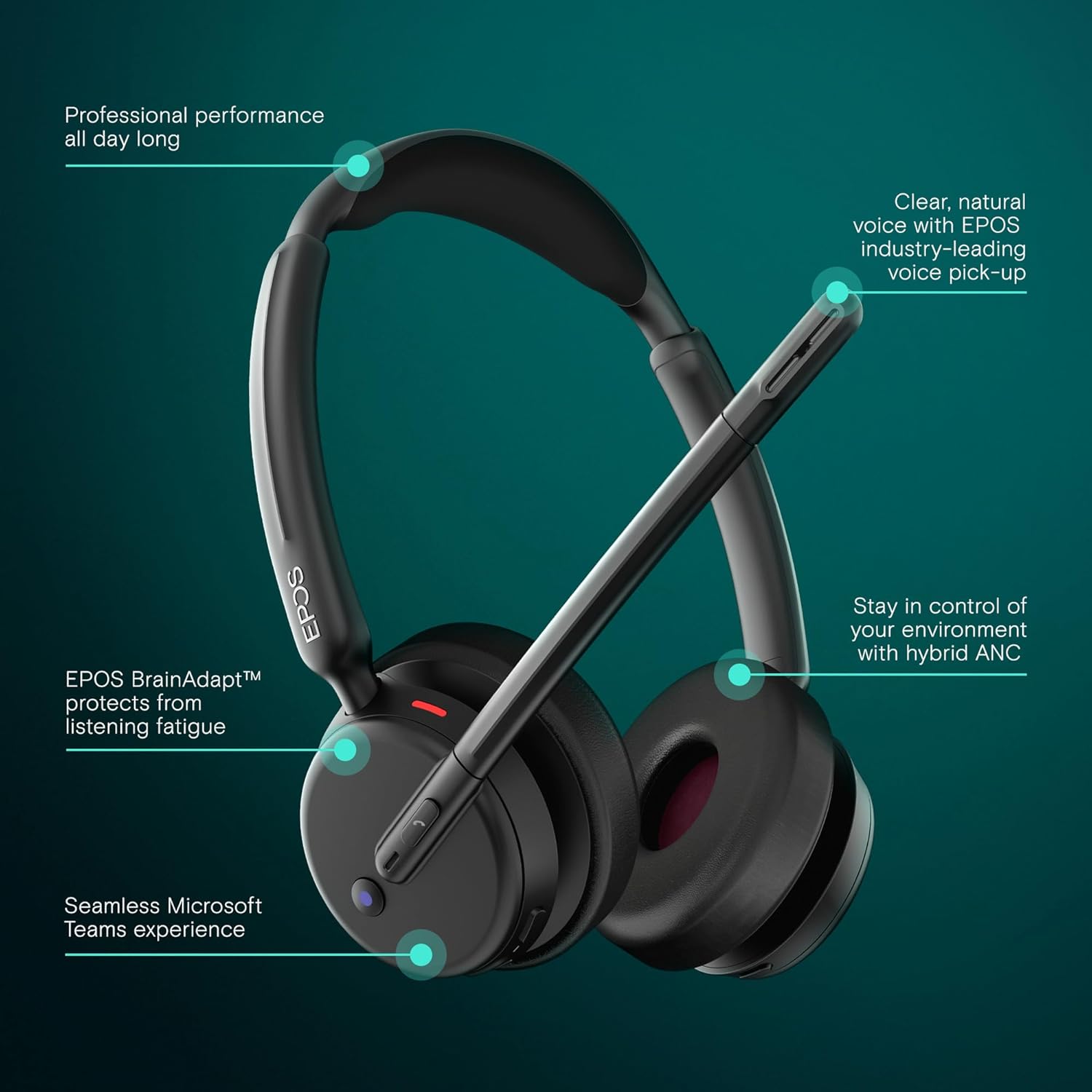
Image: Visual representation of the headset's main operational features.
5. Pagrindinės savybės
- Hibridinis aktyvus triukšmo slopinimas: Adaptively reduces background noise for crystal-clear calls and enhanced focus.
- EPOS AI™ Voice Technology: Advanced microphones isolate your voice from surrounding noise, ensuring natural and professional-sounding calls.
- EPOS BrainAdapt™ Technology: Designed to protect your brain from fatigue caused by poor audio and noise, boosting focus and productivity during long calls.
- Microsoft Teams Certified & UC Compatible: Optimized for Microsoft Teams and compatible with leading Unified Communications platforms like Zoom and Google Meet for effortless collaboration.
- Seamless Dual Connectivity: Includes both USB-C and USB-A options with the BTD 900c dongle and adapter for instant plug-and-play connection to various devices.
- Pailgintas akumuliatoriaus veikimo laikas: Offers up to 35 hours of talk time, supporting long hybrid workdays without frequent recharging.
- Lengvas, ant ausies dedamas dizainas: Provides all-day comfort with soft leatherette cushions, minimizing listening fatigue.
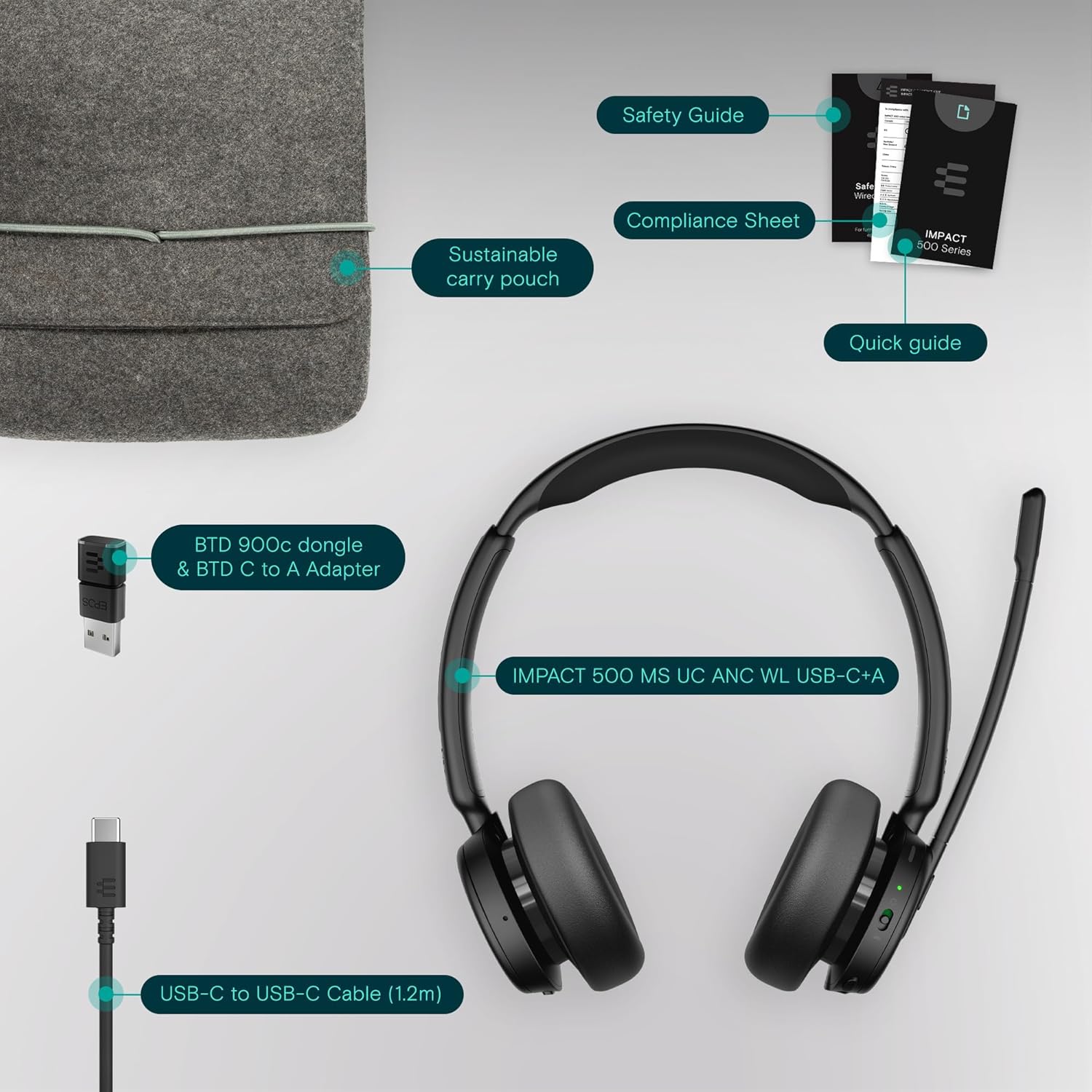
Image: User wearing the headset in a professional setting, highlighting comfort and clarity.
6. Priežiūra
To ensure the longevity and optimal performance of your EPOS Impact 500 ANC Wireless Headset, follow these maintenance guidelines:
- Valymas: Ausinėms valyti naudokite minkštą, sausą šluostę. Ausų kaušelius švelniai nuvalykite šiek tiek drėgnu skudurėliu.amp cloth if necessary, avoiding excessive moisture. Do not use harsh chemicals or abrasive materials.
- Saugykla: When not in use, store the headset in the provided sustainable carry pouch to protect it from dust, scratches, and impacts.
- Temperatūra: Venkite ausinių ilgą laiką laikyti itin aukštoje temperatūroje (karštyje arba šaltyje) arba tiesioginiuose saulės spinduliuose.
- Drėgmė: Laikykite ausines atokiau nuo vandens ir didelės drėgmės.
7. Problemų sprendimas
If you encounter issues with your headset, try the following troubleshooting steps:
- Nėra galios: Ensure the headset is fully charged using the provided USB-C cable and a reliable power source.
- Nėra garso / mikrofono, kuris neveikia:
- Check if the headset is properly paired with your device via Bluetooth or connected via the USB dongle.
- Verify that the headset is selected as the default audio input/output device in your computer's sound settings or communication application (e.g., Microsoft Teams, Zoom).
- Ensure the microphone boom is lowered and not muted.
- Paleiskite įrenginį ir ausines iš naujo.
- Prasta garso kokybė:
- Move closer to your connected device to ensure a strong Bluetooth signal.
- Patikrinkite, ar netrukdo kiti belaidžiai įrenginiai.
- Įsitikinkite, kad mikrofonas tinkamai pastatytas šalia burnos.
- ANC Not Functioning: Ensure the ANC feature is activated. Refer to the Quick Guide for specific controls.
- Connectivity Issues with Dongle: Try inserting the USB dongle into a different USB port on your computer. Ensure the dongle is fully inserted.
For further assistance, consult the comprehensive user manual available on the EPOS website or contact EPOS customer support.
8. Specifikacijos
| Funkcija | Detalė |
|---|---|
| Prekės ženklas | EPOS |
| Modelio pavadinimas | POVEIKIS 500 |
| Modelio numeris | 1001490 |
| Spalva | Juoda |
| Ausų išdėstymas | Ant ausies |
| Triukšmo valdymas | Hibridinis triukšmo slopinimas |
| Ryšio technologija | Belaidis ryšys („Bluetooth“) |
| Bluetooth versija | 5.0 |
| Kontrolės metodas | Palieskite |
| Vidutinis akumuliatoriaus veikimo laikas | 35 valandų |
| Prekės svoris | 391 gramų |
| Korpuso medžiaga | Dirbtinė oda |
| Dažnių diapazonas | 20 Hz–20 000 Hz |
| Papildomos funkcijos | Noise Cancellation, AI Voice Technology, BrainAdapt Technology |
| Suderinami įrenginiai | Nešiojamieji kompiuteriai, staliniai kompiuteriai, planšetiniai kompiuteriai, telefonai, išmanieji garsiakalbiai, televizoriai, mobilieji telefonai |
9. Garantija ir palaikymas
The EPOS Impact 500 ANC Wireless Headset comes with a 2 metų gamintojo garantija. For warranty claims, technical support, or additional product information, please visit the official EPOS websvetainėje arba susisiekite su jų klientų aptarnavimo skyriumi. Išsaugokite pirkimo įrodymą, kad galėtumėte patvirtinti garantiją.