
1. Produktas baigtasview
The Gosasa 6016 is a versatile unisex digital-analog sports watch designed for active lifestyles. It combines the classic appearance of analog hands with the practical features of a digital display. This watch is equipped with multiple functions including an alarm, stopwatch, countdown timer, and dual time display, making it suitable for various activities and daily wear.
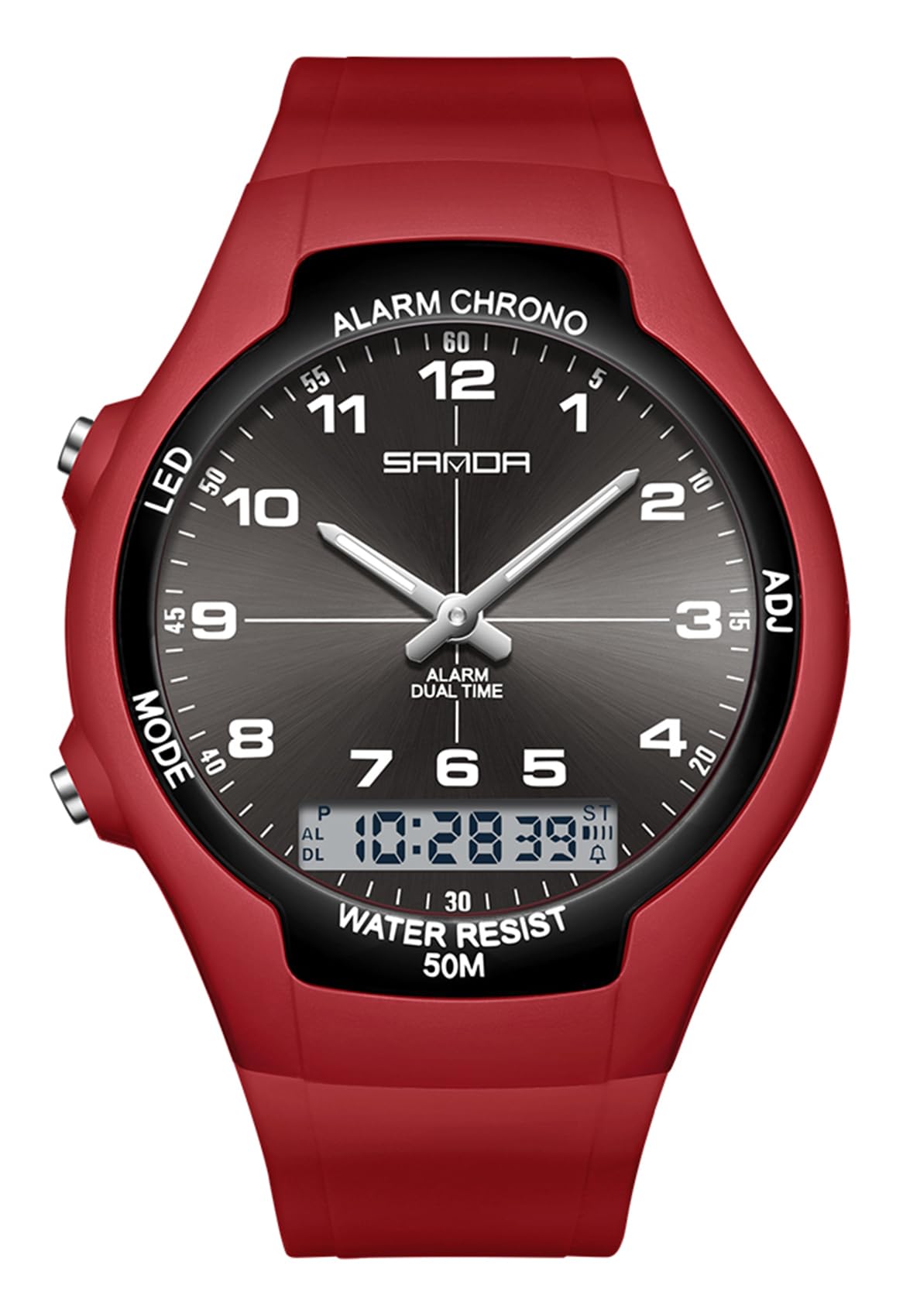
Image 1.1: The Gosasa 6016 Unisex Digital Analog Sports Watch in Red. This image displays the watch's face, showing both analog hands and a digital display, along with the four control buttons.
Pagrindinės funkcijos:
- Dvigubas ekranas: Analoginis ir skaitmeninis laiko rodymas.
- Daugiafunkcis: Signalizacija, Hourly Chime, Stopwatch, Countdown Timer, Week/Date Display, 12/24-Hour Format.
- Atsparumas vandeniui: 50 meters (5 ATM) suitable for hand washing, rain, and cold showers.
- Luminous Hands & LED Backlight: Matomumui prasto apšvietimo sąlygomis.
- Patogus dizainas: Lightweight ABS case with a durable TPU band.
2. Mygtukų funkcijos
The Gosasa 6016 watch features four control buttons located on the sides of the watch case. Understanding their functions is essential for operating the watch.

Image 2.1: Close-up of the watch face, highlighting the digital display and the positions of the control buttons.
- LED Button (Top Left): Įjungia skaitmeninio ekrano LED foninį apšvietimą.
- MODE mygtukas (apačioje kairėje): Cycles through different modes: Time Display, Alarm, Stopwatch, Countdown Timer, Dual Time.
- CHRONO/ALARM Button (Top Right): Used to start/stop the stopwatch, set the alarm, and adjust values in setting modes.
- ADJ mygtukas (apačioje dešinėje): Used to enter and exit setting modes, and to select items for adjustment.
3. Sąranka ir laiko reguliavimas
3.1 Skaitmeninio laiko ir datos nustatymas
- Įprastu laiko rodymo režimu paspauskite REŽIMAS mygtuką kelis kartus, kol pradės mirksėti skaitmeninis laiko ekranas, rodantis, kad įjungtas nustatymo režimas.
- Paspauskite ADJ button to cycle through the settings: seconds, hour, minute, month, date, day of the week, 12/24-hour format.
- Naudokite CHRONO/ALARM button to increase the flashing value. Hold the button to rapidly advance the value.
- Kai visi norimi nustatymai bus nustatyti, paspauskite ADJ mygtuką dar kartą, kad išeitumėte iš nustatymo režimo.
3.2 Analoginių rodyklių reguliavimas
The analog hands on the Gosasa 6016 watch are synchronized with the digital time. To adjust the analog hands, you must first set the digital time accurately. The analog hands will automatically adjust to match the digital time after the digital time is set and confirmed.
4. Veikimo funkcijos
4.1 Aliarmo funkcija
- Įprastame laiko ekrane paspauskite REŽIMAS button until "AL" (Alarm) appears on the digital display.
- Paspauskite ADJ button to make the alarm hour setting flash.
- Naudokite CHRONO/ALARM mygtuką, kad nustatytumėte norimą žadintuvo valandą.
- Paspauskite ADJ again to select the alarm minute setting, then use CHRONO/ALARM nustatyti minutes.
- Paspauskite ADJ patvirtinti ir išeiti iš žadintuvo nustatymo.
- Norėdami įjungti / išjungti žadintuvą, žadintuvo režime paspauskite CHRONO/ALARM mygtuką. Atsiras / išnyks aliarmo piktograma, rodanti jo būseną.
4.2 Chronometro funkcija
- Įprastame laiko ekrane paspauskite REŽIMAS button until "ST" (Stopwatch) appears.
- Paspauskite CHRONO/ALARM mygtuką, kad paleistumėte chronometrą.
- Paspauskite CHRONO/ALARM dar kartą, kad pristabdytumėte chronometrą.
- Norėdami tęsti, paspauskite CHRONO/ALARM.
- Norėdami nustatyti chronometro pradinę padėtį, kai jis pristabdytas, paspauskite ADJ mygtuką.
- Paspauskite REŽIMAS , kad išeitumėte iš chronometro režimo.
4.3 Atgalinės atskaitos laikmatis
Specific instructions for the countdown timer are not detailed in the product description. Typically, this function is accessed via the MODE button and set using the ADJ and CHRONO/ALARM buttons similar to the alarm or stopwatch. Refer to the watch's on-screen prompts if available.
4.4 LED foninis apšvietimas
Paspauskite LED button (top left) to illuminate the digital display for a few seconds, providing visibility in dark environments.

Image 4.1: The Gosasa 6016 watch displaying its green LED backlight, enhancing readability in low-light conditions.
4.5 Water Resistance (50M / 5 ATM)
This watch is designed to withstand water pressure up to 50 meters (5 ATM). This means it is suitable for:
- Daily use, such as hand washing.
- Poveikis lietui.
- Šalti dušai.
- Plaukimas sekliame vandenyje.
Svarbu: Laikrodis yra ne recommended for hot water activities (e.g., hot showers, saunas) or diving, as extreme temperature changes or high-pressure water jets can compromise the water seals.
5. Priežiūra ir priežiūra
Proper care will ensure the longevity and optimal performance of your Gosasa 6016 watch.
- Reguliarus valymas: Wipe the watch regularly with a soft, lint-free cloth to remove dirt, dust, and oils. This prevents build-up that can damage the surface over time.
- Venkite stiprių cheminių medžiagų: Keep your watch away from strong chemicals, perfumes, lotions, and cleaning agents. These substances can damage the watch's materials, particularly the TPU band and the case finish.
- Temperatūros kraštutinumai: Venkite laikrodžio ilgą laiką būti veikiamam ekstremalių temperatūrų – tiek karštų, tiek šaltų.
- Baterijos keitimas: When the digital display dims or functions become erratic, it may be time to replace the battery. It is recommended to have battery replacement performed by a qualified watch technician to ensure proper sealing and water resistance.
6. Problemų sprendimas
If you encounter issues with your Gosasa 6016 watch, refer to the following common troubleshooting steps:
- Skaitmeninis ekranas tuščias arba blankus:
- Patikrinkite, ar akumuliatorių reikia pakeisti.
- Ensure the watch has not been exposed to extreme cold, which can temporarily affect LCD performance.
- Mygtukai nereaguoja:
- Ensure the watch is not in a locked mode (if applicable, though not specified for this model).
- Try pressing the buttons firmly.
- If the watch was recently submerged, ensure it is dry.
- Laikas netikslus:
- Re-adjust the digital time following the instructions in Section 3.1.
- If the issue persists, the battery may be low, affecting timekeeping accuracy.
- Vanduo laikrodžio viduje:
- Immediately stop using the watch.
- Contact customer support or a professional watch repair service. Do not attempt to open the watch yourself.
For persistent issues not covered here, please refer to the Warranty & Support section for contact information.
7. Specifikacijos
| Funkcija | Specifikacija |
|---|---|
| Modelio numeris | 6016 |
| Judėjimo tipas | Kvarcas |
| Ekrano tipas | Analog and Digital (Dual Display) |
| Bylos medžiaga | Akrilnitrilo butadieno stirenas (ABS) |
| Juostos medžiaga | Termoplastinis poliuretanas (TPU) |
| Krištolo medžiaga | Akrilas |
| Vandens atsparumo gylis | 50 metrų (5 bankomatai) |
| Korpuso skersmuo | 38 mm / 1.5 colio |
| Korpuso storis | 11 mm / 0.43 colio |
| Juostos plotis | 18–22 mm / 0.71–0.87 colio |
| Laikrodžio ilgis | 265 mm / 10.43 colio |
| Prekės svoris | 38 gramų / 1.34 uncijos |
| Papildomos funkcijos | Alarm, Stopwatch, Countdown Timer, Week/Date Display, 12/24 Hour Format, Luminous Hands, LED Backlight |
8. Garantija ir palaikymas
Gosasa is committed to customer satisfaction. If you have any questions or require assistance with your watch, please refer to the following:
- Grąžinimo politika: You may return the watch and its original packaging in undamaged condition within 30 days of purchase, without needing to provide a reason.
- Techninė pagalba: For questions regarding watch adjustment, functions, or any other operational queries, please contact the seller directly through the platform where the purchase was made.
- Klientų patirtis: We strive to ensure a happy customer experience and highly value your feedback.
9. Produkto vaizdo įrašas
Watch this official product video for a visual guide on the Gosasa Unisex Digital Analog Sports Watch.
Video 9.1: An official product video demonstrating the features and design of the Gosasa Unisex Digital Analog Sports Watch. This video provides a visual overview of the watch's functionality and aesthetic.