
1. Įvadas

Image: The Yaheetech Gaming Chair Model 615816 positioned in a modern gaming environment, showcasing jo dizainą ir išvaizdą.
Thank you for choosing the Yaheetech Gaming Chair Model 615816. This manual provides essential information for the safe and efficient use of your new gaming chair. Please read these instructions carefully before assembly and use, and retain them for future reference.
Saugos įspėjimai
- Neviršykite maksimalios leistinos apkrovos 136 kg (300 svaro).
- To prevent tipping, avoid leaning heavily or suddenly on the chair's backrest, especially when fully reclined.
- Prieš naudodami įsitikinkite, kad visi varžtai ir veržlės yra tvirtai priveržtos. Periodiškai patikrinkite ir prireikus priveržkite.
- Surinkimo metu laikykite vaikus ir naminius gyvūnus atokiau. Mažos dalys gali kelti užspringimo pavojų.
- Use the chair only on a flat, stable surface.
- Nestovėkite ant kėdės.
- Venkite kėdės tiesioginių saulės spindulių ar ekstremalių temperatūrų, kad nesugadintumėte medžiagos.
2. Produktas baigtasview
The Yaheetech Gaming Chair Model 615816 is designed for comfort and support during extended periods of sitting, whether for gaming, work, or study. It features an ergonomic design with multiple adjustable components.
Pagrindinės savybės
- Ergonomiškas dizainas: High backrest with neck, shoulder, lumbar, arm, and leg support.
- Adjustable Reclining Angle: Reclines between 90 and 135 degrees.
- Massage Lumbar Cushion: USB-powered for enhanced comfort.
- Ištraukiama kojų atrama: Provides leg support for relaxation.
- Reguliuojamas sėdynės aukštis: Gas lift mechanism for smooth height adjustment.
- Pocket Spring Cushion: Adapts to body posture for pressure absorption.
- Premium Faux Leather: Breathable, easy to clean, and durable.
- 360° pasukimas: Smooth rotation for mobility.
- Wide Metal Star Base: Užtikrina stabilumą ir ilgaamžiškumą.
- Convenient Back Pocket: For storing small items like power banks or controllers.

Vaizdas: Viršview of the Yaheetech Gaming Chair highlighting its ergonomic design, high-density foam seat, pocket spring cushion, breathable perforated faux leather, convenient back pocket, massage lumbar pillow with switch, and wide metal star base.

Vaizdas: Išsamus view of the internal pocket spring cushion, illustrating its construction for enhanced comfort and pressure absorption.
3. Sąranka ir surinkimas
The Yaheetech Gaming Chair requires assembly. Please refer to the separate Surinkimo vadovas included in your package for detailed, step-by-step instructions. Ensure all components are present before beginning assembly.
Pakuotės turinys:
- Gaming Chair Components (Backrest, Seat, Armrests, Base, Wheels, Gas Lift, etc.)
- Surinkimo vadovas
- Accessory Kit (Screws, Allen Wrench, etc.)
- Lumbar Cushion with USB Cable
- Galvos atramos pagalvėlė
Note: Some components may be pre-assembled. Follow the instructions in the dedicated assembly manual carefully to ensure correct and safe setup.
4. Naudojimo instrukcijos
4.1. Sėdynės aukščio reguliavimas
Norėdami reguliuoti sėdynės aukštį, suraskite svirtį, esančią dešinėje pusėje po sėdyne.
- To raise the seat: Lift the lever while taking your weight off the seat. The seat will rise automatically. Release the lever at the desired height.
- To lower the seat: Lift the lever while remaining seated. The seat will lower. Release the lever at the desired height.
4.2. Reclining the Backrest
The backrest can be reclined between 90 and 135 degrees.
- To recline: Pull the recline lever (usually on the left side) upwards and lean back. Release the lever to lock the backrest in position.
- To return to upright position: Pull the recline lever upwards and lean forward slightly. The backrest will return to its original position. Release the lever to lock.
4.3. Using the Footrest
The chair features an extendable footrest for added comfort.
- To extend: Pull the footrest out from under the seat.
- To retract: Push the footrest back under the seat until it is fully stored.
4.4. Activating the Massage Lumbar Cushion
The lumbar cushion provides a massage function.
- Connect the USB cable from the lumbar cushion to a compatible USB power source (e.g., computer USB port, USB wall adapter 5V-1A, power bank).
- Press the ON/OFF button on the USB cable to activate or deactivate the massage function.
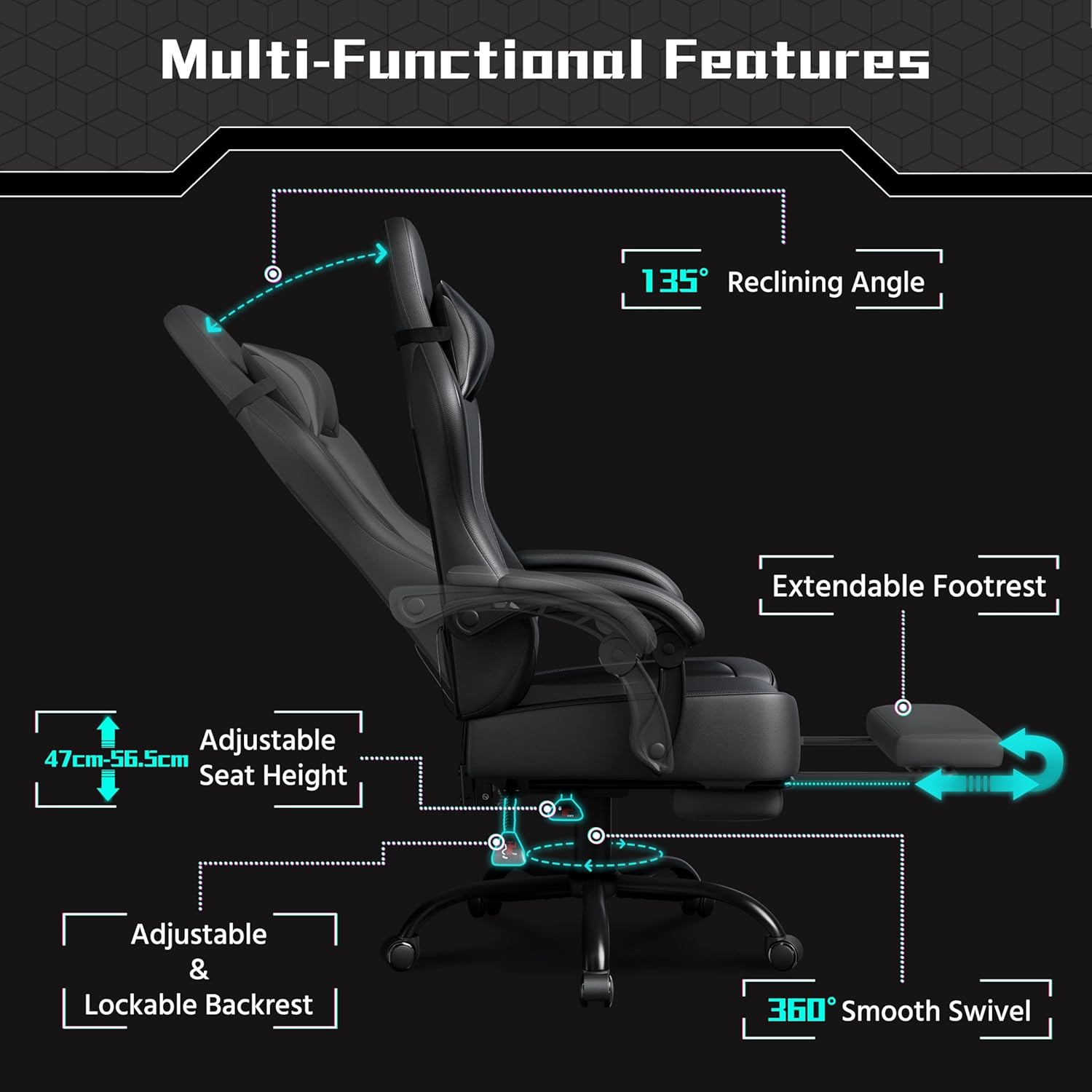
Image: Diagram illustrating the multi-functional features of the Yaheetech Gaming Chair, including the 135° reclining angle, extendable footrest, adjustable seat height (47cm-56.5cm), adjustable and lockable backrest, and 360° smooth swivel.

Image: Illustration of the Yaheetech Gaming Chair's 90-135° reclining capability and how its ergonomic design provides support for the neck, shoulders, lumbar region, arms, and legs.
5. Priežiūra
Proper maintenance ensures the longevity and optimal performance of your gaming chair.
- Valymas: The faux leather upholstery can be cleaned with a simple damp audinys. Do not use detergents or chemical cleaning agents, as these may damage the material.
- Patikra: Periodically check all screws, bolts, and moving parts (wheels, gas lift, recline mechanism) for tightness and proper function. Re-tighten any loose fasteners.
- Tepimas: If any moving parts become stiff or noisy, a small amount of silicone-based lubricant can be applied.
- Venkite perkrovos: Always adhere to the maximum weight capacity of 136 kg.
- Saugykla: Jei kėdutę ilgesnį laiką laikysite, laikykite ją vėsioje, sausoje vietoje, apsaugotoje nuo tiesioginių saulės spindulių.

Vaizdas: Stambus planas view of the premium faux leather material used on the Yaheetech Gaming Chair, highlighting its breathable, easy-to-clean, and durable properties.
6. Problemų sprendimas
Šiame skyriuje aptariamos dažniausiai pasitaikančios problemos, su kuriomis galite susidurti naudodami žaidimų kėdę.
| Problema | Galima priežastis | Sprendimas |
|---|---|---|
| Kėdė svyruoja arba jaučiasi nestabili. | Atsilaisvinusios tvirtinimo detalės; nelygios grindys. | Check and tighten all screws and bolts. Ensure the chair is on a flat surface. |
| Sėdynės aukščio reguliavimas neveikia. | Dujinio keltuvo gedimas; užstrigo svirties mechanizmas. | Ensure the lever is fully engaged. If the gas lift is faulty, contact customer support. |
| Atlošas neatlenkiamas ir neužsifiksuoja. | Recline mechanism stuck; lever not fully engaged. | Check the recline lever for obstructions. Ensure it is pulled fully to recline and released to lock. |
| Masažo funkcija neveikia. | USB cable not connected; power source issue; ON/OFF button not pressed. | Ensure the USB cable is securely connected to a working power source. Press the ON/OFF button on the cable. Try a different USB port or power adapter. |
| Cypimo garsai. | Atsilaisvinusios jungtys; trintis tarp dalių. | Tighten all fasteners. Apply a small amount of silicone lubricant to moving joints if necessary. |
If you encounter an issue not listed here or if the suggested solutions do not resolve the problem, please contact Yaheetech customer support.
7. Specifikacijos
| Modelio numeris | 615816 |
| Prekės ženklas | Yaheetech |
| Spalva | Juoda |
| Medžiagos | Polyurethane, PVC, Foam, Metal, Laminate, Polyester, Plastic |
| Assembled Dimensions (W x D x H) | 72 x 72 x 124.5–134 cm (28.3 x 28.3 x 49–52.8 colio) |
| Seat Area (W x D) | 52.5 x 50 cm (20.7 x 19.7 colio) |
| Reguliuojamas sėdynės aukštis | 47–56.5 cm (18.5–22.2 colio) |
| Didžiausia apkrova | 136 kg (300 svaro) |
| Produkto svoris | 19.4 kg (42.8 svaro) |
| Atlošimo kampas | 90-135 laipsnių |
| Reikalingas surinkimas | Taip |
| Rekomenduojamas naudojimas | Computer, Gaming, Video Games |
| Kambario tipas | Office, Bedroom, Game and Recreation Room |

Image: Detailed diagram showing the dimensions of the Yaheetech Gaming Chair, including width, depth, height, seat dimensions, and footrest extension.
8. Garantija ir palaikymas
For warranty information, please refer to the documentation provided with your purchase or visit the official Yaheetech website. If you require assistance with assembly, parts, or troubleshooting that is not covered in this manual, please contact Yaheetech customer support.
Kontaktinė informacija: Prašome apsilankyti www.yaheetech.com for support options, including FAQs, contact forms, and customer service details.