
1. Įvadas
Ačiū, kad pirkoteasing the ULTIMEA Aura A60 U2621 7.1ch Dolby Atmos Soundbar System. This manual provides essential information for setting up, operating, and maintaining your new sound system. Please read this manual thoroughly before use to ensure proper functionality and to maximize your audio experience.

Figure 1.1: Immersive audio experience with the ULTIMEA Aura A60 system.
2. Saugos informacija
Kad sumažintumėte elektros smūgio, gaisro ar įrenginio sugadinimo riziką, laikykitės šių saugos priemonių:
- Nelaikykite šio prietaiso nuo lietaus ar drėgmės.
- Ant aparato nedėkite daiktų, pripildytų skysčių, pavyzdžiui, vazų.
- Užtikrinkite tinkamą vėdinimą. Neužblokuokite jokių ventiliacijos angų.
- Nemontuokite šalia jokių šilumos šaltinių, pvz., radiatorių, šilumokaičių, viryklių ar kitų įrenginių (įskaitant ampkeltuvai), kurie gamina šilumą.
- Saugokite maitinimo laidą, kad ant jo neužeitų ar nesuspaustų, ypač prie kištukų, patogių lizdų ir toje vietoje, kur jie išeina iš aparato.
- Naudokite tik gamintojo nurodytus priedus/priedus.
- Atjunkite šį įrenginį žaibuojant arba kai nenaudojate ilgą laiką.
- Visus techninės priežiūros darbus patikėkite kvalifikuotam techninės priežiūros personalui.
3. Pakuotės turinys
Prašome patikrinti, ar visi daiktai yra ir yra geros būklės:
- ULTIMEA Aura A60 Soundbar
- Wireless Subwoofer (4-inch, BassMX Technology)
- 4 x Surround Speakers (2 front, 2 rear)
- Nuotolinio valdymo pultas
- HDMI kabelis
- Maitinimo adapteris / laidai
- Vartotojo vadovas (šis dokumentas)
4. Produktas baigtasview
The ULTIMEA Aura A60 U2621 is a 7.1ch Dolby Atmos soundbar system designed to deliver an immersive home theater audio experience. It features a main soundbar unit, a powerful wireless subwoofer with BassMX technology, and four surround speakers.
4.1 Main Soundbar Unit
The main soundbar unit houses 3 main channels for clear dialogue and primary audio. It serves as the central hub for all audio connections.

Figure 4.1: Main soundbar unit with front surround speakers.
4.2 Belaidis žemųjų dažnių garsiakalbis
The dedicated 4-inch wireless subwoofer incorporates BassMX technology to enhance low frequencies, providing deep and resonant bass for a more impactful audio experience.

Figure 4.2: Wireless subwoofer with BassMX technology.
4.3 erdvinio garso kolonėlių
The system includes four surround speakers: two front and two rear. The rear speakers connect wirelessly to the soundbar, minimizing cable clutter and allowing flexible placement to create an expansive acoustic space.

Figure 4.3: Diagram of 7.1ch sound distribution.
4.4 Įvesties / išvesties prievadai
The soundbar features multiple input options for versatile connectivity:
- HDMI eARC: For high-quality audio transmission and seamless TV integration.
- Optinis: Skaitmeninė garso įvestis.
- AUX: Analoginė garso įvestis.
- USB: Medijos atkūrimui.
- Bluetooth: Belaidis garso transliavimas.

Figure 4.4: Rear panel connections, including HDMI eARC.
5. Sąranka
5.1 Fizinis išdėstymas
Optimal placement of your sound system components is crucial for the best audio experience.
- Garso juosta: Place the soundbar centrally below your television. Ensure it is not obstructed.
- Žemų dažnių garsiakalbis: Position the wireless subwoofer on the floor near the soundbar. Experiment with placement to find the best bass response for your room.
- Priekiniai erdvinio garso garsiakalbiai: Place the two wired front surround speakers to the left and right of your TV, ideally at ear level when seated.
- Galiniai erdvinio garso garsiakalbiai: Position the two wireless rear surround speakers behind your primary listening position, to the left and right. These speakers will automatically connect wirelessly to the soundbar once powered on.

Figure 5.1: Recommended speaker placement for Dolby Atmos.
5.2 Jungtys
Norėdami prijungti garso juostą, atlikite šiuos veiksmus:
- Maitinimo jungtis: Connect the power cables to the soundbar, subwoofer, and surround speakers, then plug them into a power outlet.
- HDMI eARC (rekomenduojama): Connect one end of the provided HDMI cable to the HDMI eARC port on your soundbar and the other end to the HDMI eARC/ARC port on your TV. This connection supports Dolby Atmos and allows for TV remote control of the soundbar.
- Optinis ryšys (alternatyvus): If your TV does not have an HDMI eARC/ARC port, connect an optical cable (not included) from your TV's optical output to the OPTICAL input on the soundbar.
- AUX Connection (Alternative): For analog audio sources, connect a 3.5mm AUX cable (not included) from your device's audio output to the AUX input on the soundbar.
- USB jungtis: Insert a USB drive into the USB port on the soundbar for direct media playback.
- „Bluetooth“ susiejimas: To connect a Bluetooth device, select the Bluetooth input on the soundbar. On your device, search for 'ULTIMEA Aura A60' and pair.
6. Naudojimo instrukcijos
6.1 Maitinimo įjungimas/išjungimas
Norėdami įjungti arba išjungti sistemą, paspauskite garso juostos arba nuotolinio valdymo pulto maitinimo mygtuką.
6.2 Įvesties pasirinkimas
Use the 'Input' button on the remote control or the soundbar to cycle through available input sources: HDMI eARC, Optical, AUX, USB, and Bluetooth.

Figure 6.1: Remote control for easy operation.
6.3 Garsumo valdymas
Adjust the master volume using the 'Volume Up' and 'Volume Down' buttons on the remote control or the soundbar. You can also adjust subwoofer and surround speaker levels independently.
6.4 Sound Modes and EQ Presets
The Aura A60 offers various sound modes and EQ presets to optimize audio for different content and preferences.
- Specialūs režimai: Select from 6 specialized modes: Movie, Music, Voice, Sports, Game, and Night.
- EQ išankstiniai nustatymai: Access 121 professional EQ presets for genres like Bass, Pop, Classical, and Rock via the ULTIMEA app.

Figure 6.2: 121 preset EQ matrix for customized audio.
6.5 Programų valdymas
Download the ULTIMEA app to your smartphone for advanced control and customization options, including a 10-band EQ and access to all EQ presets.
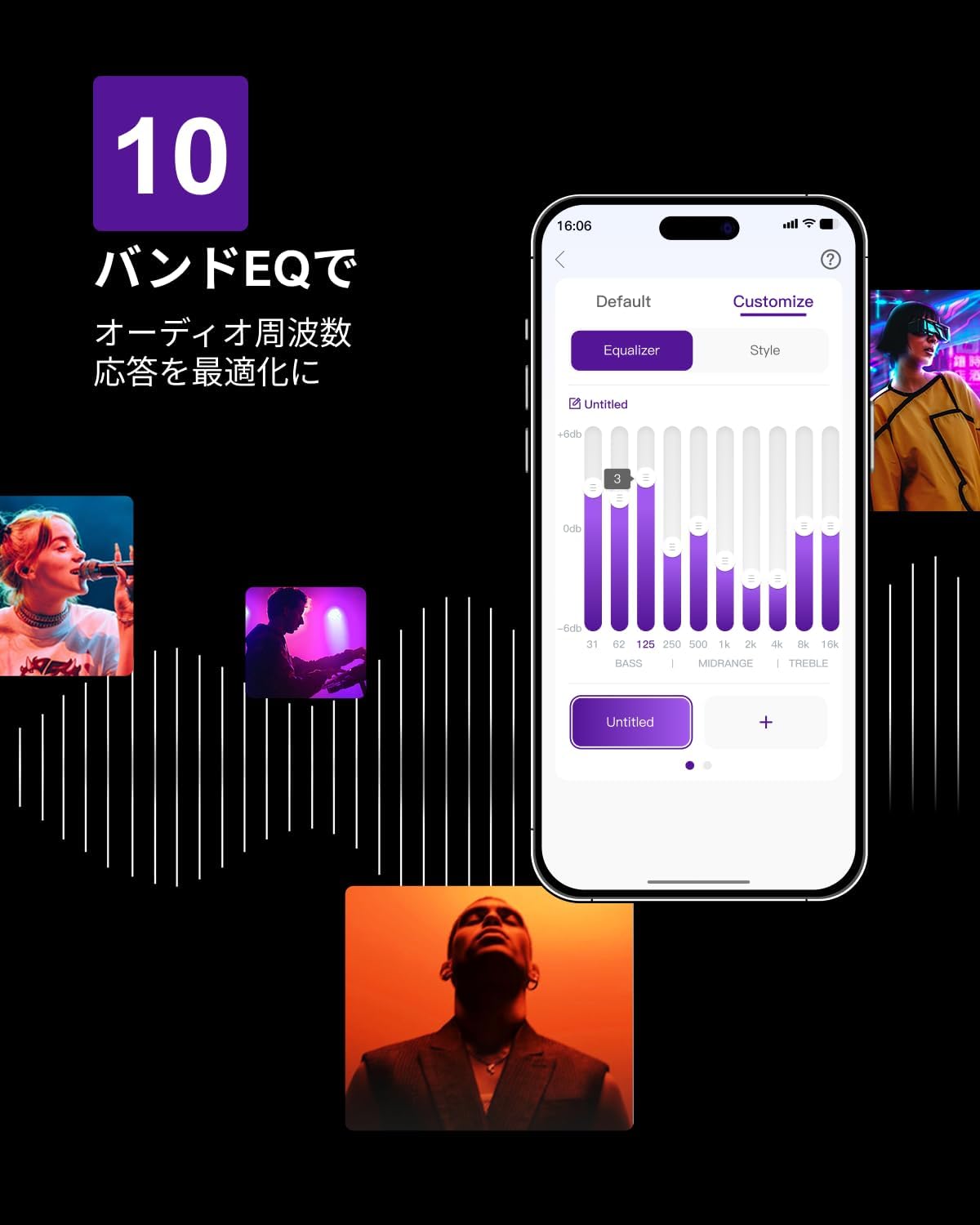
Figure 6.3: ULTIMEA mobile application interface.
7. Priežiūra
To ensure the longevity and optimal performance of your ULTIMEA Aura A60 soundbar system, follow these simple maintenance guidelines:
- Valymas: Use a soft, dry cloth to wipe the surfaces of the soundbar, subwoofer, and speakers. Do not use liquid cleaners or abrasive materials, as they may damage the finish.
- Vėdinimas: Įsitikinkite, kad visos ventiliacijos angos yra švarios ir neuždengtos, kad išvengtumėte perkaitimo.
- Saugykla: Jei sistemą ilgesnį laiką sandėliuosite, atjunkite ją nuo maitinimo šaltinio ir laikykite vėsioje, sausoje vietoje, apsaugotoje nuo tiesioginių saulės spindulių ir ekstremalių temperatūrų.
8. Problemų sprendimas
Jei kyla problemų dėl garso juostos sistemos, žr. toliau pateiktas dažniausiai pasitaikančias problemas ir sprendimus:
| Problema | Galima priežastis | Sprendimas |
|---|---|---|
| Nėra garso iš garso juostos. | Pasirinkta neteisinga įvestis, per mažas garsumas, netinkamai prijungti laidai. | Verify the correct input source. Increase volume. Check all cable connections (HDMI, Optical, AUX). Ensure the soundbar is powered on. |
| No sound from subwoofer/surround speakers. | Subwoofer/speakers not paired or powered on, volume too low. | Ensure subwoofer and surround speakers are powered on. They should automatically pair. If not, refer to the pairing instructions in the full manual (if available) or contact support. Increase their individual volume levels. |
| Iškraipytas arba prasta garso kokybė. | Incorrect audio settings, poor source quality, interference. | Adjust EQ settings or try different sound modes. Ensure the audio source is high quality. Check for nearby electronic devices causing interference. |
| Bluetooth ryšio problemos. | Device out of range, not in pairing mode, interference. | Ensure the soundbar is in Bluetooth pairing mode. Move your device closer to the soundbar. Disconnect and re-pair the device. |
If the problem persists after trying these solutions, please contact ULTIMEA customer support.
9. Specifikacijos
| Funkcija | Detalė |
|---|---|
| Prekės ženklas | ULTIMALAS |
| Modelio pavadinimas | Aura A60 |
| Modelio numeris | U2621 |
| Garsiakalbio tipas | Soundbar with 7.1ch Surround Sound |
| Garso technologija | Dolby Atmos, BassMX Technology |
| Ryšys | HDMI eARC, Bluetooth, Optical, AUX, USB |
| Žemųjų dažnių garsiakalbis | 4-inch Wired Subwoofer (integrated BassMX) |
| Erdvinio garso garsiakalbiai | 4 (2 wired front, 2 wireless rear) |
| Kontrolė | Remote Control, ULTIMEA App |
| Spalva | Juoda |
| Matmenys (G x P x A) | 9 cm x 40 cm x 7 cm (Soundbar, approximate) |
| Kilmės šalis | Kinija |
10. Garantija ir palaikymas
ULTIMEA is committed to providing high-quality products and customer satisfaction. Your Aura A60 U2621 soundbar system comes with comprehensive support.
10.1 Informacija apie garantiją
Specific warranty details may vary by region. Please refer to the warranty card included with your product or visit the official ULTIMEA websvetainėje, kurioje pateikiamos naujausios garantijos sąlygos.
10.2 Pagalba klientams
For any questions, technical assistance, or troubleshooting not covered in this manual, please contact our dedicated support team:
- 365-Day Support: Our expert staff is available year-round to assist you.
- Tiesioginis pokalbis: Instant responses are available via live chat on our websvetainę.
- Grąžinimai: We offer a 30-day return policy with free shipping for your peace of mind.

365-Day Expert Support

Instant Live Chat

30 dienų nemokamas grąžinimas
Dėl papildomos pagalbos apsilankykite ULTIMEA Brand Store.


