
1. Įvadas
This manual provides essential information for setting up, operating, maintaining, and troubleshooting your CHUWI Hi10 X2 2-in-1 Laptop Tablet. Please read it thoroughly before using your device.
Kas yra dėžutėje
- Hi10 X2 Tablet
- Magnetinė klaviatūra
- Dėklas su stovu
- Įkroviklio rinkinys
- Vartotojo vadovas (šis dokumentas)

Image 1.1: CHUWI Hi10 X2 Tablet with Magnetic Keyboard and Case.
2. Sąranka
2.1 Pradinis įkrovimas
Before first use, fully charge your CHUWI Hi10 X2 tablet using the provided charger set. Connect the charger to the Type-C port on the tablet and plug it into a power outlet. The charging indicator light will illuminate.
2.2 Attaching the Magnetic Keyboard and Case
Align the tablet with the magnetic connectors on the keyboard. The magnets will secure the tablet in place. The case with stand can be adjusted to your preferred viewing kampas.
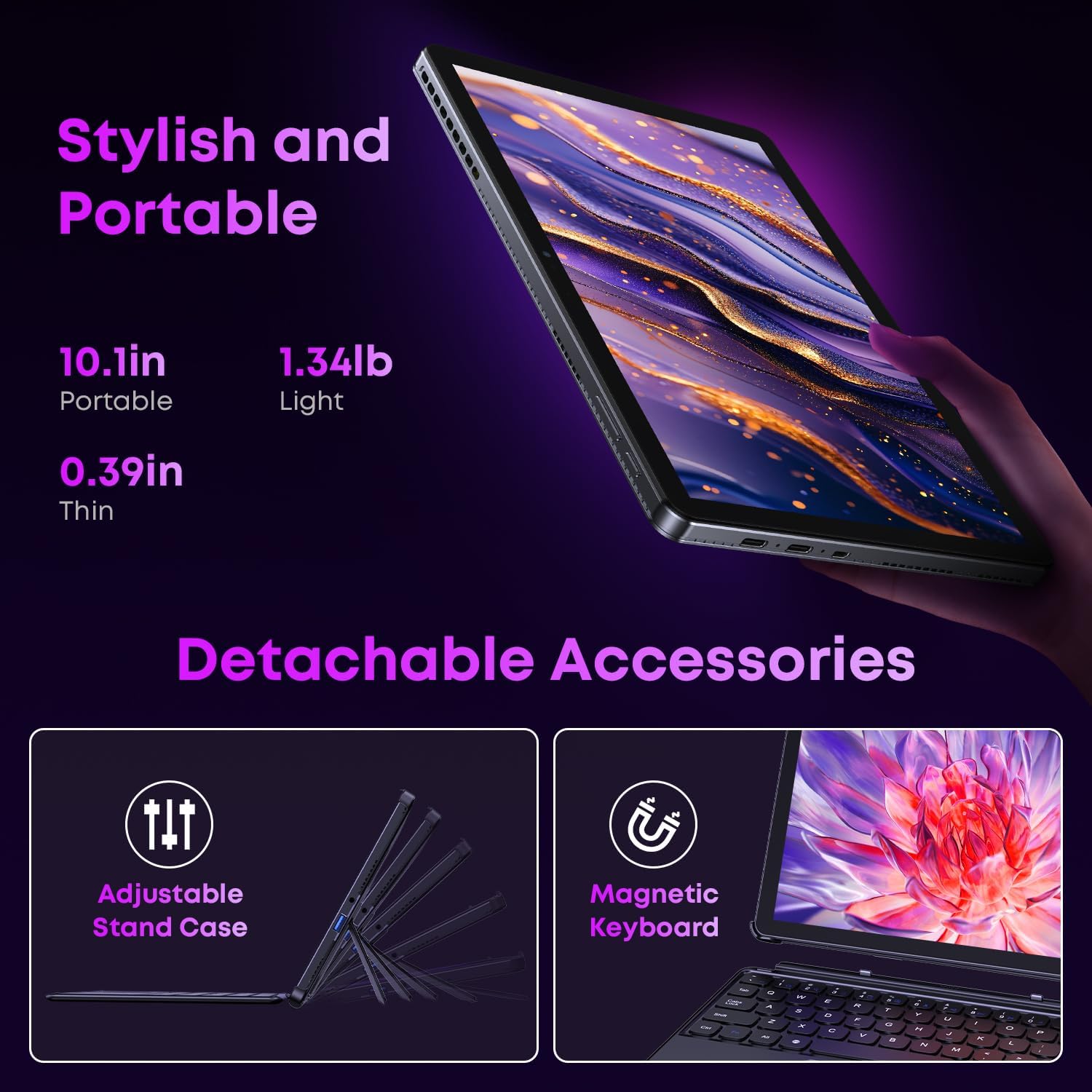
Image 2.1: Detachable accessories including the magnetic keyboard and adjustable stand case.
2.3 First Boot-Up and Windows Activation
Press and hold the power button until the screen turns on. Follow the on-screen instructions to complete the initial Windows 11 setup. If your Windows system arrives unactivated, please send the serial number (located on the back of the device) to CHUWI support via Amazon for your activation key.
2.4 Prisijungimas prie „Wi-Fi“.
During setup, you will be prompted to connect to a Wi-Fi network. Select your network and enter the password. The device supports Wi-Fi 6 for fast and stable connections.
3. Naudojimo instrukcijos
3.1 Įjungimas / išjungimas ir miego režimas
- Maitinimas: Paspauskite ir palaikykite maitinimo mygtuką, kol ekranas įsijungs.
- Išjungti: From the Windows Start menu, select Power > Shut down.
- Miegojimo rezimas: Briefly press the power button to enter or exit sleep mode.
3.2 Jutiklinio ekrano naudojimas
The 10.1-inch HD touchscreen supports 10-point multi-touch gestures. Use taps, swipes, and pinches for navigation and interaction with applications.

Image 3.1: The 10.1-inch HD touchscreen display.
3.3 Nešiojamojo ir planšetinio kompiuterio režimai
The magnetic keyboard allows for seamless switching between laptop and tablet modes. Attach the keyboard for typing and productivity, or detach it for a pure tablet experience.
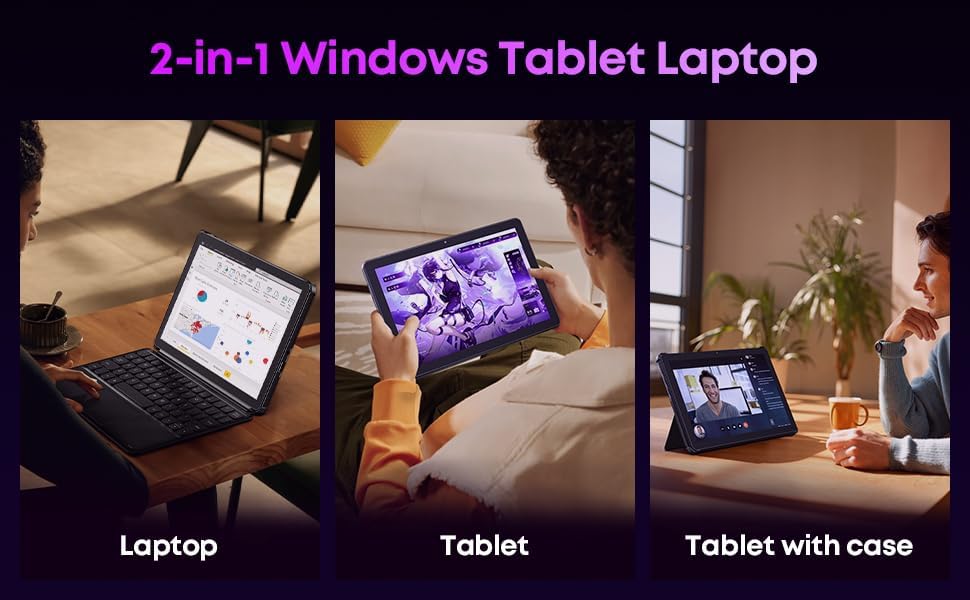
Image 3.2: Usage scenarios demonstrating laptop, tablet, and tablet with case modes.
3.4 Ryšys
- USB prievadai: The tablet features a full-featured Type-C port and a USB 3.2 Gen1 port for data transfer and connecting peripherals.
- Mikro HDMI: Connect to external monitors or TVs using the Micro HDMI port for extended display options, supporting up to 4K video output.
- "Bluetooth 5.3": Pair with wireless headphones, mice, and other Bluetooth accessories.
- „Wi-Fi 6“: Enjoy high-speed internet connectivity for streaming and browsing.
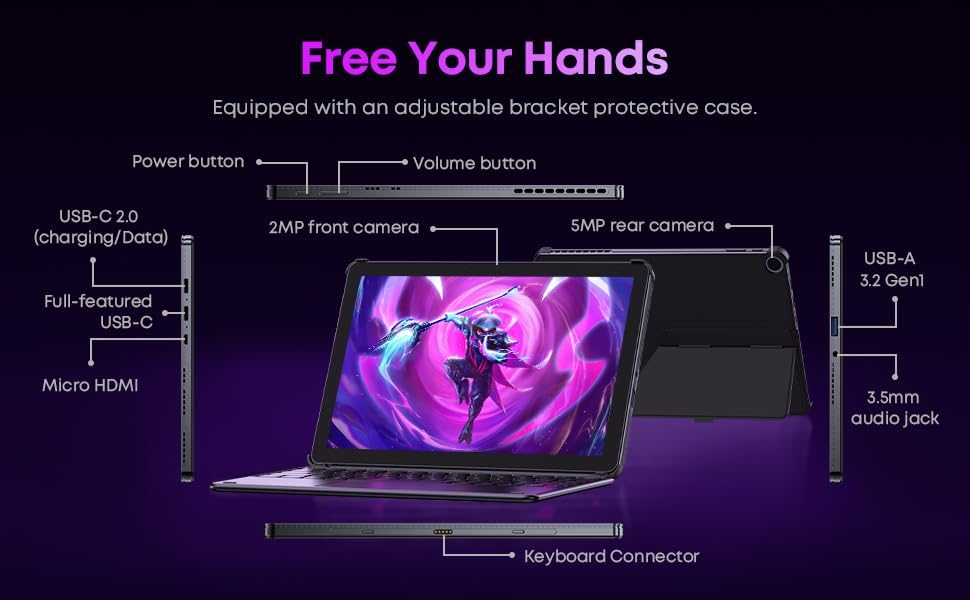
3.3 pav.: Išsamus view of the tablet's ports and connectors.
3.5 Kameros naudojimas
The tablet is equipped with a 5MP autofocus rear camera for capturing photos and videos, and a 2MP front camera for video calls and selfies.

Image 3.4: Camera and wireless connectivity features.
3.6 Processor and Storage
Powered by a 10th Gen Intel Core i3 processor (up to 3.9GHz) and 8GB RAM, the tablet handles multitasking efficiently. The 256GB SSD provides ample storage and fast access to your files.

Image 3.5: Intel 10th Gen Core i3 Processor details.
3.7 Produktas baigtasview Vaizdo įrašas
3.6 vaizdo įrašas: metimas per sekundęview of the CHUWI Hi10 X2 2-in-1 Laptop Tablet, highlighting its features and functionality.
4. Priežiūra
4.1 Prietaiso valymas
Planšetinio kompiuterio ekraną ir korpusą valykite minkštu, nepūkuotu audiniu. Įsisenėjusias dėmes šiek tiek nuvalykite.ampNuvalykite šluostę vandeniu arba ekrano valymo tirpalu. Venkite stiprių cheminių medžiagų ar abrazyvinių medžiagų.
4.2 Akumuliatoriaus priežiūra
To prolong battery life, avoid exposing the tablet to extreme temperatures. It is recommended to keep the battery charge between 20% and 80% for optimal longevity. Avoid fully discharging the battery frequently.
4.3 Programinės įrangos naujiniai
Reguliariai tikrinkite, ar yra „Windows“ naujinimų, ir juos įdiekite, kad jūsų sistemoje būtų įdiegti naujausi saugos pataisymai ir našumo patobulinimai. Eikite į „Nustatymai“ > „Windows“ naujinimas.
4.4 Saugojimo valdymas
Periodiškai review ir ištrinkite nereikalingus files and applications to free up storage space on the 256GB SSD. This helps maintain optimal device performance.
5. Problemų sprendimas
5.1 Įrenginys neįsijungia
- Ensure the device is fully charged. Connect the charger and wait a few minutes before attempting to power on.
- Norėdami atlikti griežtą atkūrimą, 10–15 sekundžių palaikykite nuspaudę maitinimo mygtuką.
5.2 „Wi-Fi“ ryšio problemos
- Iš naujo paleiskite „Wi-Fi“ maršrutizatorių ir planšetinį kompiuterį.
- Patikrinkite, ar kiti įrenginiai gali prisijungti prie to paties „Wi-Fi“ tinklo.
- Pamirškite tinklą „Windows“ nustatymuose ir prijunkite iš naujo.
5.3 Ekranas nereaguoja į prisilietimą
- Iš naujo paleiskite planšetinį kompiuterį.
- Įsitikinkite, kad ekranas yra švarus ir be šiukšlių.
5.4 Keyboard Not Working
- Ensure the tablet is correctly aligned and securely connected to the magnetic keyboard.
- Iš naujo paleiskite planšetinį kompiuterį.
Daugiau pagalbos rasite skyriuje „Palaikymas“.
6. Specifikacijos
| Funkcija | Specifikacija |
|---|---|
| Prekės ženklas | CHUWI |
| Modelio pavadinimas | Hi10 X2 |
| Procesorius | Intel Core i3 (10th Gen, up to 3.9 GHz) |
| Operacinė sistema | Windows 11 Home |
| RAM | 8 GB |
| Sandėliavimas | 256 GB SSD |
| Ekrano dydis | 10.1 colių |
| Ekrano raiška | 1280 x 800 pikselių |
| Ryšys | „Wi-Fi 6“, „Bluetooth 5.3“. |
| Uostai | Full-featured Type-C, USB 3.2 Gen 1, Micro HDMI, 3.5mm Audio Jack |
| Kameros | 5MP Autofocus Rear, 2MP Front |
| Svoris | 1.3 svaro (apie 0.59 kg) |
| Matmenys (I x P x Storis) | 9.6" x 6.49" x 0.39" |
| Baterijos talpa | 3400 mAh |
7. Informacija apie garantiją
The CHUWI Hi10 X2 2-in-1 Laptop Tablet comes with a 1 metų ribota garantija. This warranty covers manufacturing defects and malfunctions under normal use. Please retain your proof of purchase for warranty claims.
For detailed warranty terms and conditions, please refer to the official CHUWI websvetainėje arba susisiekite su klientų aptarnavimo tarnyba.
8. Parama
If you encounter any issues not covered in the Troubleshooting section, or require assistance with Windows activation, please contact CHUWI customer support. You can typically find support contact information on the official CHUWI website or through your purchase platform (e.g., Amazon seller messaging).
When contacting support, please have your device's serial number and proof of purchase readily available.