
1. Įvadas
This manual provides essential instructions for the proper use and maintenance of your XIAOMI REDMI Buds 8 Pro wireless earbuds. Please read this manual thoroughly before using the product to ensure optimal performance and longevity.
2. Kas yra dėžutėje
Patikrinkite, ar pakuotėje yra visi reikalingi daiktai:
- XIAOMI REDMI Buds 8 Pro Wireless Earbuds
- Belaidžio įkrovimo dėklas
- USB įkrovimo laidas
- Ausų antgaliai (įvairių dydžių)
- Vartotojo vadovas (šis dokumentas)
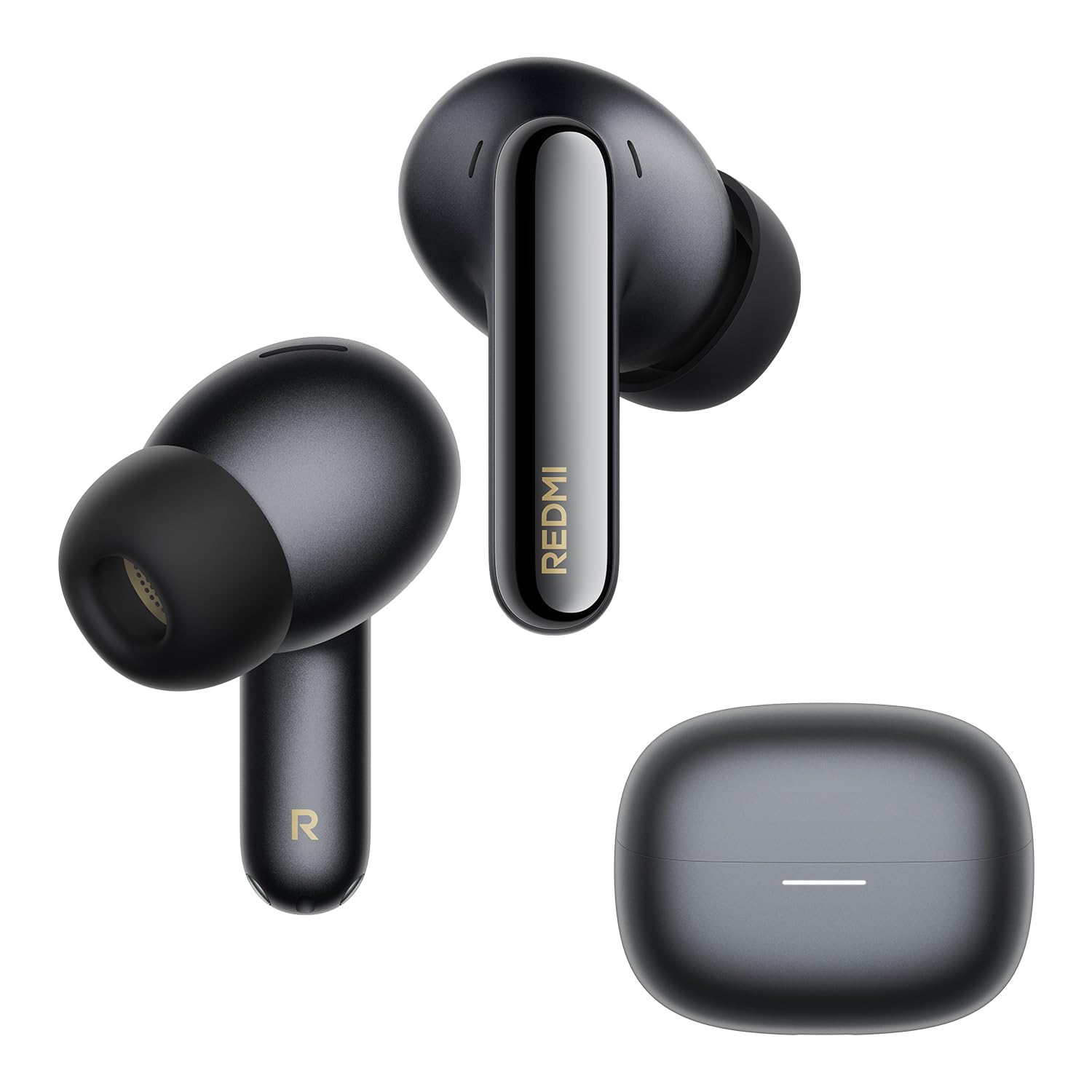
Image: The XIAOMI REDMI Buds 8 Pro earbuds and their charging case, typically included in the product package.
3. Produkto ypatybės
- Aktyvus triukšmo slopinimas (ANC): Up to 55 dB intelligent ANC with ultra-wide frequency noise cancellation (up to 5 kHz) to reduce ambient noise.
- Prisitaikantis ANC: Real-time noise cancellation that identifies environmental noise and automatically adjusts to your surroundings and earbud fit.
- Išvalyti skambučius: AI noise reduction with a triple microphone system ensures clear calls, even in windy conditions (up to 12 m/s wind resistance).
- Didelės raiškos garsas: Hi-Res Audio certified with powerful triple coaxial drivers for detailed and rich sound.
- Dolby Audio: Enhanced audio experience with clear dialogue and realistic surround sound for various media.
- Dimensional Audio: Immersive audio with dynamic head tracking for music, videos, and games.
- Ilgas baterijos veikimo laikas: Iki 8 valandų vienu įkrovimu ir iki 33 valandų su įkrovimo dėklu.
- Greitas įkrovimas: 5 minučių įkrovimo užteks maždaug 2 valandoms atkūrimo.
- IP54 atsparumas vandeniui ir dulkėms: Apsauga nuo purslų ir dulkių.
- "Bluetooth 5.4": Improved connection stability and efficiency.
- Kelių įrenginių jungtis: Prijunkite prie dviejų įrenginių vienu metu, kad galėtumėte sklandžiai perjungti.
- „Google Fast Pair“: Greitas ir paprastas susiejimas su „Android“ įrenginiais.
- „Xiaomi“ ausinių programėlė: Customize gestures, audio settings, and more.

Image: Illustration demonstrating the noise reduction capabilities of the earbuds.
4. Sąranka
4.1. Ausinių ir dėklo įkrovimas
- Įdėkite ausines į įkrovimo dėklą.
- Prijunkite USB įkrovimo laidą prie dėklo įkrovimo prievado ir prie maitinimo šaltinio.
- The indicator light on the case will show charging status. Ensure the case is fully charged before first use.
A full charge takes approximately 60 minutes for the earbuds and case.
4.2. Pairing with a Device (Google Fast Pair)
- Įsitikinkite, kad „Android“ įrenginyje įjungtas „Bluetooth“.
- Open the charging case with the earbuds inside and place it near your device.
- A pop-up notification for Google Fast Pair should appear on your device. Tap to connect.
- If the notification does not appear, manually search for "REDMI Buds 8 Pro" in your device's Bluetooth settings.

Image: Visual representation of the Google Fast Pair process with a smartphone and the earbud case.
4.3. Kelių įrenginių prijungimas
The earbuds support simultaneous connection to two devices. Once paired with two devices, the earbuds will automatically switch audio sources between them. For example, if you are listening to music on a tablet and receive a call on your phone, the earbuds will switch to the phone call.

Image: Diagram illustrating the multi-device connection feature, showing earbuds connected to both a smartphone and a tablet.
4.4. Ausinių uždėjimas
Select the ear tips that provide the best seal and comfort for your ears. A good seal is crucial for optimal sound quality and noise cancellation performance.
5. Naudojimo instrukcijos
5.1. Palieskite Valdikliai
The REDMI Buds 8 Pro feature touch controls on each earbud. Specific gestures can be customized via the Xiaomi Earbuds app.
| Veiksmas | Funkcija |
|---|---|
| Vienu paspaudimu | Leisti / pristabdyti, atsiliepti į skambutį |
| Dukart bakstelėjimas | Kitas takelis, pokalbio pabaiga |
| Trigubas bakstelėjimas | Ankstesnis takelis, balso asistento aktyvavimas |
| Paspauskite ir palaikykite (kairysis ausinės antgalis) | Perjungti ANC / skaidrumo režimą |
| Paspauskite ir palaikykite (dešinysis ausinės antgalis) | Perjungti ANC / skaidrumo režimą |
5.2. Aktyvus triukšmo slopinimas (ANC) ir skaidrumo režimas
The earbuds feature multiple ANC modes and a Transparency mode. Use the touch controls or the Xiaomi Earbuds app to switch between modes:
- ANC įjungta: Sumažina aplinkos triukšmą, kad klausymosi patirtis būtų įtraukianti.
- Skaidrumo režimas: Allows you to hear your surroundings while listening to audio, useful for awareness in urban environments.
- ANC išjungta: Standartinis klausymo režimas be aktyvaus triukšmo slopinimo.

Image: Illustration showing the "Immersive Commute Mode" with icons for airplane, train, and public transport, indicating optimized noise cancellation for these environments.
5.3. „Xiaomi“ ausinių programėlė
Download the Xiaomi Earbuds app from your device's app store (Google Play Store for Android, Apple App Store for iOS) to access advanced features:
- Jutiklinių valdiklių tinkinimas.
- Adjust ANC levels and modes.
- Equalizer settings for personalized audio.
- Firmware atnaujinimai.
- Battery status display.

Image: Screenshots of the Xiaomi Earbuds app interface, showing various settings and controls for the earbuds.
6. Priežiūra
6.1. Valymas
- Reguliariai valykite ausines ir įkrovimo dėklą minkštu, sausu, nepūkuotu skudurėliu.
- Nuimkite ausų antgalius ir, jei reikia, nuvalykite juos vandeniu ir švelniu muilu, prieš vėl įdėdami, įsitikinkite, kad jie yra visiškai sausi.
- Gently clean the charging contacts on both the earbuds and inside the case with a dry cotton swab to ensure proper connection.
6.2. Sandėliavimas
Kai nenaudojate, laikykite ausines įkrovimo dėkle, kad apsaugotumėte jas nuo dulkių ir pažeidimų, ir kad jos būtų įkrautos.
6.3. Atsparumas vandeniui ir dulkėms (IP54)
The earbuds are rated IP54 for dust and splash resistance. This means they can withstand light rain and sweat but are not suitable for swimming, showering, or submersion in water. Avoid exposing them to high-pressure water or extreme humidity.

Image: Illustration depicting the IP54 rating, showing earbuds with water droplets, indicating splash and dust resistance.
7. Problemų sprendimas
7.1. Earbuds Not Charging or Turning On
- Verify the charging case battery level. If low, charge the case first.
- Inspect the charging contacts on the earbuds and inside the case for dirt, deformation, or damage. Ensure clean and proper contact.
- Attempt to reset the earbuds: Place them in the case with the lid open. Press and hold the function button on the bottom of the case for 10 seconds until the LED flashes rapidly. The earbuds will reset to factory settings and enter pairing mode. Then, re-pair them with your device.
- Jei problema išlieka, susisiekite su klientų aptarnavimo tarnyba.

Image: A section from a manual detailing steps to troubleshoot charging or power-on issues for the earbuds.
7.2. Disconnections or Audio Latency
Disconnections or audio latency can be influenced by environmental factors, network conditions, and the processing speed of the audio codec. As true wireless earbuds, the REDMI Buds 8 Pro may experience slight audio delay during transmission from the phone to the primary and secondary earbuds.
Apsvarstykite šiuos dalykus:
- Ensure your device is within the Bluetooth range (up to 10 meters).
- Sumažinkite kitų belaidžių įrenginių keliamus trukdžius.
- Update the earbud firmware via the Xiaomi Earbuds app.
- If using the LDAC audio codec and a sampling rate of 96 kHz or higher, dimensional audio effects may not be supported, potentially affecting performance.

Image: A section from a manual addressing potential disconnections or audio latency issues.
7.3. Dimensional Audio Compatibility
The REDMI Buds 8 Pro are compatible with dimensional audio. To enable this feature:
- In the Xiaomi Earbuds app, connect the REDMI Buds 8 Pro, go to the home page, select [Audio], then enable [Dimensional Audio] (Immersive Sound).
- On Xiaomi or REDMI phones, go to Bluetooth device list, tap the icon next to REDMI Buds 8 Pro, select [Dimensional Audio], then enable [Immersive Sound].
Pastaba:
- Dimensional audio is not compatible with all Xiaomi phones. Some models may not support this function even after updating to the latest system version. Compatibility will gradually improve with future system updates.
- If the audio codec is set to LDAC and the sampling rate is 96 kHz or higher, dimensional audio effects are not supported.
8. Specifikacijos
| Funkcija | Detalė |
|---|---|
| Modelio pavadinimas | XIAOMI REDMI Buds 8 Pro |
| Modelio numeris | M2535E1 |
| Spalva | Juoda |
| Ausų išdėstymas | Į ausis |
| Ryšio technologija | Belaidis ryšys („Bluetooth“) |
| Bluetooth versija | 5.4 |
| Bluetooth diapazonas | 10 metrai |
| Triukšmo valdymas | Aktyvus triukšmo panaikinimas (ANC) |
| Dažnio atsakas | 20 Hz–20 000 Hz |
| Varža | 16 omai |
| Jautrumas | 123 dB |
| Garso tvarkyklės tipas | Dinaminis vairuotojas |
| Garso tvarkyklės dydis | 14.2 milimetrų |
| Garso vėlavimas | 45 milisekundės |
| Valdymo tipas | Palieskite valdymą |
| Baterijos veikimo laikas (ausinės) | Iki 8 valandų |
| Baterijos veikimo laikas (su dėklu) | Iki 33 valandų |
| Įkrovimo laikas | 60 minučių |
| Atsparumo vandeniui lygis | IP54 (Splash and Dust Resistant) |
| Gaminio matmenys | 3.06 x 2.13 x 2.45 cm |
| Produkto svoris | 46.9 gramų |
| Medžiaga | Plastikiniai |
| Suderinami įrenginiai | Visi įrenginiai, kuriuose veikia „Bluetooth“. |
9. Informacija apie garantiją
The XIAOMI REDMI Buds 8 Pro comes with a 2 metų gamintojo garantija. Išsaugokite pirkimo įrodymą garantiniams reikalavimams. Garantija taikoma medžiagų ir gamybos defektams įprasto naudojimo sąlygomis. Ji netaikoma žalai, atsiradusiai dėl netinkamo naudojimo, nelaimingų atsitikimų, neleistinų modifikacijų ar įprasto nusidėvėjimo.
For detailed warranty terms and conditions, please refer to the official XIAOMI websvetainėje arba susisiekite su jų klientų aptarnavimo tarnyba.
10. Parama
For further assistance, technical support, or service inquiries regarding your XIAOMI REDMI Buds 8 Pro, please utilize the following resources:
- „Xiaomi“ ausinių programėlė: The app provides access to FAQs, troubleshooting tips, and direct support options.
- Oficialus „Xiaomi“ Websvetainė: Visit the official XIAOMI website for product information, support articles, and contact details for your region.
- Klientų aptarnavimas: Žr. kontaktinę informaciją, pateiktą ant gaminio pakuotės arba oficialiame websvetainė tiesioginiam klientų aptarnavimui.


