
Įvadas
The New Bee GT40 is a versatile and accurate clip-on instrument tuner designed for a wide range of stringed instruments including guitar, bass, ukulele, violin, and cello. Featuring a bright color display, 360° rotatable clip, and a rechargeable battery, this tuner provides fast and precise tuning for musicians of all levels. This manual will guide you through the setup, operation, maintenance, and troubleshooting of your New Bee GT40 tuner.
Kas yra dėžutėje
Patikrinkite pakuotės turinį, kad įsitikintumėte, jog yra visi reikalingi daiktai:
- New Bee GT40 Guitar Tuner
- USB-C įkrovimo laidas
- Vartotojo vadovas (šis dokumentas)

Produkto savybės
- Greitas ir tikslus derinimas: Equipped with an advanced digital processor and high-sensitivity piezo sensor for quick and precise tuning across various instruments.
- Bright Color Display: High-resolution color screen ensures clear visibility in diverse lighting conditions, from dark stages to bright outdoor environments.
- Įkraunama baterija: Provides approximately 6 hours of continuous tuning on a single charge. Includes a USB-C charging cable for convenient recharging.
- 360° pasukamas segtukas: The tuner features a 360° swivel and 135° tilt, allowing for optimal viewing angles on any headstock, whether left or right-handed. The padded clamp protects your instrument's finish.
- Kompaktiškas ir nešiojamas: Its ultra-compact design allows it to fit easily in a guitar bag or pocket, making it ideal for on-the-go use.
- Multi-Instrument Support: Supports Chromatic, Guitar, Bass, Ukulele, and Violin tuning modes.


Sąranka
1. Charging the Tuner
Before first use, fully charge the tuner. Connect the supplied USB-C cable to the tuner's charging port and plug the other end into any standard USB power source (e.g., computer, USB wall adapter). The battery indicator on the screen will show charging status. A full charge provides approximately 6 hours of working time.

2. Attaching the Tuner
Clip the tuner onto the headstock of your instrument. The padded clamp ensures a secure grip without damaging the instrument's finish. Adjust the tuner's angle using its 360° rotational and 135° tilt capabilities for optimal viewing.
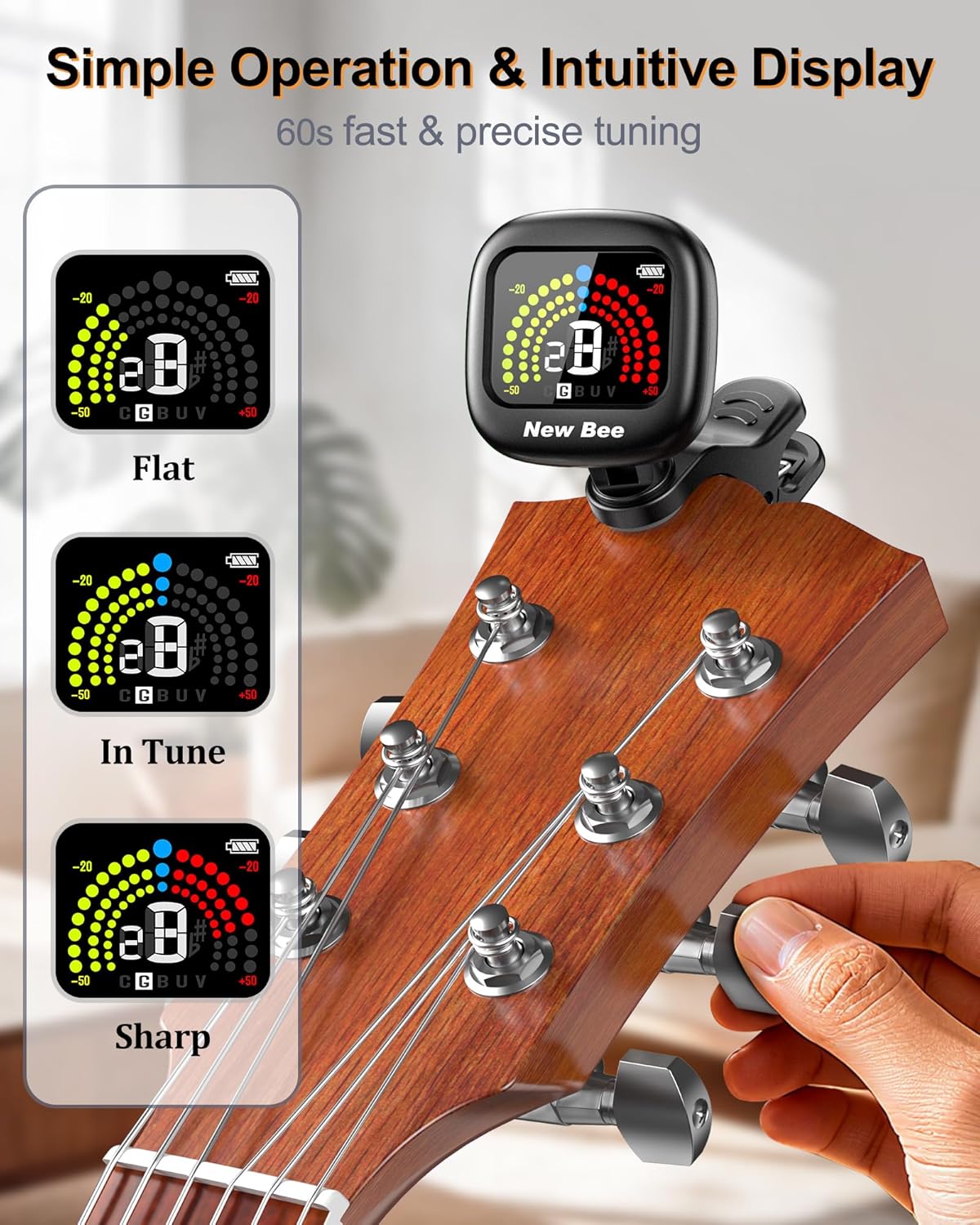

Naudojimo instrukcijos
1. Maitinimo įjungimas/išjungimas
Press and hold the power button (usually located on the side) for a few seconds to turn the tuner on or off. The display will light up when powered on. The tuner will automatically switch off after 5 minutes of no signal input to conserve battery life.
2. Selecting Tuning Mode
Briefly press the power button to cycle through the available tuning modes: Chromatic (C), Guitar (G), Bass (B), Ukulele (U), and Violin (V). Select the mode appropriate for your instrument.

3. Instrumento derinimas
Once the tuner is attached and the correct mode is selected, pluck a single string on your instrument. The tuner will detect the vibration and display the note name and pitch accuracy on the screen.
- Butas: If the note is flat, the left side of the display will illuminate (typically yellow/green), and the needle will be to the left of the center. Tighten the string until the display indicates it is in tune.
- Aštri: If the note is sharp, the right side of the display will illuminate (typically red), and the needle will be to the right of the center. Loosen the string until the display indicates it is in tune.
- Derinyje: When the note is in tune, the center of the display will illuminate (typically blue/green), and the needle will be centered.

Priežiūra
To ensure the longevity and optimal performance of your New Bee GT40 tuner, follow these maintenance guidelines:
- Valymas: Wipe the tuner with a soft, dry cloth. Avoid using abrasive cleaners, solvents, or harsh chemicals, as these can damage the display or casing.
- Saugykla: Store the tuner in a cool, dry place away from direct sunlight and extreme temperatures. When not in use for extended periods, ensure it is fully charged before storage and periodically recharge it to maintain battery health.
- Tvarkymas: Handle the tuner with care. Avoid dropping it or subjecting it to strong impacts, which can affect its internal components and accuracy.
Trikčių šalinimas
If you encounter issues with your New Bee GT40 tuner, refer to the following common problems and solutions:
| Problema | Galima priežastis | Sprendimas |
|---|---|---|
| Imtuvas neįsijungia. | Žemas akumuliatoriaus įkrovos lygis arba jo visai nėra. | Charge the tuner using the provided USB-C cable. Ensure the charging cable and power source are functional. |
| Inaccurate or inconsistent tuning. | Incorrect tuning mode selected; external noise interference; loose connection to instrument. | Verify the correct tuning mode (C, G, B, U, V) is selected. Ensure you are in a quiet environment. Re-clip the tuner securely to the instrument's headstock. |
| Ekranas blankus arba nereaguoja. | Low battery; tuner malfunction. | Charge the tuner. If the issue persists after charging, contact customer support. |
| Tuner automatically turns off too quickly. | Power-saving feature activated. | The tuner is designed to turn off after 5 minutes of no signal input to save battery. This is normal operation. |
Specifikacijos
| Funkcija | Specifikacija |
|---|---|
| Modelio numeris | GT40 |
| Derinimo režimai | Chromatinė, gitara, bosas, ukulelė, smuikas |
| Aptikimo metodas | Vibration (Piezo Sensor) |
| Maitinimo šaltinis | Įkraunama ličio polimero baterija |
| Baterijos talpa | 90 mAh |
| Darbo laikas | Apytiksliai 6 valandos vienam įkrovimui |
| Įkrovimo prievadas | USB-C |
| Ekranas | Spalvotas LCD |
| Rotacija | 360° pasukimas, 135° pakreipimas |
| Matmenys | 1.85 x 1.96 x 1.22 colio (47 x 49.8 x 31 mm) |
| Svoris | 1.76 uncijos (50 g) |
| Medžiaga | Plastikiniai |
Garantija ir palaikymas
New Bee products are designed for reliability and performance. For any questions, technical assistance, or warranty claims, please refer to the contact information provided with your purchase or visit the official New Bee websvetainėje. Išsaugokite pirkimo kvitą kaip pirkimo įrodymą, jei jums reikės garantinio aptarnavimo.