
1. Įvadas
Thank you for choosing the UGREEN 11-inch Keyboard Case. This product is designed to enhance your iPad experience by providing a comfortable typing solution and versatile viewing angles, transforming your tablet into a portable workstation. This manual provides essential information for setup, operation, maintenance, and troubleshooting to ensure optimal performance.
2. Suderinamumas
Šis klaviatūros dėklas suderinamas su šiais „iPad“ modeliais:
- iPad Air 11-inch (M4/M3/M2, 2026/2025/2024)
- iPad Pro 11-inch (4th/3rd/2nd/1st Gen)
- iPad Air 5th Generation (2022)
- iPad Air 4th Generation (2020)
Suderinami modelių numeriai: A3459, A2902, A3266, A1980, A2228, A2759, A2377, A2316, A2588.
Pastaba: Šis atvejis yra ne compatible with iPad Pro 11-inch (M4) 2024.

Figure 2.1: Detailed compatibility chart for UGREEN 11-inch Keyboard Case.
3. Pakuotės turinys
Įsitikinkite, kad jūsų siuntinyje yra visi daiktai:
- UGREEN 11-inch Keyboard Case
- USB-C įkrovimo laidas (3 pėdos)
- Vartotojo vadovas
4. Produktas baigtasview
The UGREEN Keyboard Case features a robust design with several key functionalities:
- Precision Magnetic Back Plate: Ensures a secure and stable attachment for your iPad.
- Reguliuojamas 125° kampu Viewpakreipimo kampas: Allows for flexible positioning for typing, browsing, or viewing.
- Žirkliniai jungiklio klavišai: Provides a smooth, quiet, and consistent typing experience.
- 3-Level Adjustable Backlight: Offers illumination for comfortable use in various lighting conditions.
- Reaguojantis jutiklinis skydelis: Enables precise cursor control and supports multi-gesture navigation.
- Dual Orientation Viewing: Supports both portrait and landscape modes.
- 650 mAh baterija: Provides extended usage and standby times.

Figure 4.1: Powerful magnetic hold for stable iPad attachment.

Figure 4.2: Quick-set magnetic stand with 125° adjustable viewing kampas.

Figure 4.3: Scissor-switch keyboard design and 3-level adjustable backlighting.

Figure 4.4: Responsive touchpad with multi-gesture support.
5. Sąrankos instrukcijos
5.1 „iPad“ prijungimas
- Align your compatible iPad with the magnetic back plate of the case.
- The iPad will securely snap into place due to the strong magnetic connection.
5.2 Powering On the Keyboard
- Locate the power switch on the right side of the keyboard.
- Slide the switch to the 'ON' position. The indicator light will briefly illuminate.
5.3 Bluetooth poravimas
- Įsitikinkite, kad klaviatūra įjungta.
- Savo „iPad“ įrenginyje eikite į Nustatymai > Bluetooth.
- Įjunkite „Bluetooth“. Jūsų „iPad“ ieškos netoliese esančių įrenginių.
- Select "UGREEN Keyboard" (or similar name) from the list of available devices.
- Vykdykite visus ekrane pateikiamus nurodymus, kad užbaigtumėte susiejimo procesą.
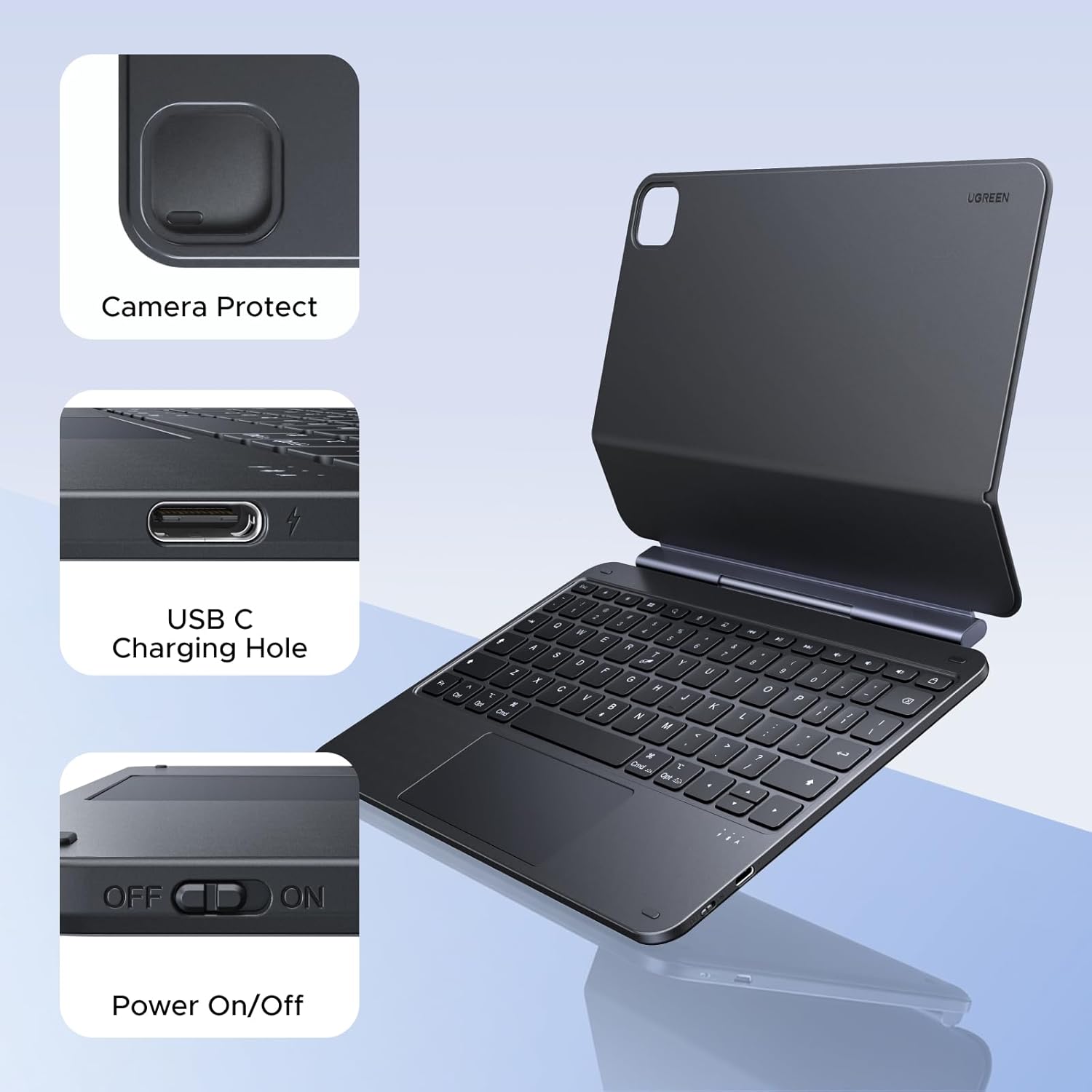
Figure 5.1: Location of the power switch and USB-C charging port.
6. Naudojimo instrukcijos
6.1 Reguliavimas Viewing kampas
The magnetic stand allows for a 125° adjustable viewing angle. Gently tilt your iPad to achieve your desired position for typing, drawing, or media consumption.
6.2 Jutiklinės planšetės naudojimas
The integrated touchpad supports various multi-touch gestures for intuitive navigation:
- Bakstelėjimas vienu pirštu: Spustelėkite / pasirinkite
- Slinkimas dviem pirštais: Slinkite aukštyn / žemyn arba kairėn / dešinėn
- Suspauskite, kad padidintumėte: Priartinti / sumažinti
- Trimis pirštais braukimas aukštyn: Atidaryti programų perjungiklį
- Three-finger swipe down: Grįžkite į pagrindinį ekraną
- Perbraukite trimis pirštais kairėn / dešinėn: Perjunkite atidarytas programas
6.3 Foninio apšvietimo reguliavimas
Paspauskite light icon key (usually next to the function keys) to cycle through the 3 levels of backlight brightness or to turn it off.
6.4 Dual Orientation Viewing
The case supports both portrait and landscape orientations. Simply rotate your iPad while it is magnetically attached to switch modes. This allows for flexible viewing during video calls, streaming, or browsing without compromising stability.

Figure 6.1: Versatile usage modes including typing, viewing, sketching, and reading.
7. Klaviatūros įkrovimas
The keyboard is equipped with a 650mAh battery for extended use.
- Baterijos veikimo laikas: Up to 6 months standby time, or 5 months of regular use with the backlight off.
- Įkrovimo laikas: Apytiksliai 2 valandos pilnai įkrauti.
- Įkrovimo būdas: Use the included USB-C cable to connect the keyboard's USB-C port to a power source.

7.1 pav.: Baterijos veikimas perview.
8. Priežiūra
To ensure the longevity and optimal performance of your UGREEN Keyboard Case, follow these maintenance guidelines:
- Valymas: Naudokite minkštą, damp cloth to wipe the exterior of the case. Avoid harsh chemicals or abrasive materials. For the keyboard keys, use a soft brush or compressed air to remove dust and debris.
- Saugykla: When not in use, store the keyboard case in a clean, dry environment away from extreme temperatures and direct sunlight.
- Tvarkymas: Avoid dropping the case or subjecting it to strong impacts, which could damage internal components or the magnetic mechanism.
9. Problemų sprendimas
If you encounter issues with your UGREEN Keyboard Case, refer to the following common problems and solutions:
9.1 Keyboard Not Pairing or Connecting
- Patikrinkite galią: Ensure the keyboard's power switch is in the 'ON' position.
- Baterijos lygis: Verify that the keyboard has sufficient battery charge. Charge it if necessary.
- Bluetooth on iPad: Confirm that Bluetooth is enabled on your iPad (Nustatymai > Bluetooth).
- Įrenginio suporavimas iš naujo: If the keyboard was previously paired, try forgetting the device on your iPad's Bluetooth settings and then re-pairing it.
- Iš naujo paleiskite įrenginius: Iš naujo paleiskite ir „iPad“, ir klaviatūrą.
9.2 Inconsistent Touchpad Response
- Clean Touchpad: Ensure the touchpad surface is clean and free of dirt or moisture.
- Programinės aparatinės įrangos atnaujinimas: Check the UGREEN websvetainėje, kurioje pateikiami visi galimi klaviatūros programinės įrangos atnaujinimai.
- „iPad“ nustatymai: Review your iPad's touchpad settings under Nustatymai > Generolas > Trackpad & Mouse.
9.3 iPad Feels Top-Heavy or Unstable
- Paviršiaus stabilumas: Ensure the keyboard case is placed on a flat, stable surface.
- Kampo reguliavimas: Sureguliuokite viewing angle to a more balanced position. Extreme angles may reduce stability.
- Magnetinė jungtis: Confirm the iPad is fully and securely attached to the magnetic back plate.
10. Specifikacijos
| Funkcija | Detalė |
|---|---|
| Prekės ženklas | ŽALIA |
| Modelio numeris | i711 |
| Suderinami įrenginiai | Tablet (Specific iPad models listed in Compatibility section) |
| Ryšio technologija | Bluetooth |
| Klaviatūros aprašymas | Flexible, Scissor-switch |
| Klaviatūros išdėstymas | QWERTY |
| Medžiaga | Plastic, Steel (Keyboard Plate) |
| Maitinimo šaltinis | Maitinamas baterija (650 mAh ličio baterija) |
| Ypatingos savybės | Magnetic Case, Adjustable Backlight, Touchpad |
11. Garantija ir palaikymas
11.1 Informacija apie garantiją
This UGREEN product is covered by a 2 metų gamintojo garantija nuo pirkimo datos. Ši garantija apima medžiagų ir gamybos defektus normaliai naudojant.
Garantija netaikoma:
- Žala, padaryta nelaimingo atsitikimo, piktnaudžiavimo, netinkamo naudojimo, potvynio, gaisro, žemės drebėjimo ar kitų išorinių priežasčių.
- Damage caused by operating the product outside the permitted or intended uses described by UGREEN.
- Damage caused by service performed by anyone who is not a representative of UGREEN.
11.2 Pagalba klientams
For technical support, warranty claims, or general inquiries, please contact UGREEN customer service through the following channels:
- Websvetainė: Apsilankykite oficialiame UGREEN websvetainė, kurioje rasite pagalbos išteklius ir kontaktinę informaciją.
- El. paštas: Žiūrėkite savo produkto pakuotę arba UGREEN websvetainėje, kad gautumėte tinkamą palaikymo el. pašto adresą.
- Internetinis mažmenininkas: If purchased from an online retailer, you may also contact their customer service for assistance.
Please have your product model number (i711) and proof of purchase ready when contacting support.