
Memorex MXTAB11
Memorex MXTAB11 11-inch Android 14 Tablet Bundle User Manual
Model: MXTAB11
1. Įvadas
The Memorex MXTAB11 11-inch Android 14 Tablet Bundle is designed for versatile use, supporting work, streaming, gaming, and learning. This tablet offers premium performance with an A523 ARM 8-core Cortex processor, optimized graphics, and comes with essential accessories for immediate use.

Image 1: The Memorex MXTAB11 tablet set up with its Bluetooth keyboard and wireless headphones on a wooden table, ready for use.
Pagrindinės funkcijos:
- Galingas našumas: A523 ARM 8-core Cortex processor (up to 2.0GHz) with optimized graphics for smooth multitasking and responsive app performance.
- Ryškus ekranas: 11-inch FHD IPS display with 1920 x 1200 pixel resolution for clear visuals.
- Ample saugykla: 128 GB vidinės atminties programoms, nuotraukoms ir kt. files.
- Efektyvi atmintis: 4GB RAM for smooth operation.
- Modern OS: Runs on Android 14.
- Patvarus dizainas: Features a metal body for enhanced durability.
- Ryšys: Supports 802.11a/b/g/n/ac/ax wireless types.
2. Kas yra dėžutėje
Your Memorex MXTAB11 Tablet Bundle includes the following items:
- Memorex 11” Tablet
- Bluetooth klaviatūra
- Belaidės ausinės
- Apsauginis dėklas su stovu
- AC Adapter Charger & Cable
- Instrukcijų vadovas
- Greitos pradžios vadovas
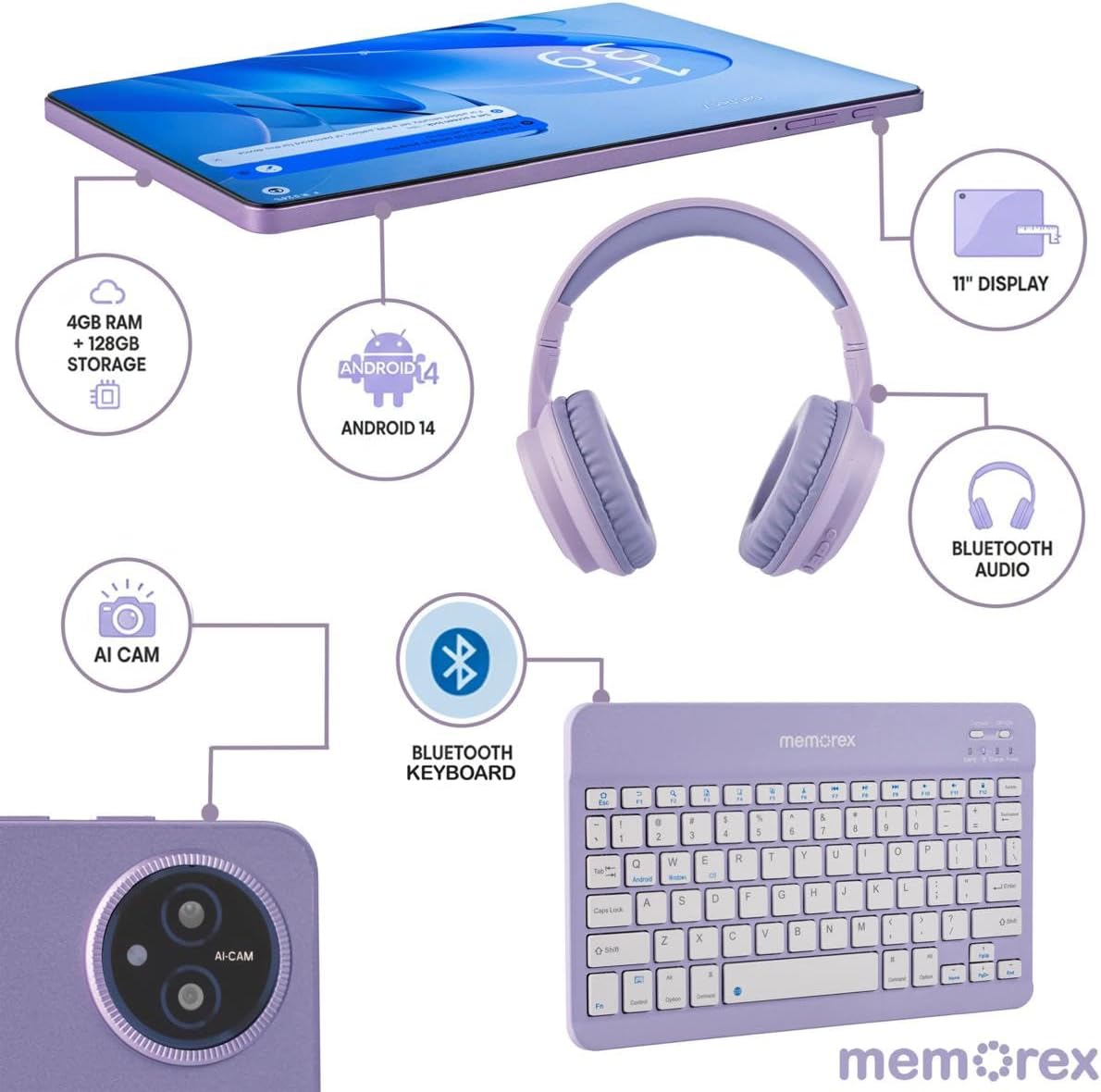
Image 2: A visual breakdown of the Memorex MXTAB11 tablet's features and included accessories, such as 4GB RAM, 128GB storage, Android 14, 11-inch display, AI camera, Bluetooth keyboard, Bluetooth audio, and wireless headphones.
3. Sąranka
3.1 Pradinis įjungimas ir konfigūracija
- Įkraukite planšetinį kompiuterį: Before first use, connect the tablet to the AC adapter charger and cable provided. Allow it to charge fully.
- Maitinimas: Press and hold the power button (usually located on the side or top edge) until the Memorex logo appears on the screen.
- Vykdykite ekrane pateikiamus nurodymus: Planšetinis kompiuteris padės jums atlikti pradinį nustatymo procesą, įskaitant:
- Kalbos pasirinkimas.
- Prisijungimas prie „Wi-Fi“ tinklo.
- Signing in with your Google account (or creating one).
- Ekrano užrakto nustatymas (PIN kodas, šablonas, slaptažodis).
3.2 Connecting Bluetooth Keyboard and Wireless Headphones
- Įjungti Bluetooth: On your tablet, swipe down from the top of the screen to open the Quick Settings panel. Tap the Bluetooth icon to turn it on. Alternatively, go to Nustatymai > Prijungti įrenginiai > „Bluetooth“.
- Pair Bluetooth Keyboard:
- Turn on the Bluetooth keyboard (refer to the keyboard's quick start guide for specific instructions).
- On your tablet's Bluetooth settings, tap 'Pair new device'.
- Select the keyboard from the list of available devices. Follow any on-screen prompts to complete pairing.
- Pair Wireless Headphones:
- Put your wireless headphones into pairing mode (refer to the headphones' quick start guide).
- On your tablet's Bluetooth settings, tap 'Pair new device'.
- Select the headphones from the list of available devices. Follow any on-screen prompts to complete pairing.
4. Planšetinio kompiuterio valdymas
4.1 Pagrindinė navigacija
- Pagrindinis ekranas: Centrinis jūsų programėlių ir valdiklių centras.
- Programėlių stalčius: Braukite aukštyn nuo ekrano apačios, kad pasiektumėte visas įdiegtas programas.
- Greitieji nustatymai ir pranešimai: Swipe down from the top of the screen to access quick settings (Wi-Fi, Bluetooth, brightness) and view pranešimai.
- Atgal, Pradžia, Naujausios programos: Use the navigation buttons at the bottom of the screen to go back, return to the home screen, or view neseniai atidarytos programos.
4.2 Programų naudojimas
The tablet comes pre-loaded with essential Google applications and allows you to download more from the Google Play Store.
- „Google Play“ parduotuvė: Tap the Play Store icon to browse and download new apps, games, movies, and books.
- Web Naršymas: Use the pre-installed Chrome browser to access the internet.
- Kamera: Tap the Camera icon to take photos or record videos using the tablet's dual cameras.
- Kalendorius: Manage your schedule and events.
- Files: Access and organize your documents, images, videos, and other files.

Image 3: A person comfortably using the Memorex MXTAB11 tablet with its Bluetooth keyboard and wireless headphones, demonstrating its suitability for various activities like work or entertainment.
5. Priežiūra
- Valymas: Planšetinio kompiuterio ekraną ir korpusą valykite minkštu, nepūkuotu audiniu. Venkite stiprių cheminių medžiagų ar abrazyvinių medžiagų.
- Programinės įrangos atnaujinimai: Reguliariai tikrinkite, ar yra sistemos atnaujinimų, ir juos įdiekite, kad užtikrintumėte optimalų našumą ir saugumą. Eikite į Nustatymai > Sistema > Sistemos naujinimas.
- Akumuliatoriaus priežiūra: Norėdami pailginti akumuliatoriaus veikimo laiką, venkite ekstremalių temperatūrų ir neleiskite akumuliatoriui dažnai visiškai išsikrauti.
- Saugyklos valdymas: Periodiškai valykite nereikalingus fileir programas, kad atlaisvintumėte vietos saugykloje ir išlaikytumėte našumą.
6. Problemų sprendimas
6.1 Bendrosios problemos ir sprendimai
- Planšetinis kompiuteris neįsijungia: Įsitikinkite, kad planšetinis kompiuteris įkrautas. Prijunkite jį prie įkroviklio ir palaukite kelias minutes, prieš bandydami jį vėl įjungti.
- Lėtas našumas: Close unused applications, clear cache, or restart the tablet. Check for available system updates.
- „Wi-Fi“ ryšio problemos: Iš naujo paleiskite „Wi-Fi“ maršrutizatorių ir planšetinį kompiuterį. Planšetinio kompiuterio nustatymuose pamirškite tinklą ir prijunkite jį iš naujo.
- „Bluetooth“ susiejimo klaida: Ensure both devices are in pairing mode and within range. Restart Bluetooth on the tablet and try pairing again.
- Programėlių strigimas: Clear the app's cache or data via Settings > Apps > [App Name] > Storage > Clear Cache/Data. Reinstall the app if the issue persists.
7. Specifikacijos
| Ekrano dydis | 11 colių |
| Ekrano raiška | 1920 x 1200 pikselių (Full HD IPS) |
| Procesorius | A523 ARM Cortex-A523 Octa-Core Processor, up to 2.0 GHz |
| RAM | 4 GB |
| Flash atminties dydis | 128 GB |
| Operacinė sistema | Android 14 |
| Belaidis tipas | 802.11a, 802.11ac, 802.11ax, 802.11b, 802.11g, 802.11n |
| Prekės svoris | 5 svaro |
| Gaminio matmenys | 10 x 4 x 13 colio |
| Spalva | Mėlyna |
8. Garantija ir palaikymas
8.1 Grąžinimo politika
Prekę galima grąžinti arba pakeisti per 30 dieną nuo įsigijimo datos.
8.2 Apsaugos planai
Papildomi apsaugos planai galimi ilgesniam laikotarpiui:
- 2 metų apsaugos planas: One-time payment of $30.99.
- Visiška apsauga: Monthly payment of $16.99, covering all eligible past and future purchases.
For further support or inquiries, please refer to the contact information provided in your Quick Start Guide or visit the official Memorex support websvetainę.
Ask a question about this manual
Ask about setup, troubleshooting, compatibility, parts, safety, or missing instructions. Manuals+ will review the question and use this page’s manual context to help answer it.