
1. Įvadas
The HOBOT-SP10 iScraper Window Cleaning Robot is designed to provide efficient and streak-free cleaning for various glass surfaces. Featuring Spray-Sweep-Scrape (SSS) technology, 6000Pa suction, and intelligent navigation, this robot simplifies window maintenance for both indoor and outdoor use. It supports control via a smartphone app and remote control, offering a convenient cleaning experience.

Vaizdas: priekis view of the HOBOT-SP10 iScraper Window Cleaning Robot, showcasing its compact design and water tank.
Vaizdo įrašas: Viršijimasview of the HOBOT-SP10 iScraper Window Cleaning Robot's features and operation.
2. Saugos informacija
Read all safety instructions before operating the HOBOT-SP10. Failure to follow these instructions may result in electric shock, fire, or serious injury.
- Always attach the safety rope and secure it to a sturdy anchor point before placing the robot on a window, especially for high-rise cleaning. The safety rope can withstand up to 230kgf of pulling force.
- Ensure the power cord is securely connected to the robot and a power outlet. The robot features a UPS backup system that maintains suction for 20 minutes during a power loss, accompanied by voice and app alerts.
- Nenaudokite roboto ant įskilusių ar pažeistų stiklinių paviršių.
- Rankas, plaukus ir laisvus drabužius laikykite toliau nuo judančių dalių.
- Neleiskite vaikams ar naminiams gyvūnams būti šalia roboto veikimo metu.
- Use only HOBOT-approved cleaning solutions and accessories.
- For outdoor use, ensure weather conditions are suitable (no strong winds or rain).

Image: Diagram illustrating the safety rope and secure power connection for the HOBOT-SP10.
3. Kas yra dėžutėje
Your HOBOT-SP10 package includes the following components:
- HOBOT-SP10 iScraper Window Cleaning Robot
- Nuotolinio valdymo pultas
- Valymo pagalvėlės (mikropluošto šluostės)
- Maitinimo adapteris ir laidas
- Apsauginis lynas
- Naudojimo instrukcija (šis vadovas)
- Vandens pripildymo butelis
- Storage-Carrier Case (if included with your model)

Image: The HOBOT-SP10 robot, remote control, and various accessories neatly arranged in a storage case.
4. Sąranka
4.1. Attaching the Cleaning Cloth
Before use, prepare the cleaning cloth for optimal performance, especially for washing mode.
- Rinse the cleaning cloth under running water.
- Sulenkite damp cloth three times.
- Wring out excess water until no water drips remain. The cloth should be damp, nepermirkęs.
- Align the edge of the cleaning cloth carefully, ensuring it does not over-cover the squeegee on both sides of the robot. This prevents slipping and damage to the edge-leakage sensors.
Video: Instructions on how to prepare and attach the cleaning cloth for the HOBOT-SP10 washing mode.

Image: The HOBOT-SP10 with a microfiber cleaning cloth properly attached to its base.
4.2. Vandens bako užpildymas
Locate the water tank on the robot. Use the provided water filling bottle to fill the tank with clean water or HOBOT-approved cleaning solution. Do not overfill.
4.3. Connecting Power and Safety Rope
Connect the power adapter to the robot's threaded DC jack and then to a power outlet. Secure the safety rope to a stable indoor fixture before placing the robot on the window.
5. Naudojimo instrukcijos
5.1. Roboto pastatymas ant lango
Place the HOBOT-SP10 firmly on the glass surface. Ensure it adheres securely before releasing your grip. The 6000 Pa static suction will hold it in place.

Image: A person placing the HOBOT-SP10 onto a window, demonstrating its adherence.
5.2. Valymo pradžia ir pabaiga
Press the power button on the robot or use the remote control/app to start cleaning. To stop, press the pause/stop button. The robot will return to its starting position upon completion or when stopped.
5.3. SSS Glass-Cleaning Technology
The HOBOT-SP10 utilizes a three-step cleaning process:
- Purškimas: Dual nozzles on both sides spray an ultra-wide angle, wind-resistant mist to loosen dirt.
- Šluoti: A thick microfiber cloth sweeps the surface, removing dust and dirt.
- Scrape: Dual glide scrapers, made of durable high surface tension material, remove residual water without streaks. When moving horizontally, the robot automatically lifts the leading scraper and engages the trailing one.

Image: Visual representation of the HOBOT-SP10's Spray, Sweep, Scrape cleaning mechanism.
5.4. Cleaning Modes and Path Planning
The HOBOT-SP10 offers multiple cleaning modes for various needs:
- Standard Mode (ZH): Zigzag horizontally first, then clean along the left and right sides of the window.
- Fine Cleaning Mode (ZN): Zigzag horizontally first, then vertically.
- Fast Cleaning Mode (Z): Only zigzag horizontally.
- Handle Avoidance Mode (ZHA): ZH mode with left and right window handle dodging algorithm, providing an extra scrub to remove stubborn stains.
The iScraper detects and optimizes the cleaning path, moving horizontally along the edges in parallel downward strokes, then finishing with precise sweeps along both vertical edges for thorough coverage.
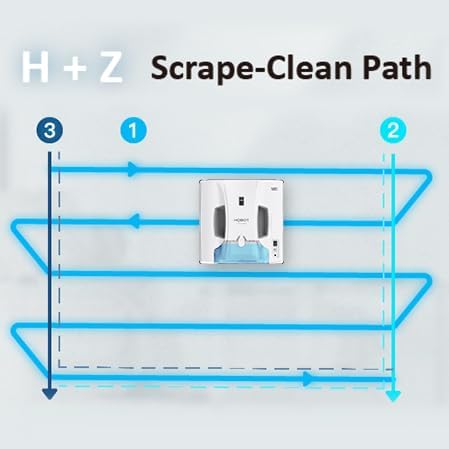
Image: Illustration of the HOBOT-SP10's H+Z (Horizontal then Vertical) scrape-clean path for comprehensive coverage.
5.5. Edge-Leakage Sensors and Edge-to-Edge Clean
The robot's Edge-Leakage Sensors detect and react instantly to air leaks from window seals, frameless edges, or minor bumps against window frames, ensuring a smoother and safer cleaning experience. The trailing scraper removes dirt piles from the edge, preventing buildup near the frame for a spotless finish.
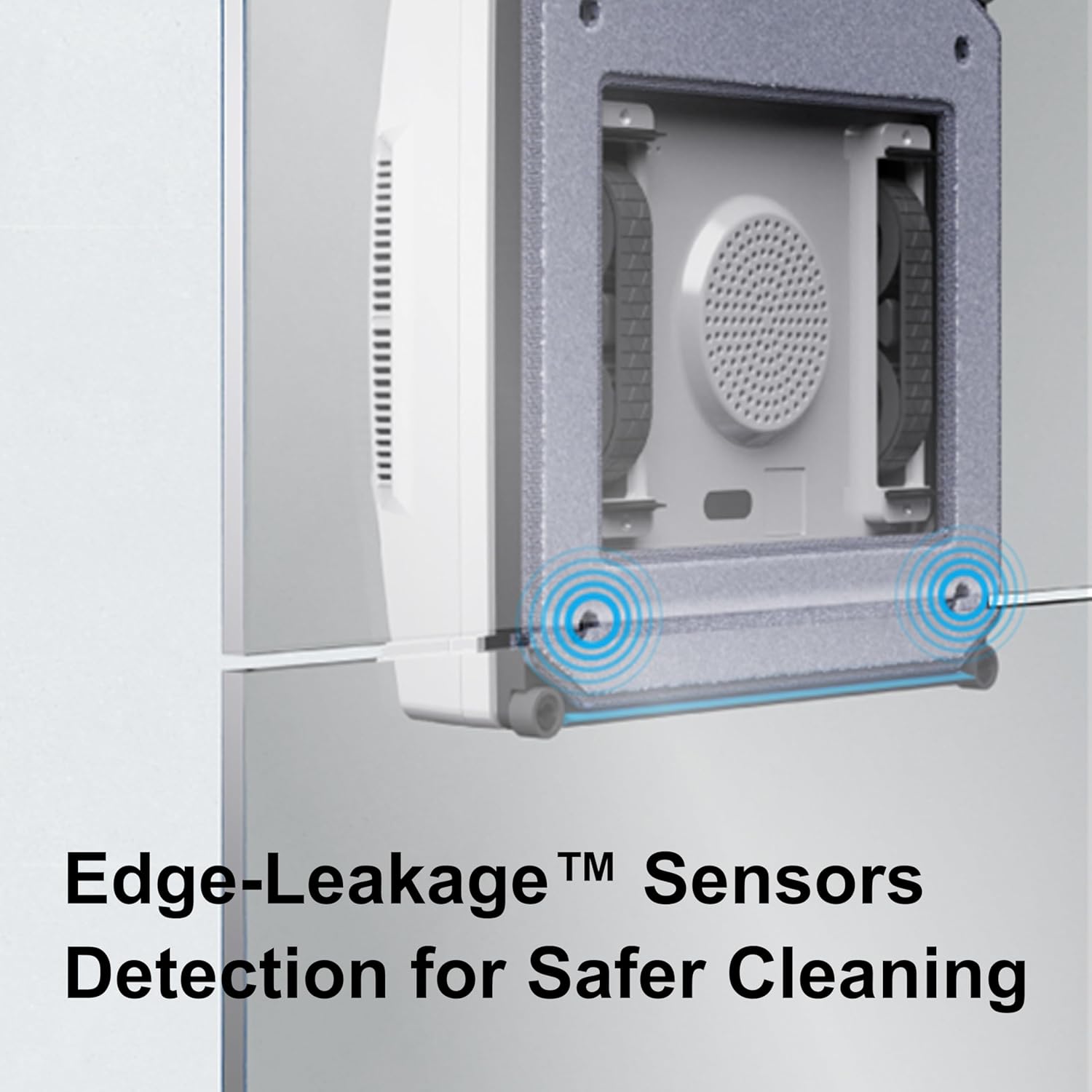
Image: Close-up of the HOBOT-SP10's Edge-Leakage Sensors detecting the edge of a window.

Image: The HOBOT-SP10 cleaning right up to the edge of a window, illustrating its edge-to-edge cleaning capability.
5.6. Naudojimas patalpose ir lauke
The HOBOT-SP10 is suitable for both indoor and outdoor window cleaning. Its robust design and powerful suction ensure stable operation on various glass types.
5.7. Reclined Windows and Glass Thickness
The HOBOT-SP10 can operate on reclined windows with angles between 7° and 100°, making it suitable for greenhouse roofs and solar panels. It is designed for glass of all thicknesses and finishes.
6. Priežiūra
6.1. Cleaning Cloth Care
The microfiber cleaning cloths are machine-washable. Regularly wash them to maintain optimal cleaning performance. Ensure they are completely dry before reattaching.
6.2. Scraper and Nozzle Replacement
The scrapers and nozzles are designed for easy replacement. Refer to the detailed instructions for replacing these components to ensure consistent cleaning results.

Vaizdas: Stambus planas view of the HOBOT-SP10 showing the replaceable scraper and spraying nozzle components.
6.3. General Robot Cleaning
Roboto išorę nuvalykite minkšta, sausa šluoste. Nenaudokite abrazyvinių valiklių ir nemerkite roboto į vandenį.
7. Problemų sprendimas
| Problema | Galima priežastis | Sprendimas |
|---|---|---|
| Robot not adhering to window | Insufficient suction, dirty surface, or damaged cleaning cloth. | Ensure power is connected. Clean the glass surface. Replace cleaning cloth if worn. Check for air leaks around the robot. |
| Streaks left on window | Cleaning cloth too wet/dirty, or worn scrapers. | Ensure cleaning cloth is damp, not soaking. Use a clean, dry cloth for finishing mode. Replace scrapers if necessary. |
| Robot slips or stops at edges | Cleaning cloth covering squeegee, or edge-leakage sensor issue. | Re-align cleaning cloth to ensure it does not cover the squeegee. Clean edge-leakage sensors. |
| App/Remote control not responding | Batteries low, or connectivity issue. | Replace remote control batteries. Ensure Bluetooth is enabled on your smartphone and the robot is within range. |
| Vanduo nepurškiamas | Water tank empty, or nozzles clogged. | Refill water tank. Clean or replace nozzles if clogged. |
8. Specifikacijos
| Funkcija | Detalė |
|---|---|
| Prekės ženklas | HOBOTAS |
| Modelio pavadinimas | HOBOT-SP10 iScraper Window Cleaning Robot |
| Siurbimo galia | 6000 Pa Static Suction |
| Valymo technologija | Spray-Sweep-Scrape (SSS) |
| Grandikliai | Dual Glide Scrapers (Durable High Surface Tension Material) |
| Purškikliai | Pressurized Dual Nozzles (Ultra-Wide Angle, Wind-Resistant) |
| Jutikliai | Edge-Leakage Sensors |
| Kontrolės metodas | App Control, Remote Control, Button Control |
| Baterijos tipas | Lithium Ion (with UPS backup for 20 minutes) |
| Maitinimo šaltinis | Su laidu elektra |
| Prekės matmenys (I x P x A) | 9.64 colio ilgio x 9.64 colių pločio x 2.95 colio aukščio |
| Prekės svoris | 3.1 svaro |
| Apsauginis lynas | 230kgf strength |
| Taikomi paviršiai | Framed/Frameless Glass, Reclined Windows (7°~100°), Green House Roof, Solar Panels |
9. Garantija ir palaikymas
For warranty information, product registration, or technical support, please refer to the official HOBOT website or contact HOBOT customer service. Keep your purchase receipt for warranty claims.
You can visit the HOBOT Store for more information: HOBOT Store on Amazon.