
1. Įvadas
The MoKo Wireless CarPlay Adapter seamlessly converts your car's existing wired CarPlay system into a wireless experience. This adapter is designed for quick auto-connection and stable performance, allowing you to enjoy navigation, music, calls, and Siri assistant without the need for cables. Its compact design and durable construction ensure a reliable and convenient driving experience.

Figure 1: Comparison of wired vs. wireless CarPlay setup, demonstrating reduced cable clutter.
2. Produktas baigtasview
The MoKo Wireless CarPlay Adapter features a compact form factor with a flexible nylon braided cable for enhanced durability. It includes an upgraded 2025 core chip for ultra-fast startup and low-latency connection. An LED indicator provides status feedback.
2.1 Pakuotės turinys
- MoKo Wireless CarPlay Adapter
- USB-C–USB-A adapteris (platesniam suderinamumui)
- Greitos pradžios vadovas

Figure 2: The MoKo Wireless CarPlay Adapter with its flexible nylon braided cable and LED indicator.

Figure 3: The adapter shown with both USB-A and USB-C connection options.
3. Sąrankos instrukcijos
Setting up your MoKo Wireless CarPlay Adapter is a simple plug-and-play process. No complex installations or tools are required.
- Prijunkite: Connect the MoKo Wireless CarPlay Adapter into your car's USB port that supports wired Apple CarPlay. Use the appropriate USB-A or USB-C connector.
- Susieti Bluetooth: On your iPhone, go to Bluetooth settings and pair with the adapter (usually named 'Wireless-Adapter-XXXX'). Ensure your iPhone's Wi-Fi is also turned on.
- Connect to CarPlay: Once paired, your car's display will prompt you to connect to CarPlay. Confirm the connection.
The adapter is designed to auto-connect to your iPhone when you start your car, significantly reducing connection time compared to traditional wired setups.
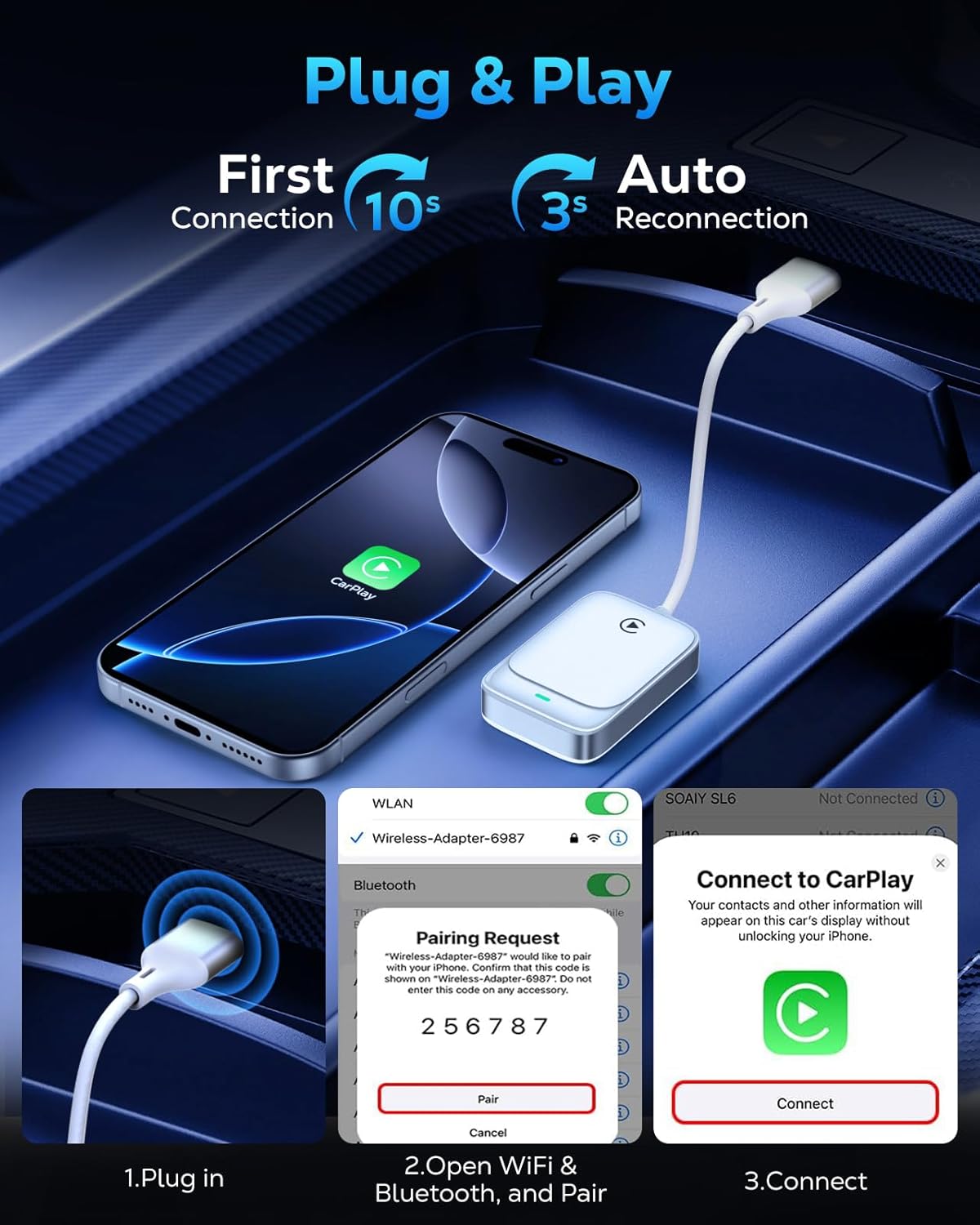
Figure 4: Visual guide for the three-step plug and play connection process.
3.1 Vaizdo įrašo vadovas sąrankai
Video 1: This video demonstrates the seamless wireless CarPlay experience, including the unboxing and quick setup process of the MoKo Wireless CarPlay Adapter in a vehicle.
4. Naudojimo instrukcijos
Once connected, the MoKo Wireless CarPlay Adapter allows you to utilize all standard CarPlay functions wirelessly, maintaining your car's original control methods.
4.1 Pagrindinės funkcijos
- Navigacija: Use Apple Maps or other compatible navigation apps directly on your car's display.
- Muzikos atkūrimas: Stream music from your iPhone's library or favorite apps.
- „Siri“ asistentas: Activate Siri for voice commands, hands-free messaging, and more.
- Telefono skambučiai: Saugiai skambinkite ir priimkite skambučius naudodami savo automobilio informacijos ir pramogų sistemą.

Figure 5: Display of various CarPlay functions available through the adapter.
4.2 Valdymo metodai
The adapter supports your car's original control mechanisms for a familiar user experience:
- Padėjėjas balsu: Use Siri for hands-free operation.
- Vairo valdikliai: Manage audio, calls, and navigation directly from your steering wheel.
- Jutiklinio ekrano valdymas: Interact with CarPlay apps via your car's touch screen.
- OEM rankenėlės valdymas: Utilize your car's original equipment manufacturer (OEM) control knobs.

Figure 6: Illustration of different control methods supported by the adapter.
4.3 Vaizdo įrašo vadovas apie veikimą
2 vaizdo įrašas: šiame vaizdo įraše pateikiama išsami informacijaview of the MoKo Wireless CarPlay Adapter, demonstrating its features and how it enhances the in-car experience.
5. Suderinamumas
The MoKo Wireless CarPlay Adapter offers broad compatibility with specific requirements:
- Automobilio suderinamumas: Compatible with any car equipped with a factory-installed wired Apple CarPlay system.
- „iPhone“ suderinamumas: Supports iPhone 6 and later models.
- iOS versija: Reikalinga „iOS 10“ arba naujesnė versija.
Note: This adapter is NOT compatible with vehicles that lack Apple CarPlay or with Android Auto systems. Please verify your car's specifications before purchase.
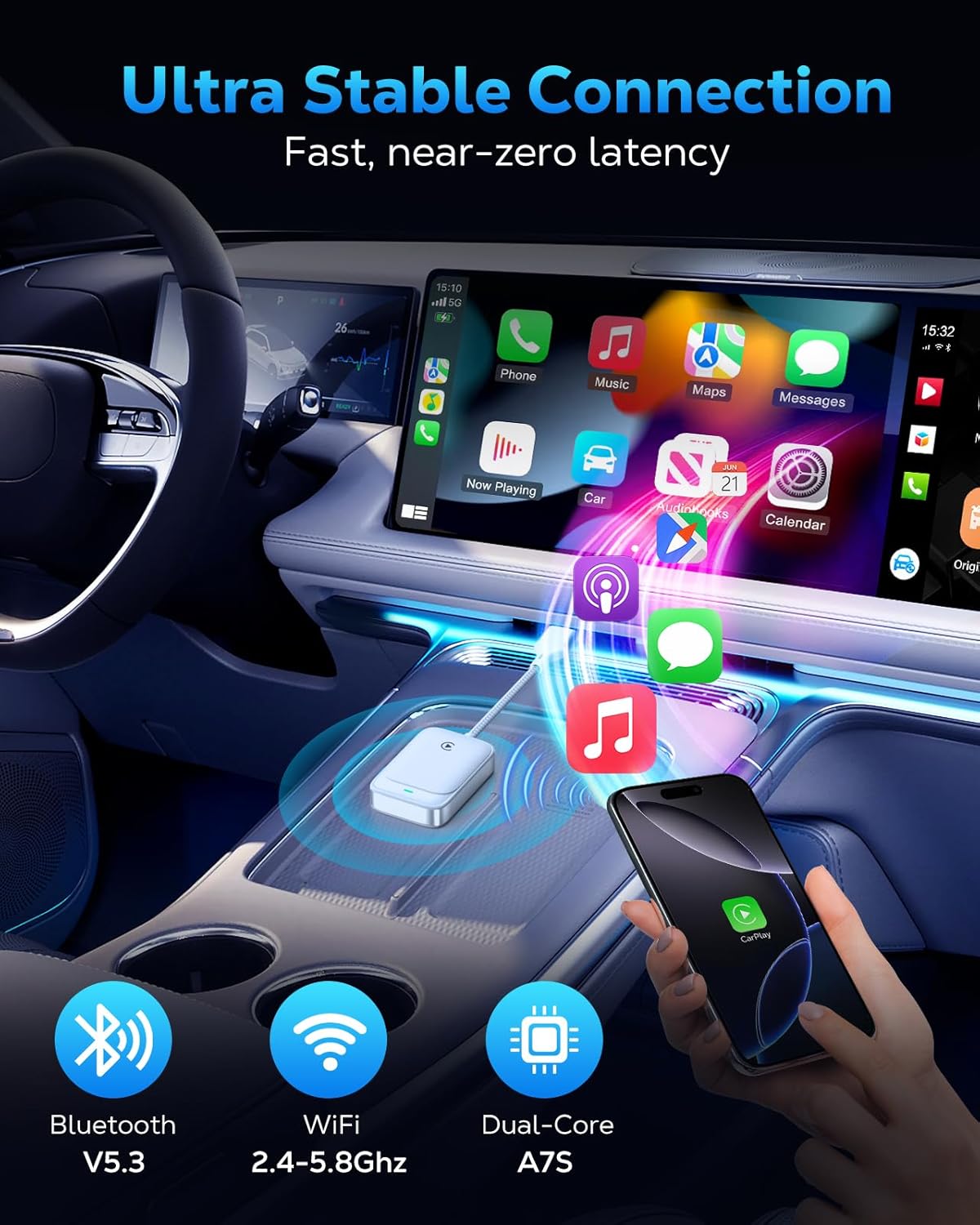
Figure 7: The adapter's advanced chip for stable and fast connection.
6. Problemų sprendimas
If you encounter issues with your MoKo Wireless CarPlay Adapter, consider the following common solutions:
- Ryšio problemos: If the adapter fails to connect or disconnects frequently, ensure your iPhone's Bluetooth and Wi-Fi are both enabled. Try restarting both your iPhone and your car's infotainment system.
- Firmware atnaujinimai: The adapter supports firmware updates for optimal functionality and to resolve potential issues. Refer to the official MoKo support website for instructions on how to check for and apply updates.
- Suderinamumo patikrinimas: Double-check that your vehicle has factory-installed wired Apple CarPlay and that your iPhone meets the iOS 10+ requirement.
For persistent issues, please refer to the detailed solutions in the included manual or contact our professional technical support team.
7. Specifikacijos
| Funkcija | Detalė |
|---|---|
| Gaminio matmenys | 7.6 x 1.34 x 0.47 colio |
| Prekės svoris | 0.74 uncijos |
| Ryšys | 5.8GHz WiFi, Bluetooth V5.3 |
| Lustų rinkinys | 2025 Upgraded Core Chip (e.g., Cortex A7S) |
| Suderinamumas | Cars with factory wired Apple CarPlay, iPhone 6+ with iOS 10+ |
8. Priežiūra
To ensure the longevity and optimal performance of your MoKo Wireless CarPlay Adapter, follow these simple maintenance guidelines:
- Laikyti švarų: Reguliariai valykite adapterį minkštu, sausu skudurėliu, kad pašalintumėte dulkes ir šiukšles. Nenaudokite skystų valiklių.
- Venkite ekstremalių temperatūrų: Do not expose the adapter to extreme heat or cold, as this can affect its internal components.
- Elkitės atsargiai: While the braided cable is durable, avoid excessive bending or pulling on the cable and connectors to prevent damage.
- Saugi vieta: Ensure the adapter is placed in a secure location within your vehicle to prevent it from being dislodged or damaged during driving.
9. Parama
MoKo is committed to providing excellent customer support. If you have any questions, encounter issues, or require technical assistance with your Wireless CarPlay Adapter, please do not hesitate to contact our professional technicians. We are always ready to help you.
For the latest firmware updates and support resources, please visit the official MoKo websvetainėje arba žr. kontaktinę informaciją, pateiktą jūsų greitojo paleidimo vadove.