
Įvadas
Thank you for choosing the MEETION C9990 Wireless Bluetooth Keyboard and Mouse combo. This product offers versatile connectivity options (2.4GHz USB and dual Bluetooth channels), an ergonomic design for comfort, and rechargeable batteries for extended use. This manual will guide you through the setup, operation, and maintenance of your new device.
Pakuotės turinys
- MEETION C9990 Wireless Keyboard
- Belaidė pelė MEETE
- USB imtuvas (laikomas pelės baterijų skyriuje)
- USB-C įkrovimo laidas
- Vartotojo vadovas
Produktas baigtasview
Klaviatūros ypatybės
- Viso dydžio išdėstymas: Includes a numeric pad for comprehensive data entry.
- Low-Noise Scissor-Switch Keys: Provides a quiet and comfortable typing experience.
- Multimedijos klavišai: Dedicated function keys for quick access to media controls and system functions.
- Fixed Anti-Slip Stand: Ensures stability and an ergonomic typing angle.
- Itin plonas dizainas: Estetiškai malonusasing and space-efficient.

Image: Close-up of the keyboard keys, illustrating the low-noise scissor-switch design for quiet and comfortable typing.

Image: The keyboard features a fixed-angle anti-slip stand for enhanced stability and typing comfort.
Pelės savybės
- Ergonomic Sculpted Design: Contoured shape supports natural wrist and hand posture.
- Reguliuojamas DPI: Four DPI settings (800-2400) for precise cursor control.
- Tilt-Scroll Wheel: Allows for horizontal and vertical scrolling.
- Režimo jungiklis: Easily switch between 2.4GHz and Bluetooth modes.

Image: The mouse features an ergonomic sculpted design to provide comfort during extended use.

Image: Detailed diagram of the mouse highlighting its various components and functions, including buttons, scroll wheel, and switches.
Sąrankos instrukcijos
1. Įrenginių įkrovimas
Both the keyboard and mouse are equipped with built-in rechargeable batteries. Before first use, or when the battery indicator shows low power, charge both devices using the provided USB-C cable.
- Prijunkite įkrovimo laido USB-C galą prie klaviatūros ir pelės įkrovimo prievado.
- Prijunkite įkrovimo laido USB-A galą prie USB maitinimo šaltinio (pvz., kompiuterio USB prievado, USB sieninio adapterio).
- Įkrovimo indikatoriaus lemputė užsidegs įkrovimo metu ir užges, kai bus visiškai įkrauta.
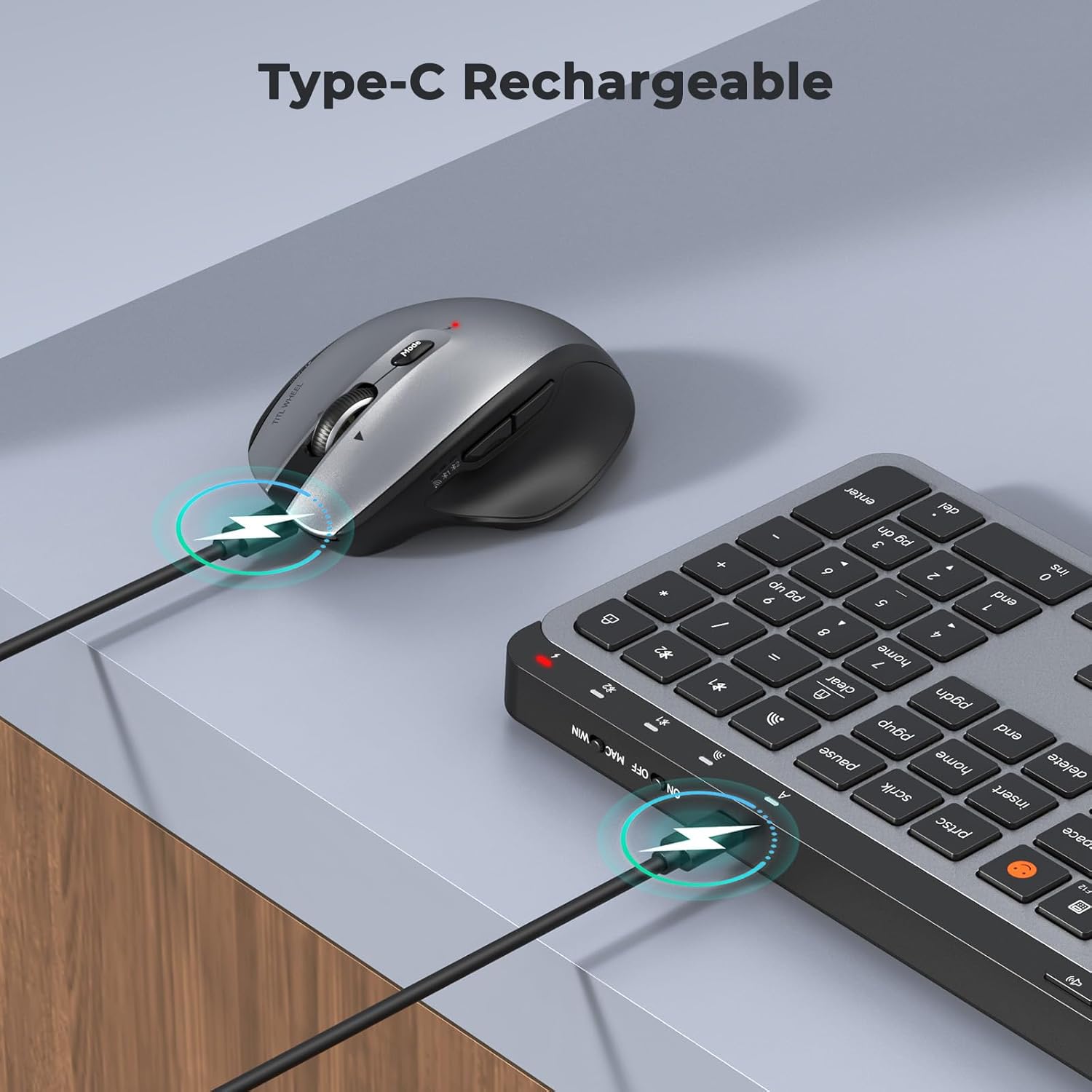
Image: Both the keyboard and mouse are rechargeable via USB-C, ensuring convenience and eliminating the need for disposable batteries.
2. Prisijungimas prie įrenginių
The C9990 combo supports three connection modes: 2.4GHz wireless (via USB receiver) and two Bluetooth channels (BT1, BT2).
2.1. 2.4 GHz belaidis ryšys
- Locate the USB receiver, typically stored in the mouse's battery compartment.
- Prijunkite USB imtuvą prie laisvo kompiuterio USB prievado.
- Įjunkite klaviatūrą ir pelę naudodami atitinkamus maitinimo jungiklius.
- Norėdami naudoti klaviatūrą, paspauskite 2.4G button (usually indicated by a USB icon) to switch to 2.4GHz mode.
- For the mouse, switch the mode selector to the 2.4G padėtis.
- Įrenginiai turėtų prisijungti automatiškai.
2.2. „Bluetooth“ ryšys (BT1 / BT2)
- Įjunkite klaviatūrą ir pelę.
- Klaviatūrai: Paspauskite ir palaikykite BT1 or BT2 button for 3-5 seconds until the indicator light flashes rapidly, indicating pairing mode.
- Pelėms: Switch the mode selector to the BT1 or BT2 position, then press and hold the Bluetooth pairing button (often located on the underside) until the indicator light flashes.
- Savo įrenginyje (nešiojamame kompiuteryje, planšetiniame kompiuteryje, išmaniajame telefone) eikite į „Bluetooth“ nustatymus ir ieškokite naujų įrenginių.
- Select "MEETION Keyboard" and "MEETION Mouse" from the list to pair.
- Repeat for the second Bluetooth channel (BT2) if connecting to another device.
3. Įrenginių perjungimas
The C9990 allows seamless switching between up to three connected devices (one 2.4GHz and two Bluetooth).
- Klaviatūrai: Paspauskite skirtą 2.4G, BT1, arba BT2 button to switch to the desired connected device.
- Pelėms: Use the mode switch on the underside of the mouse to select 2.4G, BT1, arba BT2.

Image: The keyboard and mouse can switch between three devices (PC, tablet, phone) with a single click, indicated by the Bluetooth and 2.4G icons.
Naudojimo instrukcijos
Klaviatūros funkcijos
- Multimedijos klavišai (F1–F12): These keys provide quick access to functions like brightness control, display window, home, dictation, sleep, app switcher, screen mirroring, screen capture, music player, email, and calculator. Functions may vary slightly depending on the operating system.
- Jaustukų raktas: The dedicated emoji key supports Windows, macOS, iPad (iPadOS), and Android Samsung devices. It does not support iPhone (iOS).

Image: The keyboard features a row of multimedia keys (F1-F12) for quick access to various system functions.
Pelės funkcijos
- DPI reguliavimas: Press the DPI switch button (usually located near the scroll wheel) to cycle through the available DPI settings (800, 1200, 1600, 2400). Adjust to your preference for cursor speed and precision.
- Tilt-Scroll Wheel: In addition to vertical scrolling, tilt the scroll wheel left or right for horizontal scrolling in applications that support it (e.g., spreadsheets).
- Pirmyn/atgal mygtukai: Use the side buttons for quick navigation in web naršyklės ir file tyrinėtojai.
Priežiūra
- Valymas: Klaviatūros ir pelės paviršiams valyti naudokite minkštą, sausą šluostę. Jei nešvarumai sunkiai įveikiami, šiek tiek nuvalykite.ampNuvalykite šluostę vandeniu arba švelniu valymo tirpalu. Venkite stiprių cheminių medžiagų ar abrazyvinių medžiagų.
- Akumuliatoriaus priežiūra: To prolong battery life, avoid fully discharging the devices frequently. Charge them when the low battery indicator appears. If storing for an extended period, charge them to about 50% and recharge every few months.
- Saugykla: Įrenginius laikykite vėsioje, sausoje vietoje, apsaugotoje nuo tiesioginių saulės spindulių ir ekstremalių temperatūrų.
Trikčių šalinimas
Ryšio problemos
- Įrenginys neprisijungia: Ensure both the keyboard and mouse are powered on and fully charged. Check that the correct connection mode (2.4G, BT1, or BT2) is selected on both devices. For Bluetooth, ensure your host device's Bluetooth is enabled and the devices are in pairing mode.
- Pertraukiamas ryšys: Move the devices closer to your computer. Avoid using them near strong electromagnetic interference sources (e.g., Wi-Fi routers, other wireless devices).
- 2.4 GHz imtuvas neatpažintas: Try plugging the USB receiver into a different USB port. Ensure the receiver is fully inserted.
Funkcionalumo problemos
- Klavišai arba pelė nereaguoja: Recharge the devices. Restart your computer or device. Re-pair the devices if using Bluetooth or re-insert the USB receiver for 2.4GHz.
- Mouse cursor erratic: Clean the mouse sensor. Ensure you are using the mouse on a suitable surface (not highly reflective or transparent). Adjust DPI settings.
Specifikacijos
| Modelio numeris | C9990 |
| Ryšio technologija | „Bluetooth“, USB (2.4 GHz belaidis ryšys) |
| Klaviatūros išdėstymas | QWERTY, Full Size |
| Pelės judėjimo aptikimas | Optinis |
| Pelės DPI nustatymai | 800, 1200, 1600, 2400 |
| Maitinimo šaltinis | Maitinamas baterijomis (įkraunamas per USB-C) |
| Suderinamos operacinės sistemos | „Windows“, „macOS“, „Linux“, „Chrome“ OS, „Android“ |
| Prekės svoris | 1.16 Kilograms (combined) |
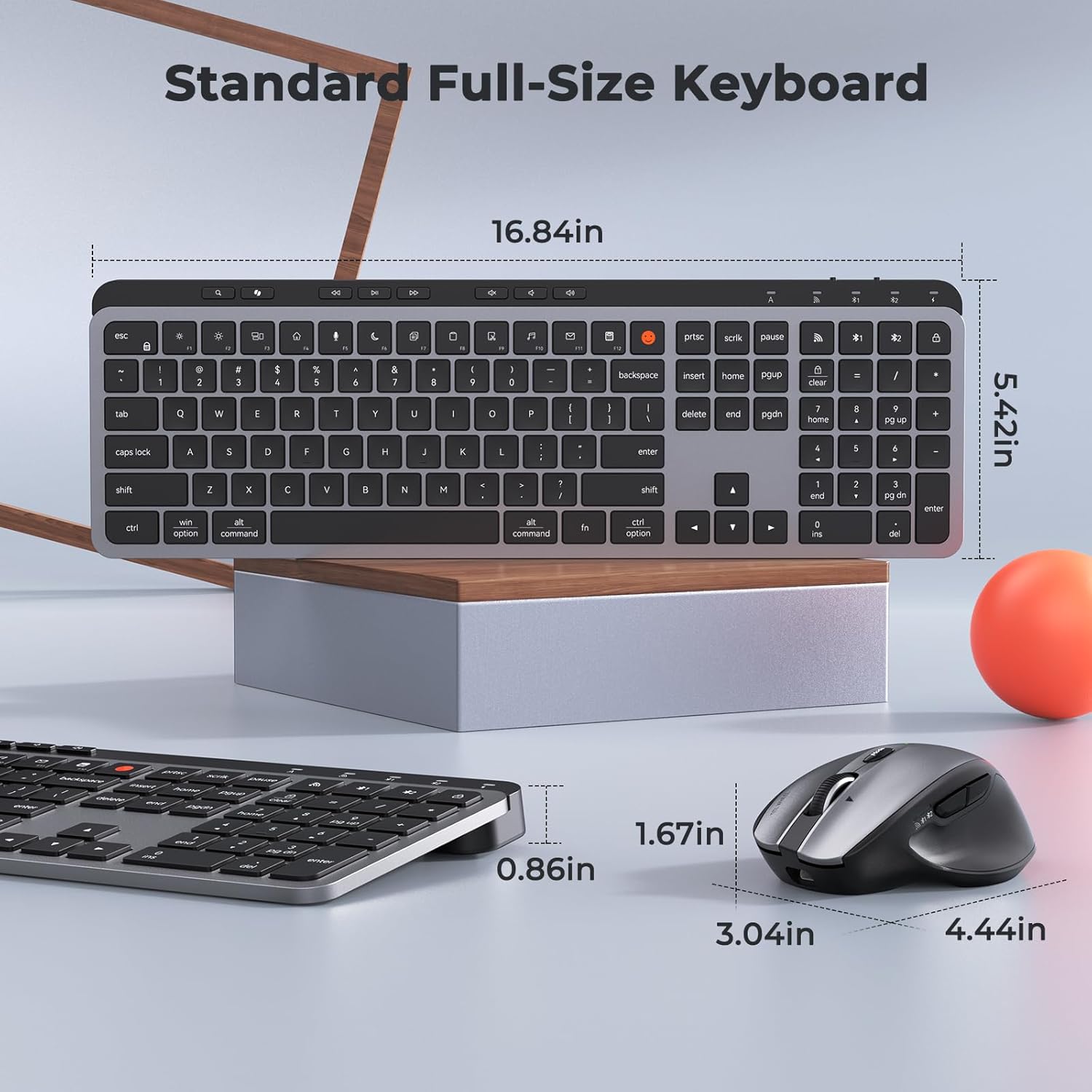
Image: Dimensions of the MEETION C9990 keyboard and mouse for reference.
Garantija ir palaikymas
The MEETION C9990 Wireless Bluetooth Keyboard and Mouse comes with a 1 metų garantija nuo įsigijimo datos. Ši garantija taikoma gamybos defektams, atsiradusiems įprasto naudojimo sąlygomis.
For technical support, troubleshooting assistance, or warranty claims, please contact MEETION customer service through the retailer where you purchased the product or visit the official MEETION websvetainė kontaktinei informacijai.
Saugos informacija
- Saugokite prietaisus nuo vandens, drėgmės ar ekstremalių temperatūrų.
- Venkite prietaisų numetimo ar stiprių smūgių.
- Do not attempt to disassemble or repair the devices yourself. Refer to qualified service personnel.
- Laikyti vaikams nepasiekiamoje vietoje.
- Atsakingai utilizuokite baterijas ir elektroninius komponentus pagal vietinius reikalavimus.