
1. Įvadas
Thank you for choosing the TOPTRO TP3 4K Google TV Portable Projector. This manual provides essential information for setting up, operating, and maintaining your projector. Please read it thoroughly before use to ensure optimal performance and safety.
The TOPTRO TP3 is designed to deliver a versatile and immersive viewing experience, featuring integrated Google TV, AI-powered image adjustments, and comprehensive connectivity options. Enjoy your content at home, outdoors, or on the go.
2. Produktas baigtasview
2.1 Pagrindinės savybės
- Integruota „Google TV“: Access over 10,000 official streaming applications, including Netflix, Prime Video, and YouTube, without additional devices.
- Google Voice Control: Use the remote control's voice assistant button to search for content, adjust settings, and control playback hands-free.
- AI-Powered Image Adjustment: Features automatic focus, automatic keystone correction, obstacle avoidance, and automatic screen adjustment for a perfectly aligned and clear image within seconds.
- Native 1080P Resolution with 4K Decoding: Delivers sharp, detailed images and natural colors, supporting 4K video decoding.
- Short Throw Ratio (0.8:1): Projects a 60-inch image from just one meter distance, ideal for small spaces.
- 90-Degree Rotating Stand: Allows for flexible projection angles, including ceiling projection.
- Išplėstinis ryšys: Equipped with dual-band WiFi 6, Bluetooth 5.3, HDMI ARC, USB, and a 3.5mm audio jack for wide device compatibility.
- Nešiojamas dizainas: Weighing only 1.2 kg (2.6 lbs) with a hidden carry handle, making it easy to transport.
2.2 Pakuotės turinys
Įsitikinkite, kad pakuotėje yra visi daiktai:
- TOPTRO TP3 projektorius
- Nuotolinio valdymo pultas
- HDMI kabelis
- Maitinimo adapteris
- Vartotojo vadovas
3. Sąranka
3.1 Pradinis išdėstymas
Place the projector on a stable, flat surface. The 90-degree rotating stand allows for various projection angles, including wall, ceiling, or tabletop. For optimal image quality, ensure the projection surface is smooth and light-colored.

Image: The TOPTRO TP3 projector can be used in diverse environments, from living rooms to outdoor camping, showcasing jo prisitaikomumą.
3.2 Maitinimo jungtis
- Connect the power adapter to the projector's power input.
- Plug the power adapter into a suitable electrical outlet (220V).
- Paspauskite projektoriaus arba nuotolinio valdymo pulto maitinimo mygtuką, kad jį įjungtumėte.
3.3 Tinklo jungtis
Upon first startup, follow the on-screen prompts to connect to your Wi-Fi network. The projector supports dual-band WiFi 6 for a fast and stable connection.
3.4 „Google TV“ sąranka
After connecting to Wi-Fi, sign in with your Google account to access Google TV and download applications from the Google Play Store. This step is crucial for utilizing the integrated streaming services.

Image: The projector's interface showing integrated Google TV with direct access to popular streaming applications.
4. Naudojimo instrukcijos
4.1 Pagrindinės operacijos
- Maitinimo įjungimas/išjungimas: Press the power button on the remote or projector.
- Navigacija: Use the directional buttons on the remote to navigate menus.
- Pasirinkimas: Press the 'OK' button to confirm selections.
- Garsumo valdymas: Use the volume buttons on the remote.
4.2 Vaizdo koregavimas
The TOPTRO TP3 features AI-powered automatic image adjustments:
- Automatinis fokusavimas: Projektorius automatiškai reguliuoja vaizdo aiškumą.
- Auto Keystone korekcija: Automatically corrects distorted images to a rectangular shape.
- Kliūčių vengimas: Detects and adjusts the image to avoid objects on the projection surface.
- Auto Screen Adjustment: Optimizuoja vaizdą, kad jis tilptų į ekrano plotą.
These adjustments occur automatically within seconds of powering on or repositioning the projector. Manual digital zoom (80-100%) is also available for fine-tuning image size.

Image: Visual representation of the projector's AI-powered automatic image adjustment features, ensuring a clear and aligned picture.
4.3 Google Voice Control
Press the dedicated voice assistant button on your remote control and speak your command. For example, say "Open YouTube" or "Play music." The projector will respond to your voice commands for quick access to functions and content.
4.4 Screen Mirroring (Google Cast)
Utilize Google Cast technology to wirelessly mirror content from your smartphone or tablet to the projector. For iPhone users, download the "AirScreen" application from the Google Play Store on the projector for wireless screen mirroring.
4.5 Rotating Stand Usage
The integrated 90-degree rotating stand allows you to easily adjust the projection angle. Simply pivot the projector to direct the image onto a wall, screen, or ceiling. This feature is particularly useful for bedroom viewing or creative setups.
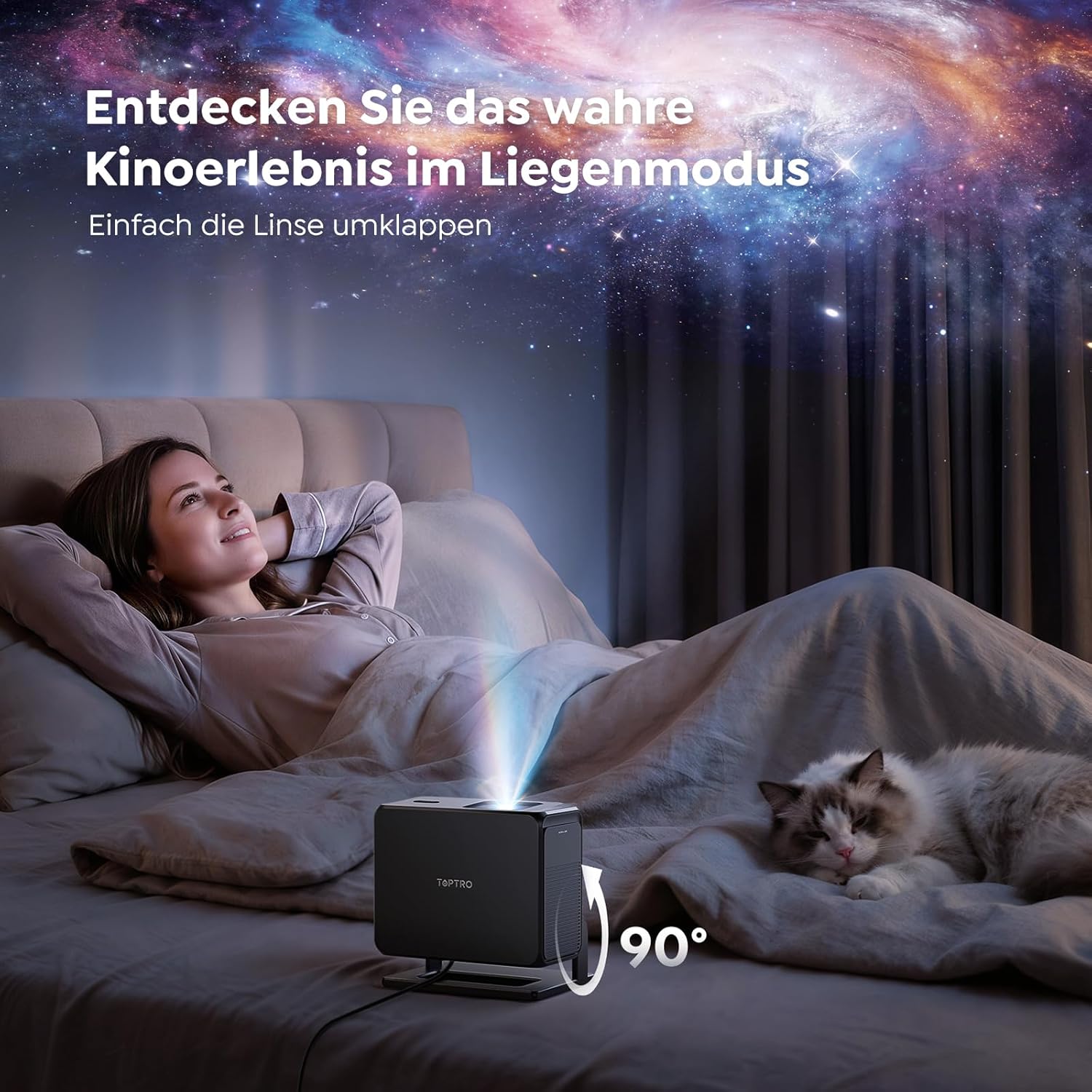
Image: The TOPTRO TP3 projector rotated 90 degrees to project content onto a bedroom ceiling, offering a unique viewpatirtį.
5. Ryšys
5.1 Laidinės jungtys
- HDMI ARC/CEC: Connect external devices like laptops, gaming consoles (Xbox/PlayStation 5), or Blu-ray players. The ARC feature allows audio to be sent back to a compatible sound system.
- USB: Prijunkite USB atmintines, kad galėtumėte atkurti medijos failus.
- 3.5 mm garso lizdas: Prijunkite išorinius laidinius garsiakalbius arba ausines.
5.2 Belaidės jungtys
- „Wi-Fi 6“: Provides faster and more stable wireless connectivity for streaming and online content.
- "Bluetooth 5.3": Connect Bluetooth headphones or speakers for an enhanced audio experience.
6. Priežiūra
6.1 Objektyvo valymas
Gently clean the projector lens with a soft, lint-free cloth designed for optical surfaces. Avoid using abrasive cleaners or excessive force, as this can scratch the lens.
6.2 Bendras valymas
Projektoriaus išorę nuvalykite minkšta, sausa šluoste. Nenaudokite skystų valiklių tiesiai ant įrenginio.
6.3 Saugykla
Kai nenaudojate, laikykite projektorių vėsioje, sausoje vietoje, toliau nuo tiesioginių saulės spindulių ir ekstremalių temperatūrų. Naudokite originalią pakuotę arba apsauginį dėklą, kad išvengtumėte dulkių kaupimosi ir pažeidimų.
7. Problemų sprendimas
7.1 Nerodomas vaizdas
- Įsitikinkite, kad projektorius įjungtas ir prijungtas prie maitinimo šaltinio.
- Check all cable connections (HDMI, USB) to external devices.
- Verify the input source selected on the projector matches the connected device.
- Confirm the lens cap is removed.
7.2 Neryškus vaizdas
- Leiskite automatinio fokusavimo funkcijai baigti reguliavimą.
- Įsitikinkite, kad projektoriaus paviršius yra lygus, o projektorius stabilus.
- Clean the projector lens if smudges or dust are visible.
7.3 Nėra garso
- Patikrinkite projektoriaus ir prijungto šaltinio įrenginio garsumo lygį.
- Ensure external speakers or headphones are properly connected (wired or Bluetooth).
- If using HDMI ARC, verify your sound system is compatible and correctly configured.
7.4 Nuotolinio valdymo pultas neveikia
- Pakeiskite nuotolinio valdymo pulto baterijas.
- Įsitikinkite, kad tarp nuotolinio valdymo pulto ir projektoriaus IR imtuvo nėra jokių kliūčių.
For further assistance, refer to the detailed troubleshooting section in the full user manual or contact customer support.
8. Specifikacijos
| Funkcija | Specifikacija |
|---|---|
| Prekės ženklas | TOPTRO |
| Modelio pavadinimas | TP3 |
| Gimtoji raiška | 1920 x 1080 (1080p) |
| Video Decoding Support | 4K |
| Ekrano tipas | LED |
| Ypatingos savybės | Auto Focus, Auto Keystone Correction, Obstacle Avoidance, Auto Screen Adjustment, Google TV, Google Voice Control |
| Ryšio technologija | HDMI, USB, Bluetooth 5.3, Wi-Fi 6 |
| Techninės įrangos sąsaja | HDMI ARC/CEC, USB, 3.5mm Audio |
| Gaminio matmenys (IxPxH) | 19.4 x 15.8 x 14.1 cm |
| Prekės svoris | 1.2 kg |
| Formos faktorius | Nešiojami |
| Montavimo tipas | Ceiling Mount, Tabletop, Wall |
| Minimalus vaizdo dydis | 40 colių |
| Maksimalus vaizdo dydis | 120 colių |
| Maksimalus metimo atstumas | 2.13 metrų |
| ttage | 220 voltų |
| Įtraukti komponentai | HDMI kabelis |
| Spalva | Juoda |
| Valdiklio tipas | Nuotolinio valdymo pultas |
| Suderinami įrenginiai | Xbox/PlayStation 5, Smartphone, Tablet, Laptop, Speaker, Notebook |
| Rekomenduojami naudojimo būdai | Gaming, Business, Home Cinema, Education |
9. Garantija ir palaikymas
9.1 Informacija apie garantiją
Konkrečias garantijos sąlygas rasite prie gaminio pridėtoje garantijos kortelėje. Išsaugokite pirkimo įrodymą, jei prireiktų pateikti garantijos pretenzijas.
9.2 Pagalba klientams
If you encounter any issues or have questions regarding your TOPTRO TP3 projector, please contact our customer service team. We provide prompt, professional, and effective support to ensure a smooth user experience.
Contact details can typically be found on our official websvetainėje arba garantijos kortelėje.


