1. Įvadas
This manual provides essential information for the installation, operation, and maintenance of the Generic DAA78L 13127-1 348.01404.0011 Motherboard. Please read this manual thoroughly before installation and keep it for future reference.
The Generic DAA78L 13127-1 348.01404.0011 Motherboard (Model 6524285428570) is designed for compatibility with TC-120 and XC-120 systems, offering reliable performance for your computing needs.
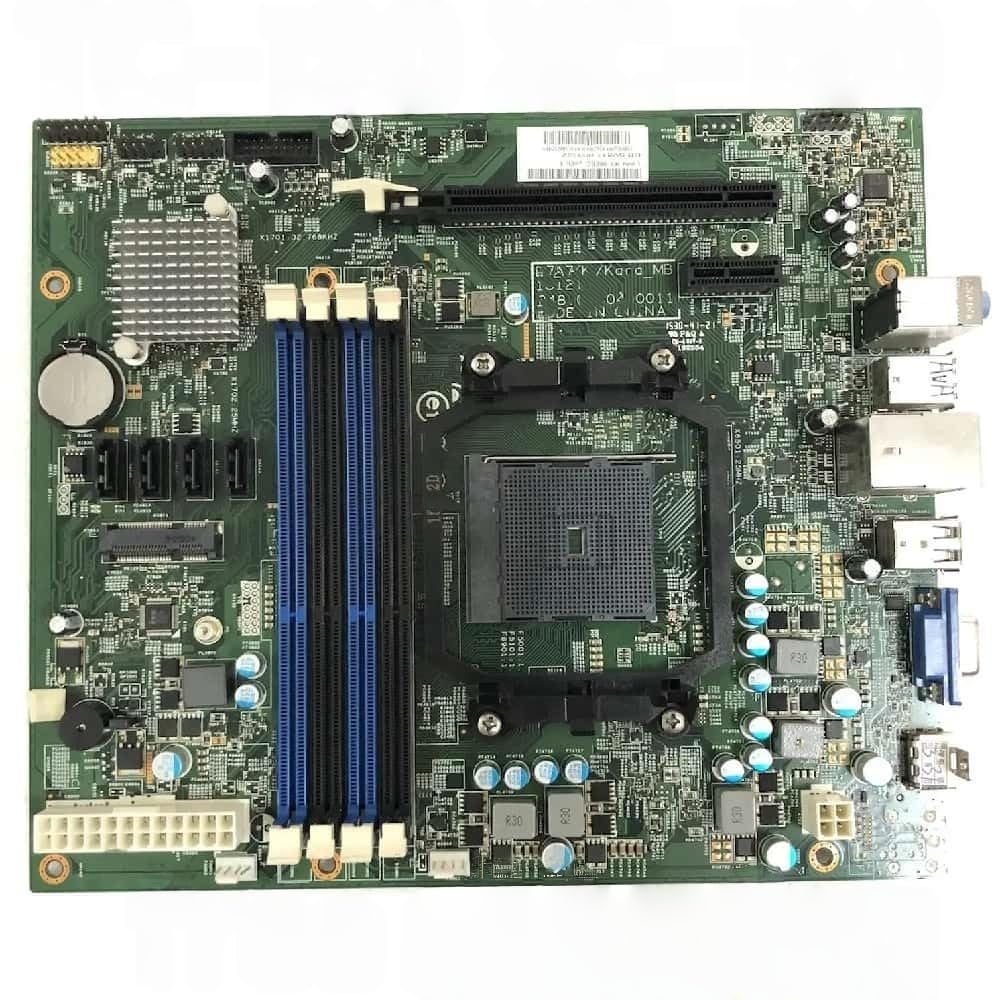
Figure 1: Generic DAA78L 13127-1 348.01404.0011 Motherboard. This image displays the main components and layout of the motherboard.
2. Sąranka ir diegimas
2.1 Saugos priemonės
- Prieš montuodami arba išimdami komponentus, visada atjunkite maitinimą.
- Kad išvengtumėte elektrostatinės iškrovos (ESD) sukeliamos žalos, dėvėkite antistatinį riešo dirželį.
- Handle the motherboard by its edges, avoiding contact with components and connectors.
2.2 Komponentų diegimas
- Paruoškite važiuoklę: Ensure your computer case is ready for motherboard installation. Install standoffs if necessary.
- Įdiekite procesorių: Carefully align the CPU with the socket on the motherboard. Lower the CPU into place without force. Secure the CPU retention arm.
- Įdiekite procesoriaus aušintuvą: Attach the CPU cooler according to its specific instructions. Ensure proper thermal paste application.
- Įdiekite RAM: Open the DIMM slot clips. Align the RAM module notch with the slot key. Press firmly on both ends until the clips lock into place.
- Pagrindinės plokštės montavimas: Carefully place the motherboard into the chassis, aligning the screw holes with the standoffs. Secure with screws.
- Prijunkite maitinimą: Prijunkite 24 kontaktų ATX maitinimo jungtį ir 4/8 kontaktų CPU maitinimo jungtį iš maitinimo šaltinio prie pagrindinės plokštės.
- Prijunkite išorinius įrenginius: Connect front panel headers (power switch, reset switch, USB, audio), SATA devices, and any expansion cards (e.g., graphics card).
3. Naudojimo instrukcijos
3.1 Pirmasis paleidimas
- Įdiegę ir prijungę visus komponentus, prijunkite monitorių, klaviatūrą ir pelę.
- Power on the system. The system should display the BIOS/UEFI splash screen.
- Access the BIOS/UEFI setup by pressing the designated key (usually DEL or F2) during startup.
3.2 BIOS / UEFI konfigūracija
The BIOS/UEFI interface allows you to configure system settings, boot order, and hardware parameters. Refer to your system's specific BIOS/UEFI manual for detailed instructions on navigation and settings.
3.3 Tvarkyklės diegimas
After installing your operating system, install the necessary drivers for the motherboard's chipsets, audio, network, and other integrated components. These drivers are typically provided on a support CD or can be downloaded from the manufacturer's websvetainę.
4. Priežiūra
- Dulkių šalinimas: Reguliariai valykite dulkes nuo pagrindinės plokštės ir kitų komponentų suslėgtu oru. Prieš valydami įsitikinkite, kad sistema išjungta ir atjungta nuo elektros tinklo.
- BIOS / UEFI atnaujinimai: Periodiškai tikrinkite gamintojo website for BIOS/UEFI updates. Updates can improve stability, compatibility, and performance. Follow update instructions carefully to avoid system damage.
- Kabelių valdymas: Įsitikinkite, kad vidiniai kabeliai yra tvarkingai išvedžioti, kad pagerėtų oro srautas ir būtų išvengta trukdžių.
5. Problemų sprendimas
| Problema | Galima priežastis | Sprendimas |
|---|---|---|
| Sistema neįsijungia. | Power cables not connected; faulty power supply; front panel header incorrect. | Check 24-pin and CPU power connectors. Verify power supply functionality. Recheck front panel connections. |
| Nėra ekrano išvesties. | Monitor cable loose; graphics card not seated; RAM issues. | Ensure monitor cable is secure. Reseat graphics card. Reseat RAM modules. Test with one RAM stick. |
| System beeps during startup. | Hardware error indicated by beep codes. | Consult your motherboard's specific beep code documentation to identify the component causing the error (e.g., RAM, graphics card). |
| Operating system fails to load. | Incorrect boot order; corrupted OS installation; faulty storage drive. | Patikrinkite paleidimo tvarką BIOS/UEFI. Pabandykite pataisyti OS arba įdiegti iš naujo. Išbandykite atminties įrenginį. |
6. Specifikacijos
The following specifications are for the Generic DAA78L 13127-1 348.01404.0011 Motherboard:
- Modelio numeris: 6524285428570
- Dalies numeris: DAA78L 13127-1 348.01404.0011
- Suderinamumas: Suitable for TC-120 and XC-120 systems.
- Gamintojas: Bendras
- ASIN: B0GF1RRVKF
- Pirmas prieinamas: 5 m. sausio 2026 d
- Note: Detailed specifications regarding chipset, CPU socket, RAM slots, expansion slots, and I/O ports should be obtained from the official product page or manufacturer's documentation.
7. Garantija ir palaikymas
7.1 Informacija apie garantiją
For warranty details, please refer to the specific terms and conditions provided by the seller or manufacturer at the time of purchase. Typically, electronic components come with a limited warranty covering manufacturing defects.
Pastaba: Neleistini pakeitimai arba netinkamas montavimas gali panaikinti gaminio garantiją.
7.2 Techninė pagalba
For technical assistance, troubleshooting, or further inquiries, please contact the seller or the manufacturer's support channels. Have your product part number (DAA78L 13127-1 348.01404.0011) and purchase information ready when contacting support.
You may also find additional resources and FAQs on the manufacturer's official websvetainę.