
1. Įvadas
This manual provides detailed instructions for the setup, operation, maintenance, and troubleshooting of your NuPhy Node100 Wireless Mechanical Keyboard. Please read this manual thoroughly to ensure proper use and to maximize your keyboard's functionality.
2. Pagrindinės savybės
- Gesture Touch: The Node100 mechanical keyboard is equipped with a touch area at the top. Through this area, you can change the volume or brightness by sliding control, which can be configured via NuPhyIO software.
- Trijų režimų jungtis: This wireless keyboard supports Bluetooth, 2.4GHz, and USB-C wired connections. It can connect to up to five devices simultaneously and switch between them effortlessly using shortcut keys and side buttons.
- Tarpiklio tvirtinimo konstrukcija: The keyboard features a gasket mount design that ensures a smooth and quiet typing experience. This design effectively reduces vibration and noise while providing consistent comfort and eliminates hollow echoes.
- Backlighting & PBT Keycaps: With NuPhyIO, you can easily customize the backlight of the Node100 keyboard. The double-shot PBT keycaps effectively prevent characters from fading and provide a durable touch.
- Greitas atsakymas: The 2.4GHz mode and wired mode can achieve a 1000Hz polling rate, allowing for quick response during use, suitable for both gaming and office tasks.
3. Pakuotės turinys
Upon unboxing your NuPhy Node100 keyboard, verify that all the following items are included:
- 1 x Node100 Keyboard
- 1 x 2.4G imtuvas
- 1 x USB-C į USB-C laidas
- 1 x USB-C į USB-A adapteris
- 1 x Keycap/Switch Puller
- Extra Keycaps (6 for Low-Profile, 7 for High-Profile)
- 1 x Quick Start Guide (with FAQ & Instructions)
Video: This video demonstrates the unboxing process of the NuPhy Node100 keyboard, showcasing the contents of the package including the keyboard, cables, and accessories.

Image: A visual representation of the NuPhy Node100 keyboard along with its complete set of accessories, including the USB-C cable, 2.4G receiver, keycap/switch puller, and extra keycaps.
4. Sąranka ir prijungimas
4.1. Ryšio režimai
The Node100 keyboard supports three connection types:
- USB-C laidinis: For a direct, plug-and-play connection.
- Bluetooth: For wireless connection to up to three devices.
- 2.4 GHz belaidis ryšys: For a low-latency wireless connection using the included receiver.

Image: A diagram illustrating the three available connection modes for the Node100 keyboard: USB-C for wired, Bluetooth for wireless, and 2.4GHz for wireless with a dedicated dongle.
4.2. Ryšio režimų perjungimas
Use the side switch on the keyboard to select your desired connection mode:
- Slyskite į USB-C for wired mode.
- Slyskite į Bluetooth for wireless Bluetooth mode. Press Fn + 1/2/3 , kad perjungtumėte susietus „Bluetooth“ įrenginius.
- Slyskite į 2.4 GHz for wireless 2.4GHz mode. Press fn+4 suaktyvinti.

Vaizdas: Stambus planas view of the side of the Node100 keyboard, highlighting the USB-C port and the physical switches used to select between wired, Bluetooth, and 2.4GHz wireless connection modes.
5. Naudojimo instrukcijos
5.1. Gesture Touch Functionality
The Node100 features a touch area at the top for intuitive control:
- Slide your finger across the touch area to adjust volume or screen brightness.
- This functionality can be customized using the NuPhyIO software.
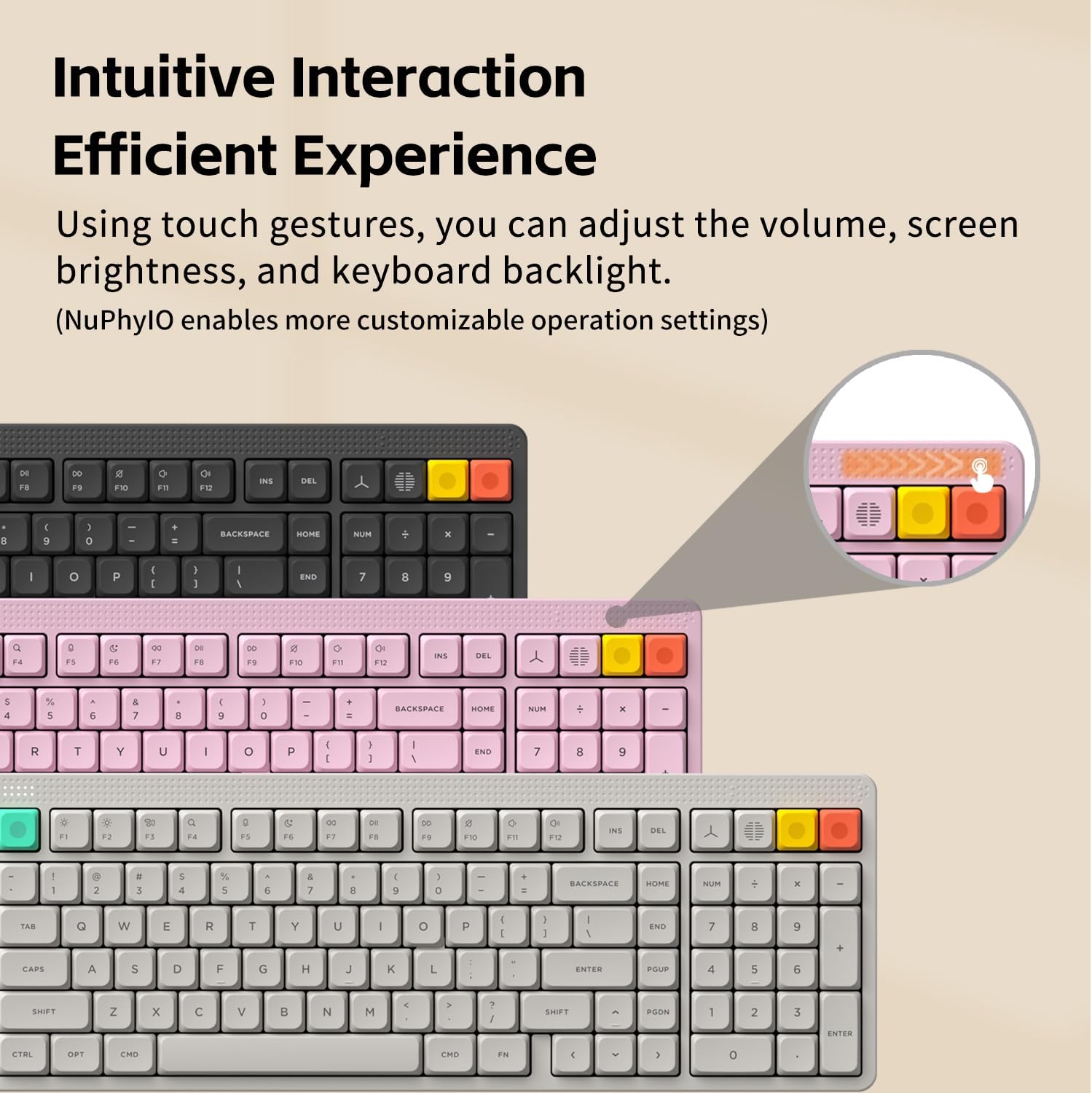
Image: A visual representation of the Node100 keyboard, specifically highlighting the gesture touch area located at the top, used for adjusting volume and screen brightness.
5.2. NuPhyIO Software Customization
The NuPhyIO software allows for extensive customization of your keyboard:
- Klavišų susiejimai: Remap keys to suit your workflow.
- Išplėstinės funkcijos: Assign special functions to keys.
- Apšvietimo efektai: Customize RGB backlighting patterns and colors.
- Makro įrašymas: Sukurkite ir priskirkite makrokomandas sudėtingoms komandoms.
Connect your keyboard via USB-C to your computer and access the NuPhyIO software to begin customization. The software supports Windows, macOS, and Linux systems.
Video: A tutorial demonstrating how to use the NuPhyIO software to customize key bindings and record macros, including setting a Mac lock screen function for enhanced productivity.
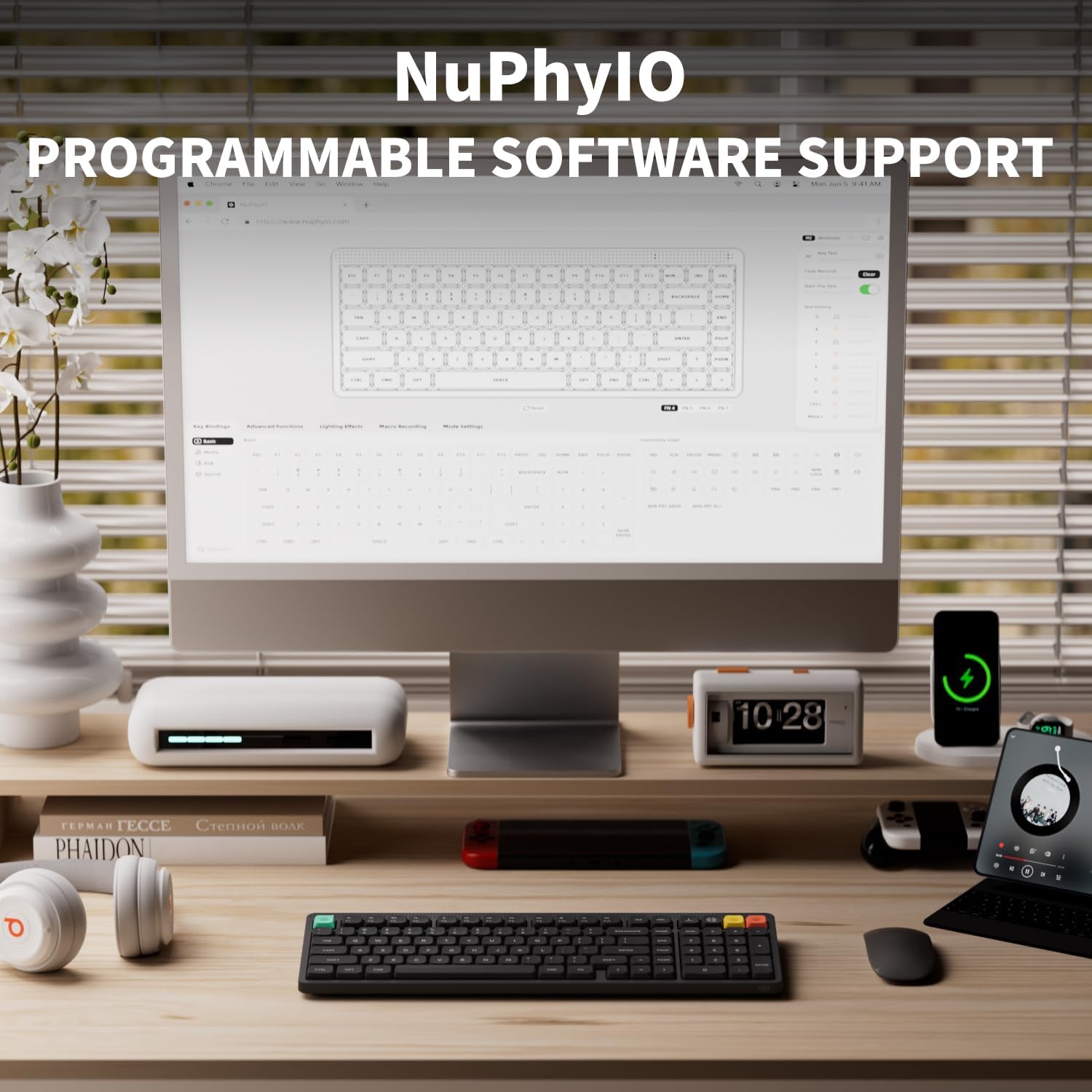
Image: A computer screen displaying the NuPhyIO software interface, which provides various options for programming key functions, customizing RGB lighting, and managing macros for the Node100 keyboard.
5.3. Adjustable Kickstand
The keyboard features a two-stage kickstand, allowing you to adjust the typing angle to 4°, 8°, or 10° for ergonomic comfort.

Paveikslėlis: Šoninė pusė view of the Node100 keyboard illustrating its two-stage adjustable kickstand, which can be set to angles of 4, 8, or 10 degrees for personalized ergonomic comfort.
6. Baterijos veikimo laikas
The Node100 keyboard is equipped with a 3000mAh battery, providing:
- Approximately 60-100 hours of battery life with backlighting ON.
- Approximately 1000 hours of battery life with backlighting OFF.

Image: A visual highlighting the 3000mAh battery capacity of the NuPhy Node100 keyboard, emphasizing its extended battery life for prolonged use.
7. Priežiūra
7.1. Valymas
- Klaviatūros paviršiui valyti naudokite minkštą, sausą šluostę.
- For deeper cleaning, use the included keycap puller to remove keycaps and clean underneath with compressed air or a small brush.
- Venkite naudoti stiprių cheminių medžiagų ar abrazyvinių medžiagų.
7.2. Klaviatūros dangtelio ir jungiklio keitimas
The Node100 is hot-swappable, allowing for easy replacement of switches without soldering. Use the provided keycap/switch puller for safe removal and installation.

Image: An exploded diagram illustrating the internal components of the Node100 keyboard, showcasing its gasket mount structure which contributes to a softer and more consistent typing experience.
8. Problemų sprendimas
8.1. Ryšio problemos
- Belaidis atjungimas: Ensure the keyboard is charged. Check that the 2.4GHz receiver is securely plugged in or that Bluetooth is enabled on your device and the keyboard is paired. Try re-pairing Bluetooth or re-inserting the 2.4GHz receiver.
- Lag or Delayed Input: In 2.4GHz or Bluetooth mode, ensure there are no strong interference sources nearby. For optimal performance, use wired mode or ensure the keyboard is close to the receiver/device.
- Keyboard Not Recognized (Wired): Ensure the USB-C cable is properly connected to both the keyboard and your computer. Try a different USB port or cable.
8.2. Key Functionality
- Klavišai nereaguoja: Check if the keyboard is in the correct operating mode (Windows/Mac switch). If individual keys are not working, they might need to be reseated or replaced if they are hot-swappable.
- Foninio apšvietimo problemos: Ensure backlighting is enabled via NuPhyIO or keyboard shortcuts. Check brightness settings.
8.3. Software Issues (NuPhyIO)
- Programinė įranga neaptinka klaviatūros: Ensure the keyboard is connected via USB-C and the correct mode is selected. Restart the NuPhyIO software and/or your computer.
- Customizations Not Applying: Ensure you have saved and applied changes within the NuPhyIO software.
9. Specifikacijos
| Funkcija | Detalė |
|---|---|
| Prekės ženklas | nuphy |
| Modelio numeris | NuPhy Node100 keyboard |
| Ryšio technologija | USB-C/2.4GHz/Bluetooth |
| Raktų skaičius | 103 |
| Jungiklio tipas | Mechanical (Blush Nano Switch for this variant) |
| Klaviatūros išdėstymas | QWERTY |
| Ypatingos savybės | Backlit, Programmable Keys, Hot-Swappable, Gesture touch, Ergonomic |
| Suderinami įrenginiai | Laptop, MAC, PC, Tablet |
| Rekomenduojami naudojimo būdai | Žaidimai, biuras |
| Medžiaga | Akrilnitrilo butadieno stirenas, polikarbonatas |
| Prekės svoris | 787.3 gramų |
| Maitinimo šaltinis | USB maitinimas |
10. Garantija ir palaikymas
For warranty information and technical support, please refer to the official NuPhy website or contact their customer service directly. Details are typically provided in the Quick Start Guide included with your product.
Taip pat galite apsilankyti NuPhy Store on Amazon dėl papildomų išteklių ir kontaktinės informacijos.