
Svarbios saugos instrukcijos
Prieš naudodami šį prietaisą, atidžiai perskaitykite visas instrukcijas. Nesilaikant šių instrukcijų, gali kilti elektros smūgis, gaisras arba sunkūs kūno sužalojimai.
- Prieš valydami ar atlikdami bet kokią techninę priežiūrą, visada atjunkite ventiliatorių nuo elektros tinklo.
- Nenaudokite ventiliatoriaus, jei pažeistas laidas arba kištukas.
- Laikykite maitinimo laidą toliau nuo įkaitusių paviršių.
- Nemerkite ventiliatoriaus į vandenį ar kitus skysčius.
- This fan is designed for both indoor and outdoor use, featuring IPX4 water resistance and UV protection. However, avoid prolonged exposure to heavy rain.
- Įsitikinkite, kad ventiliatorius pastatytas ant lygaus, stabilaus paviršiaus, kad jis neapvirstų.
- Ventiliatoriui veikiant, laikykite vaikus ir naminius gyvūnus atokiau nuo jo.
Produktas baigtasview
The DREO TurboCool Outdoor Misting Fan 711AS is designed to provide powerful and quiet cooling for both indoor and outdoor environments. It features advanced misting technology, multiple speed settings, smart modes, and versatile control options.

Image: The DREO TurboCool Outdoor Misting Fan 711AS providing cooling in an outdoor patio area.
Pakuotės turinys
- 1 × DREO Tower Fan (DR-HTF021AS)
- 1 × maitinimo adapteris
- 1 × Remote Control (includes 2 × AAA Batteries)
- 1 × Vartotojo vadovas
- A Set of Accessories
Sąranka
Surinkimas
The DREO TurboCool Misting Fan features tool-free assembly. Simply follow the instructions provided in the included user manual to attach the base and any other components. Ensure all parts are securely connected before plugging in the fan.

Image: Visual representation of the fan's tool-free assembly process.
Įdėjimas
Place the fan on a firm, level surface. The 9.8 ft (3m) power cord allows for flexible placement. When using outdoors, ensure the fan is positioned where it can effectively circulate air and mist without obstruction. The fan is weather-resistant (IPX4-rated water resistance and UV-protection) for outdoor use.
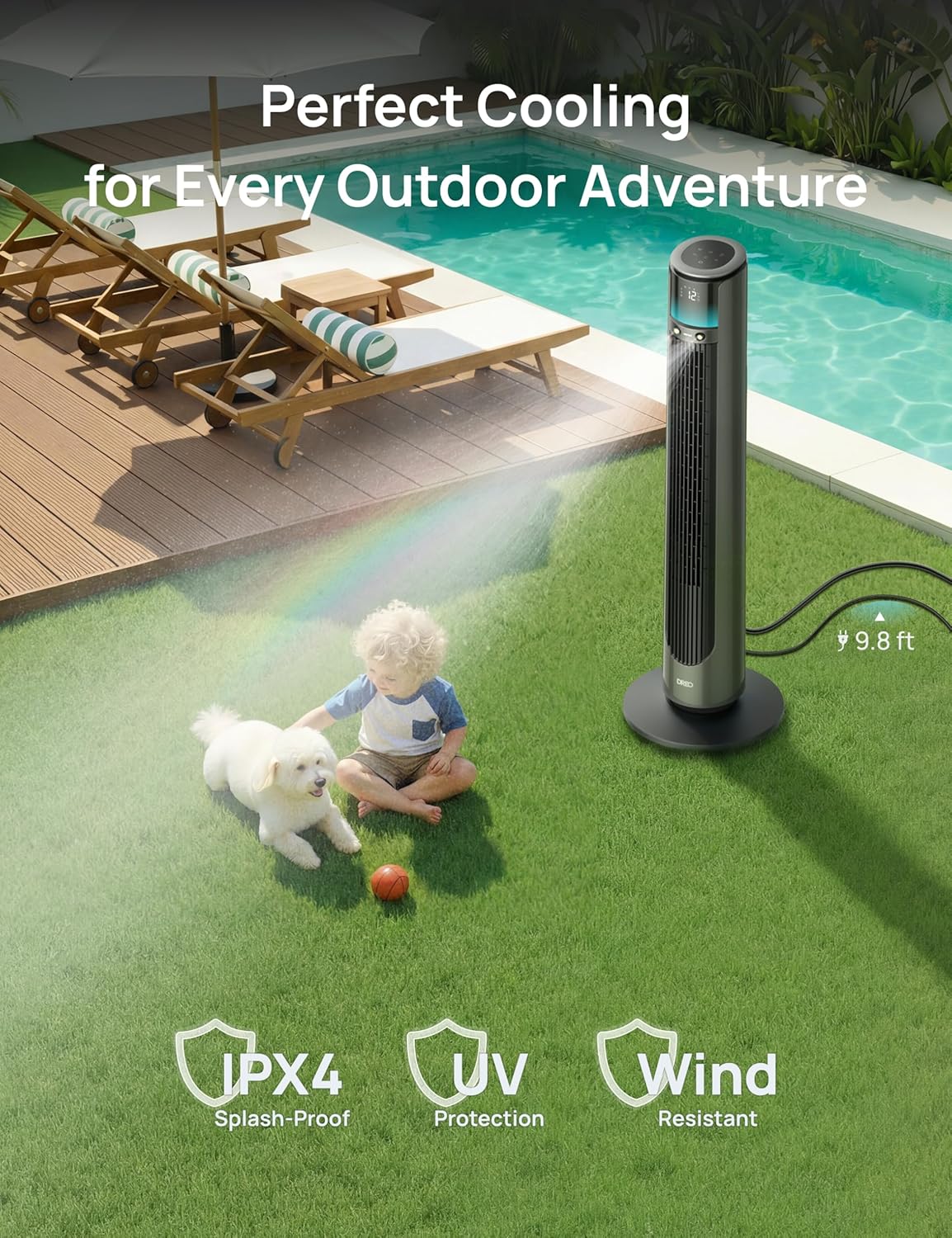
Image: The DREO Misting Fan positioned outdoors near a pool, demonstrating its weather-resistant design.
Naudojimo instrukcijos
Maitinimo įjungimas/išjungimas
Connect the power adapter to a suitable electrical outlet. Press the power button on the control panel or remote control to turn the fan on or off.
Fan Speeds and Modes
The fan offers 12 precise speed levels and 4 smart modes (Normal, Auto, Natural, Sleep) to customize your cooling experience. Use the control panel, remote, or app to adjust settings.
- Įprastas režimas: Užtikrina pastovų oro srautą pasirinktu greičiu.
- Automatinis režimas: Automatiškai reguliuoja ventiliatoriaus greitį pagal aplinkos temperatūrą.
- Natūralus režimas: Imituoja natūralų vėjelį keisdamas ventiliatoriaus greitį.
- Miegojimo rezimas: Operates at a lower, quieter speed for undisturbed rest, gradually decreasing speed over time.

Image: The fan's display showing available fan speeds and modes.
Osciliacija
The fan features MotionSync oscillation, allowing you to customize the oscillation angle from 30° to 150°. Use the remote control or app to direct airflow precisely where needed. The power-off memory function restores your last oscillation settings.

Image: Demonstrating remote control use to adjust the fan's oscillation angle.
Miglojimo funkcija
Activate the TurboCool Mist Technology for enhanced cooling. The fan produces an 86.9µm ultra-fine mist, capable of dropping temperatures by up to 12°F. Ensure the water tank is filled before activating the misting function.

Image: The fan's misting feature in action, showing the fine mist output.
Valdymo parinktys
The DREO TurboCool Misting Fan offers multiple control methods:
- Jutiklinis skydelis: Integrated controls on the top of the fan.
- Nuotolinio valdymo pultas: Full functionality from a distance.
- DREO programėlė: Connect via Wi-Fi or Bluetooth for smart control, scheduling, and advanced settings. The fan automatically switches to Bluetooth if Wi-Fi is unstable.
- Balso asistentai: Suderinamas su „Alexa“ ir „Google Assistant“, kad būtų galima valdyti laisvų rankų įranga.

Image: Demonstrating the DREO app for smart control of the fan.
Laikmatis ir užraktas nuo vaikų
Set the 12-hour timer to automatically turn off the fan. Activate the child lock feature to prevent unintended changes to settings.
Aplinkos šviesa
The built-in RGB ambient light provides a modern glow, enhancing the outdoor atmosphere.
Priežiūra
Ventiliatoriaus valymas
Regular cleaning ensures optimal performance. The fan features a detachable rear grille for easy access. Unplug the fan before cleaning.
- Išorė: Išorę nuvalykite minkšta, damp audinys. Nenaudokite abrazyvinių valiklių.
- Galinės grotelės: Remove the rear grille and clean it with a vacuum cleaner or rinse it under water. Ensure it is completely dry before reattaching.
- Vandens bakas: Periodically clean the water tank to prevent mineral buildup and maintain mist quality.

Image: Cleaning the detachable rear grille of the fan.
Trikčių šalinimas
If you encounter any issues with your DREO TurboCool Misting Fan, please refer to the following common solutions:
| Problema | Galima priežastis | Sprendimas |
|---|---|---|
| Ventiliatorius neįsijungia. | Nėra elektros, atsilaisvinęs kontaktas. | Ensure the power cord is securely plugged into a working outlet. Check if the power adapter is properly connected to the fan. |
| Jokio rūko nesigamina. | Empty water tank, clogged nozzle. | Refill the water tank. Clean the misting nozzle if it appears clogged. |
| Ventiliatorius neįprastai triukšmingas. | Obstruction, unstable surface. | Check for any obstructions in the fan grille. Ensure the fan is on a stable, level surface. |
| Nuotolinio valdymo pultas neveikia. | Išsikrovusios baterijos, kliūtis. | Replace the AAA batteries in the remote control. Ensure there are no obstructions between the remote and the fan. |
| Programėlių valdymo problemos. | Wi-Fi/Bluetooth connectivity problems. | Ensure your device's Wi-Fi or Bluetooth is enabled. Restart the DREO app. If Wi-Fi is unstable, the fan automatically switches to Bluetooth. |
If the problem persists, please contact DREO customer support for assistance.
Specifikacijos
| Funkcija | Detalė |
|---|---|
| Prekės ženklas | DREO |
| Modelio pavadinimas | 711AS |
| Modelio numeris | DR-HTF021AS |
| Spalva | Anglis |
| Gaminio matmenys (D x P x A) | 12.99 "D x 12.99" P x 42.24" A |
| Prekės svoris | 13.16 svaro |
| Maitinimo šaltinis | Su laidu elektra |
| Vattage | 40 vatų |
| Variklio tipas | DC |
| Greičių skaičius | 12 |
| Triukšmo lygis | Vos 20 decibelai |
| Oro srauto talpa | 2022 kubinės pėdos per minutę |
| Maksimalus oro srauto greitis | 33 pėdų/s |
| Misting Reach | Iki 23.2 pėdų |
| Osciliacija | 30° to 150° Customizable |
| Kontrolės metodai | App Control, Remote Control, Touchpad Control, Voice Control |
| Išmaniųjų namų suderinamumas | Yes (Wi-Fi, Bluetooth, Alexa, Google Assistant) |
| Naudojimas viduje / lauke | Indoor, Outdoor (IPX4 Water Resistant, UV Protection) |
| Ypatingos savybės | Misting, LED Light, Quiet Operation, 12h Timer, Child Lock |
| Sertifikatai | ETL, FCC |
Garantija ir palaikymas
DREO is committed to providing high-quality products and excellent customer service. For warranty information or technical support, please refer to the contact details provided in your product packaging or visit the official DREO website. Our expert after-sales service team is available to assist you.
Oficialūs produktų vaizdo įrašai
Dreo TurboCool Outdoor Misting Fan 711AS Overview
Vaizdo įrašas: pareigūnas viršview of the DREO TurboCool Outdoor Misting Fan 711AS, showcasing jo savybes ir veikimą.


