
Įvadas
This manual provides essential instructions for setting up, operating, and maintaining your XINDADA H12 2025 4G Smartwatch. Please read this manual thoroughly before using the device to ensure proper function and to maximize your user experience.
Pakuotės turinys
Patikrinkite, ar jūsų prekės pakuotėje yra visi šie daiktai:
- 1 x XINDADA H12 2025 Smartwatch
- 1 x laikrodžio dirželis
- 1x įkrovimo laidas
- 1 x Gaminio vadovas
Produktas baigtasview
The XINDADA H12 2025 is a 4G Android 9.0 OS smartwatch featuring a 1.51-inch AMOLED display, a 500W HD camera, GPS, Wi-Fi, and comprehensive health monitoring capabilities. It supports app downloads from the Google Play Store.
Pagrindinės funkcijos:
- Full 4G Netcom: Supports 4G connectivity (EU/UK countries only).
- High-Performance CPU: SL8541E quad-core processor for smooth operation.
- Android 9.0 OS: Enhanced performance and security.
- Large AMOLED Display: 1.51-inch screen with 466x466 resolution, wide color gamut, and 178° viewing kampas.
- 500W HD Camera: Rotatable front/rear camera.
- 800 mAh baterija: Extended battery life.
- Sveikatos stebėjimas: Heart rate, blood oxygen, sleep detection, sedentary reminders, step counting.
- Sporto režimai: Running, walking, hiking, mountaineering, rope skipping.
- Programos palaikymas: Download apps like WhatsApp, YouTube, Facebook, Instagram, TikTok from Google Play Store.
- Intelligent Crown: Rotating crown for menu navigation.

Image: The smartwatch features a 1.51-inch AMOLED display with 466x466 resolution, offering a wide color gamut (98% Adobe RGB) and a 178-degree ultra-wide viewkampas aiškiam vaizdui.
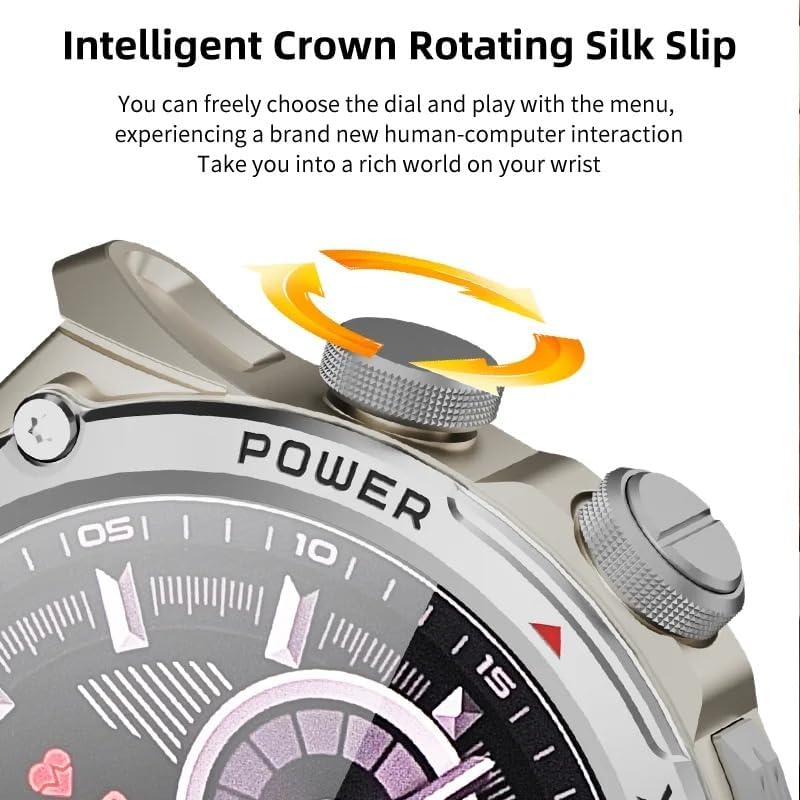
Image: Close-up of the smartwatch's intelligent rotating crown, which allows for intuitive navigation through menus and watch faces.

Image: The smartwatch is equipped with a 500W HD camera that can rotate 180 degrees, functioning as both a front and rear camera.
Sąranka
1. Įrenginio įkrovimas
Before first use, fully charge your smartwatch. Connect the provided charging cable to the charging port on the watch and to a standard USB power adapter (not included). The watch display will indicate charging status.
2. SIM Card Installation (for 4G connectivity)
The smartwatch supports 4G Netcom. Ensure your SIM card is compatible with the supported network bands (2G: B3+B5+B8; 3G: B1+B5+B8; 4G_FDD: B1+B3+B5+B7+B8+B20; 4G_TDD: B34+B38+B39+B40+B41). This feature is primarily for EU/UK countries. Refer to the watch's manual for specific SIM card tray access and insertion instructions.
3. Pradinis įjungimas
Press and hold the Power button (usually located on the side of the watch) until the XINDADA logo appears. Follow the on-screen prompts to select your language and initial settings.
4. Connecting to the HiSportPro App
To synchronize data and receive notifications from your mobile phone, download and connect to the HiSportPro application.
- 1 veiksmas: Enable Bluetooth on both your smartwatch and your mobile phone.
- 2 veiksmas: On your smartwatch, access the app market and download the "Bluetooth Assistant" application.
- 3 veiksmas: On your mobile phone, download the "HiSportPro" app from your phone's app store (Google Play Store for Android, Apple App Store for iOS).
- 4 veiksmas: Open the Bluetooth Assistant on your smartwatch and enable Bluetooth service.
- 5 veiksmas: In the HiSportPro app on your phone, use the scan function to scan the QR code displayed on your smartwatch to establish the connection.
- 6 veiksmas: Once connected, you can configure notification push settings within the HiSportPro app to receive mobile phone information on your watch.

Image: The smartwatch on a wrist, displaying a message, illustrating its capability for 4G calls and real-time message viewing.
Naudojimo instrukcijos
Pagrindinė navigacija
- Jutiklinis ekranas: Tap to select, swipe to navigate through menus and screens.
- Besisukanti karūna: Pasukite karūnėlę, kad slinktumėte per sąrašus arba koreguotumėte nustatymus. Paspauskite karūnėlę, kad grįžtumėte į pradinį ekraną arba patvirtintumėte pasirinkimus.
- Maitinimo mygtukas: Press to wake/sleep the screen. Long press to power on/off or restart.
- Pakelkite iki pažadinimo: The screen can be activated by raising your wrist.
Ryšio ypatybės
- Telefono skambučiai: With a SIM card installed, you can make and receive calls directly from the watch. Access the "Phone" application.
- Susirašinėjimas: View and reply to messages (SMS, WhatsApp, etc.) directly on the watch.
- Kontaktai: Access your synchronized contacts.
Kameros naudojimas
The smartwatch features a 500W HD camera. Open the "Camera" application. The camera can rotate 180 degrees to function as both a front-facing and rear-facing camera. Tap the screen to take photos or start video recording.
Sveikatos ir fizinio pasirengimo stebėjimas
- Širdies ritmo stebėjimas: Access the "Heart Rate" app to measure your heart rate.
- Kraujo deguonies stebėjimas: Use the "Blood Oxygen" app to check your SpO2 levels.
- Miego aptikimas: The watch automatically monitors your sleep patterns when worn during sleep. View data in the "Sleep Detection" app or HiSportPro.
- Priminimas apie sėdimą darbą: Enable this feature in settings to receive alerts when you have been inactive for too long.
- Žingsnių skaičiavimas: The watch automatically tracks your daily steps.
Sporto režimai
The smartwatch supports various sports modes to track your exercise data.

Image: Icons representing various sports modes available on the smartwatch, including running, walking, cycling, mountaineering, and rope skipping.
Norėdami pradėti treniruotę:
- Navigate to the "Sports" application.
- Select your desired activity (e.g., Running, Walking, Mountaineering, Rope Skipping).
- Tap to start the activity. The watch will begin tracking relevant metrics like duration, distance, and calories burned.
- Tap to pause or end the activity. Your exercise data will be saved and can be viewed on the watch or in the HiSportPro app.
Kitos programos ir funkcijos
- „Google Play“ parduotuvė: Download and install additional applications such as WhatsApp, YouTube, Facebook, Instagram, and TikTok directly from the Play Store on your watch.
- Oras: View dabartinės oro sąlygos.
- Muzikos grotuvas: Play music stored on the watch or control music on your phone.
- Naršyklė: Access the internet using the built-in browser.
- Calendar, Calculator, Alarm: Standard utility applications.
- OTA Online Update: The watch supports Over-The-Air software updates. Check for updates periodically in the settings menu to ensure optimal performance and access to new features.
Priežiūra
- Valymas: Reguliariai valykite išmanųjį laikrodį ir dirželį minkštu, sausu skudurėliu. Venkite naudoti stiprias chemines medžiagas ar abrazyvines medžiagas.
- Atsparumas vandeniui: While the watch may have some water resistance, avoid prolonged exposure to water, swimming, or showering with the watch unless explicitly stated otherwise in the product specifications.
- Akumuliatoriaus priežiūra: To prolong battery life, avoid fully discharging the battery frequently. Charge the watch when the battery level is low. Store the watch in a cool, dry place when not in use for extended periods.
- Programinės įrangos atnaujinimai: Keep your watch's software updated to ensure optimal performance and security.
Trikčių šalinimas
| Problema | Galimas sprendimas |
|---|---|
| Laikrodis neįsijungia. | Ensure the watch is fully charged. Connect it to the charger for at least 30 minutes. If it still doesn't turn on, try a long press (10-15 seconds) of the power button. |
| Cannot connect to HiSportPro app. |
|
| 4G network not working. |
|
| Ekranas nereaguoja. | Restart the watch by long-pressing the power button. If the issue persists, ensure the screen is clean and dry. |
| Netikslūs sveikatos duomenys. | Įsitikinkite, kad laikrodis tvirtai uždėtas ant riešo – ne per stipriai ar per laisvai. Nuvalykite jutiklius laikrodžio gale. Matavimo metu venkite per didelio judėjimo. |
Specifikacijos
| Funkcija | Detalė |
|---|---|
| Prekės ženklas | XINDADA |
| Modelis | H12 2025 |
| Operacinė sistema | Android 9.0 |
| CPU | SL8541E Quad-core |
| Ekranas | 1.51-inch AMOLED, 466x466 resolution |
| Fotoaparatas | 500W HD, 180° rotation |
| Baterijos talpa | 800 mAh |
| Ryšys | 4G (EU/UK bands), Wi-Fi, Bluetooth |
| Tinklo juostos | 2G: B3+B5+B8; 3G: B1+B5+B8; 4G_FDD: B1+B3+B5+B7+B8+B20; 4G_TDD: B34+B38+B39+B40+B41 |
| Programų suderinamumas | HiSportPro (for phone sync), Google Play Store apps |
| Produkto svoris | 100 g |
| Pakuotės matmenys | 5 x 5 x 5 cm |
Garantija ir palaikymas
Dėl garantijos informacijos ir klientų aptarnavimo žr. kartu su pirkiniu pateiktus dokumentus arba susisiekite tiesiogiai su pardavėju / gamintoju. Išsaugokite pirkimo įrodymą, jei galėtumėte pateikti garantijos pretenzijas.
Manufacturer: XINDADA