
1. Įvadas
This manual provides detailed instructions for the safe and effective use of the HABOTEST HT821A Thermal Imager. The HT821A is a professional-grade handheld thermal imaging camera designed for fast, accurate, and intuitive temperature detection across various applications. It features a temperature measurement range of -20°C to 550°C (-4°F to 1022°F) and an infrared resolution of 96x96, which can be enhanced to 240x240 using super-resolution technology. Please read this manual thoroughly before operating the device.
2. Saugos informacija
To ensure safe operation and to prevent damage to the device, please observe the following safety precautions:
- Do not point the thermal imager directly at strong energy sources, such as the sun or high-power lasers, as this may damage the detector.
- Venkite įrenginio veikimo ekstremaliose temperatūrose, didelėje drėgmėje ar korozinėje aplinkoje.
- Neardykite ir nemodifikuokite įrenginio. Remontą turėtų atlikti tik įgalioti techninės priežiūros darbuotojai.
- Naudokite tik nurodytą įkrovimo laidą ir maitinimo adapterį.
- Saugokite prietaisą nuo vandens ir kitų skysčių.
- Ensure the device is securely held during operation to prevent accidental drops.
- Išmeskite bateriją ir įrenginį pagal vietinius reikalavimus.
3. Produktas baigtasview ir komponentai
The HABOTEST HT821A Thermal Imager package includes the following items:
- HABOTEST HT821A Thermal Imager
- USB duomenų kabelis
- Vartotojo vadovas (šis dokumentas)
Familiarize yourself with the main parts of the thermal imager:

3.1 paveikslas: Priekyje view of the HABOTEST HT821A Thermal Imager, showing the display screen and control buttons.
4. Sąranka
4.1 Įrenginio įkrovimas
The HT821A Thermal Imager is equipped with a built-in 2000mAh Lithium battery. Before initial use, ensure the device is fully charged.
- Connect the provided USB-C data cable to the USB-C port on the thermal imager.
- Kitą USB-C laido galą prijunkite prie suderinamo USB maitinimo adapterio (nepridedamas) arba kompiuterio USB prievado.
- The charging indicator on the device will illuminate, indicating that charging is in progress.
- Once fully charged, the indicator light will change (refer to device display for battery status).
4.2 Įjungimas / išjungimas
- Norėdami įjungti: Paspauskite ir palaikykite maitinimo mygtuką (paprastai pažymėtą maitinimo simboliu), kol ekranas įsijungs.
- Norėdami išjungti: Paspauskite ir palaikykite maitinimo mygtuką, kol įrenginys išsijungs.
5. Naudojimo instrukcijos
5.1 Pagrindinis temperatūros matavimas
The HT821A provides real-time temperature readings with automatic tracking of the highest, lowest, and center temperatures on the screen.

5.1 paveikslas: Display showing automatic tracking of highest and lowest temperature points.
The device automatically identifies and displays the maximum, minimum, and center point temperatures within the field of view, providing immediate insights into temperature distribution.
5.2 Super-Resolution Mode
Enhance the clarity of thermal images by activating the super-resolution mode. This technology increases the infrared resolution from 96x96 to 240x240.
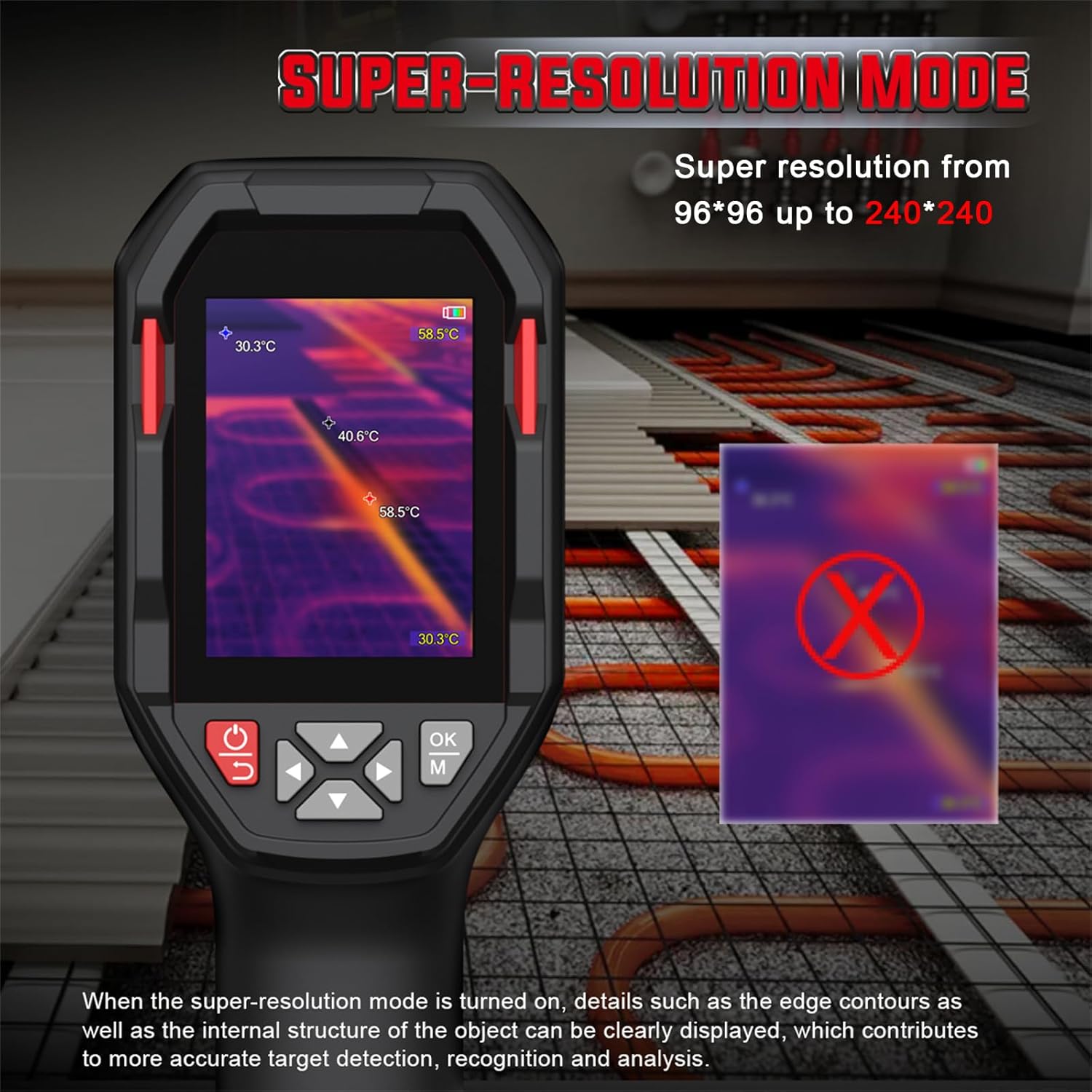
5.2 paveikslas: Comparison of standard and super-resolution thermal images, showing enhanced detail.
- Refer to the device menu for activating or deactivating the super-resolution feature.
- When active, details such as edge contours and internal structures of objects become clearer, aiding in precise target detection and analysis.
5.3 Multiple Color Palettes
The HT821A offers 8 pseudocolor palettes to visualize temperature differences. Different palettes can highlight specific temperature ranges or details, making them suitable for various inspection scenarios.
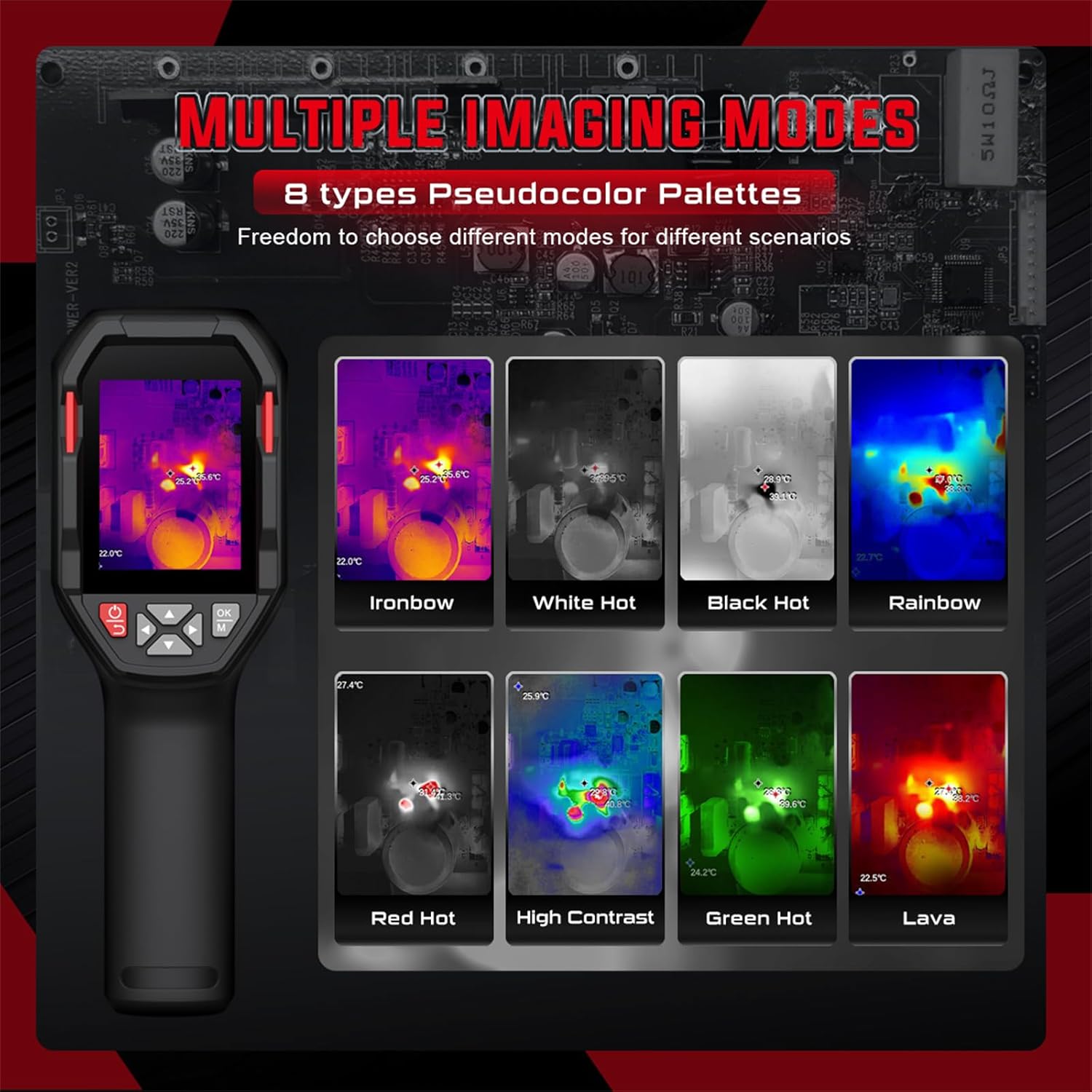
5.3 paveikslas: Examples of different pseudocolor palettes available on the HT821A.
- Common palettes include Ironbow, White Hot, Black Hot, Rainbow, Red Hot, High Contrast, Green Hot, and Lava.
- Navigate through the device menu to select the desired color palette.
5.4 Aukštos ir žemos temperatūros signalizacija
Set custom temperature limits to trigger an alarm when measured temperatures exceed or fall below the defined thresholds.

5.4 paveikslas: Visual representation of high and low temperature alarm functionality.
- Access the alarm settings in the device menu.
- Define the upper and lower temperature limits.
- The device will provide a visual or audible alert when temperatures fall outside the set range.
5.5 Area Temperature Measurement
The device allows for fixed-area temperature measurement, enabling you to analyze temperatures within a specific region of interest.

5.5 paveikslas: Display with a fixed-area measuring frame, showing center, maximum, and minimum temperatures within that frame.
- Activate the area measurement function through the menu.
- A frame will appear on the screen, and the device will measure the center, maximum, and minimum temperatures exclusively within this frame.
5.6 Distance Compensation and Emissivity
- Atstumo kompensacija: The HT821A supports distance compensation for improved accuracy, with settings for 0.5 M, 1 M, 2 M, and 3 M. Adjust this setting based on your distance to the target object.
- Reguliuojamas spinduliavimas: The device features adjustable emissivity to ensure accurate readings across different material surfaces. Consult a table of common material emissivities and adjust the setting in the menu accordingly.
5.7 Kalbos nustatymai
The HT821A supports multiple languages for user interface navigation.
5.6 paveikslas: Language selection menu on the HT821A.
- Navigate to the language settings in the device menu.
- Select from available languages including English, Spanish, French, German, Dutch, Japanese, Korean, Russian, Arabic, Simplified Chinese, and Traditional Chinese.
5.8 Image Storage and Data Transfer
- Vaizdo saugykla: The device has built-in memory to store thermal images in JPG format. Press the capture button (refer to device layout) to save an image.
- Duomenų perdavimas: Connect the thermal imager to a computer using the provided USB-C cable. The device will appear as a removable storage device, allowing you to transfer stored images for further analysis.
5.9 Žibintuvėlio funkcija
The HT821A includes a built-in flashlight for reliable operation in dark or low-light environments. Activate the flashlight through the device menu or a dedicated button (refer to device layout).
6. Paraiškos
The HABOTEST HT821A Thermal Imager is a versatile tool suitable for a wide range of professional and home inspection scenarios.

6.1 paveikslas: Examples of the HT821A in use for various inspection tasks.
- Building Inspection: Detecting insulation deficiencies, moisture issues, and air leaks.
- Elektros įrangos priežiūra: Identifying overheating components in electrical panels, circuits, and motors.
- HVAC Performance: Inspecting heating and cooling systems for blockages or inefficiencies.
- Mechanical Equipment: Monitoring machinery for abnormal heat signatures indicating wear or malfunction.
- Santechnika: Locating hidden water leaks behind walls or under floors.
- Automobilių apžiūra: Diagnosing engine overheating, brake issues, or HVAC system problems.
7. Priežiūra
7.1 Prietaiso valymas
- Use a soft, dry cloth to clean the exterior of the thermal imager.
- For the lens and screen, use a lens cleaning cloth and a specialized lens cleaning solution. Do not use abrasive materials or harsh chemicals.
- Ensure no moisture enters the device openings.
7.2 Akumuliatoriaus priežiūra
- Reguliariai įkraukite akumuliatorių, net jei įrenginys nenaudojamas, kad palaikytumėte jo būklę.
- Venkite dažnai visiškai iškrauti akumuliatorių.
- Laikykite prietaisą vėsioje, sausoje vietoje, kai jo ilgesnį laiką nenaudojate.
7.3 Saugykla
When storing the thermal imager, ensure it is kept in its protective packaging or a suitable case to prevent damage from impacts or dust. Avoid storing it in direct sunlight or areas with extreme temperature fluctuations.
8. Problemų sprendimas
If you encounter issues with your HT821A Thermal Imager, refer to the following common problems and solutions:
| Problema | Galima priežastis | Sprendimas |
|---|---|---|
| Įrenginys neįsijungia. | Išsikrovęs akumuliatorius arba įrenginio gedimas. | Charge the device for at least 2 hours. If it still doesn't power on, contact customer support. |
| Vaizdas neryškus arba neaiškus. | Dirty lens, incorrect focus (if applicable), or environmental factors. | Clean the lens with a soft cloth. Ensure the object is within the optimal measurement range. Activate Super-Resolution mode for enhanced clarity. |
| Netikslūs temperatūros rodmenys. | Incorrect emissivity setting, distance compensation, or environmental interference. | Adjust the emissivity setting to match the target material. Verify distance compensation is set correctly. Avoid measuring through reflective surfaces. |
| Nepavyksta perkelti vaizdų į kompiuterį. | Faulty USB cable, incorrect connection, or driver issue. | Įsitikinkite, kad USB-C laidas yra tvirtai prijungtas prie įrenginio ir kompiuterio. Išbandykite kitą USB prievadą arba laidą. Paleiskite abu įrenginius iš naujo. |
If the problem persists after attempting these solutions, please contact HABOTEST customer support for further assistance.
9. Specifikacijos
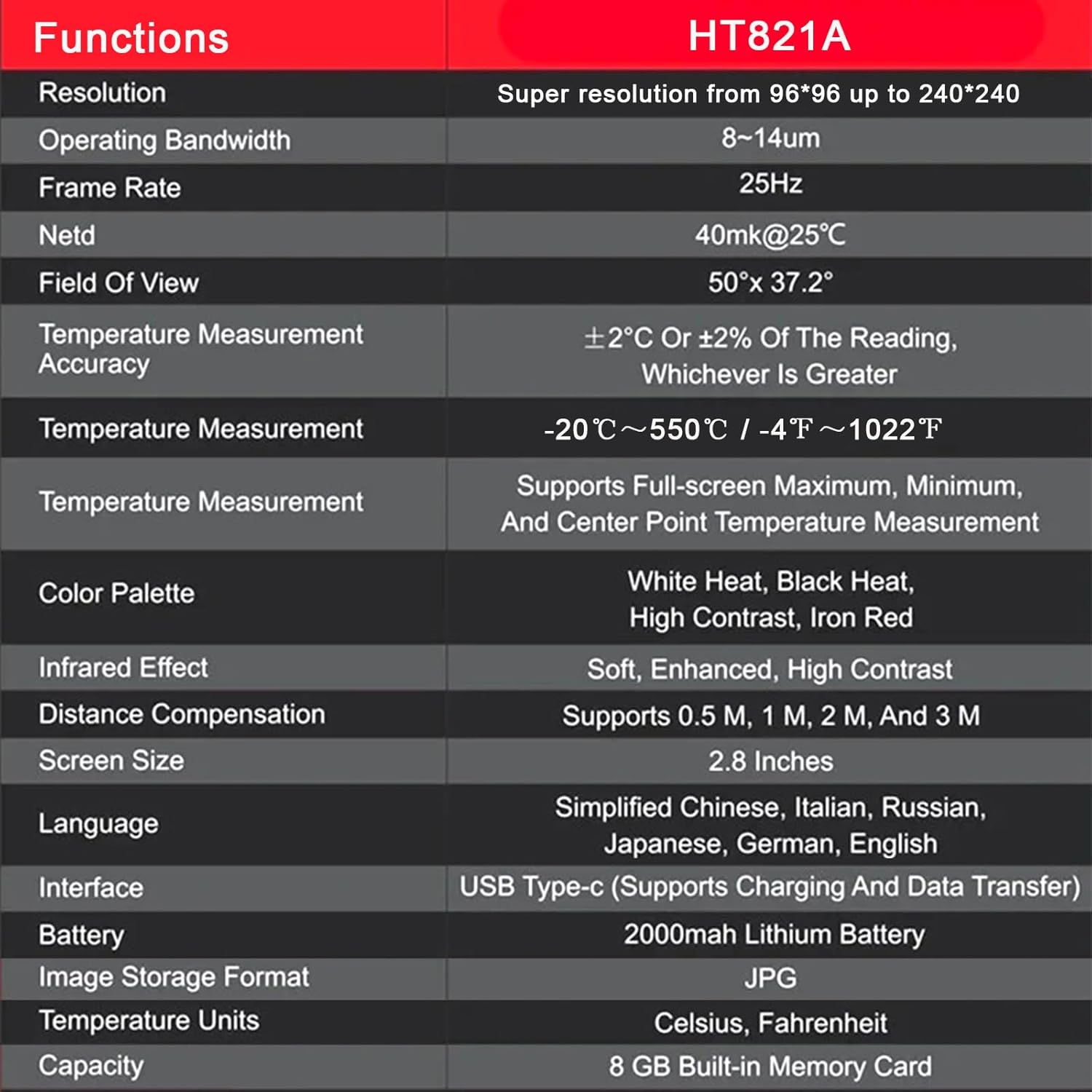
The following table outlines the key technical specifications of the HABOTEST HT821A Thermal Imager:
| Funkcija | Detalė |
|---|---|
| Modelis | HT821A |
| Rezoliucija | 96x96 (Super resolution up to 240x240) |
| Veikimo dažnių juostos plotis | 8-14 µm |
| Kadrų dažnis | 25 Hz |
| NETD failą | 40mk@25°C |
| Laukas View | 50 ° × 37.2 ° |
| Temperatūros matavimo tikslumas | ±2°C or ±2% of the reading, whichever is greater |
| Temperatūros matavimo diapazonas | -20°C iki 550°C (nuo -4°F iki 1022°F) |
| Temperature Measurement Features | Supports Full-screen Maximum, Minimum, and Center Point Measurement |
| Spalvų paletės | White Heat, Black Heat, High Contrast, Iron Red (and others) |
| Infrared Effect | Soft, Enhanced, High Contrast |
| Atstumo kompensacija | Supports 0.5 M, 1 M, 2 M, and 3 M |
| Ekrano dydis | 2.8 colių |
| Kalbos palaikymas | Simplified Chinese, Italian, Russian, Japanese, German, English, Spanish, French, Dutch, Korean, Arabic, Traditional Chinese |
| Sąsaja | USB Type-C (Supports Charging and Data Transfer) |
| Baterija | 2000 mAh ličio baterija |
| Vaizdo saugojimo formatas | JPG |
| Temperatūros vienetai | Celsijaus, Farenheito |
| Vidinė saugykla | 8 GB Built-in Memory Card |
| Išorinė medžiaga | Plastikiniai |
10. Garantija ir palaikymas
10.1 Informacija apie garantiją
HABOTEST products are manufactured to high-quality standards. For specific warranty terms and conditions, please refer to the warranty card included with your product or visit the official HABOTEST webGarantija paprastai taikoma medžiagų ir gamybos defektams, atsiradusiems įprasto naudojimo sąlygomis.
10.2 Pagalba klientams
If you have any questions, require technical assistance, or need to report a problem with your HABOTEST HT821A Thermal Imager, please contact HABOTEST customer support.
- Palaikymas internetu: Visit the official HABOTEST webDUK, produktų registracijos ir kontaktinių formų svetainė.
- Pagalba el. paštu: Žiūrėkite savo produkto pakuotę arba oficialų webklientų aptarnavimo el. pašto adreso svetainė.
Please have your product model number (HT821A) and purchase information ready when contacting support.

