
1. Įvadas
The aosu T2 Pro is an advanced wireless outdoor security camera featuring innovative dual-lens technology for comprehensive home surveillance. It combines a fixed wide-angle lens with a pan-tilt-zoom (PTZ) camera to eliminate blind spots and provide multi-directional coverage. Designed for ease of use and robust performance, this solar-powered camera offers 3K resolution, full-color night vision, AI human and vehicle tracking, and flexible local storage options without requiring a subscription.
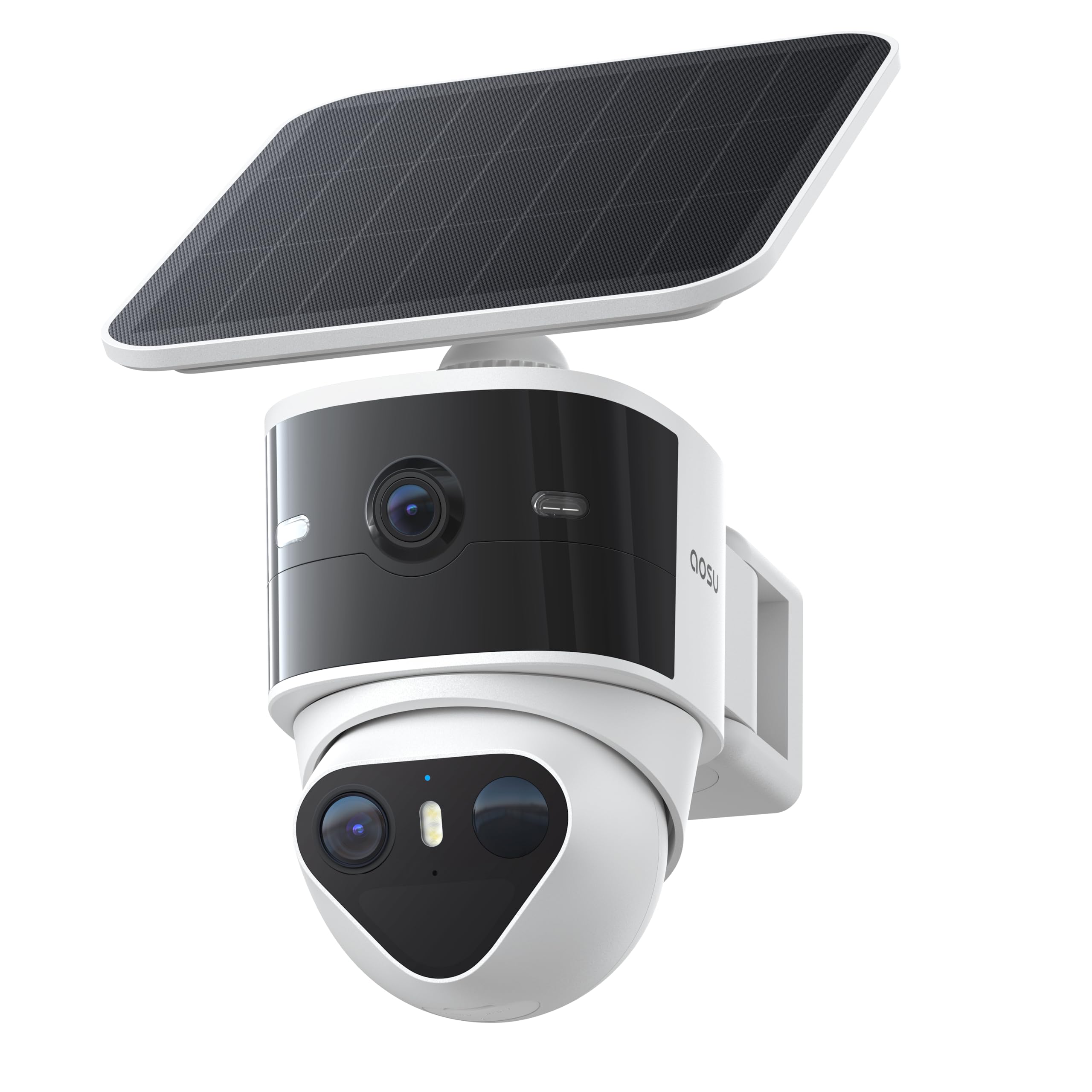
Image: The aosu T2 Pro camera unit, featuring its dual lenses and integrated solar panel, mounted on a wall bracket.
2. Kas yra dėžutėje
Prieš tęsdami montavimą, įsitikinkite, kad yra visi reikalingi elementai:
- Saulės apsaugos kamera
- Mounting Bracket
- Įkrovimo kabelis
- Išsiplėtimo varžtai
- Padėties lipdukai
3. Sąranka
The aosu T2 Pro is designed for a simple 3-step wireless installation. Follow these instructions for optimal setup:
3.1 Fizinis įrengimas
- Pasirinkite vietą: Pasirinkite lauko vietą, kurioje būtų užtikrintas aiškus vaizdas view of the desired monitoring area and receives adequate sunlight for the solar panel. The camera is IP65 weatherproof, suitable for various conditions.
- Sumontuokite laikiklį: Use the provided positioning stickers to mark drill holes. Secure the mounting bracket to the wall using the expansion screws.
- Pritvirtinkite fotoaparatą: Slide the aosu T2 Pro camera onto the mounted bracket until it locks securely. Adjust the angle of the solar panel to maximize sun exposure.

Image: The aosu T2 Pro camera mounted on a wall, with its solar panel positioned to capture sunlight.
3.2 Programėlės sąranka
- Download the aosu App: Ieškokite "aosu" in your smartphone's app store (iOS or Android) and download the application.
- Sukurti paskyrą: Atidarykite programėlę ir vykdykite ekrane pateikiamus nurodymus, kad sukurtumėte naują vartotojo paskyrą.
- Pridėti įrenginį: In the app, select the option to add a new device. Scan the QR code located on your aosu T2 Pro camera.
- Prisijunkite prie „Wi-Fi“: Follow the app prompts to connect your camera to your home's 2.4GHz Wi-Fi network.
Video: aosu T2 Pro Solar Security Cameras Installation Guide. This video demonstrates the step-by-step process of physically installing the camera and connecting it to the aosu mobile application.
4. Naudojimo instrukcijos
The aosu T2 Pro offers a range of features for effective surveillance and home security.
4.1 Dual Cam Technology
The camera features a dual-lens system: a 170-degree fixed wide-angle lens and a 360-degree pan-tilt-zoom (PTZ) camera. This provides comprehensive coverage without blind spots.
- Platus kampas View: Provides a broad overview jūsų turto.
- PTZ Tracking: Automatically zooms in and tracks movement detected by the wide-angle lens, ensuring the entire event is captured.
- Lock-Capture System: On-device AI detects people and vehicles, then the PTZ camera tracks their movement, capturing the full story in one continuous clip.

Paveikslėlis: Antena view illustrating the 170-degree wide-angle view and 360-degree PTZ tracking coverage provided by the aosu T2 Pro camera.
4.2 Video Quality & Night Vision
Both lenses capture video in crisp 3K resolution, allowing for clear identification of details.
- Dual 3K UHD: Delivers ultra-clear details and supports up to 8x hybrid zoom.
- Spalvotas naktinis matymas: Enhanced IR-assisted technology ensures consistent clarity and color even in low-light conditions.

Image: A close-up of the aosu T2 Pro's dual lenses, highlighting its 3K UHD video capabilities.
4.3 Audio & Alerts
The camera includes features for active deterrence and communication.
- Dvipusis pokalbis: Communicate with visitors or deter intruders directly through the camera.
- Siren & Lights: Trigger a siren and spotlights in response to detected activity.
- Pritaikomi įspėjimai: Set fence lines, driveway zones, and loitering alerts to receive real-time notifications.
4.4 AI Detection
On-device AI differentiates between people and vehicles, reducing false alarms and providing more accurate alerts.
- Human & Vehicle Tracking: Focuses on relevant movements.
- Reduced False Alarms: Filters out insignificant motion like leaves or insects.
4.5 Programų valdymas
Manage your camera and view footage through the intuitive aosu app.
- Tiesiogiai View: Pasiekite realaus laiko maistotagiš abiejų kamerų.
- Event Recordings: Review recorded events triggered by motion.
- Remote PTZ Control: Manually control the PTZ camera's direction and zoom.
- Išmanusis atkūrimas: Tiesiogiai view important clips on a timeline for a daily overview.
- Šeimos bendrinimas: Grant role-based access to family and friends.
5. Maitinimo valdymas
The aosu T2 Pro is designed for continuous operation with its solar charging capabilities.
- Varomas saulės energija: A high-efficiency solar panel keeps the 9,200mAh battery charged, providing year-round security.
- 24/7 Coverage: The combination of battery and solar power ensures continuous operation even during overcast days or power outages.
- Flexible Solar Panel Mounting: The detachable solar panel allows for optimal positioning to maximize sunlight exposure.
Image: A visual representation of the solar panel efficiently charging the camera under sunlight, ensuring continuous power.
6. Sandėliavimas
Tavo footage is securely stored with flexible options.
- Vietinė saugykla: Supports microSD card storage up to 256GB (card not included) for secure recording and playback without a subscription.
- Saugykla debesyje: Optional cloud storage is available via in-app purchase for automatic backup and easy sharing.

Image: A close-up of the camera's microSD card slot, indicating support for local storage up to 256GB.
7. Priežiūra
To ensure optimal performance and longevity of your aosu T2 Pro camera, regular maintenance is recommended:
- Clean Lenses and Solar Panel: Periodiškai nuvalykite kameros objektyvus ir saulės bateriją minkšta,amp cloth to remove dust, dirt, or debris that may obstruct vision or reduce charging efficiency.
- Patikrinkite montavimą: Ensure the mounting bracket remains secure and the camera is firmly attached, especially after severe weather conditions.
- Monitoriaus akumuliatoriaus būsena: Regularly check the battery level via the aosu app to ensure consistent charging and performance.
- Firmware atnaujinimai: Keep the camera's firmware updated through the aosu app to benefit from the latest features, security enhancements, and bug fixes.
8. Problemų sprendimas
If you encounter issues with your aosu T2 Pro camera, try the following steps:
- Nėra galios: Ensure the solar panel is clean and receiving direct sunlight. Check the battery level in the app. If necessary, charge the camera directly using the USB-C charging cable.
- Nėra „Wi-Fi“ ryšio: Verify your Wi-Fi network is 2.4GHz. Ensure the camera is within range of your router. Restart your router and the camera.
- Prasta vaizdo kokybė: Check your Wi-Fi signal strength. Clean the camera lenses. Ensure there are no obstructions in the camera's field of view.
- Judesio aptikimo problemos: Adjust detection sensitivity settings in the app. Ensure detection zones are correctly configured.
- Programėlė neatsako: Close and reopen the aosu app. Ensure your smartphone's operating system is up to date.
9. Specifikacijos
| Funkcija | Detalė |
|---|---|
| Prekės ženklas | aosu |
| Modelio pavadinimas | Aosu Security Camera T2 Pro |
| Ryšio technologija | Bluetooth, Ethernet, Wireless, QR Code Scan |
| Ypatingos savybės | Blindspot Eliminated, Coordinated Defense, Dual 3K Cam Fusion, Lock-Capture System, Color Night Vision, 2-Way Audio |
| Naudojimas viduje / lauke | Lauke |
| Suderinami įrenginiai | Android, iOS, Amazon Alexa, Google Assistant |
| Montavimo tipas | Sieninis laikiklis |
| Spalva | Baltas |
| Diegimo tipas | Montuojamas prie sienos |
| Forma | Kupolas |
| Įspėjimo tipas | Garsas ir judesys |
| Veiksminga nejudančioji raiška | 5 MP |
| Vaizdo įrašymo raiška | 3K |
| Kadrų dažnis | 15 kadrų per sekundę |
| Naktinio matymo diapazonas | 10 metrai |
| Naktinis matymas | Naktinė spalva |
| Prekės matmenys | 6 x 7 x 2.5 colio |
| Maitinimo šaltinis | Maitinamas saulės energija, maitinamas baterijomis |
| Viewing kampas | 360 laipsnių |
| Optinis priartinimas | 8 x |
| „Flash“ atminties palaikomas maksimalus dydis | 256 GB |
10. Garantija ir palaikymas
For warranty information and customer support, please refer to the official aosu website or contact their customer service directly. The brand is known for its solid customer service and commitment to product reliability.