
1. Įvadas
This manual provides detailed instructions for the setup, operation, maintenance, and troubleshooting of your Aigo AG98 Wireless Mechanical Keyboard. Please read this manual thoroughly before using the product to ensure optimal performance and longevity.
2. Saugos informacija
- Saugokite klaviatūrą nuo skysčių ar per didelės drėgmės.
- Venkite ekstremalių temperatūrų.
- Do not attempt to disassemble or repair the keyboard yourself. This may void the warranty and cause damage.
- Įkrovimui naudokite tik pridedamą USB C tipo laidą.
- Laikyti vaikams nepasiekiamoje vietoje.
3. Pakuotės turinys
Patikrinkite, ar pakuotėje yra visi reikalingi daiktai:
- Aigo AG98 Wireless Mechanical Keyboard
- C tipo USB kabelis
- Vartotojo vadovas
4. Produktas baigtasview
The Aigo AG98 is a versatile 98-key mechanical keyboard featuring triple-mode connectivity (Bluetooth, 2.4G Wireless, USB Type-C Wired), RGB backlighting, and hot-swappable switches. Its compact design and durable ABS construction make it suitable for both gaming and daily use across various devices.

Figure 1: Aigo AG98 keyboard demonstrating its triple-mode connectivity with various devices.
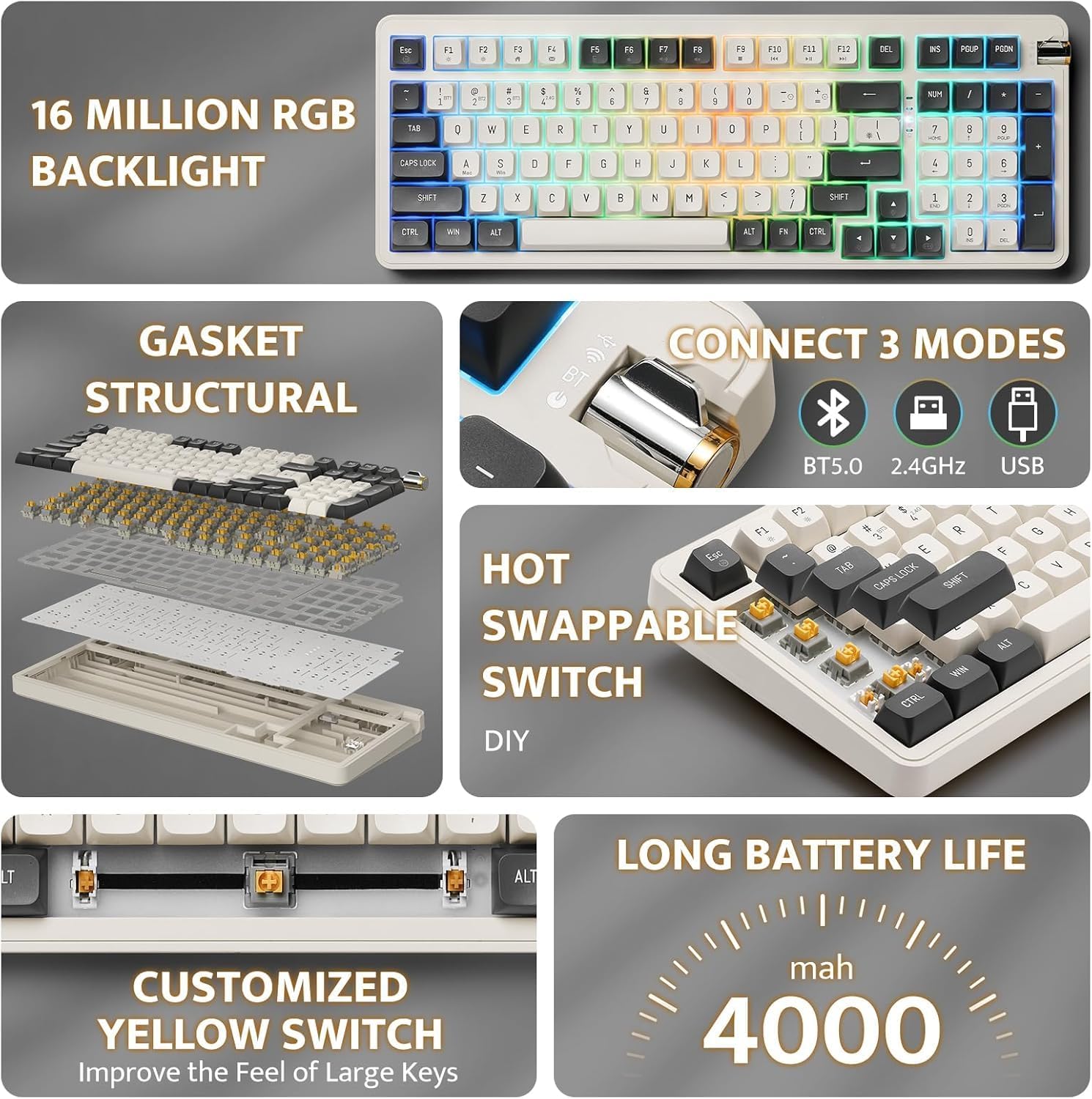
Figure 2: Key features of the Aigo AG98, including structural design, connectivity options, and battery capacity.
5. Sąranka
5.1. Klaviatūros įkrovimas
Before initial use, fully charge the keyboard using the provided USB Type-C cable. Connect the cable to the keyboard's USB-C port and the other end to a powered USB port (e.g., computer, wall adapter).

Figure 3: USB-C port and mode switch location.
5.2. Ryšio režimai
The Aigo AG98 supports three connection modes: Bluetooth, 2.4G Wireless, and USB Type-C Wired. Use the switch on the side of the keyboard to select your desired mode.
5.2.1. USB Type-C Wired Connection
- Įsitikinkite, kad klaviatūros režimo jungiklis yra laidinio (USB) padėtyje.
- Connect the USB Type-C cable to the keyboard and your computer.
- Jūsų operacinė sistema automatiškai atpažins klaviatūrą.
5.2.2. 2.4G belaidis ryšys
- Ensure the mode switch on the keyboard is set to the 2.4G wireless position.
- Plug the 2.4G USB receiver into an available USB port on your device.
- The keyboard should connect automatically. If not, press and hold the Fn + 4 key combination to initiate pairing.
5.2.3. „Bluetooth“ ryšys
- Ensure the mode switch on the keyboard is set to the Bluetooth (BT) position.
- Savo įrenginyje (asmeniniame kompiuteryje, planšetiniame kompiuteryje, išmaniajame telefone) įjunkite „Bluetooth“ ir ieškokite naujų įrenginių.
- On the keyboard, press and hold Fn + 1, Fn + 2, or Fn + 3 to enter pairing mode for BT1, BT2, or BT3 respectively. The indicator light will flash.
- Select "Aigo AG98" from the list of available devices on your screen.
- Kai susiejimas bus atliktas, indikatoriaus lemputė nustos mirksėti.
6. Naudojimo instrukcijos
6.1. RGB foninio apšvietimo valdymas
The Aigo AG98 features customizable RGB backlighting. Use the following key combinations to control the lighting effects:
- Fn + \|: Change backlight mode.
- Fn + ↑: Padidinkite foninio apšvietimo ryškumą.
- Fn + ↓: Sumažinkite foninio apšvietimo ryškumą.
- Fn + ←: Slow down backlight effect speed.
- Fn + →: Speed up backlight effect speed.

Figure 4: Aigo AG98 with RGB backlighting activated.
6.2. Karšto keitimo jungikliai
The Aigo AG98 keyboard features hot-swappable switches, allowing you to change mechanical switches without soldering. This enables customization of typing feel and sound.

Figure 5: Hot-swappable yellow switches with details on pre-lubrication and stable shaft design.
Norėdami pakeisti jungiklį:
- Išjunkite klaviatūrą arba atjunkite ją nuo įrenginio.
- Use a switch puller tool (not included) to carefully grip the switch and pull it straight up.
- Align the pins of the new switch with the holes on the PCB and press it gently until it clicks into place. Ensure the pins are not bent.
7. Priežiūra
7.1. Valymas
- Prieš valydami atjunkite klaviatūrą.
- Klaviatūros paviršiui nuvalyti naudokite minkštą, sausą šluostę.
- For deeper cleaning, use a keycap puller (not included) to remove keycaps and clean dust or debris with compressed air or a small brush.
- Nenaudokite stiprių cheminių medžiagų ar abrazyvinių medžiagų.
7.2. Akumuliatoriaus priežiūra
- Venkite dažnai visiškai iškrauti akumuliatorių.
- Charge the keyboard regularly, even if not in use, to maintain battery health.
- Jei klaviatūra nebus naudojama ilgą laiką, laikykite ją vėsioje, sausoje vietoje.
8. Problemų sprendimas
| Problema | Galima priežastis | Sprendimas |
|---|---|---|
| Klaviatūra nereaguoja (belaidė) | Low battery, incorrect mode, pairing issue, receiver not connected. | Charge the keyboard. Ensure correct mode is selected. Re-pair the keyboard (Fn + 1/2/3 for BT, Fn + 4 for 2.4G). Check USB receiver connection. |
| Klaviatūra nereaguoja (laidinė) | Cable issue, incorrect mode. | Ensure cable is securely connected. Try a different USB port or cable. Ensure wired mode is selected. |
| RGB foninis apšvietimas neveikia | Backlight turned off, brightness set to minimum. | Press Fn + \| to cycle modes. Increase brightness with Fn + ↑. |
| Specific key not working | Sugedęs jungiklis, šiukšlės po klaviatūros dangteliu. | Remove keycap and clean. If issue persists, replace the hot-swappable switch. |
| End key not working (Windows) | Mouse Keys enabled in OS accessibility settings. | Disable "Mouse Keys" in your operating system's accessibility settings. |
9. Specifikacijos
- Modelis: AG98
- Prekinis ženklas: Aigo
- Ryšys: Bluetooth 5.0, 2.4G Wireless, USB Type-C Wired
- Raktų skaičius: 98
- Išdėstymas: QWERTY (anglų k.)
- Jungiklio tipas: Mechanical (Linear Yellow Switches)
- Ypatingos savybės: Hot-swappable switches, RGB Backlighting, Ergonomic Design
- Medžiaga: Akrilnitrilo butadieno stirenas (ABS)
- Baterija: 1200 XNUMX mAh įkraunama ličio baterija
- Suderinama OS: Windows 10+, Android, iOS, Mac, Linux
- Suderinami įrenginiai: Kompiuteris, nešiojamas kompiuteris, planšetinis kompiuteris, išmanusis telefonas
- Prekės svoris: 425 gramų
10. Informacija apie garantiją
The Aigo AG98 keyboard comes with a 14-day warranty from the date of purchase. This warranty covers manufacturing defects. It does not cover damage caused by misuse, accidents, unauthorized modifications, or normal wear and tear. Please retain your proof of purchase for warranty claims.
11. Parama
For further assistance or technical support, please refer to the contact information provided with your purchase or visit the official Aigo websvetainę.