
1. Įvadas
Thank you for choosing the Sharp 40HF2265E Full HD Google TV. This manual provides essential information for setting up, operating, and maintaining your television. Featuring integrated Google TV, HDR10 support, Dolby Digital audio, and Bluetooth connectivity, your new TV offers a rich entertainment experience. Please read this manual thoroughly before use to ensure proper operation and to maximize your viewteikiantis malonumą.

1.1 vaizdas: priekis view of the Sharp 40HF2265E Full HD Google TV.
2. Kas yra dėžutėje
Atsargiai išpakuokite televizorių ir patikrinkite, ar yra visi šie daiktai:
- „Sharp 40HF2265E“ televizorius
- Maitinimo kabelis
- Remote Control (requires 2 AAA batteries, not always included)
- Vartotojo vadovas (šis dokumentas)
- Garantijos kortelė
If any items are missing or damaged, please contact your retailer or Sharp customer support immediately.
3. Sąranka
3.1 Stovo montavimas
To install the TV stand, place the TV screen-down on a soft, flat surface to prevent scratches. Align the stand feet with the corresponding slots on the bottom of the TV and secure them with the provided screws. Ensure the stand is firmly attached before placing the TV upright.

3.1 vaizdas: priekis view of the TV with stand feet attached.
3.2 Tvirtinimas prie sienos
If you prefer to wall-mount your TV, you will need a VESA-compatible wall mount (not included). The Sharp 40HF2265E supports a VESA mounting standard of 200 x 200 mm. Refer to the wall mount's instructions for installation. Always ensure the wall can support the weight of the TV and the mount.

3.2 vaizdas: galinis view of the TV, highlighting VESA mounting points and ports.
3.3 Išorinių įrenginių prijungimas
Connect your external devices to the appropriate ports on the back and side of the TV. The TV features multiple HDMI, USB, and other connectivity options.
- HDMI prievadai: Skirta prijungti „Blu-ray“ grotuvus, žaidimų konsoles, priedėlius ir kt.
- USB prievadai: Skirta USB atmintinėms prijungti, norint leisti mediją arba atnaujinti programinę įrangą.
- Ethernet prievadas: Laidiniam interneto ryšiui.
- Antenos / kabelinės televizijos įvestis: Antenos arba kabelinės televizijos signalo prijungimui.
- Garso išvestis: Skirta išorinėms garso sistemoms prijungti.
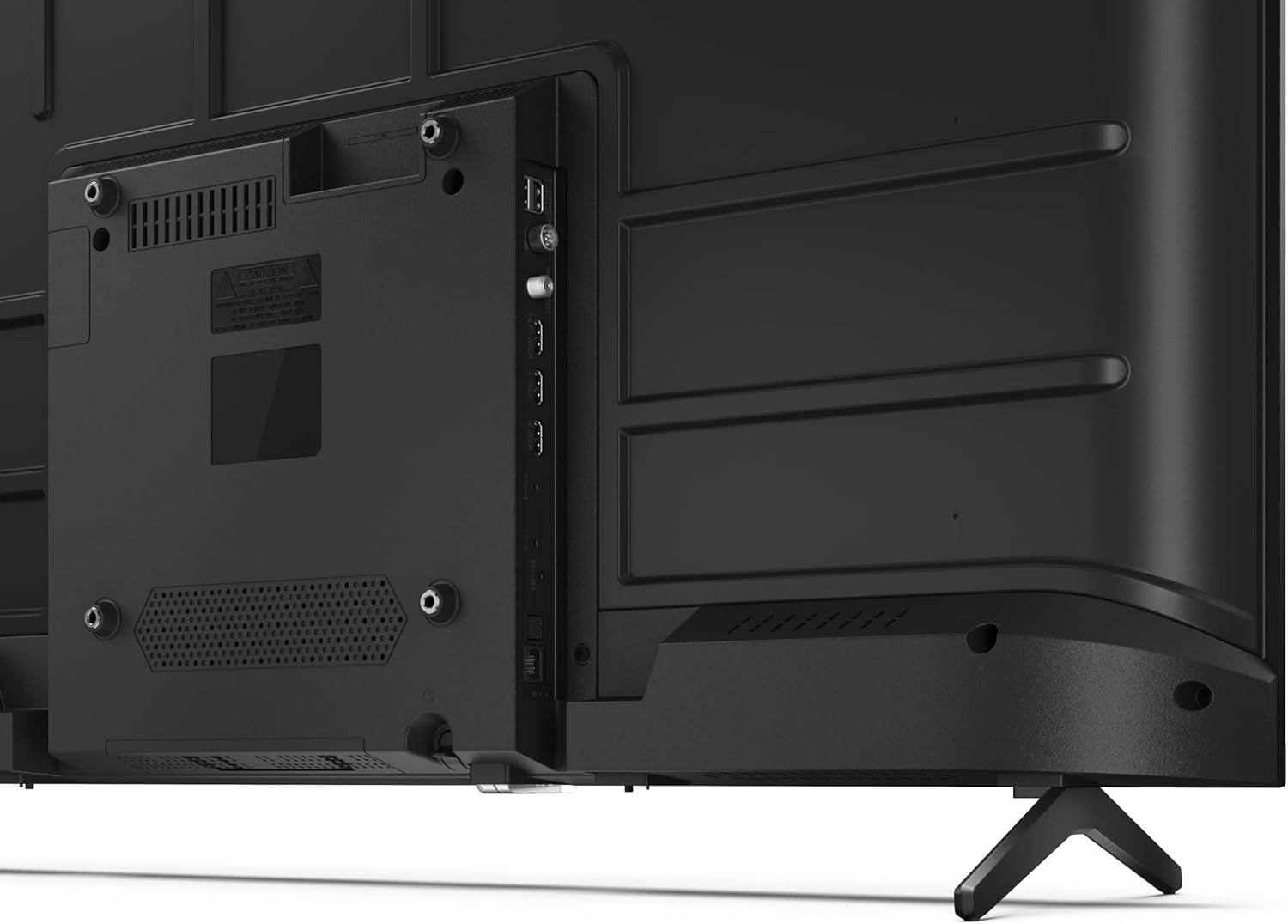
3.3 pav.: Išsamus view televizoriaus jungčių prievadų.
3.4 Pradinis įjungimas ir „Google TV“ sąranka
After connecting all necessary cables, plug the power cable into an electrical outlet. Press the power button on the remote control or on the TV. Follow the on-screen instructions to complete the initial setup, including network connection, Google account login, and channel scanning.
4. Operacinis
4.1 Nuotolinio valdymo pulto funkcijos
The remote control allows you to navigate the TV's features. Common buttons include Power, Volume Up/Down, Channel Up/Down, Input Source, Home (Google TV), Navigation (directional arrows, OK), Back, and Google Assistant.
4.2 „Google TV“ sąsaja
Your Sharp TV runs on Google TV, providing a personalized home screen with content recommendations from your subscriptions. Use the remote's navigation buttons to browse movies, shows, apps, and your library.

Image 4.1: The Google TV home screen on the Sharp 40HF2265E.
4.3 Įvesties pasirinkimas
To switch between connected devices (e.g., HDMI 1, HDMI 2, TV tuner), press the 'Input' or 'Source' button on your remote control and select the desired input from the on-screen menu.
4.4 Vaizdo ir garso nustatymai
Access the TV's settings menu to adjust picture modes (Standard, Vivid, Cinema, Game), brightness, contrast, color, and sound modes (Standard, Music, Movie, Speech). The TV supports HDR10 for enhanced contrast and color, and Dolby Digital for rich audio.

Image 4.2: Visual representation of HDR (High Dynamic Range) technology.
4.5 „Google Assistant“ ir „Chromecast“
Use the built-in Google Assistant for voice control. Press the Google Assistant button on your remote and speak your commands, such as searching for content, controlling smart home devices, or getting information. Chromecast allows you to cast content directly from compatible devices like smartphones or tablets to your TV.

Image 4.3: Google Assistant integration for voice commands.
4.6 „Bluetooth“ ryšys
Pair Bluetooth-enabled devices such as headphones or soundbars with your TV for a wireless audio experience. Navigate to the TV's settings menu, select 'Remotes & Accessories', and then 'Pair new device' to connect.
5. Priežiūra
5.1 Televizoriaus valymas
Always unplug the TV before cleaning. Use a soft, dry cloth to wipe the screen and TV body. For stubborn marks, lightly dampen the cloth with water or a specialized screen cleaner. Never use abrasive cleaners, waxes, or solvents.
5.2 Programinės įrangos naujiniai
Your Google TV may receive automatic software updates. Ensure your TV is connected to the internet to receive these updates, which can improve performance and add new features. You can also manually check for updates in the settings menu.
6. Problemų sprendimas
Jei kyla problemų dėl televizoriaus, žr. šiuos dažniausiai pasitaikančius sprendimus:
- Nėra galios: Patikrinkite, ar maitinimo laidas tvirtai prijungtas prie televizoriaus ir sieninio lizdo. Įsitikinkite, kad lizdas veikia.
- Nėra vaizdo / garso: Patikrinkite, ar pasirinktas teisingas įvesties šaltinis. Patikrinkite visas kabelių jungtis (HDMI, anteną). Pabandykite paleisti televizorių iš naujo.
- Nuotolinio valdymo pultas neveikia: Pakeiskite baterijas (2 AAA). Įsitikinkite, kad tarp nuotolinio valdymo pulto ir televizoriaus IR jutiklio nėra jokių kliūčių.
- Tinklo ryšio problemos: For Wi-Fi, check your router and ensure the TV is within range. For wired connections, check the Ethernet cable. Try restarting your router and the TV.
- Vaizdo kokybės problemos: Sureguliuokite vaizdo nustatymus (ryškumą, kontrastą, ryškumą). Įsitikinkite, kad įvesties šaltinis teikia aukštos kokybės signalą.
For more complex issues, consult the comprehensive troubleshooting section in the full digital manual or contact Sharp customer support.
7. Specifikacijos
Below are the technical specifications for the Sharp 40HF2265E Full HD Google TV:

Image 7.1: Dimensions of the Sharp 40HF2265E TV.
| Funkcija | Specifikacija |
|---|---|
| Prekės ženklas | Aštrus |
| Modelio numeris | 40HF2265E |
| Modelio pavadinimas | HF serija |
| Modelio metai | 2025 |
| Ekrano dydis | 40 colio (81 centimetrai) |
| Ekrano technologija | LED |
| Rezoliucija | 1080p (viskas viename) |
| Atnaujinimo dažnis | 60 Hz |
| Krašto santykis | 16:9 |
| Kontrasto santykis | 100000:1 |
| Screen Finish | Matinis |
| Reagavimo laikas | 8 milisekundės |
| Foninio apšvietimo technologija | LED |
| Supported HDR Format | HDR10, HLG |
| Vaizdo kokybės gerinimas | Dynamic Contrast, HDR10, HLG |
| Motion Enhancement Technology | Motion Interpolation |
| Operacinė sistema | Google TV |
| Internet Applications | Apple TV, Google TV, Hulu, Prime Video, YouTube |
| Ypatingos savybės | Bluetooth, Chromecast, Dolby Digital, HD Tuner |
| Ryšio technologija | Ethernet, USB, „Wi-Fi“ |
| Belaidė technologija | Bluetooth |
| Bluetooth versija | 5.0 |
| Screen Mirroring Technology | Chromecast, Google Cast |
| Iš viso HDMI prievadų | 3 |
| Total USB 2.0 Ports | 2 |
| Number of Composite Video Inputs | 1 |
| Garso įvestis | Mini composite/CVBS + audio input |
| Total Audio Output Ports | 2 |
| Garso išvesties režimas | Stereo |
| Garso kodavimas | DD |
| Integrated Surround Sound Format | Dolby AC-4, Dolby Digital, Dolby Digital Plus |
| Maksimali garsiakalbio išvesties galia | 16 vatai (2 x 8 W) |
| Garso kanalų skaičius | 2.0 |
| Transliacijos sistema | DVB-T2/C/S/S2 |
| Vaizdo įrašų kodavimas | MKV |
| Gaminio matmenys (DxPxA) | 8.4P x 89.2lx 50.9A cm |
| Prekės svoris | 5.4 kilogramo |
| Svoris be stovo | 5.4 kilogramo |
| Pagrindo plotis | 765 milimetrų |
| VESA montavimo standartas | 200 x 200 mm |
| Energijos suvartojimas | 37 vatų |
| ttage | 230 voltų |
| Remote Control Battery Size | AAA |
| Remote Control Battery Quantity | 2 |
| Parental Control Technology | Kindersicherung Über Google Tv |
| ES atsarginių dalių prieinamumas | 7 metai |
8. Garantija ir palaikymas
8.1 Gaminio garantija
The Sharp 40HF2265E television comes with a 2-year manufacturer's warranty. Please refer to the included Warranty Card for detailed terms and conditions regarding coverage and service. Keep your proof of purchase for warranty claims.
8.2 Pagalba klientams
If you require further assistance, have questions not covered in this manual, or need technical support, please contact Sharp customer service. Contact information can typically be found on the Warranty Card or the official Sharp websvetainę.