
1. Įvadas
This manual provides essential information for setting up, operating, and maintaining your iFFALCON 50U95A 50-inch 4K QD-Mini LED Smart Google TV. Please read it thoroughly before using the product to ensure safe and optimal performance. Keep this manual for future reference.
The iFFALCON 50U95A combines advanced QD-Mini LED display technology with a 144Hz native refresh rate, HDR 1000nit peak brightness, and an ONKYO 2.1 Hi-Fi audio system to deliver an immersive viewing and listening experience. Powered by Google TV, it offers a wide range of smart features and content.
2. Svarbi saugos informacija
Naudodami šį televizorių, visada laikykitės pagrindinių saugos atsargumo priemonių, kad sumažintumėte gaisro, elektros smūgio ir sužalojimų riziką.
- Saugokite televizorių nuo lietaus ar drėgmės.
- Neatidarykite korpuso; visus techninės priežiūros darbus patikėkite kvalifikuotiems darbuotojams.
- Užtikrinkite tinkamą vėdinimą ir neužblokuokite ventiliacijos angų.
- Use only the power adapter and cable supplied with the unit.
- Pastatykite televizorių ant stabilaus, lygaus paviršiaus, kad jis nenukristų.
- Laikykite televizorių atokiau nuo tiesioginių saulės spindulių, šilumos šaltinių ir ekstremalių temperatūrų.
- Atjunkite televizorių nuo elektros tinklo žaibuojant arba kai jis ilgą laiką nenaudojamas.
3. Kas įskaičiuota
Patikrinkite, ar pakuotėje yra visi komponentai:
- iFFALCON 50U95A 50-inch 4K QD-Mini LED Smart Google TV
- Maitinimo adapteris
- Maitinimo kabelis
- Nuotolinio valdymo pultas
- TV stovas (2 vnt.)
- Vartotojo vadovas (šis dokumentas)

Vaizdas: priekis view of the iFFALCON 50U95A 50-inch TV. This image shows the television from the front, highlighting its slim bezels and stand.
4. Sąranka
4.1 Stovo tvirtinimas
- Atsargiai padėkite televizorių ekranu žemyn ant minkšto, lygaus paviršiaus, kad nepažeistumėte ekrano.
- Sulygiuokite stovo dalis su varžtų skylėmis televizoriaus apačioje.
- Pritvirtinkite stovus pridėtais varžtais. Įsitikinkite, kad jie tvirtai pritvirtinti.

Vaizdas: Šoninė view of the iFFALCON 50U95A TV with stand. This image illustrates the television's profile ir kaip stovas jį laiko.
4.2 Išorinių įrenginių prijungimas
Televizorius turi kelias prijungimo galimybes:
- HDMI prievadai (x4): Connect Blu-ray players, gaming consoles, and other HDMI-enabled devices.
- USB prievadas (x1): Prijunkite USB atmintines, kad galėtumėte atkurti medijos failus.
- „Wi-Fi“ ir „Bluetooth“: Belaidžio tinklo ir priedų jungtims.
Vaizdas: Galinis view of the iFFALCON 50U95A TV showing ports. This image displays the back panel of the television, indicating the location of various input and output ports.
4.3 Įjungimas
- Prijunkite maitinimo laidą prie televizoriaus, o tada – prie elektros lizdo.
- Paspauskite maitinimo mygtuką ant nuotolinio valdymo pulto arba ant paties televizoriaus.
- Follow the on-screen instructions for initial setup, including network connection and Google TV account login.
5. Naudojimo instrukcijos
5.1 Nuotolinio valdymo pulto funkcijos
The remote control allows you to navigate the TV's interface, adjust settings, and access smart features. Refer to the remote control diagram in the separate quick start guide for button layout.
5.2 „Google TV“ sąsaja
Your iFFALCON TV runs on Google TV, providing a personalized experience with content recommendations, access to streaming apps, and Google Assistant voice control.
- Pagrindinis ekranas: Access your favorite apps, movies, and shows.
- „Google“ padėjėjas: Paspauskite „Google Assistant“ mygtuką nuotolinio valdymo pulte, kad galėtumėte naudoti balso komandas turiniui ieškoti, išmaniųjų namų įrenginiams valdyti ir kt.
- Programos: Atsisiųskite ir tvarkykite programas iš „Google Play“ parduotuvės.
5.3 Vaizdo ir garso nustatymai
Norėdami pritaikyti nustatymus, eikite į nustatymų meniu viewklausymosi patirtis:
- Vaizdo režimai: Choose from various presets (e.g., Standard, Vivid, Movie, Game) or customize brightness, contrast, color, and sharpness.
- Garso režimai: Select audio presets (e.g., Standard, Music, Movie) or adjust equalizer settings.
- HDR nustatymai: The TV supports HDR10, HDR10+, Dolby Vision, and HLG. Ensure your content source is HDR compatible for optimal performance.
- Žaidimo meistras: Activate Game Master mode for reduced input lag and optimized gaming performance.
6. Pagrindinės savybės
6.1 QD-Mini LED Display Technology
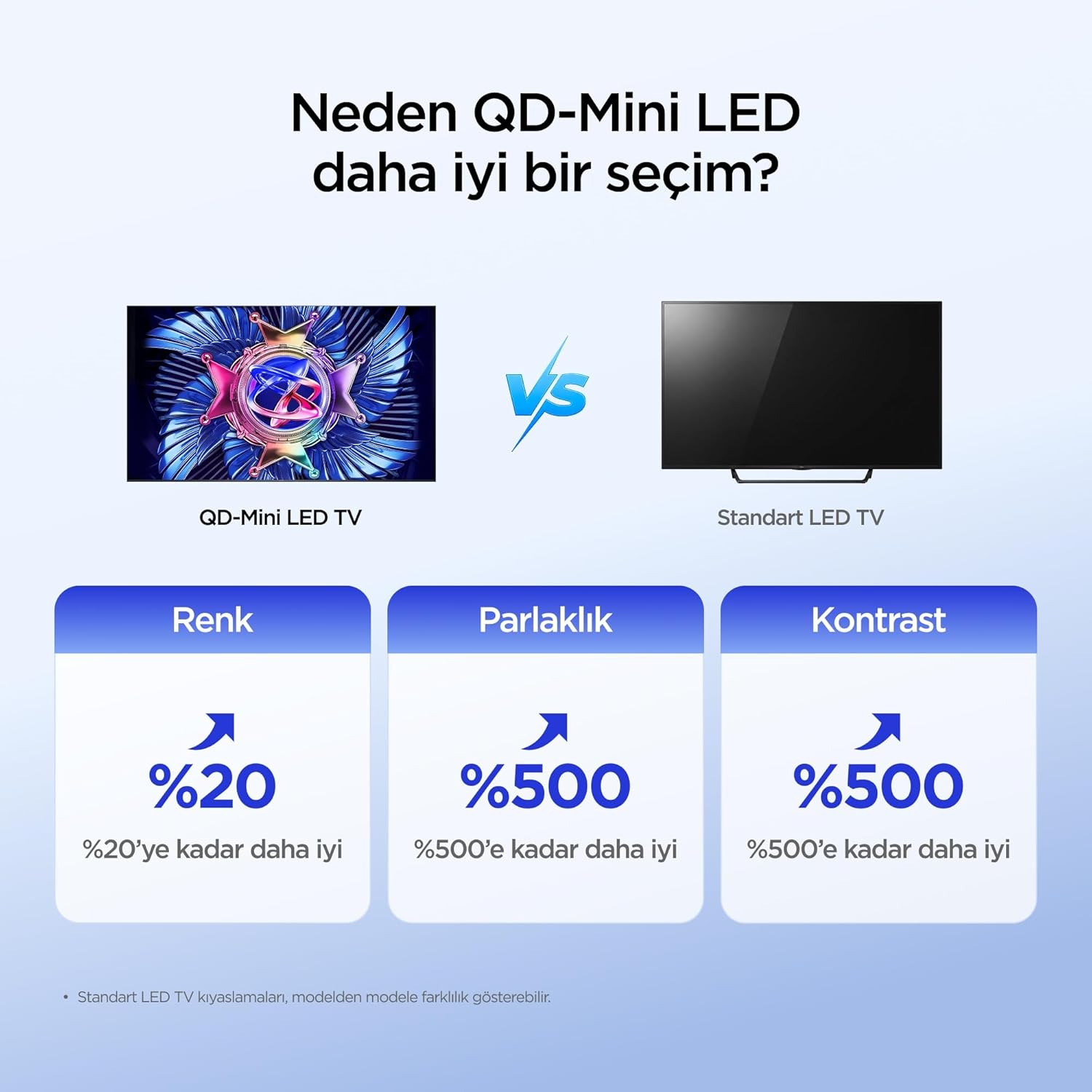
The iFFALCON 50U95A utilizes QD-Mini LED technology, combining Quantum Dot color with Mini LED backlighting. This results in superior brightness, contrast, and color accuracy compared to traditional LED TVs.

Image: Comparison illustrating the benefits of QD-Mini LED over standard LED TVs in terms of color, brightness, and contrast.
With over 500 local dimming zones, the TV provides precise light control at a pixel level, enhancing detail in both bright and dark scenes. It achieves a peak brightness of 1000 nits, ensuring vibrant images even in well-lit environments.

Image: A vibrant image demonstrating the 1000 nits peak brightness capability of the TV.
6.2 144Hz Native Refresh Rate
Experience smoother motion and clearer images with the 144Hz native refresh rate. This is particularly beneficial for fast-paced action movies and gaming, reducing motion blur and ghosting.

Image: A dynamic image of a race car, illustrating the smooth motion provided by the 144Hz native refresh rate.
6.3 ONKYO 2.1 Hi-Fi Audio System with Dolby Atmos
The integrated ONKYO 2.1 channel speaker system delivers rich, immersive stereo sound with deep bass. Combined with Dolby Atmos, it creates a cinematic audio experience, bringing sound to life with incredible clarity and depth.

Image: A living room scene depicting sound waves emanating from the TV, illustrating the immersive audio experience of the 2.1 speaker system.
6.4 AI PQ Pro Processor
The AI PQ Pro Processor intelligently analyzes and optimizes content pixel by pixel. This advanced processor enhances picture quality, delivering sharper details, improved contrast, and more vibrant colors for an overall superior viewpatirtį.

Image: A visual representation of the AI PQ Pro Processor chip, highlighting its role in optimizing image quality.
6.5 Matte HVA Panel & Ultra Slim Design
The Matte HVA Panel reduces glare and reflections, providing a comfortable viewing experience even in bright rooms. Its ultra-slim design allows for seamless integration into any living space, whether on a stand or wall-mounted.

Image: A comparison showing the reduced reflections and improved viewing experience of a Matte HVA Panel compared to a standard panel.

Image: A visual representation of the TV's ultra-slim design, highlighting its sleek profile.
7. Priežiūra
7.1 Ekrano valymas
- Išjunkite televizorių ir atjunkite maitinimo laidą.
- Švelniai nuvalykite ekraną minkšta, be pūkelių šluoste.
- Įsisenėjusioms dėmėms lengvai nuvalykiteampNuvalykite šluostę vandeniu arba specializuotu ekrano valikliu (nepurkškite tiesiai ant ekrano).
- Venkite naudoti stiprias chemines medžiagas, abrazyvus ar valiklius, kurių sudėtyje yra alkoholio.
7.2 Spintos valymas
- Nuvalykite spintelę minkštu, sausu skudurėliu.
- Do not use liquid or aerosol cleaners directly on the cabinet.
8. Problemų sprendimas
| Problema | Galima priežastis | Sprendimas |
|---|---|---|
| Nėra galios | Neprijungtas maitinimo laidas; neveikia maitinimo lizdas. | Įsitikinkite, kad maitinimo laidas yra tvirtai prijungtas. Išbandykite lizdą su kitu įrenginiu. |
| Nėra vaizdo, bet yra garsas | Incorrect input source selected; backlight off. | Norėdami pasirinkti tinkamą šaltinį, paspauskite nuotolinio valdymo pulto mygtuką „Įvestis“. Patikrinkite vaizdo nustatymus. |
| Nėra garso, bet vaizdas yra | Garsas nutildytas arba per mažas; pasirinkta neteisinga garso išvestis. | Unmute volume or increase level. Check audio output settings (e.g., TV speakers, external soundbar). |
| Nuotolinio valdymo pultas neveikia | Baterijos išsikrovė arba įdėtos neteisingai; kliūtis tarp nuotolinio valdymo pulto ir televizoriaus. | Pakeiskite baterijas. Užtikrinkite, kad televizoriaus IR imtuvas būtų matomas tiesiogiai. |
| Wi-Fi ryšio problemos | Neteisingas slaptažodis; maršrutizatoriaus problemos; televizorius per toli nuo maršrutizatoriaus. | Re-enter Wi-Fi password. Restart router. Move TV closer to router or use a Wi-Fi extender. |
If the problem persists after trying these solutions, please contact iFFALCON customer support.
9. Specifikacijos
| Funkcija | Detalė |
|---|---|
| Modelis | 50U95A |
| Ekrano dydis | 50 colių |
| Ekrano technologija | QD-Mini LED |
| Rezoliucija | 4K (3840 x 2160) |
| Atnaujinimo dažnis | 144 Hz (natyvusis) |
| Didžiausias ryškumas | 1000 nitų |
| HDR palaikymas | HDR10, HDR10+, Dolby Vision, HLG |
| Garso sistema | ONKYO 2.1 Channel Speakers, Dolby Atmos, DTS Virtual:X |
| Operacinė sistema | Google TV |
| Procesorius | AI PQ Pro Processor |
| Ryšys | 4x HDMI, 1x USB, Wi-Fi, Bluetooth |
| Matmenys (G x P x A) | 6.9 cm gylio x 111.1 cm pločio x 64.6 cm aukščio |
| Svoris | 13 kg |
10. Garantija ir palaikymas
Your iFFALCON 50U95A TV comes with a 2 metų gamintojo garantija. This warranty covers defects in materials and workmanship under normal use. For warranty claims or technical support, please contact iFFALCON customer service through their official websvetainėje arba kontaktinę informaciją, pateiktą jūsų produkto dokumentuose.
For the latest support information, FAQs, and software updates, visit the official iFFALCON support websvetainė: www.iffalcon.com