
FUNYET NY-01
FUNYET 2026 14.1-inch Laptop User Manual
Modelis: NY-01
Įvadas
This manual provides essential information for setting up, operating, maintaining, and troubleshooting your FUNYET 2026 14.1-inch Laptop. Please read this manual thoroughly before using your device to ensure proper function and longevity.
Kas yra dėžutėje
Patikrinkite, ar pakuotėje yra visi reikalingi daiktai:
- FUNYET 2026 14.1-inch Laptop
- Power Adapter (12V2A DC)
- Instrukcijų vadovas (šis dokumentas)
- Garantijos kortelė
Produktas baigtasview
The FUNYET 2026 laptop is designed for productivity and entertainment, featuring a powerful processor and versatile connectivity.
Pagrindinės savybės
- Operacinė sistema: Pre-installed Windows 11 Pro for enhanced multitasking and security.
- Procesorius: Intel Celeron N5095 (4 cores, 4 threads, up to 2.9 GHz) for smooth performance.
- Atmintis ir saugojimas: 16GB LPDDR4 RAM and 512GB M.2 SSD, with support for up to 1TB TF Card expansion.
- Ekranas: 14.1-inch IPS Full HD (1920x1080) screen, offering clear and vibrant visuals, with a 180° foldable hinge for flexible viewing.
- Ryšys: Dual-band 5G Wi-Fi and Bluetooth 5.0 for fast and stable wireless connections.
- Prievadai: Includes 2x USB 3.0, 1x 3.5mm Headphone Jack, 1x 3.5mm DC Adapter port, 1x Mini-HDMI, and 1x TF Card slot.
- Baterija: Integrated 5000mAh battery providing 4-5 hours of normal use and over 50 hours of standby time.
- Camera & Audio: Built-in 0.3-megapixel front camera and dual microphones for video calls and online meetings.
Komponento identifikavimas
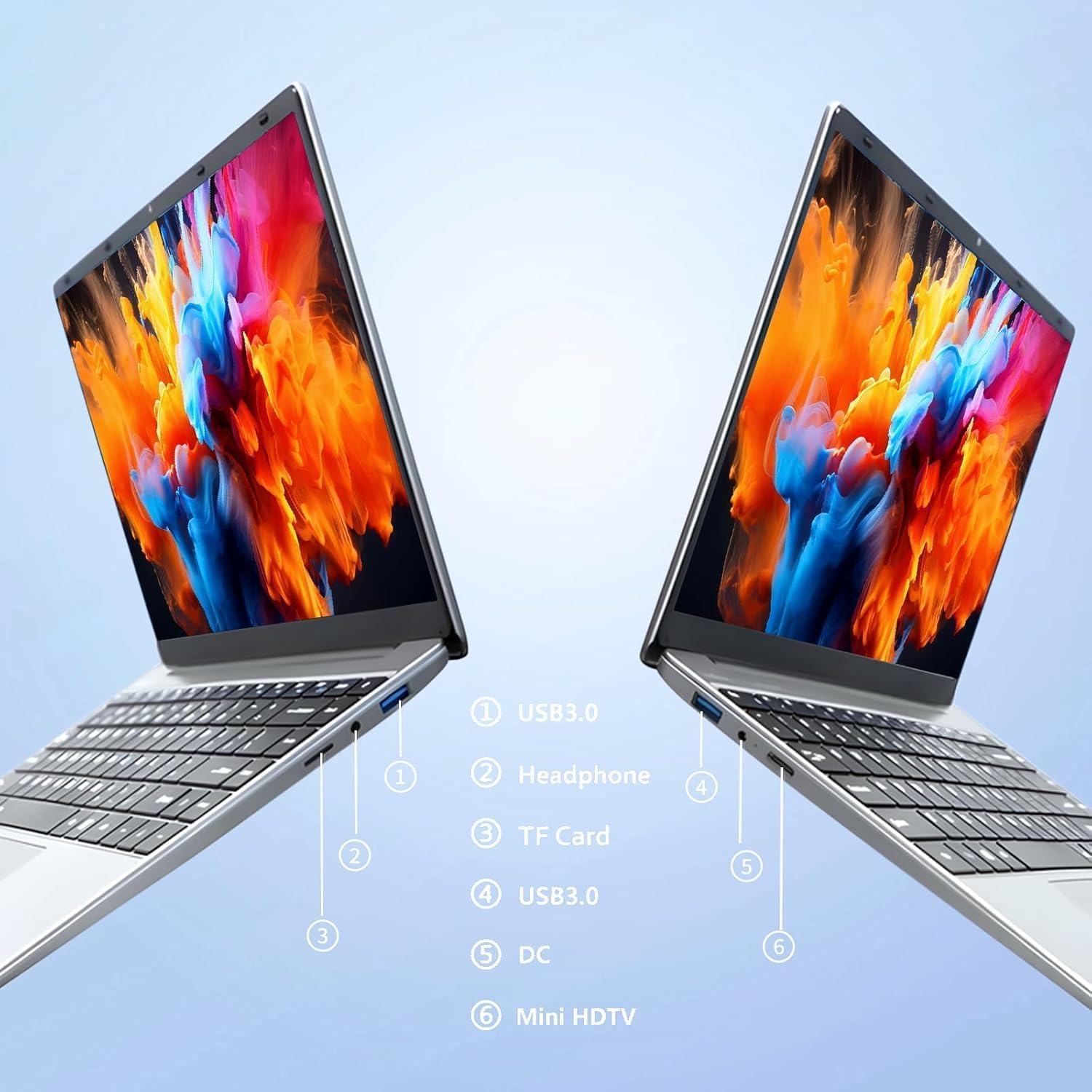
Vaizdas: Šoninė view of the laptop highlighting port locations.
This image illustrates the various ports available on the FUNYET 2026 laptop. On one side, you will find a USB 3.0 port, a 3.5mm headphone jack, and a TF Card slot. On the opposite side, there is another USB 3.0 port, the DC power input, and a Mini-HDMI port.

Vaizdas: Laptop screen displaying its 14-inch Full HD IPS features.
The laptop features a 14-inch Full HD (1920x1080) IPS display with a 16:9 aspect ratio and ultra-narrow bezels, providing a wide perspective and vivid images.

Vaizdas: Laptop demonstrating its 180-degree foldable hinge.
The laptop's hinge allows the screen to fold back 180 degrees, offering versatile viewkampai ir naudojimo režimai.
Sąrankos vadovas
1. Pradinis įkrovimas
- Išpakuokite nešiojamąjį kompiuterį ir maitinimo adapterį iš dėžutės.
- Connect the power adapter to the DC input port on the side of the laptop.
- Įkiškite maitinimo adapterį į sieninį lizdą.
- Prieš pirmą kartą naudodami nešiojamąjį kompiuterį, leiskite jam įkrauti bent 30 minučių arba tol, kol akumuliatoriaus indikatorius rodys pakankamą įkrovą.
2. Pirmasis įjungimas
- Atidarykite nešiojamojo kompiuterio dangtį.
- Press the power button, usually located on the keyboard deck or side.
- Vykdykite ekrane pateikiamus nurodymus, kad užbaigtumėte „Windows 11 Pro“ sąrankos procesą, įskaitant kalbos pasirinkimą, tinklo ryšį ir vartotojo paskyros kūrimą.
3. Prisijungimas prie Wi-Fi
- During the initial Windows setup, you will be prompted to connect to a Wi-Fi network. Select your network from the list and enter the password.
- If setting up later, click the Wi-Fi icon in the taskbar, select your network, and click "Connect".
Naudojimo instrukcijos
Energijos valdymas
- Maitinimas: Paspauskite maitinimo mygtuką.
- Miegojimo rezimas: Uždarykite dangtelį arba trumpai paspauskite maitinimo mygtuką.
- Išjungti: Spustelėkite mygtuką „Pradėti“, tada „Maitinimas“, tada „Išjungti“.
- Paleisti iš naujo: Spustelėkite mygtuką „Pradėti“, tada „Maitinimas“, tada „Paleisti iš naujo“.
Using the Touchpad and Touchscreen
- Jutiklinė dalis: Use gestures for navigation. Single tap for left-click, two-finger tap for right-click, two-finger scroll for scrolling.
- Jutiklinis ekranas: Tap to select, pinch to zoom, swipe to scroll.
Išorinio ekrano jungtis
To connect an external monitor or projector:
- Connect a Mini-HDMI cable from the laptop's Mini-HDMI port to the external display's HDMI input.
- If necessary, use a Mini-HDMI to HDMI adapter (not included).
- Paspauskite „Windows“ klavišas + P to open the Project menu and select your desired display mode (Duplicate, Extend, Second screen only).
Using TF Card Expansion
Insert a TF card into the designated slot for additional storage. The laptop supports up to 1TB TF card expansion.
Priežiūra ir priežiūra
- Valymas: Ekraną ir korpusą valykite minkšta, nepūkuota šluoste. Įsisenėjusias dėmes šiek tiek nuvalykite.ampNuvalykite šluostę vandeniu arba ekrano valikliu. Venkite stiprių cheminių medžiagų.
- Akumuliatoriaus priežiūra: Norėdami pailginti akumuliatoriaus veikimo laiką, venkite dažnai visiškai jį iškrauti. Jei ilgesnį laiką nenaudojate nešiojamojo kompiuterio, laikykite jį vėsioje, sausoje vietoje.
- Temperatūra: Operate the laptop within a temperature range of 5°C to 35°C (41°F to 95°F). Avoid direct sunlight or extreme heat/cold.
- Vėdinimas: Ensure the ventilation openings are not blocked to prevent overheating. Do not place the laptop on soft surfaces like beds or sofas during operation.
- Programinės įrangos atnaujinimai: Reguliariai atnaujinkite „Windows“ ir tvarkykles, kad užtikrintumėte optimalų našumą ir saugumą.
Trikčių šalinimas
Bendros problemos ir sprendimai
| Problema | Galimas sprendimas |
|---|---|
| Nešiojamasis kompiuteris neįsijungia. | Ensure the power adapter is securely connected and plugged into a working outlet. Check if the battery is charged. Try holding the power button for 10-15 seconds for a hard reset. |
| „Wi-Fi“ ryšio problemos. | Check if Wi-Fi is enabled in Windows settings. Restart your router and the laptop. Ensure you are within range of the Wi-Fi signal. Verify the Wi-Fi password. |
| Lėtas veikimas. | Close unnecessary applications. Check for background processes in Task Manager. Ensure Windows is updated. Consider running a disk cleanup. |
| Išorinis ekranas neaptiktas. | Ensure the Mini-HDMI cable is connected correctly. Check the input source on your external display. Press „Windows“ klavišas + P , kad perjungtumėte rodymo režimus. |
| Baterija greitai išsikrauna. | Adjust screen brightness. Close power-intensive applications. Check power settings in Windows and select a power-saving plan. Disconnect external peripherals when not in use. |
Techninės specifikacijos
| Prekės ženklas | FUNYET |
| Modelio pavadinimas | NY-01 |
| Ekrano dydis | 14.1 colių |
| Rezoliucija | 1920 x 1080 (Full HD) |
| Ekrano technologija | IPS LCD |
| Procesorius | „Intel Celeron N5095“ (iki 2.9 GHz) |
| RAM | 16 GB LPDDR4 (2400 MHz) |
| Sandėliavimas | 512 GB M.2 SSD (expandable via TF Card up to 1TB) |
| Operacinė sistema | Windows 11 Pro |
| Grafika | Integruota Intel Graphics |
| Belaidis ryšys | 5G Wi-Fi (2.4 GHz, 5.8 GHz), Bluetooth 5.0 |
| Uostai | 2x USB 3.0, 1x 3.5mm Headphone, 1x 3.5mm DC Adapter, 1x Mini-HDMI, 1x TF Card Slot |
| Webkumštelis | 0.3 Megapixel Front Camera |
| Baterijos talpa | 5000 mAh / 38.5 Wh |
| Matmenys (I x P x A) | 32.2 x 21 x 2.1 cm (12.68 x 8.27 x 0.83 colio) |
| Svoris | 1.4 kg (3.09 svarai) |
| Ypatinga funkcija | 180° Foldable Hinge |
Garantija ir palaikymas
Informacija apie garantiją
Your FUNYET 2026 laptop comes with a 2 metų garantija from the date of purchase. Please retain your proof of purchase for warranty claims. The warranty covers manufacturing defects and malfunctions under normal use. It does not cover damage caused by misuse, accidents, unauthorized repairs, or normal wear and tear.
Be to, a 6-month free exchange/return policy may apply, subject to the terms and conditions of your purchase platform.
Pagalba klientams
For any issues, questions, or technical assistance, please contact FUNYET customer support:
- Palaikymas internetu: Available 24/7. You can typically find support by logging into your Amazon account, navigating to "Your Account" -> "Your orders", and selecting "Ask Product Question" for your FUNYET laptop.
- El. paštas: funyestore@outlook.com
- Telefonas: +49 800-000-7147 (Please note operating hours may vary)

Vaizdas: Customer service contact details and warranty information.
This image provides a visual summary of the support options, including the 2-year warranty, 6-month exchange/return policy, and contact information for phone and email support.
Ask a question about this manual
Ask about setup, troubleshooting, compatibility, parts, safety, or missing instructions. Manuals+ will review the question and use this page’s manual context to help answer it.