
1. Įvadas
The IMILAB EC6 Dual 2K+2K is a plug-in outdoor security camera designed for comprehensive home surveillance. It features a unique dual-lens system, offering wide-angle coverage and intelligent tracking capabilities. This manual provides detailed instructions for setting up, operating, and maintaining your camera to ensure optimal performance and security.

Figure 1: IMILAB EC6 Dual 2K+2K Camera highlighting its dual-lens design for extensive coverage.
2. Kas yra dėžutėje
Įsitikinkite, kad pakuotėje yra visi komponentai:
- IMILAB EC6 Dual 2K+2K Plug-in Camera x 1
- Mounting Kit x 1 (includes screws and expansion nuts)
- Power Cable 10ft & Adapter x 1
- User Manual & Card x 1

Figure 2: Contents of the IMILAB EC6 Dual 2K+2K camera package.
3. Sąranka
3.1 Fizinis įrengimas
The EC6 Dual camera can be mounted on walls, ceilings, or columns. Ensure the installation location provides a clear view ir stabilų „Wi-Fi“ signalą.
- Paruoškite montavimo paviršių: Use the provided positioning sticker to mark the drill holes on your chosen surface.
- Gręžimo skylės: Drill holes approximately 30mm deep at the marked positions.
- Insert Expansion Nuts: Gently tap the four expansion nuts into the drilled holes.
- Maršruto kabeliai: Embed the power cable and Ethernet cable (if using wired connection) into the bracket slot for a neat installation.
- Sumontuokite fotoaparatą: Align the camera's mounting bracket with the holes and secure it using the screws. Tighten the nuts to ensure stability.
- Sureguliuoti kampą: Adjust the camera to your desired surveillance angle. The bullet camera (upper lens) can be tilted by hand up to 10 degrees. The turret camera (lower lens) can be panned and tilted using the app.

Figure 3: Versatile installation options for the EC6 Dual camera.
Video 1: EC6 Dual Setup Guide. This video demonstrates the unboxing, physical setup, app connection, and installation process for the IMILAB EC6 Dual camera.
3.2 Programėlės ryšys
To connect your camera to the app:
- Atsisiųskite programą: Download the Xiaomi Home/Mi Home app from your smartphone's app store.
- Maitinimas: Connect the power cable to the camera and plug it into a power outlet. Wait for a voice prompt indicating initial activation.
- Pridėti įrenginį: Open the app, click the '+' icon in the upper right corner, and select 'Scan'.
- Nuskaityti QR kodą: Scan the QR code located on the label of the power cord.
- Select Connection Type: Choose between 'Wired Network Connection' or 'Wireless Connection (Wi-Fi)'.
3.2.1 Laidinio tinklo ryšys
- Prijunkite maršrutizatoriaus Ethernet kabelį prie kameros Ethernet prievado.
- Vykdykite programėlės ekrane pateikiamus nurodymus, kad užbaitumėte ryšį.

Figure 4: Power and Ethernet ports for wired connection.
3.2.2 „Wi-Fi“ ryšys
- Select your Wi-Fi network from the list, enter the password, and click 'Next Step'.
- The app will automatically complete the Wi-Fi connection.
4. Naudojimo instrukcijos
4.1 Dual Angle Surveillance
The EC6 Dual camera features two independent lenses for simultaneous monitoring of two angles. The lower lens can pan 360° and tilt 135° via the app, while the upper lens maintains a fixed view. This allows for comprehensive coverage and intelligent tracking of moving objects.

Figure 5: Dual angle surveillance providing two live feeds simultaneously.
4.2 2K+2K Day/Night Full-Color Vision
Both camera lenses support 2K resolution, delivering clear and detailed footage. Equipped with four LED lights and four infrared lights, the camera provides vivid full-color vision during the day and at night.

Figure 6: Clear 2K+2K live view with two-way audio and smart color night vision.
4.3 Smart Deterrence
The camera features subscription-free smart deterrence. Upon motion detection, it can automatically trigger a siren, spotlight, or a custom voice alert to deter potential threats.
- Sirena: Įjungia garsinį signalą.
- Dėmesio centre: Turns on bright LED lights.
- Custom Voice Alert: Plays a pre-recorded message.

Figure 7: Smart deterrence features in action.
Video 2: 'Catching Santa' - Demonstrates the camera's ability to detect and record activity, highlighting its dual-lens surveillance and deterrence features.
Video 3: 'You almost got me!' - Illustrates the camera's detection and two-way audio capabilities in a simulated scenario.
4.4 Dvipusis garsas
Communicate with visitors or deter intruders in real-time using the built-in two-way audio feature accessible through the app.

Figure 8: Two-way audio functionality via the app.
4.5 Judesio aptikimas ir pranešimai
Set up to two customizable motion zones within the Xiaomi Home/Mi Home app. The camera will continuously monitor these areas and send immediate push notifications to your phone when motion is detected, ensuring you stay connected and informed.

Figure 9: App interface for motion zones and notifications.
4.6 Lanksčios saugojimo galimybės
The camera offers versatile storage solutions for your footage:
- „MicroSD“ kortelė: Supports local storage on a MicroSD card up to 256GB (not included) for continuous 24/7 recording and enhanced privacy.
- Saugykla debesyje: A 3-month free trial is available for new users, providing cloud storage for motion-triggered clips.
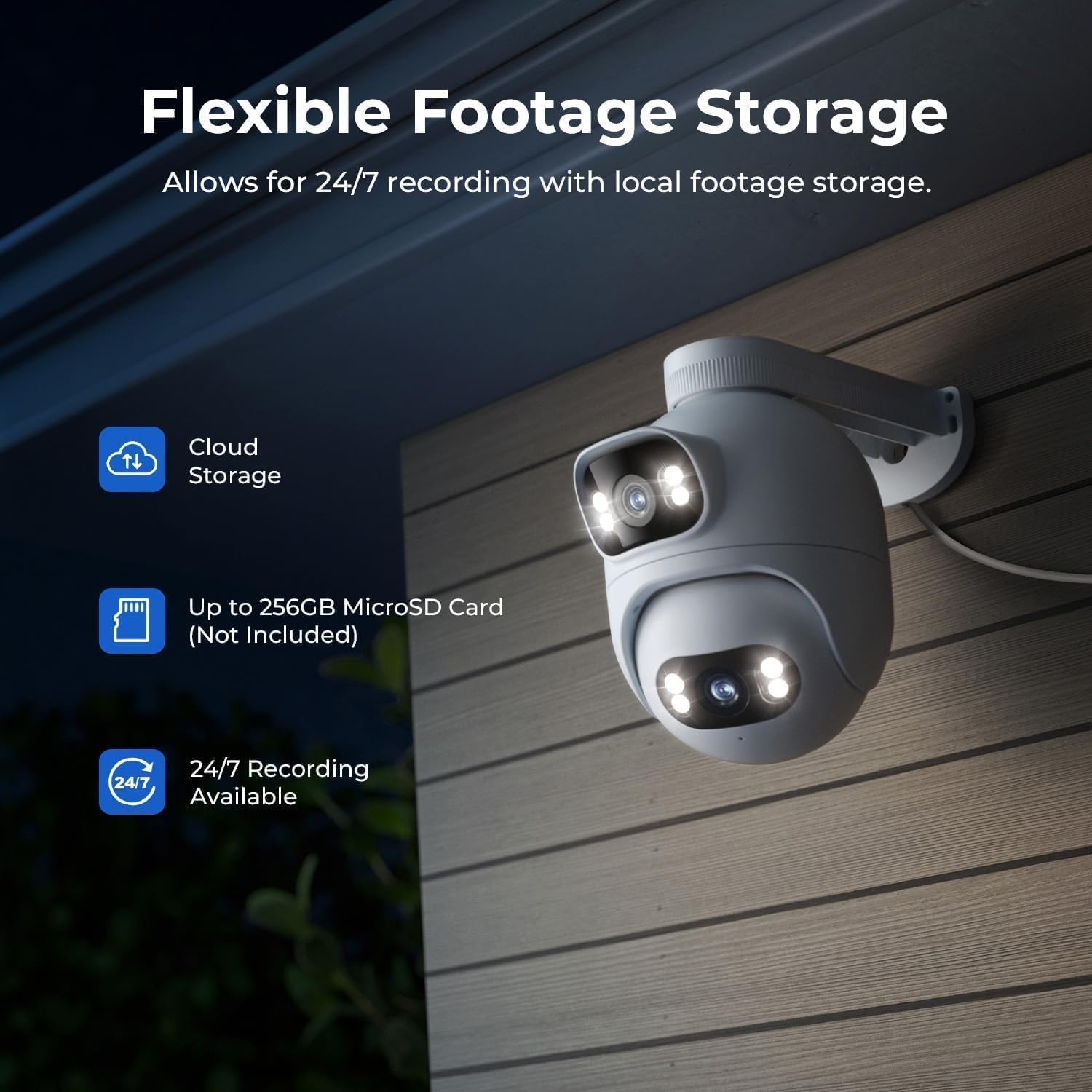
Figure 10: Flexible storage options for recorded footage.

Figure 11: Location of the MicroSD card slot.
Video 4: 'EC6 Dual 2K+2K Outdoor Camera, 24/7 Surveillance' - Highlights the camera's continuous recording and surveillance capabilities.
4.7 Nuotolinis panoramavimas ir pakreipimas
Control the lower lens's pan (360°) and tilt (135°) movements remotely through the app. You can also set preset angles for quick access to specific viewsrityse.

Figure 12: 360-degree pan functionality.
4.8 Naktinio matymo nustatymai
Adjust night vision settings in the app's 'Camera Settings' menu. Options include:
- Juodos/baltos nakties matymas: Displays a black and white image.
- Spalvotas naktinis matymas: Displays a color image with spotlights on at night or in low light.
- Išmanusis spalvotas naktinis matymas: When a person is detected, the spotlights turn on automatically, providing a color image at night or in low light, while conserving power when no motion is detected.
5. Priežiūra
- Valymas: Reguliariai valykite fotoaparato objektyvus minkšta,amp šluoste, kad užtikrintumėte aiškią vaizdo kokybę. Venkite abrazyvinių valiklių.
- Firmware atnaujinimai: Check the Xiaomi Home/Mi Home app periodically for firmware updates to ensure your camera has the latest features and security enhancements.
- Maitinimas: Įsitikinkite, kad kamera prijungta prie stabilaus maitinimo šaltinio. Venkite dažnų elektros energijos tiekimo sutrikimų.
- Kabelio apžiūra: Periodically inspect the power and Ethernet cables for any signs of wear or damage.
6. Problemų sprendimas
| Problema | Galima priežastis | Sprendimas |
|---|---|---|
| Kamera neįsijungia | Maitinimo adapteris neprijungtas arba sugedęs. | Patikrinkite maitinimo jungtis. Išbandykite kitą maitinimo lizdą. |
| Nepavyko prisijungti prie „Wi-Fi“. | Neteisingas „Wi-Fi“ slaptažodis; kamera per toli nuo maršrutizatoriaus; „Wi-Fi“ signalo trukdžiai. | Verify Wi-Fi password. Move camera closer to router. Reduce interference from other devices. Ensure 2.4GHz Wi-Fi is used. |
| Prasta vaizdo kokybė | Dirty lens; low network bandwidth. | Clean the camera lens. Check your internet speed and network stability. |
| Judesio aptikimas neveikia | Motion detection disabled; incorrect motion zone settings. | Enable motion detection in the app. Adjust motion zone sensitivity and areas. |
| Dvipusio garso problemos | Microphone/speaker muted; network issues. | Check app settings for audio mute. Ensure stable network connection. |
7. Specifikacijos
| Funkcija | Specifikacija |
|---|---|
| Modelio pavadinimas | EC6 Dual 2K+2K |
| Modelio numeris | CMSXJ68A |
| Vaizdo įrašymo raiška | 2 tūkst + 2 tūkst |
| Ryšio technologija | Laidinis, belaidis („Wi-Fi“) |
| Ypatingos savybės | Dual Lens, 24/7 Recording, 800LM Adjustable Lights, 360° PTZ, 3X Zoom, Local Storage, No Monthly Fee |
| Naudojimas viduje / lauke | Lauke |
| Valdiklio tipas | Amazon Alexa, Google Assistant, Xiaomi Home/Mi Home App |
| Montavimo tipas | Wall/Ceiling/Pole Mount |
| Atsparumo vandeniui lygis | Atsparus vandeniui (IP65) |
| Naktinis matymas | Starlight, Color Night Vision |
| „Flash“ atminties tipas | „Micro SD“ (iki 256 GB) |
| Maitinimo šaltinis | Su laidu elektra |
| Darbinė temperatūra | -30°C iki 60°C |
8. Garantija ir palaikymas
Your IMILAB EC6 Dual 2K+2K Outdoor Security Camera comes with a 2 metų gamintojo garantijaBe to, a 30 dienų nemokamo grąžinimo politika is available. For technical support, troubleshooting assistance, or warranty claims, please refer to the contact information provided in the 'User Manual & Card' included in your package or visit the official IMILAB websvetainę.