
Įvadas
Ačiū, kad pirkoteasing the Aiwa 14-inch Portable Media Player Travel Kit. This device is designed to provide versatile entertainment on the go, allowing you to enjoy DVDs, CDs, and other media without relying on internet connectivity. This manual provides essential information for setting up, operating, and maintaining your portable media player.
Saugos informacija
Prieš naudodami šį gaminį, atidžiai perskaitykite visas saugos instrukcijas. Išsaugokite šį vadovą ateičiai.
- Saugokite įrenginį nuo lietaus, drėgmės ar ekstremalių temperatūrų.
- Nestatykite prietaiso šalia šilumos šaltinių arba tiesioginiuose saulės spinduliuose.
- Use only the provided power adapters (AC/DC and car adapter) to charge the device.
- Nebandykite ardyti ar modifikuoti įrenginio. Visus techninės priežiūros darbus patikėkite kvalifikuotiems darbuotojams.
- Handle discs carefully to prevent scratches or damage.
- Įrenginio veikimo metu užtikrinkite tinkamą vėdinimą.
Pakuotės turinys
Patikrinkite, ar pakuotėje yra visi reikalingi daiktai:
- Aiwa 14-inch Portable Media Player (Main Unit)
- Nuotolinio valdymo pultas
- Laidinės ausinės
- Apsauginis nešiojimo krepšys
- AC/DC maitinimo adapteris
- Automobilio maitinimo adapteris (12 V)
- Vartotojo vadovas
Produktas baigtasview
Familiarize yourself with the components and controls of your portable media player.
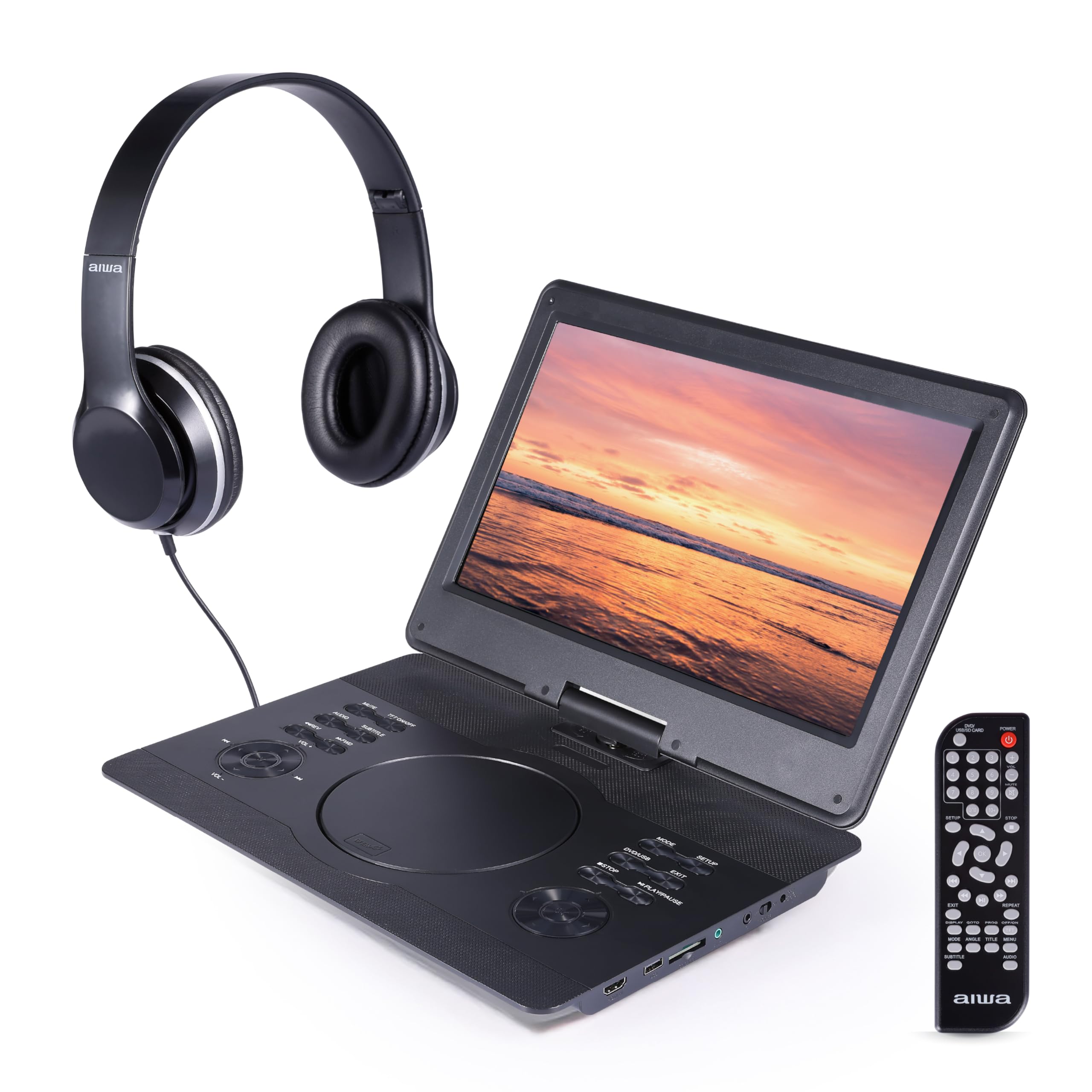
1 paveikslas: Priekyje view of the Aiwa Portable Media Player with included remote control.

2 paveikslas: Šoninė view showing the open disc tray and headphone connection.
Pagrindinės įrenginio savybės:
- 14-inch Swiveling LCD Screen: Suteikia lankstumo viewing angles and can fold flat.
- Disko dėklas: DVD ir CD diskų įdėjimui.
- Valdymo mygtukai: Play/Pause, Stop, Skip, Volume, Menu, Setup, Mode, etc.
- Integruoti stereofoniniai garsiakalbiai: Garso atkūrimui be ausinių.
- HDMI įvestis: Connect external devices like gaming consoles or streaming sticks.
- USB prievadas: Skirta medijos atkūrimui iš USB atmintinių.
- SD kortelės lizdas: For playing media from SD memory cards.
- Ausinių lizdas: Privačiam pasiklausymui.
- Maitinimo įvestis: For connecting AC/DC or car adapters.

3 paveikslas: The screen can swivel and fold flat for compact use.
Sąranka
1. Akumuliatoriaus įkrovimas
- Connect the AC/DC power adapter to the DC IN port on the player and then to a wall outlet.
- Užsidegs įkrovimo indikatoriaus lemputė. Visiškas įkrovimas paprastai trunka 2–3 valandas.
- Alternatively, use the car power adapter to charge the device in a vehicle.
2. Įjungimas/išjungimas
- Norėdami įjungti, paspauskite ir palaikykite GALIA mygtuką ant įrenginio arba nuotolinio valdymo pulto.
- Norėdami išjungti, paspauskite ir palaikykite GALIA mygtuką dar kartą.
3. Ausinių prijungimas
- Plug the included wired headphones into the AUSINĖS jack on the side of the player.
- The built-in speakers will automatically mute when headphones are connected.
4. Using the Carrying Bag

4 paveikslas: The included carrying bag for transport and protection.
- Place the media player and its accessories into the protective carrying bag for safe transport.
Veikiantis
1. Disc Playback (DVD/CD)
- Atidarykite disko dėklo dangtelį.
- Atsargiai uždėkite DVD arba CD ant veleno etikete į viršų.
- Close the disc tray cover firmly.
- Grotuvas automatiškai aptiks diską ir pradės atkūrimą arba parodys disko meniu.
- Use the control buttons on the unit or remote (Play/Pause, Stop, Skip, Menu, etc.) to navigate and control playback.
2. USB / SD kortelės atkūrimas
- Įkiškite USB atmintinę į USB prievadą arba SD kortelę į SD kortelės lizdą.
- Paspauskite REŽIMAS button on the unit or remote to select USB or SD mode.
- Naršykite po savo filenaudodami krypties mygtukus ir paspauskite PLAY/ENTER to select and play media.
3. HDMI įvestis
- Connect an external device (e.g., gaming console, streaming stick) to the HDMI-IN port on the player using an HDMI cable (not included).
- Paspauskite REŽIMAS button on the unit or remote to select HDMI input.
- The player's screen will display the content from the connected HDMI device.
4. Ekrano reguliavimas

5 paveikslas: The screen can be swiveled and tilted for optimal viewing.
- The screen can swivel up to 180 degrees and tilt for various viewkampų.
- It can also be folded flat against the base unit, transforming the device into a tablet-like form factor.
5. Garsumo valdymas
- Reguliuokite garsumą naudodami VOL+ ir VOL- mygtukus ant įrenginio arba nuotolinio valdymo pulto.
Priežiūra
Prietaiso valymas
- Wipe the screen and exterior surfaces with a soft, dry, lint-free cloth.
- Įsisenėjusioms dėmėms šiek tiek pamirkykiteamplt šluostę nuvalykite vandeniu arba švelniu, neabrazyviniu valikliu.
- Do not use harsh chemicals or abrasive materials, as they may damage the finish.
- Keep the disc tray and ports free of dust and debris.
Sandėliavimas
- When not in use, store the player in its protective carrying bag in a cool, dry place.
- Venkite laikyti vietose, kuriose yra didelė drėgmė arba ekstremali temperatūra.
Trikčių šalinimas
Jei kyla problemų, žr. toliau pateiktas dažniausiai pasitaikančias problemas ir sprendimus:
| Problema | Galima priežastis | Sprendimas |
|---|---|---|
| Nėra galios | Battery depleted; Power adapter not connected or faulty. | Charge the battery using the AC/DC or car adapter. Ensure connections are secure. |
| Diskas negrojamas / klaida „Nėra disko“ | Diskas įdėtas neteisingai; diskas nešvarus arba subraižytas; nesuderinamas disko formatas. | Ensure disc is inserted label-side up. Clean the disc. Try a different disc. Verify disc is DVD/CD/VCD format. |
| Nėra garso | Volume too low; Headphones connected; Mute function active. | Increase volume. Disconnect headphones if using speakers. Check if mute is active on remote. |
| Prasta vaizdo kokybė | Disc quality; Screen viewing angle; Low resolution content. | Ensure disc is clean and undamaged. Adjust screen angle. Note that native resolution is 800x480. |
| Nuotolinio valdymo pultas neveikia | Batteries depleted; Obstruction between remote and player; Remote sensor blocked. | Replace remote batteries. Ensure clear line of sight to the player's IR sensor. |
Specifikacijos
| Funkcija | Detalė |
|---|---|
| Prekės ženklas | Aiwa |
| Modelio numeris | AI7017-BLK-T37-6 |
| Ekrano dydis | 14 colių |
| Ekrano tipas | LCD |
| Gimtoji raiška | 800x480 |
| Palaikomos medijos rūšys | DVD, CD, CD-R, DVD-R, VCD, USB, SD Card |
| Ryšys | HDMI Input, USB Port, SD Card Slot, Headphone Jack |
| Garsas | Built-in Stereo Speakers, Headphone Output |
| Maitinimo šaltinis | Rechargeable Battery, AC/DC Adapter, Car Adapter (12V) |
| UPC | 021331134455 |
Informacija apie garantiją
This product is covered by a limited manufacturer's warranty. Please refer to the warranty card included in your package or contact customer support for details regarding warranty terms and conditions.
Pagalba klientams
For technical assistance, troubleshooting, or warranty inquiries, please contact Aiwa customer support. Contact information can typically be found on the product packaging or the official Aiwa websvetainę.


