
1. Įvadas
This manual provides essential instructions for setting up, operating, and maintaining your Nothing Phone (4a) Pro. Please read this guide thoroughly to ensure proper use and to maximize the performance of your device.
2. Pradinė sąranka
2.1. Išpakavimas ir komponentai
Atidarius pakuotę, patikrinkite, ar yra visi komponentai:
- Nothing Phone (4a) Pro device
- Ausinės
Note: A USB Type-C cable and SIM ejector tool may be sold separately or included depending on region. A power adapter is typically sold separately.
2.2. SIM kortelės įdėjimas
- Raskite SIM kortelės dėklą telefono šone.
- Insert a SIM ejector tool (not always included) into the small hole next to the tray and press gently until the tray pops out.
- Įdėkite nano-SIM kortelę (-es) į dėklą auksiniais kontaktais žemyn.
- Atsargiai įstatykite dėklą atgal į telefoną, kol jis spragtelėdamas užsifiksuos.
2.3. Įjungimas ir pradinė konfigūracija
- Press and hold the Power button until the Nothing logo appears.
- Vykdykite ekrane pateikiamus nurodymus, kad pasirinktumėte kalbą, prisijunkite prie „Wi-Fi“ tinklo ir prisijunkite naudodami „Google“ paskyrą.
- Complete the setup process, including data transfer (if applicable) and security settings.
3. Telefono valdymas
3.1. Ekranas ir vartotojo sąsaja
The Nothing Phone (4a) Pro features a 6.83-inch 1.5K Flexible AMOLED Display su a 144Hz atnaujinimo dažnis, providing vibrant colors and smooth scrolling. Navigate the interface using touch gestures.
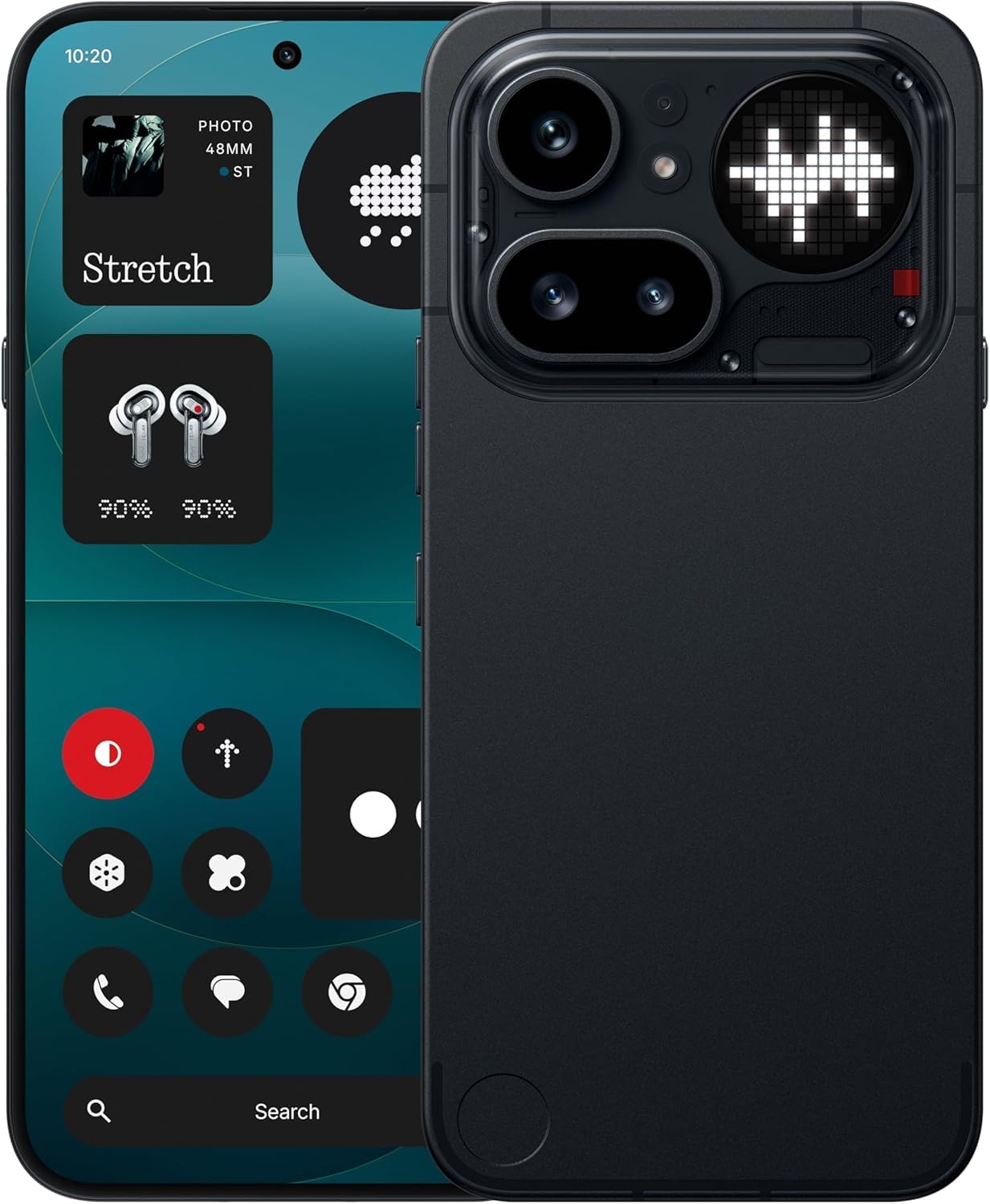
Image: The Nothing Phone (4a) Pro showcasing its flexible AMOLED display and sleek design.
3.2. Kamerų sistema
Your device is equipped with a Trijų kamerų sistema, allowing for versatile photography. The camera supports up to 140x ultra zoom for capturing distant subjects.
Image: Detail of the triple camera module and a screen showing 140x zoom capability.
3.3. Spektaklis
The Nothing Phone (4a) Pro is powered by the Snapdragon 7 Gen 4 processor, ensuring smooth multitasking and efficient performance for demanding applications and games. It comes with 12 GB RAM for enhanced responsiveness.
Image: A visual representation of the Snapdragon 7 Gen 4 processor, highlighting the device's core performance component.
3.4. Baterija ir įkrovimas
Įrenginyje yra a 5080 mAh baterija, providing extended usage times. It supports 50W greitas įkrovimas technology, allowing for quick recharging.
Paveikslėlis: vidinis view of the phone, showing the battery component with its specifications.
3.5. Programinės įrangos ir dirbtinio intelekto funkcijos
Your Nothing Phone (4a) Pro runs on Nothing OS, remiantis Android 14, offering a clean and intuitive user experience. It integrates Essential AI tools ir funkcijos Google Gemini + ChatGPT Integration for advanced assistance and productivity.
Image: Screenshots depicting the Nothing OS home screen, an AI tools interface, and the Google Gemini + ChatGPT integration menu.
3.6. Ryšys
Prietaisas palaiko 5G cellular technology for high-speed internet access. It uses a C tipo USB (USB 2.0) connector for charging and data transfer.
4. Priežiūra
4.1. Įrenginio valymas
To clean your phone, use a soft, lint-free cloth. Avoid abrasive materials or harsh chemicals. For stubborn smudges, slightly dampNuvalykite šluostę vandeniu arba elektronikos ekranams skirtu valikliu.
4.2. Programinės įrangos atnaujinimai
Reguliariai tikrinkite, ar yra programinės įrangos atnaujinimų, ir juos įdiekite, kad jūsų įrenginyje būtų naujausios funkcijos, saugos pataisymai ir našumo patobulinimai. Eikite į Nustatymai > Sistema > Programinės įrangos atnaujinimas , kad patikrintumėte, ar yra galimų atnaujinimų.
4.3. Akumuliatoriaus priežiūra
Norėdami pailginti baterijos veikimo laiką, venkite telefono veikti itin aukštoje temperatūroje. Rekomenduojama palaikyti baterijos įkrovą nuo 20 % iki 80 %, kad ji ilgai tarnautų.
5. Problemų sprendimas
5.1. Dažnos problemos ir sprendimai
- Įrenginys neįsijungia: Įsitikinkite, kad akumuliatorius įkrautas. Prijunkite prie įkroviklio bent 15 minučių, tada bandykite vėl įjungti.
- Programėlės stringa: Clear the cache of the problematic app (Settings > Apps > [App Name] > Storage & cache > Clear cache). If the issue persists, reinstall the app.
- Silpnas tinklo signalas: Patikrinkite, ar SIM kortelė tinkamai įdėta. Pabandykite paleisti telefoną iš naujo arba įjungti ir išjungti lėktuvo režimą.
- Baterija greitai išsikrauna: Sumažinkite ekrano ryškumą, išjunkite nereikalingas fonines programas ir apribokite vietos nustatymo paslaugas.
5.2. Gamyklinių parametrų atkūrimas
Jei nuolat susiduriate su programinės įrangos problemomis, gamyklinių parametrų atkūrimas gali jas išspręsti. Įspėjimas: tai ištrins visus jūsų telefone esančius duomenis. Prieš tęsdami sukurkite svarbių duomenų atsarginę kopiją. Eikite į Nustatymai > Sistema > Atstatyti parinktys > Ištrinti visus duomenis (atkurti gamyklinius).
6. Specifikacijos
| Funkcija | Detalė |
|---|---|
| Modelis | Nothing Phone (4a) Pro |
| Operacinė sistema | Android 14 (Nothing OS) |
| Procesorius | Snapdragon 7 Gen 4, 2.5 GHz |
| RAM | 12 GB |
| Vidinė saugykla | 256 GB |
| Ekranas | 6.83" 1.5K Flexible AMOLED, 144Hz refresh rate |
| Baterijos talpa | 5080 mAh ličio jonų |
| Įkrovimas | 50W Fast Charge, USB Type-C (USB 2.0) |
| Fotoaparatas | Triple Camera System, up to 140x ultra zoom |
| Ryšys | 5G, GSM, LTE |
| Matmenys | 16.4x7.8x0.8 cm |
| Svoris | 250 gramų |
| Dėžutės turinys | Ausinės |
7. Garantija ir palaikymas
7.1. Gaminio garantija
The Nothing Phone (4a) Pro comes with a 1 metų gamintojo garantija from the date of purchase. This warranty covers manufacturing defects and workmanship under normal use. It does not cover damage caused by accidents, misuse, unauthorized modifications, or normal wear and tear.
7.2. Pagalba klientams
For technical assistance, warranty claims, or service inquiries, please contact Nothing customer support. Refer to the official Nothing websvetainė, kurioje rasite naujausią kontaktinę informaciją.
Manufacturer: Nothing
Packer/Importer Contact: Essentially Nothing