
1. Įvadas
This manual provides essential information for setting up, operating, maintaining, and troubleshooting your Redmi A7 Pro 5G smartphone. Please read this guide thoroughly to ensure optimal performance and longevity of your device.
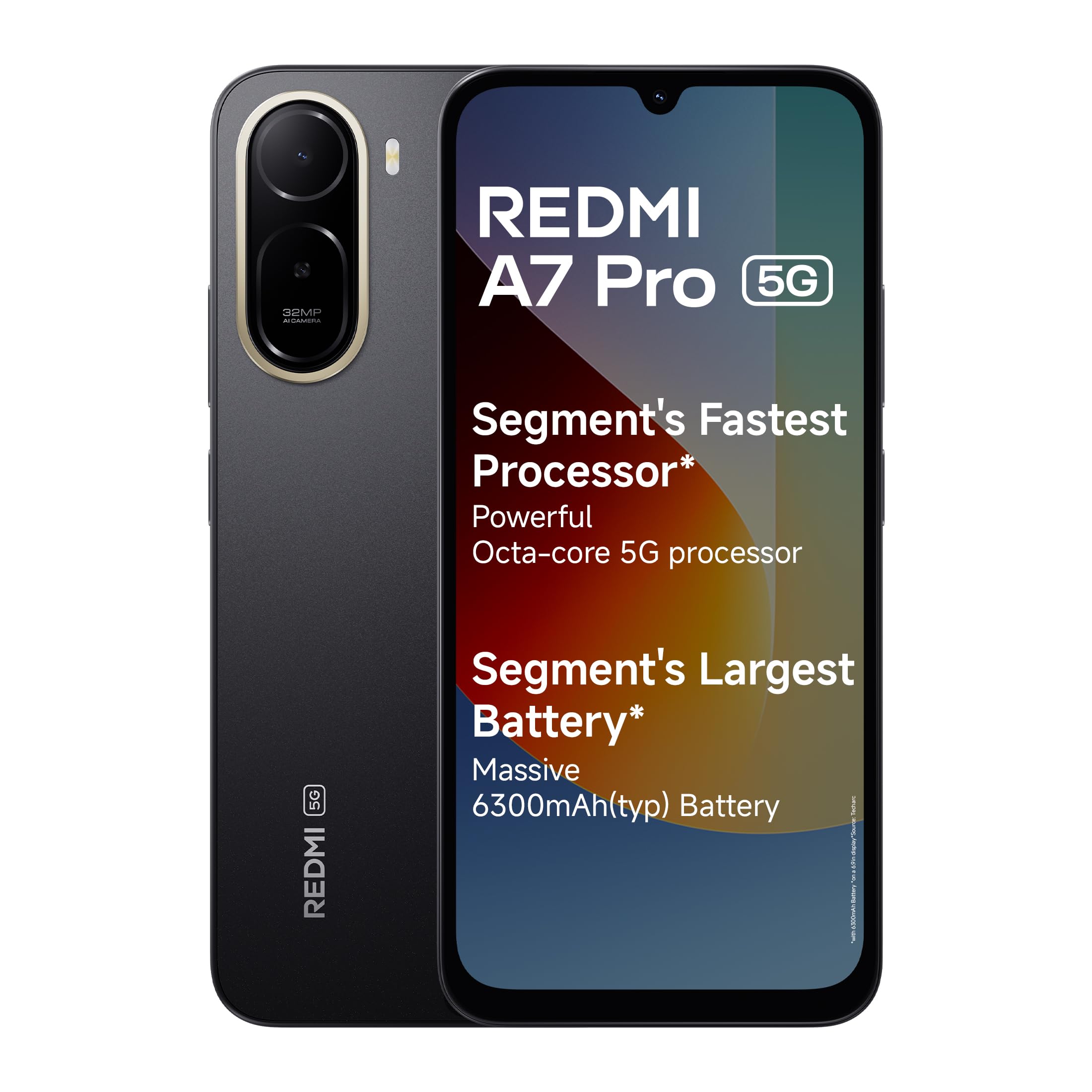
Image: Redmi A7 Pro 5G smartphone, showcasing its design and camera setup.
2. Kas yra dėžutėje
Patikrinkite, ar jūsų prekės pakuotėje yra visi šie daiktai:
- Redmi A7 Pro 5G Smartphone
- Įkroviklis
- C tipo USB kabelis
- SIM išstūmimo įrankis
- Garantijos kortelė
- Vartotojo vadovas (šis dokumentas)
3. Sąranka
3.1 SIM kortelės įdėjimas
- Suraskite SIM kortelės dėklą savo įrenginio šone.
- Įkiškite SIM kortelės išstūmimo įrankį į mažą skylutę šalia dėklo ir tvirtai spauskite, kol dėklas iššoks.
- Place your Nano-SIM card(s) and/or microSD card into the tray with the gold contacts facing down. Ensure they are correctly oriented.
- Švelniai stumkite dėklą atgal į įrenginį, kol jis užsifiksuos.
3.2 Pradinis įjungimas ir sąranka
- Paspauskite ir palaikykite maitinimo mygtuką, kol pasirodys „Redmi“ logotipas.
- Vykdykite ekrane pateikiamus nurodymus, kad pasirinktumėte kalbą, regioną ir prisijungtumėte prie „Wi-Fi“ tinklo.
- Prisijunkite naudodami „Google“ paskyrą arba sukurkite naują.
- Set up a screen lock (PIN, pattern, or password) and fingerprint recognition for enhanced security.
3.3 Įrenginio įkrovimas
Connect the USB Type-C cable to the charging port at the bottom of the phone and the other end to the provided charger. Plug the charger into a power outlet. The device supports 15W quick charging.
4. Prietaiso valdymas
4.1 Ekranas
The Redmi A7 Pro 5G features a large 17.53cm (6.9-inch) display with a 120Hz adaptive refresh rate for smooth visuals. It is TUV certified for eye comfort.

Image: The Redmi A7 Pro 5G display, emphasizing its size and smooth refresh rate.
4.2 Našumas
Powered by an Octa-core 5G processor, the device delivers stable performance for daily tasks and multitasking.

Image: Visual representation of the Octa-core 5G processor.
4.3 Baterija
The Redmi A7 Pro 5G is equipped with a 6300mAh battery. It supports 15W quick charging and 7.5W wired reverse charging, allowing you to share power with other compatible devices.

Image: Illustration of the phone's large battery capacity and charging features.
4.4 Kamera
Capture moments with the 32MP AI Dual Camera on the rear and an 8MP selfie shooter. Features include:
- Ultra HD Mode: For clear, detailed shots.
- Portreto režimas: Creates natural background blur.
- DI dangus: Automatically adjusts sky colors and brightness.
- AI Beauty Selfie: Enhances facial features for selfies.

Image: Close-up of the Redmi A7 Pro 5G's dual AI camera system.
4.5 garsas
Experience enhanced audio with 200% Volume Boosted Speakers, designed to provide clear sound even in noisy environments.

Vaizdas: vidinis view highlighting the phone's speaker system.
4.6 Programinė įranga ir funkcijos
The device runs on Android 16 with Xiaomi HyperOS 3, offering a smooth and interconnected experience. Key software features include:
- HyperIsland: A dynamic notification and interaction area.
- „Google Gemini“: Your AI assistant for various tasks.
- Apibraukite, kad ieškotumėte: Ieškokite any image, video, or text on your screen by circling it.
- Call Sync: Seamlessly pick up calls on connected tablets or laptops.
- Network Sync: Automatically connect your tablet to your phone's hotspot.
- Shared Clipboard: Copy and paste content instantly across connected Xiaomi devices.

Image: Xiaomi HyperOS 3 overview.

Image: Demonstrating Google Gemini and Circle to Search functionalities.
4.7 Saugumas ir patvarumas
The Redmi A7 Pro 5G features IP52-rated protection against dust and splashes. A side-mounted fingerprint sensor provides quick and secure access to your device.

Image: Redmi A7 Pro 5G highlighting its durability features.
5. Priežiūra
5.1 Įrenginio valymas
- Ekraną ir korpusą nuvalykite minkštu, nepūkuotu audiniu.
- Venkite naudoti stiprias chemines medžiagas, abrazyvines medžiagas ar aerozolinius purškalus.
- Laikykite prievadus švarius nuo dulkių ir šiukšlių.
5.2 Programinės įrangos naujiniai
Reguliariai tikrinkite, ar yra programinės įrangos atnaujinimų, ir juos įdiekite, kad jūsų įrenginyje būtų naujausios funkcijos, saugos pataisymai ir našumo patobulinimai. Eikite į Nustatymai > Apie telefoną > MIUI versija norėdami patikrinti, ar nėra atnaujinimų.
5.3 Akumuliatoriaus priežiūra
- Venkite ekstremalių temperatūrų, nes jos gali pabloginti akumuliatoriaus veikimo laiką.
- Nepalikite telefono įkrauto ilgai, kai jis pasiekia 100 % įkrovą.
- Norėdami optimalios akumuliatoriaus būklės, stenkitės palaikyti įkrovos lygį nuo 20 % iki 80 %.
5.4 Saugojimo valdymas
Reguliariai valykite nereikalingus files, cache, and uninstall unused applications to maintain optimal storage and performance. You can expand storage using a microSD card.
6. Problemų sprendimas
If you encounter issues with your Redmi A7 Pro 5G, try the following steps:
6.1 Įrenginys neįsijungia
- Įsitikinkite, kad akumuliatorius įkrautas. Prijunkite įkroviklį ir palaukite kelias minutes prieš bandydami įjungti.
- Paspauskite ir palaikykite maitinimo mygtuką bent 10–15 sekundžių, kad priverstumėte įrenginį paleisti iš naujo.
6.2 Įkrovimo problemos
- Check if the charger and cable are securely connected.
- Try using a different charger and cable to rule out accessory malfunction.
- Įsitikinkite, kad įkrovimo prievadas yra švarus ir be šiukšlių.
6.3 App Performance and Lag
- Uždarykite fonines programas.
- Clear app cache (Settings > Apps > Manage apps > [App Name] > Clear cache).
- Įsitikinkite, kad jūsų įrenginio programinė įranga yra atnaujinta.
- If issues persist, consider a factory reset (back up your data first).
6.4 Tinklo ryšio problemos
- Iš naujo paleiskite įrenginį.
- Įjungti ir išjungti lėktuvo režimą.
- Patikrinkite SIM kortelės įdėjimą.
- Reset network settings (Settings > Connection & sharing > Reset Wi-Fi, mobile networks & Bluetooth).
7. Specifikacijos
| Funkcija | Specifikacija |
|---|---|
| Prekės ženklas | Redmi |
| Modelis | A7 Pro 5G |
| Operacinė sistema | „Android 16“, „Xiaomi HyperOS“ |
| RAM atmintis | 4 GB |
| Sandėliavimo talpa | 128 GB (išplečiama iki 128 GB) |
| Ekrano dydis | 17.53 Centimetres (6.9 inches) |
| Rezoliucija | 720 x 1600 |
| Atnaujinimo dažnis | 120 Hz |
| Ekrano tipas | LCD |
| Galinė kamera | 32 MP (Dual Camera) |
| Priekinė kamera | 8 MP |
| Baterijos talpa | 6300 milijonųamp Valandos |
| Įkrovimas | 15W Quick Charging, 7.5W Wired Reverse Charging |
| SIM kortelės lizdas | Dvi SIM kortelės |
| Jungties tipas | C tipo USB |
| Biometrinis saugumas | Pirštų atspaudų atpažinimas |
| Tinklo ryšys | 5G, „Bluetooth“, „Wi-Fi“ |
| Prekės svoris | 210 gramų |
| Prekės matmenys | 17.2x7.9x0.8 cm |
| Patvarumas | IP52 apsaugos klasė |
8. Informacija apie garantiją
The Redmi A7 Pro 5G comes with a 1 metų gamintojo garantija įrenginiui nuo įsigijimo datos. Komplektuojamiems priedams, įskaitant baterijas, taikoma 6 mėnesių gamintojo garantija nuo pirkimo datos.
Please retain your proof of purchase for warranty claims. For detailed terms and conditions, refer to the warranty card included in your product box.
9. Parama
For further assistance, technical support, or service inquiries, please contact Redmi customer service. You can find contact details on the official Redmi website or through the support section in your device settings.
Manufacturer Contact Information: BYD INDIA PRIVATE LIMITED, DEVELOPED PLOT NO.OZ-7,SIPCOT ORAGADAM, SRIPERUMBUDUR (TK) KANCHEEPURAM DISTRICT 602105 TAMIL NADU., Xiaomi Technology India Pvt Ltd.
Importer Contact Information: Xiaomi Technology India Private Limited, Building Orchid. Block E, Embassy Tech Village, Marathahalli Outer Ring Road, Devarabisanahalli, Bengaluru 560103.

Image: Information on Redmi's service and support.


